
If you’ve searched for a free VPN, chances are VPNBook has shown up somewhere in the results. It’s been around for years, it doesn’t ask you to sign up, and it doesn’t charge a single rupee or dollar. For anyone trying to save money, that sounds like a great deal on paper.
But is it actually good? We looked closely at what VPNBook offers in 2026 — its servers, speed, setup process, and privacy practices — to help you decide if it’s worth your time, or if you’re better off going with something else.
VPNBook continues to be one of the most well-known free VPN services in 2026, offering secure internet access without requiring users to create an account or pay a subscription fee. Unlike many free VPN providers, VPNBook supports modern VPN protocols such as OpenVPN and WireGuard, along with a free web proxy, making it an attractive choice for users who want basic online privacy and unrestricted web browsing. The service advertises unlimited bandwidth, no registration, and access to servers in several countries, including the United States, the United Kingdom, Canada, Germany, France, and Poland.
Whether you’re looking to bypass basic geo-restrictions, protect your connection on public Wi-Fi, or browse the web with an extra layer of encryption, VPNBook offers a simple and cost-free solution. However, like most free VPN services, it has some limitations, including fewer server locations, manual setup requirements, and limited advanced features compared to premium VPN providers. In this guide, we’ll explore VPNBook’s features, advantages, drawbacks, security, performance, and whether it’s still a good free VPN choice in 2026.
What Is VPNBook?
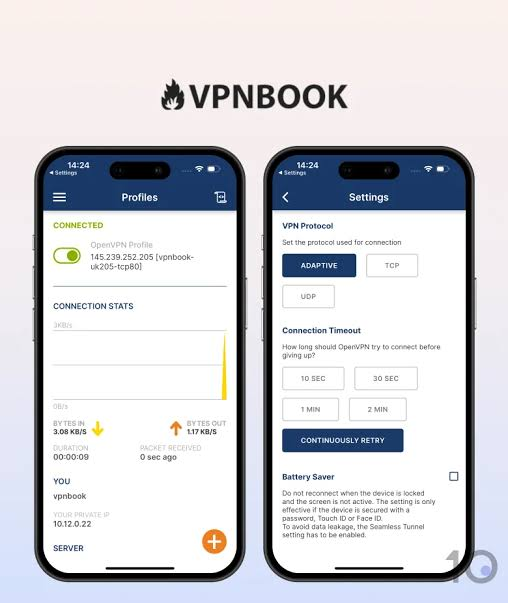
VPNBook is a free virtual private network service based in Switzerland. It’s been running since around 2011, and unlike most VPNs today, it doesn’t have a dedicated app for your phone or laptop. Instead, you connect using third-party software like OpenVPN Connect, or through manual setup files that VPNBook provides on its website.
There’s no account creation, no email verification, and no credit card required. You simply pick a server, download the configuration file, and connect. The service is funded through donations and advertising rather than subscriptions, which is part of why it can stay free.
Alongside the VPN, VPNBook also offers a free web proxy that works directly in your browser without any setup at all — useful for quick, low-effort browsing but nowhere near as secure as a full VPN connection.
How VPNBook Works
Setting up VPNBook isn’t like installing a regular app and tapping “connect.” Here’s roughly what the process looks like:
- Go to VPNBook’s website and pick a server location.
- Download the OpenVPN configuration file for that server.
- Install a separate OpenVPN client (like OpenVPN Connect) on your device.
- Import the configuration file into that client.
- Enter the username and password listed on VPNBook’s site (these change periodically).
- Connect.
For someone who’s used to apps like NordVPN or Surfshark, where you just log in and hit one button, this process feels like a throwback. It’s not overly technical once you’ve done it a couple of times, but it’s definitely not beginner-friendly, and there’s no dedicated Android or iOS app to simplify things on mobile.
Best Use
VPNBook is best for users who need a free VPN for everyday web browsing, securing connections on public Wi-Fi, and accessing websites with basic geographic restrictions. It is a good option for students, travelers, and casual users who are comfortable with manual VPN setup and do not require advanced features such as dedicated streaming servers, gaming optimization, or 24/7 customer support. While it can provide an extra layer of online privacy, users who need consistently high speeds, a wider choice of server locations, or advanced security features may find a premium VPN service more suitable.
Server Locations and Coverage
This is one of VPNBook’s biggest limitations. The server network is small — typically around four to six locations, mainly across the US, Canada, Germany, France, Poland, and the UK. There are no servers in Asia, which means it won’t help much if you’re trying to reach content hosted in that region, and it doesn’t work in countries with strict internet filtering, including China.
If your main goal is switching between many countries or reaching a wide spread of regions, VPNBook simply doesn’t have the infrastructure for it.
Speed: The Biggest Problem
Speed is where VPNBook struggles the most. Independent testing has repeatedly shown massive drops in download speed after connecting — in some cases, over 95% slower than a normal connection. That’s a huge difference. For comparison, a decent paid VPN might slow you down by 10-20% at most.
A practical example: if your regular internet connection gets you 50 Mbps, connecting through VPNBook could realistically drop that down to somewhere between 1 and 3 Mbps. That’s barely enough for browsing text-heavy pages, let alone streaming a video in HD or joining a video call without lag.
This happens mainly because the server network is small and heavily used, while there’s no financial backing to expand capacity or reduce user load per server.
Security Protocols: What’s Under the Hood
VPNBook supports two main connection methods: OpenVPN and PPTP, plus limited support for Outline (which uses the Shadowsocks protocol).
- OpenVPN is the stronger option here. It uses AES-256 encryption on most servers, which is genuinely solid and matches what many paid VPNs use. If you’re going to use VPNBook at all, this is the protocol to pick.
- PPTP is older and considerably weaker. It’s faster to set up but uses lighter 128-bit encryption and has known vulnerabilities. Most security-conscious users avoid PPTP entirely these days, and it’s mainly kept around for compatibility with older devices.
- Outline/Shadowsocks is available on a couple of servers and tends to be faster, but it trades away some of the security benefits OpenVPN provides.
The takeaway: if privacy matters to you even a little, stick to OpenVPN and skip PPTP altogether, even though it might seem like the “easy” option.
A Practical Setup Example (Windows + OpenVPN)
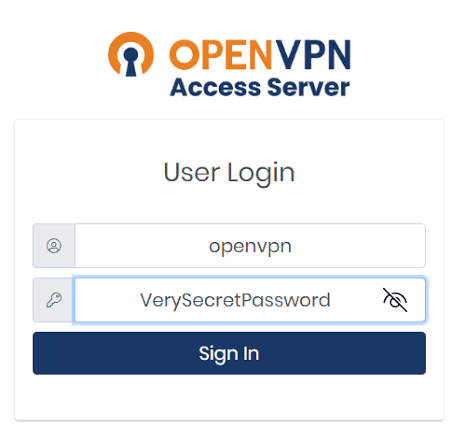
To give you a sense of what you’re signing up for, here’s roughly what a first-time setup looks like on a Windows laptop:
- Visit VPNBook’s website and note down the current username and password (these are posted on the homepage and refreshed regularly).
- Download the OpenVPN configuration bundle for the server location you want — say, the US or Germany server.
- Download and install OpenVPN Connect, since VPNBook doesn’t provide its own client.
- Open OpenVPN Connect, import the configuration file you downloaded, and enter the username and password from VPNBook’s site.
- Hit Connect and wait for the tunnel to establish — this can take longer than a typical app-based VPN.
- Run a quick IP check (searching “what’s my IP” works fine) to confirm your location has actually changed.
Compare that to a paid VPN, where the entire process is: open app, tap a country on a map, done. For someone who just wants quick, reliable protection, that difference matters a lot, especially if you’re doing this setup on multiple devices or need to repeat it every time the credentials rotate.
Does VPNBook Work for Streaming?
Short answer: no, not reliably. VPNBook is not built to get around the geo-blocks that platforms like Netflix, Hulu, and BBC iPlayer use. In testing, connecting through VPNBook’s US server for Netflix typically triggers a proxy error message, and other major platforms detect and block it just as easily.
Even if it did get past these blocks occasionally, the speed problem would likely make streaming unwatchable anyway — constant buffering and quality drops are common even for simple browsing.
If streaming is your main reason for wanting a VPN, VPNBook isn’t going to solve that problem for you.
Privacy and Logging: What You Should Know
This is the part that matters most, and it’s where VPNBook gets the most criticism. While the provider claims to offer privacy protection, testing has found that it does retain some connection data, including IP addresses, and its privacy policy is fairly vague about exactly how long this data is stored and how securely it’s handled.
There have also been long-standing rumors — never fully proven or disproven — suggesting that VPNBook data was involved in identifying people in a past legal case tied to the hacking collective Anonymous. Nobody can confirm this with certainty, but it’s worth knowing this history exists if privacy is your top priority.
On top of that, VPNBook doesn’t include a kill switch. That means if your connection drops unexpectedly, your device reverts to your regular, unprotected internet connection without warning — a real risk if you’re relying on the VPN to hide your activity or location.
In simple terms: if your main reason for wanting a VPN is strong privacy or anonymity, VPNBook probably isn’t the right tool for that job.
Key Points
- Completely free to use with no subscription fees.
- No account registration is required to use the VPN service.
- Supports secure VPN protocols, including OpenVPN and WireGuard.
- Offers unlimited bandwidth, making it suitable for regular browsing.
- Provides servers in multiple countries, including the United States, the United Kingdom, Canada, Germany, France, and Poland.
- Includes a free web proxy for quick browser-based access.
- Encrypts internet traffic to improve privacy on public Wi-Fi networks.
- Compatible with Windows, macOS, Linux, Android, iOS, and routers through manual configuration.
- Does not display ads within the VPN service.
- Best suited for users who want a simple, no-cost VPN for basic privacy and web access.
VPNBook Pros and Cons
Pros
- Completely free, with no sign-up, no email, and no payment details required
- No official cap on bandwidth or data usage
- Uses OpenVPN with AES-256 encryption on its stronger servers
- No ads shown directly inside the connection itself
- Works across Windows, Mac, Linux, Android, and iOS through manual setup
Cons
- Extremely slow speeds, often unusable for anything beyond basic browsing
- No dedicated app for any platform — setup is manual and technical
- Very few server locations, with no coverage in Asia
- Doesn’t reliably unblock Netflix, Hulu, or other streaming platforms
- No kill switch, leaving you exposed if the connection drops
- Vague privacy policy and some logging of connection data
- Login credentials change periodically, requiring you to revisit the site regularly
Who Might Still Consider VPNBook?
To be fair, VPNBook isn’t completely useless. It can work in a few narrow situations:
- Quick, low-stakes browsing on public Wi-Fi where you just want a basic layer of protection, not full anonymity.
- Occasional access to a website that’s blocked in your country, where speed doesn’t matter much.
- Testing or learning purposes, if you’re curious how OpenVPN configuration works before committing to a paid service.
But for anything involving sensitive information, regular streaming, torrenting, or serious privacy needs, it falls short.
Better Free and Budget Alternatives
If VPNBook’s downsides sound like dealbreakers (and for most people, they are), there are stronger free and low-cost options worth considering:
- Proton VPN Free — no data cap, decent speeds, and a much clearer no-logs policy. A solid pick if you want a genuinely free option that doesn’t cut too many corners.
- Windscribe Free — offers a reasonable monthly data allowance with noticeably better speeds and an actual app for most platforms.
- Surfshark or PIA (paid, budget-friendly) — if you can spend even a small amount, these cost just a couple of dollars a month and include streaming support, a kill switch, and apps for every device.
If you’re in India and mainly connecting through Airtel or Jio on mobile data, a paid budget VPN with a proper app will save you a lot of frustration compared to manually configuring VPNBook every time your login details change.
VPNBook vs Other Free VPNs at a Glance
| Feature | VPNBook | Proton VPN Free | Windscribe Free |
|---|---|---|---|
| Dedicated app | No | Yes | Yes |
| Data cap | None stated | None | 10GB/month |
| Kill switch | No | Yes | Yes |
| Streaming support | No | Limited | Limited |
| Server locations | 4–6 | 5+ | 10+ |
| Setup difficulty | High (manual) | Low | Low |
This table sums up the trade-off pretty clearly. VPNBook doesn’t cap your bandwidth, which sounds generous, but everything else about the experience — the app, the safety net of a kill switch, and the ease of setup — favors the alternatives.
Frequently Asked Questions
Is VPNBook actually free, with no hidden charges?
Yes, the core VPN service is free with no payment required. It used to offer a paid “Dedicated IP” plan, but that option is no longer available on their website.
Is VPNBook safe to use?
It provides basic encryption through OpenVPN, but its logging practices and lack of a kill switch mean it doesn’t offer the same level of safety as most paid VPNs. It’s fine for casual, low-risk use, but not something to rely on for sensitive activity.
Can VPNBook unblock Netflix or other streaming platforms?
No. In testing, it fails to bypass Netflix’s VPN detection and doesn’t reliably work with other major streaming platforms either.
Does VPNBook have an app for Android or iPhone?
No official app exists. You’ll need to set it up manually using a third-party client like OpenVPN Connect, following the configuration steps listed on VPNBook’s website.
Why do VPNBook’s login details keep changing?
VPNBook periodically updates its usernames and passwords for security and to manage server load. You’ll need to check their website for the current credentials each time you set up a new connection.
Is VPNBook good for torrenting?
It’s not recommended. The combination of slow speeds, unstable servers, and unclear privacy practices makes it a poor choice for torrenting or any activity where you need a truly private, reliable connection.
Is there a better free alternative to VPNBook?
Yes. Proton VPN Free and Windscribe Free are both generally considered stronger options, offering better speeds, dedicated apps, and clearer privacy policies while still being free to use.
Conclsion
VPNBook fills a very specific niche: people who want something free with zero commitment and don’t mind a technical setup process. But once you look past the “free” label, the trade-offs are significant — slow speeds, weak privacy guarantees, no streaming support, and a setup process that isn’t friendly for most users.
If you only need occasional, low-risk browsing protection, it can technically do the job. But if privacy, speed, or streaming matter to you at all, it’s worth looking at one of the alternatives above instead, even if you have to spend a small amount each month.

