
1. Introduction
Tabnine is an AI-powered code completion and software development assistant that integrates directly into developers’ IDEs. Designed for privacy and control, it helps individuals and enterprises accelerate coding tasks while keeping intellectual property secure through on-premises, VPC, or air-gapped deployment options.

Tabnine Review 2026 Features and capabilities:- Tabnine provides intelligent code completions, natural-language-to-code generation, and contextual chat assistance inside popular IDEs such as Visual Studio Code, JetBrains IDEA, Eclipse, and Visual Studio 2022. Developers can use it to write, refactor, document, and test code across 30 + programming languages. Its Enterprise Context Engine learns an organization’s frameworks and coding conventions to produce tailored, compliant suggestions rather than relying solely on generic training data. Features
Security and governance:- A defining characteristic of Tabnine is its focus on data protection. It never trains on customer code and offers zero data retention with optional fully private inference. The system is trained exclusively on permissively licensed open-source repositories (e.g., MIT, Apache 2.0, BSD) to mitigate legal and IP risks. Enterprise customers can enforce coding standards, access control, and full auditability through a centralized control plane. Features
Enterprise and developer impact:- Organizations deploy Tabnine to shorten development cycles, improve code consistency, and reduce review workload. Enterprise studies report productivity gains between 10 % and 50 % as the assistant automates repetitive tasks and integrates into existing SDLC tools like GitHub, GitLab, and Jira. Recognized in analyst reports by Gartner, Omdia, and InfoWorld, Tabnine has become a leading enterprise-grade AI coding platform emphasizing governance, flexibility, and security.
What is Tabnine?
Tabnine is a smart coding assistant that helps developers write code faster by offering real-time suggestions. Unlike many alternatives, Tabnine focuses heavily on privacy and local AI models, making it a preferred choice for security-conscious developers.
Who is it for?
Tabnine is best suited for:
- Professional developers
- Teams working on private codebases
- Companies with strict security policies
- Freelancers handling sensitive projects
- Developers who prefer offline tools
Why is it popular in 2026?
In 2026, Tabnine is gaining popularity because:
- Strong privacy-first approach
- Ability to run locally (offline)
- Enterprise-friendly features
- Improved accuracy and performance
Many developers are choosing Tabnine as a safer alternative to cloud-based tools.
2. Key Features

Here are the most important features of Tabnine:
1. AI-Powered Code Completion
Tabnine predicts and completes your code as you type.
Example:
Typing a function name can instantly generate the full function body.
2. Local AI Models (Offline Mode)
You can run Tabnine locally without sending your code to external servers.
Why it matters:
Perfect for companies that handle confidential data.
3. Multi-Language Support
Supports popular languages like:
- Python
- JavaScript
- Java
- C++
- Rust
- Go
4. Team Training (Custom Models)
Teams can train Tabnine on their own codebase.
Example:
It learns your coding style and suggests code based on your internal standards.
5. IDE Integration
Works smoothly with major editors like:
- VS Code
- IntelliJ IDEA
- PyCharm
6. Fast Autocomplete
Provides quick suggestions with minimal delay.
7. Code Privacy Controls
You control how your data is used and stored.
8. AI Chat (New Feature)
Ask coding questions directly inside your editor, similar to a coding assistant.
3. How It Works
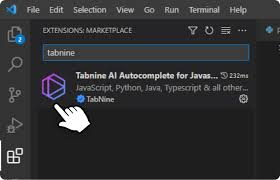
Getting started with Tabnine is simple:
Step-by-Step Guide
- Install your preferred IDE (like VS Code)
- Install the Tabnine extension
- Sign up or log in
- Choose a cloud or a local model
- Start coding
- Accept suggestions using keyboard shortcuts
Beginner Tip:
Write clear function names or comments to get better suggestions.
4. Performance & Speed

Speed
- Very fast suggestions
- Even faster in local mode (no network delay)
Accuracy
- Good for repetitive and structured code
- Slightly less advanced than some competitors for complex logic
Reliability
- Works even without internet (local mode)
- Stable and consistent performance
Real-Life Example:
While building a backend API, Tabnine can:
- Suggest endpoints
- Auto-complete database queries
- Speed up repetitive code
5. Pricing & Plans
Free Plan
- Basic code completions
- Limited features
Pro Plan
- Advanced AI suggestions
- Better accuracy
- More customization
Enterprise Plan
- Team training
- Enhanced privacy
- Full control over data
Is it worth the money?
👉 Yes, especially if privacy and offline access matter to you.
6. Pros and Cons
✅ Pros
- Strong privacy and security
- Works offline (local models)
- Fast and lightweight
- Customizable for teams
- Easy to install and use
❌ Cons
- Slightly less powerful than top competitors
- Limited free plan
- AI suggestions can be basic sometimes
7. Best Use Cases
Who should use Tabnine?
- Developers working with sensitive data
- Companies with strict security rules
- Freelancers handling private client projects
- Developers who prefer offline tools
Who should avoid it?
- Beginners who need more advanced guidance
- Developers who want highly complex AI-generated logic
- Users looking for a fully free solution
8. Comparison with Competitors
1. GitHub Copilot
- More powerful suggestions
- Better for complex coding
- Requires cloud processing
2. Amazon CodeWhisperer
- Strong integration with AWS
- Good security features
- Less flexible for general coding
Key Difference:
Tabnine stands out for privacy and offline capability, while competitors focus more on raw AI power.
9. Security & Privacy
Tabnine is one of the most secure coding assistants available.
Data Privacy
- Offers local processing (no data sharing)
- No unnecessary code storage
Encryption
- Secure data handling
- Enterprise-grade protection
Safety
- Ideal for sensitive environments
- Trusted by companies and teams
Best Practice:
Use local models for maximum privacy.
10. Final Verdict
Tabnine is a solid choice in 2026, especially for developers who care about privacy.
Should you use it?
👉 Yes, if security and offline use are your priorities
It may not be the most powerful tool, but it’s one of the safest.
11. FAQs
1. Is Tabnine free?
Yes, it has a free version with limited features.
2. Does Tabnine work offline?
Yes, one of its biggest advantages is offline functionality.
3. Is Tabnine better than GitHub Copilot?
It depends. Tabnine is better for privacy, while Copilot is stronger in advanced suggestions.
4. Which IDEs support Tabnine?
It supports VS Code, IntelliJ, PyCharm, and more.
5. Is Tabnine safe for company projects?
Yes, especially with local models and enterprise plans.
6. Can Tabnine learn my coding style?
Yes, with team training features.
7. Does Tabnine support multiple languages?
Yes, it supports many popular programming languages.
8. Is Tabnine worth it in 2026?
Yes, particularly for developers who value privacy and control.
9. What is Tabnine used for?
Tabnine is used to speed up coding by providing real-time code suggestions, auto-completions, and function generation inside your code editor.
10. Is Tabnine good for beginners?
Yes, but it’s better suited for developers who already understand basic coding. Beginners may find its suggestions helpful but less explanatory compared to other tools.
11. Does Tabnine work offline?
Yes, Tabnine can run locally on your machine, which means you can use it without an internet connection.
12. Which programming languages does Tabnine support?
It supports many popular languages, including Python, JavaScript, Java, C++, Go, and Rust.
13. Is Tabnine free in 2026?
Tabnine offers a free version with basic features, but advanced capabilities require a paid plan.
14. Is Tabnine safe for private code?
Yes, it is one of the safest coding assistants because it allows local processing and gives you control over your data.
15. Can Tabnine learn my coding style?
Yes, with its team training and customization features, it can adapt to your coding patterns over time.
16. Does Tabnine work with all IDEs?
It works with the most popular IDEs like VS Code, IntelliJ IDEA, and PyCharm.
17. Is Tabnine better than GitHub Copilot?
It depends on your needs. Tabnine is better for privacy and offline use, while GitHub Copilot is stronger in advanced code generation.
18. Can Tabnine generate full applications?
It can help generate parts of applications, but you still need to design, test, and manage the overall project.
19. Is Tabnine worth it in 2026?
Yes, especially if you value privacy, offline functionality, and consistent performance in your coding workflow.
Conclusion
Tabnine stands out in 2026 as a reliable and privacy-focused coding assistant. Its ability to run locally and protect sensitive code makes it a strong choice for professionals and teams who value security.
While it may not match the advanced capabilities of some competitors, its speed, simplicity, and offline functionality make it highly practical for everyday coding tasks.