
1. Introduction
Runway ML is an advanced AI-powered platform designed for creators who want to produce and edit videos, images, and multimedia content using machine learning tools. It offers a wide range of features, including text-to-video generation, background removal, motion tracking, and image generation, making it especially popular among filmmakers, designers, and content creators. One of its standout capabilities is the ability to generate videos from simple text prompts, allowing users to create professional-looking visuals without needing advanced editing skills.
Runway ML Review 2026 Runway ML runs entirely in the browser, so there is no need for heavy software installation, and its clean interface makes complex AI tools accessible even to beginners. It uses cutting-edge models similar to those found in platforms like Stable Diffusion, enabling high-quality outputs with impressive detail and realism. Users can also edit videos in real time, apply AI effects, and automate time-consuming tasks such as object removal or scene editing. Artbreeder
The platform works on a subscription-based model, with limited free access and more advanced features available in paid plans. While it is powerful and versatile, it may require some learning for beginners and can be resource-intensive depending on the task. Overall, Runway ML is a highly capable tool for modern content creation, offering a blend of creativity and efficiency for those looking to leverage AI in video and media production.
What is Runway ML?
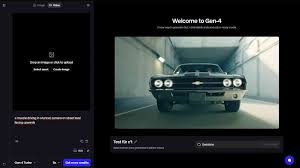
Runway ML is a powerful creative platform that helps you generate and edit videos, images, and media using advanced tools. It is widely known for its AI video generation and editing features, making it one of the top choices for creators in 2026.
Unlike basic image tools, Runway ML focuses heavily on video creation, visual effects, and content production, all inside a browser.
Who is it for?
Runway ML is ideal for:
- YouTubers and video creators
- Filmmakers and editors
- Social media marketers
- Designers and creatives
- Content creators who want fast video production
It’s especially useful for users who want professional-looking videos without complex software.
Why is it popular in 2026?
Runway ML is trending in 2026 because:
- Advanced video generation tools (Gen-2 and beyond)
- Easy-to-use interface
- No need for heavy editing software
- Fast content creation
- Cloud-based system (works on any device)
2. Key Features
1. Text-to-Video Generation
Create videos from simple text prompts.
Example:
“A futuristic city with flying cars, cinematic style.”
2. Video Editing Tools
Edit videos with features like:
- Cutting
- Trimming
- Effects
3. Background Removal (Green Screen)
Remove backgrounds from videos without a green screen.
Example:
Replace your background instantly for YouTube videos.
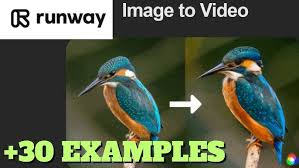
4. Image-to-Video Conversion
Turn static images into animated clips.
5. Motion Tracking
Add effects that follow objects in your video.
6. AI Image Generation
Create images for thumbnails or content.
7. Collaboration Tools
Work with teams on creative projects.
8. Cloud-Based Platform
No installation needed—everything works online.
3. How It Works (Step-by-Step)
Step 1: Sign Up
Create an account on Runway ML.
Step 2: Choose a Tool
Select what you want:
- Text-to-video
- Video editor
- Image generator
Step 3: Upload or Enter Prompt
- Upload video/image
- Or type a prompt
Step 4: Customize Settings
- Style
- Duration
- Effects
Step 5: Generate or Edit
Run the tool and wait for processing.
Step 6: Export
Download your final video or share it online.
4. Performance & Speed
Output Quality
Runway ML delivers:
- High-quality video outputs
- Smooth transitions
- Professional visual effects
Speed
- Fast for basic edits
- Slower for complex video generation
- Depends on project size
Reliability
- Stable cloud platform
- Regular updates
- Minimal downtime
5. Pricing & Plans
Free Plan
- Limited credits
- Basic features
- Watermarked exports
Paid Plans
- More credits
- Higher-quality exports
- Faster processing
- No watermark
Is it worth the money?
Yes, if you:
- Create videos regularly
- Need advanced editing tools
- Want faster workflow
6. Pros and Cons
Pros
- Powerful video generation tools
- Easy to use
- No software installation needed
- Great for content creators
- High-quality outputs
ConsThe free
- Free plan is limited
- Video generation can be slow
- Requires an internet connection
- Advanced features need paid plans
7. Best Use Cases
Who should use Runway ML?
- YouTubers and influencers
- Video editors
- Filmmakers
- Social media marketers
Who should avoid it?
- Users who only need basic image tools
- People with slow internet
- Those looking for fully free solutions
8. Comparison with Competitors
Runway ML vs Adobe Firefly
- Runway ML: Better for video editing and generation
- Adobe Firefly: Better for design and image creation
Runway ML vs Stable Diffusion
- Runway ML: Focus on video and ease of use
- Stable Diffusion: More control over images
9. Security & Privacy
Runway ML provides:
- Secure cloud infrastructure
- Account-based access
However:
- Data is processed online
- Avoid uploading sensitive content
10. Final Verdict
Runway ML is one of the best creative tools in 2026 for video generation and editing.
It stands out because of:
- Powerful video tools
- Easy interface
- Fast content creation
Is it worth using?
Yes, especially for video creators and marketers.
Recommendation:
- Beginners → Use the free plan to explore
- Professionals → Upgrade for full features
11. FAQs
1. What is Runway ML used for?
Runway ML is used to create and edit videos, images, and creative content using advanced tools.
2. Is Runway ML free?
Yes, it offers a free plan with limited credits and features.
3. Can beginners use Runway ML?
Yes, it is designed to be beginner-friendly.
4. Does Runway ML create videos?
Yes, it can generate videos from text prompts and images.
5. How fast is Runway ML?
It is fast for simple tasks, but may take longer for complex video generation.
6. Do I need a powerful computer?
No, it works online.
7. Can I use Runway ML for YouTube videos?
Yes, it is widely used for creating YouTube content.
8. Is Runway ML better than Adobe Firefly?
It depends—Runway ML is better for video, while Firefly is better for design.
9. Is Runway ML safe to use?
Yes, but avoid uploading sensitive files.
10. Is Runway ML worth it in 2026?
Yes, especially for content creators and video professionals.
11. What is Runway ML used for?
Runway ML is used to create and edit videos, generate visuals from text prompts, remove backgrounds, and add effects. It’s popular for content creation, filmmaking, and social media videos.
12. Is Runway ML free to use?
Yes, Runway ML offers a free plan with limited credits and features. Paid plans unlock more credits, faster processing, and higher-quality exports.
13. Can beginners use Runway ML easily?
Yes, it’s designed to be beginner-friendly. The interface is simple, and you don’t need advanced editing skills to get started.
14. Does Runway ML support text-to-video generation?
Yes, one of its main features is generating videos from text prompts, which makes content creation much faster.
15. How fast is Runway ML?
It is fast for basic edits, but more complex video generation tasks can take longer, depending on length and quality settings.
16. Do I need a powerful computer to use Runway ML?
No, it runs on the cloud, so even a basic laptop or smartphone can use it smoothly.
17. Can I use Runway ML for YouTube videos?
Yes, many creators use it to make YouTube videos, reels, and short-form content.
18. Does Runway ML add watermarks?
The free plan may include watermarks, while paid plans usually remove them.
19. Is Runway ML safe to use?
Yes, it is generally safe. However, avoid uploading sensitive or personal files since it’s a cloud-based platform.
20. Is Runway ML better than traditional video editing software?
It depends. Runway ML is faster and easier for modern workflows, while traditional software may offer deeper manual control.
21. Is Runway ML worth it in 2026?
Yes, especially for content creators and marketers who want fast and professional video creation without complex tools.
Conclusion
Runway ML has become one of the most powerful creative tools in 2026, especially for anyone working with video content. It simplifies complex editing tasks and allows you to create high-quality videos, effects, and visuals without needing advanced technical skills or expensive software.
Its biggest strength is video generation and editing in one place. You can go from idea to finished content much faster compared to traditional editing tools. Whether you’re making YouTube videos, social media clips, or creative projects, it saves time and effort.
However, it’s not perfect. The free plan is limited, and advanced features require a subscription. Also, video generation can take time depending on complexity. But overall, the value it offers makes it a strong choice.