
1. Introduction
Runway ML is an AI-powered creative software suite designed for generating and editing videos, images, and other media using machine learning models. It enables creators to produce professional-grade visual content through intuitive web and desktop tools without needing programming or high-end hardware.
Runway ML Review 2026 Runway ML (commonly called Runway) is a powerful AI-driven video creation and editing platform that is changing how creators produce content. It allows you to generate, edit, and enhance videos using artificial intelligence—without needing advanced editing skills or expensive equipment. Synthesia

Runway is especially popular among YouTubers, filmmakers, and digital creators because it offers futuristic features like text-to-video generation, background removal, and AI-powered effects. It works directly in your browser, making it accessible from anywhere.
What is Runway ML?
Runway ML is an advanced creative platform that allows users to generate, edit, and enhance videos using AI-powered tools. From text-to-video generation to background removal and motion tracking, it offers features that were once only available in professional editing software.
Who is it for?
Runway ML is ideal for:
- Video creators and YouTubers
- Filmmakers and editors
- Social media content creators
- Designers and digital artists
- Marketing teams
Why is it popular in 2026?
Runway ML has become extremely popular because:
- It enables cinematic video creation without complex tools
- AI-powered features save hours of editing time
- It supports next-level tools like text-to-video generation
- It’s widely used for creative storytelling and viral content
2. Key Features
1. Text-to-Video Generation
Create videos just by typing a prompt.
Example:
“Create a futuristic city scene” → AI generates a video clip.
2. Video Background Removal
Remove backgrounds without a green screen.
Use case:
Perfect for YouTube creators and ads.
3. Motion Tracking
Track objects and add effects that follow movement.
Example:
Attach text or graphics to moving objects.
4. AI Video Editing Tools
Includes:
- Cut, trim, and merge
- Scene transitions
- Effects
5. Image-to-Video Conversion
Turn images into animated videos.
Example:
Convert product images into promotional clips.
6. Green Screen (Without Green Screen)
Automatically isolate subjects from the background.
7. Collaboration Tools
Work with teams in real-time.
8. Cloud-Based Editing
No need to install software—everything runs online.
3. How It Works (Step-by-Step)
Step 1: Sign Up
Create an account on Runway ML.
Step 2: Choose a Tool
Options include:
- Text-to-video
- Video editor
- Background remover
Step 3: Upload or Create Content
- Upload video/images
- Or generate using text prompts
Step 4: Edit Your Video
- Add effects
- Trim clips
- Apply AI tools
Step 5: Export
Download your video in high quality.
4. Performance & Speed
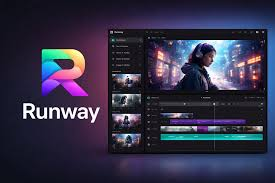
Speed
- AI processing is fast, but it depends on video complexity
- Text-to-video may take a few minutes
Output Quality
- High-quality visuals with a cinematic feel
- Great for creative and artistic content
Reliability
- Cloud-based with stable performance
- Occasionally slower during heavy usage
Real-life use:
Creators use Runway ML to produce viral reels, ads, and short films quickly.
5. Pricing & Plans
Free Plan
- Limited credits
- Basic features
- Watermarked exports
Paid Plans
- Standard Plan: More credits and features
- Pro Plan: Advanced tools + higher limits
- Enterprise: For teams and businesses
Is it worth the money?
Yes, if you:
- Create videos regularly
- Need advanced editing tools
- Want AI-powered creative control
6. Pros and Cons
✅ Pros
- Powerful AI video tools
- Text-to-video capability
- No need for expensive software
- Cloud-based and easy access
- Great for creative projects
❌ Cons
- Learning curve for beginners
- Credit-based pricing can be limiting
- Some outputs may need manual refinement
- Requires good internet connection
7. Best Use Cases
Who should use Runway ML?
- YouTubers and content creators
- Filmmakers and editors
- Social media marketers
- Creative professionals
Who should avoid it?
- Complete beginners looking for simple tools
- Users needing basic video editing only
- Those with slow internet
8. Comparison with Competitors
Runway ML vs Pictory
- Runway ML: Advanced editing and creative control
- Pictory: Simpler and faster automation
Runway ML vs Synthesia
- Runway ML: Best for cinematic and creative videos
- Synthesia: Best for avatar-based business videos
9. Security & Privacy
Runway ML offers:
- Secure cloud infrastructure
- Encrypted data handling
- No major security incidents reported
Note:
Always avoid uploading sensitive or confidential content.
10. Final Verdict
Is Runway ML worth using in 2026?
Yes—especially for creators who want advanced, creative video tools powered by AI.
Runway ML is not the easiest tool, but it’s one of the most powerful. If you’re serious about video creation and want more control, it’s a great investment.
👉 Final Recommendation:
- Best for creators and professionals
- Excellent for creative video projects
- Not ideal for beginners who want simple automation
11. FAQs
1. What is Runway ML used for?
Runway ML is used for video editing, text-to-video creation, and advanced visual effects.
2. Is Runway ML free?
Yes, it offers a free plan with limited credits.
3. Is Runway ML good for beginners?
It can be used by beginners, but there is a slight learning curve.
4. Can I create videos from text?
Yes, text-to-video is one of its main features.
5. Does Runway ML require installation?
No, it’s fully cloud-based.
6. Is Runway ML good for YouTube?
Yes, especially for creative and high-quality content.
7. How fast is Runway ML?
Processing is fast, but it depends on the complexity of the project.
8. Is Runway ML safe to use?
Yes, it uses secure systems and encryption.
9. Can teams use Runway ML?
Yes, it offers collaboration features.
10. Does it replace traditional video editing software?
Not completely, but it can handle many advanced tasks quickly.
11. What is Runway ML used for?
Runway ML is used for video editing, text-to-video generation, background removal, motion tracking, and creating cinematic-quality content quickly.
12. Is Runway ML beginner-friendly?
It can be used by beginners, but there is a slight learning curve due to its advanced features. Tutorials and templates help speed up the process.
13. Can I create videos from text?
Yes, one of Runway ML’s main features is text-to-video, where you type a prompt and get a generated video.
14. Is Runway ML free?
Yes, it offers a free plan with limited credits, watermarked outputs, and basic tools. Most advanced features require a paid plan.
15. Does Runway ML require installation?
No, it is cloud-based, so you can use it directly from your browser without installing any software.
16. How fast is Runway ML?
Video generation and editing are generally fast, but processing time depends on project complexity and length.
17. Is Runway ML good for YouTube creators?
Yes, especially for creators looking to produce high-quality, cinematic, or AI-enhanced content.
18. Can teams collaborate on Runway ML?
Yes, it has collaboration tools for teams, allowing multiple users to work on a project in real time.
19. Is Runway ML safe and secure?
Yes, it uses secure cloud infrastructure with encrypted data handling. However, sensitive content should be used cautiously.
20. Can Runway ML replace traditional video editing software?
Not completely. It’s excellent for AI-powered creative edits and effects, but traditional editors may still be better for complex, highly controlled projects.
Conclusion
Runway ML stands out in 2026 as one of the most powerful tools for creators who want more than just basic video automation. It combines advanced editing features with AI capabilities like text-to-video, background removal, and motion tracking—making high-quality video production faster and more accessible.
While it may take a little time to learn, the creative control and results it offers are worth it, especially for serious content creators, marketers, and filmmakers. It’s not the simplest tool, but it’s definitely one of the most capable.