
1. Introduction
GitHub Copilot is an artificial intelligence–powered coding assistant developed by GitHub in collaboration with OpenAI and Microsoft. It provides real-time code suggestions, explanations, and automation features directly inside popular development environments, helping programmers write software faster and with less repetitive effort. Since its 2021 launch, it has become the world’s most widely used AI developer tool. Sourcegraph
GitHub Copilot Review 2026:Core functionality: GitHub Copilot analyzes a developer’s active files and recent edits to generate probable code completions or full code blocks. It can also explain code, generate tests, and draft documentation. Through Copilot Chat and Agent Mode, users can issue natural-language prompts like “optimize this function” or “add error handling,” and Copilot proposes the corresponding edits. Its capabilities extend to command-line use and GitHub.com integration for automated pull requests and reviews. Features
Technology and training: Originally powered by the OpenAI Codex model, Copilot now uses newer large language models built jointly by GitHub, OpenAI, and Microsoft Azure AI. These models are trained on natural-language text and publicly available source code from repositories on GitHub. GitHub states that business and enterprise data are not used to train these models. Features
Plans and ecosystem: The Copilot platform offers tiers for individuals and organizations. Copilot Pro and higher plans include unlimited completions, advanced models such as GPT-5 mini and Claude Opus, and features like Copilot Code Review and Autofix for vulnerability detection. GitHub also introduced Copilot Workspace, an experimental AI-powered development environment that can plan, build, and test projects end-to-end using natural-language instructions. Features
Impact and adoption: Independent studies and GitHub’s own research show that Copilot users can code up to 55% faster and report significantly higher satisfaction. Millions of individual developers and more than 50,000 enterprise customers now use it. As part of Microsoft’s broader AI ecosystem, Copilot is positioned as a cornerstone of modern, AI-assisted software engineering. Features
What is GitHub Copilot?
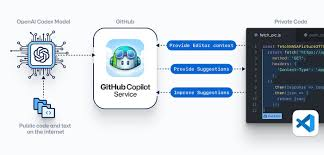
GitHub Copilot is an intelligent coding assistant that helps you write code faster and with less effort. It suggests entire lines, functions, and even full code blocks while you type.
Built by GitHub in collaboration with OpenAI, it integrates directly into popular code editors like Visual Studio Code.
Who is it for?
GitHub Copilot is ideal for:
- Beginners learning programming
- Professional developers
- Freelancers and indie hackers
- Startup founders building MVPs
- Students working on coding assignments
Why is it popular in 2026?
In 2026, GitHub Copilot is widely used because:
- It saves hours of coding time
- Helps reduce syntax errors
- Supports multiple programming languages
- Acts like a real-time coding partner
Many developers now consider it an essential productivity tool.
2. Key Features
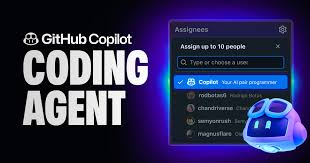
Here are the most important features of GitHub Copilot:
1. Smart Code Suggestions
Copilot predicts what you’re about to write and suggests code instantly.
Example:
If you type a comment like:
# create a function to calculate factorial
Copilot will generate the full function automatically.
2. Multi-Language Support
It works with popular languages like:
- Python
- JavaScript
- Java
- C++
- Go
- TypeScript
3. Context-Aware Coding
Copilot understands your existing code and gives suggestions based on your file context.
Example:
If you’re working on a React app, it suggests components and hooks relevant to your project.
4. Auto-Complete for Entire Functions
Instead of completing just one line, it can generate entire functions or classes.
5. Inline Chat (Copilot Chat)
You can ask coding questions directly inside your editor.
Example:
“Explain this function” or “Optimize this code.”
6. Code Refactoring Suggestions
Copilot helps improve your code quality by suggesting:
- Cleaner logic
- Better structure
- Performance improvements
7. Documentation Assistance
It can generate comments and documentation automatically.
8. Test Case Generation
Copilot can write unit tests for your code, saving time during development.
3. How It Works
Using GitHub Copilot is simple, even for beginners:
Step-by-Step Guide
- Install Visual Studio Code
- Install the GitHub Copilot extension
- Sign in with your GitHub account
- Open any coding project
- Start typing code or comments
- Accept suggestions using the Tab key
Beginner Tip:
Start by writing comments like:
“// create login system using Node.js.js.j.s”
Copilot will generate a working structure.
4. Performance & Speed
GitHub Copilot performs impressively in real-world use.
Speed
- Suggestions appear in milliseconds
- No noticeable lag in most cases
Accuracy
- High accuracy for common coding tasks
- Slight errors in complex logic (needs review)
Reliability
- Works smoothly with a stable internet
- Occasional incorrect suggestions (normal for tools like this)
Real-Life Example:
While building a blog website, Copilot can generate:
- Backend APIs
- Frontend UI components
- Database queries
This can reduce development time by 30–50%.
5. Pricing & Plans
Free Plan
- Limited usage
- Ideal for students and beginners
Paid Plan (Copilot Individual)
- Approx $10/month
- Full features unlocked
Business Plan
- Advanced team features
- Better security and control
Is it worth the money?
Yes, if you code regularly.
Even saving 1–2 hours per week makes it worth the cost.
6. Pros and Cons
✅ Pros
- Speeds up coding significantly
- Easy to use
- Supports many languages
- Great for learning and productivity
- Works inside your favorite editor
❌ Cons
- Sometimes gives incorrect code
- Requires an internet connection
- Can reduce deep learning if overused
- Paid plan needed for full power
7. Best Use Cases
Who should use GitHub Copilot?
- Developers who want faster coding
- Beginners learning programming
- Freelancers working on multiple projects
- Startup founders building MVPs
Who should avoid it?
- Developers who prefer manual coding
- People without a stable internet
- Those who want to deeply learn logic without assistance
8. Comparison with Competitors
1. Amazon CodeWhisperer
- Better for AWS-related projects
- Strong security features
- Less flexible than Copilot
2. Tabnine
- Focuses on privacy
- Works offline (limited features)
- Less powerful suggestions compared to Copilot
Key Difference:
GitHub Copilot offers the best balance between ease of use, power, and integration.
9. Security & Privacy
Security is an important concern for developers.
Data Handling
- Code may be processed to generate suggestions
- Enterprise plans offer better control
Safety
- No known major data leaks
- Used by large organizations
Best Practice
- Avoid sharing sensitive code
- Use the enterprise version for team projects
10. Final Verdict
GitHub Copilot is one of the most powerful developer tools in 2026.
Should you use it?
👉 Yes, if you want to code faster and smarter
It’s especially useful for:
- Saving time
- Learning coding faster
- Building projects quickly
11. FAQs
1. Is GitHub Copilot free?
Yes, but with limited features. Full access requires a paid plan.
2. Does GitHub Copilot replace developers?
No. It assists developers but still requires human logic and review.
3. Can beginners use GitHub Copilot?
Yes, it’s very beginner-friendly and helpful for learning.
4. Which languages does GitHub Copilot support?
It supports Python, JavaScript, Java, C++, and many more.
5. Does it work offline?
No, it requires an internet connection.
6. Is GitHub Copilot safe?
Yes, but avoid using it for sensitive or confidential code.
7. Can it write full applications?
It can generate large parts, but you still need to structure and test the app.
8. Is GitHub Copilot worth it in 2026?
Yes, especially if you code regularly or want to improve productivity.
9. Does it work with all IDEs?
It works best with Visual Studio Code, but supports others, too.
10. Can it help with debugging?
Yes, it can suggest fixes and improvements.
11. What is GitHub Copilot used for?
GitHub Copilot helps developers write code faster by suggesting lines, functions, and complete code blocks in real time while typing.
12. Is GitHub Copilot good for beginners?
Yes, beginners can use it to learn coding faster. It provides examples and suggestions that help understand syntax and logic more easily.
13. Which programming languages does GitHub Copilot support?
It supports many popular languages, including:
- Python
- JavaScript
- TypeScript
- Java
- C++
- Go
14. Does GitHub Copilot work without the internet?
No, it requires an active internet connection to generate suggestions.
15. Is GitHub Copilot free in 2026?
There is a free version with limited usage. Full access requires a paid subscription.
16. Can GitHub Copilot write complete projects?
It can generate large parts of a project, but you still need to structure, review, and test everything yourself.
17. Is GitHub Copilot safe to use?
Yes, it is generally safe. However, avoid using it for sensitive or confidential code unless you are using enterprise-level security.
18. Does GitHub Copilot replace human developers?
No. It is a tool to assist developers, not replace them. Human thinking and problem-solving are still required.
19. Can GitHub Copilot help with debugging?
Yes, it can suggest fixes, identify errors, and improve code quality.
20. Which editors support GitHub Copilot?
It works best with Visual Studio Code, but also supports other editors like Visual Studio and JetBrains IDEs.
21. Is GitHub Copilot worth it for freelancers?
Yes, freelancers can save a lot of time on repetitive coding tasks, making it a valuable investment.
Conclusion
GitHub Copilot has become one of the most valuable tools for developers in 2026. It simplifies coding, speeds up development, and helps both beginners and professionals build projects more efficiently.
While it’s not perfect and still requires human review, the time-saving benefits and ease of use make it a strong addition to any developer’s toolkit. Whether you’re building apps, learning to code, or working on freelance projects, Copilot can significantly boost your productivity.