
1. Introduction
Codeium is a modern AI-powered coding assistant designed to help developers write code faster and more efficiently. It works as a plugin in popular code editors like Visual Studio Code and JetBrains IDEs, and it also supports platforms like Jupyter Notebook.
Codeium Review 2026 At its core, Codeium provides smart code autocompletion, meaning it can predict and suggest entire lines or blocks of code as you type. This saves a lot of time, especially when working on repetitive tasks or large projects. It supports over 70 programming languages, including popular ones like Python, JavaScript, Java, and C++, making it useful for beginners as well as experienced developers.

One of the biggest advantages of Codeium is that it offers many features for free, unlike competitors such as GitHub Copilot. Developers can generate code, write functions, and even get help understanding complex logic without needing a paid subscription. It also includes a chat feature where you can ask coding-related questions and get instant answers directly inside your editor.
In real-world use, Codeium is helpful for tasks like building web applications, debugging code, learning new programming languages, or speeding up daily development work. For example, if you’re creating a website, it can automatically generate HTML, CSS, or JavaScript snippets based on your intent.
However, like any AI tool, it’s not perfect. Sometimes suggestions may not be fully accurate, so developers still need to review and test the generated code. But overall, Codeium is a powerful and beginner-friendly tool that can significantly boost productivity and make coding easier. Tabnine
What is Codeium?
Codeium is a fast-growing coding assistant that helps developers write code quickly with real-time suggestions, autocomplete, and chat-based help—all for free.
It’s often seen as a strong alternative to premium tools because it offers powerful features without a subscription cost.
Who is it for?
Codeium is ideal for:
- Beginner programmers
- Students learning coding
- Freelancers on a budget
- Developers who want a free alternative
- Startup founders building MVPs
Why is it popular in 2026?
In 2026, Codeium is popular because:
- Completely free for individuals
- Supports many programming languages
- Fast and responsive
- Easy integration with popular IDEs
Many developers choose Codeium as a budget-friendly alternative to paid tools.
2. Key Features
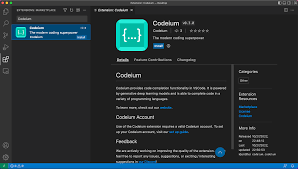
Here are the standout features of Codeium:
1. Real-Time Code Autocomplete
Codeium suggests code instantly as you type.
Example:
Write a comment like:
# function to reverse a string
It generates a working function automatically.
2. AI Chat Assistant
You can ask coding questions directly inside your editor.
Example:
“Explain this function” or “Fix this bug.”
3. Multi-Language Support
Supports 70+ programming languages,s including:
- Python
- JavaScript
- Java
- C++
- Go
4. Fast Performance
Suggestions appear quickly, even in large files.
5. IDE Integration
Works with:
- VS Code
- JetBrains IDEs
- Jupyter Notebook
6. Code Search & Explanation
Helps you understand unfamiliar code.
7. Context-Aware Suggestions
Understands your current file and project context.
8. Free for Individuals
Unlike many competitors, Codeium offers full features for free.
3. How It Works

Getting started with Codeium is simple:
Step-by-Step Guide
- Install your preferred IDE (e.g., VS Code)
- Install the Codeium extension
- Sign up for a free account
- Open a coding project
- Start typing or add comments
- Accept suggestions using the Tab key
Beginner Tip:
Use clear comments like:
“// create login API using Node.js”
to get better results.
4. Performance & Speed

Speed
- Very fast suggestions
- Minimal lag even on large projects
Accuracy
- Good for common coding tasks
- Occasionally, it’s less precise for complex logic
Reliability
- Stable performance
- Works smoothly with the internet connection
Real-Life Example:
While building a simple web app, Codeium can:
- Generate frontend components
- Suggest backend logic
- Help debug errors
This can reduce development time significantly.
5. Pricing & Plans
Free Plan
- Full access for individual users
- No major limitations
Team/Enterprise Plans
- Advanced features for teams
- Collaboration tools
- Better support
Is it worth the money?
👉 For individuals: 100% yes (it’s free)
👉 For teams: Worth it for collaboration features
6. Pros and Cons
✅ Pros
- Completely free for individuals
- Fast and responsive
- Easy to use
- Supports many languages
- Includes chat assistant
❌ Cons
- Slightly less advanced than premium tools
- Requires an internet connection
- Occasional inaccurate suggestions
7. Best Use Cases
Who should use Codeium?
- Beginners learning to code
- Students working on projects
- Freelancers on a budget
- Developers who want a free tool
Who should avoid it?
- Developers needing enterprise-level security
- Teams requiring deep customization
- Users wanting the most advanced AI capabilities
8. Comparison with Competitors
1. GitHub Copilot
- More advanced suggestions
- Paid subscription required
- Better for complex coding
2. Tabnine
- Strong privacy features
- Offers offline mode
- Less powerful free version
Key Difference:
Codeium offers the best free experience, while others focus on premium features or privacy.
9. Security & Privacy
Data Handling
- Code is processed to generate suggestions
- Enterprise plans offer better control
Safety
- No major security issues reported
- Suitable for general development
Best Practice
Avoid using it for highly sensitive code unless using enterprise features.
10. Final Verdict
Codeium is one of the best free coding assistants available in 2026.
Should you use it?
👉 Yes, if you want a powerful free coding tool
It’s perfect for beginners, freelancers, and developers who want value without paying for it.
11. FAQs
1. Is Codeium free?
Yes, Codeium is completely free for individual users.
2. Does Codeium support multiple languages?
Yes, it supports over 70 programming languages.
3. Is Codeium better than GitHub Copilot?
It depends. Codeium is free, while Copilot offers more advanced suggestions.
4. Can beginners use Codeium?
Yes, it’s beginner-friendly and easy to install.
5. Does Codeium work offline?
No, it requires an internet connection.
6. Which IDEs support Codeium?
It supports VS Code, JetBrains IDEs, and more.
7. Is Codeium safe to use?
Yes, but avoid using it for sensitive code unless using enterprise features.
8. Can Codeium generate full apps?
It can generate parts of apps, but you still need to build and manage the project.
9. Is Codeium worth it in 2026?
Yes, especially since it offers powerful features for free.
10. Is Codeium really free?
Yes, Codeium is completely free for individual users, which makes it one of the most attractive coding assistants in 2026.
11. What is Codeium used for?
Codeium helps developers write code faster by providing real-time suggestions, autocomplete, and a built-in chat assistant for coding help.
12. Which programming languages does Codeium support?
It supports 70+ programming languages, including Python, JavaScript, Java, C++, Go, and more.
13. Is Codeium good for beginners?
Yes, it’s very beginner-friendly. It helps you understand code structure and speeds up learning by providing examples.
14. Does Codeium work offline?
No, Codeium requires an internet connection to generate suggestions.
15. Is Codeium safe to use?
Yes, it is generally safe. However, avoid using it for highly sensitive or confidential code unless using enterprise-level controls.
16. Can Codeium replace developers?
No, it’s a tool to assist developers. You still need logic, testing, and problem-solving skills.
17. How does Codeium compare to GitHub Copilot?
Codeium is free and offers great value, while GitHub Copilot provides more advanced and refined code suggestions.
18. Which IDEs support Codeium?
Codeium works with VS Code, JetBrains IDEs, Jupyter Notebook, and more.
19. Can Codeium generate full applications?
It can generate parts of applications, but you still need to design, test, and manage the overall project.
20. Is Codeium worth using in 2026?
Yes, especially if you want a powerful, free coding assistant to improve your productivity.
Conclusion
Codeium stands out in 2026 as one of the best free coding assistants available. It offers fast performance, solid features, and wide language support—without charging individual users.
While it may not match the advanced capabilities of premium tools, it delivers excellent value for beginners, students, and freelancers who want to boost productivity without spending money.