
1. Introduction
Sourcegraph Copilot is a developer tool designed to help engineers search, navigate, and understand code across large repositories. It provides universal code search, semantic understanding, and cross-repository intelligence, making it easier to find functions, references, and patterns across projects. Features
Sourcegraph Copy Review 2026 Sourcegraph integrates with popular version control systems like GitHub, GitLab, and Bitbucket, allowing developers to explore code, track dependencies, and perform impact analysis without leaving their workflow. Features
One of its key features is semantic code search, which understands the meaning of your query, not just keywords. For example, you can search for “all functions that fetch user data,” and it will return relevant results across multiple languages and repositories. It also provides code intelligence, such as hover-over documentation, references, and usage examples, helping teams navigate complex codebases quickly.
In practical use, Sourcegraph is ideal for large engineering teams, open-source contributors, and organizations managing multiple repositories, helping them improve code comprehension, onboarding, and collaboration. By combining search, navigation, and intelligence, it streamlines development in complex projects.DeepCode
What is Sourcegraph Copy?
Sourcegraph Copy is a developer-focused tool designed to help teams search, understand, and reuse code across repositories. It provides fast code navigation, contextual insights, and collaboration features to make coding more efficient.
Who is it for?
Sourcegraph Copy is ideal for:
- Software developers
- Engineering teams
- Open-source contributors
- Organizations managing multiple repositories or large codebases
Why is it popular in 2026?
By 2026, Sourcegraph Copy will be popular due to its ability to increase productivity, reduce duplicated code, and improve code comprehension. Its integration with major version control systems and real-time code insights makes it a must-have for professional developers.
2. Key Features
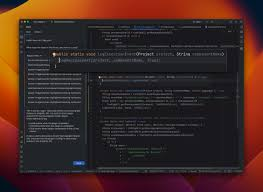
1. Universal Code Search
Search across multiple repositories and languages in seconds.
Example: Quickly find all instances of a function or variable across thousands of files.
2. Code Intelligence
Provides inline documentation, usage examples, and references for a better understanding of complex code.
3. Cross-Repository Navigation
Jump from one repository to another seamlessly without losing context.
Example: Track dependencies between services in a microservices architecture.
4. Integration with Git Platforms
Works with GitHub, GitLab, Bitbucket, and other VCS platforms for synchronized updates.
5. Collaboration Features
Comment on code, share insights, and assign review tasks to team members directly within the platform.
6. Code Reuse Suggestions
Highlights reusable components and modules to avoid duplicated efforts.
7. Security & Compliance Insights
Flags deprecated functions or risky code patterns that could impact security.
8. Customizable Workflows
Teams can set up search filters, alerts, and notifications according to their workflow needs.
3. How It Works
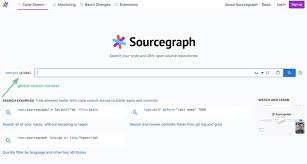
Step-by-Step Guide
- Sign up and connect your repositories (GitHub, GitLab, Bitbucket).
- Configure your search scope (entire org, specific repo, or branch).
- Use the search bar to find code, references, or functions.
- Review inline code intelligence suggestions and comments.
- Reuse or refactor code based on insights provided.
Tip for beginners: Start with a single repository to explore search and code navigation features before expanding to multiple repositories.
4. Performance & Speed
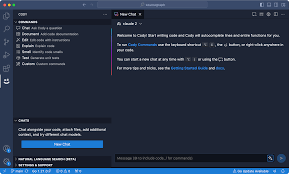
- Speed: Lightning-fast searches even across large codebases.
- Reliability: Stable uptime with minimal delays for repository indexing.
- Real-life usage: Teams using Sourcegraph report 30–50% faster code navigation and reduced duplicated code.
5. Pricing & Plans
Free Plan
- Limited repository access
- Basic code search
- Ideal for individuals or small projects
Paid Plans
- Unlimited repositories
- Advanced code intelligence
- Team collaboration and security insights
Is it worth the money?
Yes, for teams and professional developers managing large codebases, the paid plan enhances productivity, code quality, and collaboration.
6. Pros and Cons
✅ Pros
- Extremely fast cross-repository search
- Detailed code intelligence
- Improves code reuse and reduces duplication
- Integrates with major Git platforms
- Collaboration-friendly
❌ Cons
- The free plan is limited for larger teams
- Learning curve for beginners unfamiliar with code search tools
- Primarily for code understanding, not generation
7. Best Use Cases
Who should use Sourcegraph Copy?
- Large development teams with multiple repositories
- Engineers working on complex, interdependent codebases
- Teams focused on code quality and reuse
Who should avoid it?
- Solo developers with small projects
- Users looking for code generation tools
8. Comparison
1. Codiga
- Sourcegraph Copy: excels at code search and navigation
- Codiga: focuses on code quality checks and security
2. DeepCode
- Sourcegraph Copy: ideal for understanding and reusing code
- DeepCode: best for bug detection and vulnerability scanning
Key Difference: Sourcegraph Copy is optimized for code comprehension and reuse, while Codiga and DeepCode emphasize analysis and security.
9. Security & Privacy
- Secure repository connections with encryption
- Minimal data retention for privacy
- Enterprise options for confidential codebases
10. Final Verdict
Sourcegraph Copy is an excellent tool for developers and teams seeking faster code navigation, better understanding, and increased reuse of code.
Recommendation: For teams managing large, complex codebases, Sourcegraph Copy is highly recommended in 2026. It streamlines workflows, reduces duplicated efforts, and improves overall code productivity.
11. FAQs
1. What is Sourcegraph Copy used for?
It’s used for searching, understanding, and reusing code across repositories.
2. Is Sourcegraph Copy free?
Yes, it has a free plan with limited features; paid plans unlock advanced functionality.
3. Which platforms does it integrate with?
GitHub, GitLab, Bitbucket, and other Git-based platforms.
4. Can Sourcegraph Copy help reduce duplicated code?
Yes, it highlights reusable components and modules across repositories.
5. Is it suitable for beginners?
Beginners can use it, but it’s most effective for teams and developers with multiple repositories.
6. Does it improve code security?
Yes, it flags deprecated functions and risky patterns that could affect security.
7. Can it replace manual code review?
No, it complements manual review by improving code comprehension and collaboration.
8. How fast is Sourcegraph Copy?
Searches are lightning-fast, even across large repositories.
9. Is it safe for private repositories?
Yes, especially with enterprise plans and encrypted connections.
10. Is Sourcegraph Copy worth using in 2026?
Yes, for teams focused on code reuse, productivity, and understanding complex codebases.
11. What is Sourcegraph Copy?
Sourcegraph Copy is a platform that helps developers search, understand, and reuse code across multiple repositories efficiently.
12. Is Sourcegraph Copy free?
Yes, there is a free plan with limited features. Paid plans provide advanced code intelligence, collaboration, and unlimited repositories.
13. Which programming languages does Sourcegraph Copy support?
It supports the most popular languages, including Python, JavaScript, TypeScript, Java, C#, Go, and more.
14. Can Sourcegraph Copy integrate with GitHub or GitLab?
Yes, it integrates with GitHub, GitLab, Bitbucket, and other Git-based platforms.
15. Can Sourcegraph Copy help reduce duplicate code?
Yes, it highlights reusable components and modules across repositories, helping teams avoid repeated code.
16. Is Sourcegraph Copy suitable for beginners?
It’s more useful for teams and developers with multiple repositories, but beginners can start with a single repo to explore features.
17. Does Sourcegraph Copy improve code security?
Yes, it can flag deprecated functions and risky patterns that may impact security.
18. How fast is Sourcegraph Copy for large codebases?
Searches are very fast, even for projects with thousands of files, making it suitable for enterprise teams.
19. Can Sourcegraph Copy replace manual code reviews?
No, it complements manual reviews by improving code comprehension and collaboration, but human oversight is still needed.
20. Is Sourcegraph Copy worth using in 2026?
Yes, especially for teams focused on code reuse, understanding complex projects, and increasing productivity.
Conclusion
Sourcegraph Copy is a powerful tool for developers and teams looking to navigate, understand, and reuse code efficiently. With lightning-fast search, detailed code intelligence, and strong collaboration features, it helps teams maintain high-quality, organized codebases.