
Introduction
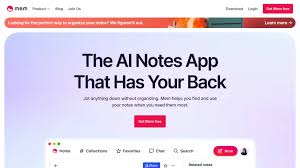
Mem AI is a modern note-taking and knowledge management tool designed to help users capture, organize, and retrieve information effortlessly. Unlike traditional note apps, Mem AI focuses on automatic organization, smart search, and contextual linking to keep your ideas connected.
Mem AI Review 2026 is ideal for writers, students, researchers, entrepreneurs, and knowledge workers who deal with large amounts of information daily. In 2026, Mem AI has become popular because it removes the need for manual organization, making note-taking faster and more intuitive. Motion
Key Features of Mem AI
Here are the core features that make Mem AI stand out:
1. Smart Note Organization
- Automatically organizes notes without folders.
- Example: Write random notes daily, and Mem AI connects related ideas automatically.
2. Powerful Search & Retrieval
- Find notes instantly using keywords or context.
- Example: Search “marketing plan” and get all related notes, even if titles differ.
3. Contextual Linking
- Links related notes based on content and usage.
- Example: A meeting note connects with related project ideas automatically.
4. Daily Notes Workflow
- Encourages capturing thoughts in a daily timeline format.
- Example: Keep track of ideas, tasks, and reflections in one continuous feed.
5. Writing Assistance
- Helps rewrite, summarize, or expand notes.
- Example: Turn rough ideas into structured outlines for blog posts or reports.
6. Collaboration Features
- Share notes and collaborate with team members.
- Example: Work together on brainstorming or research documents.
7. Cross-Platform Access
- Available on web and desktop with sync across devices.
- Example: Access your notes anytime from your laptop or browser.
How Mem AI Works
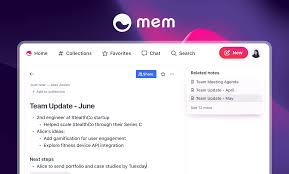
Getting started with Mem AI is simple:
- Sign up and create your account.
- Start writing notes without worrying about folders or structure.
- Use the search to find notes quickly by typing keywords.
- Explore connections suggested by Mem AI between notes.
- Edit or refine notes with built-in writing tools.
- Share notes if working with a team.
The focus is on capturing ideas first and organizing them later automatically.
Performance & Speed

- Output Quality: Mem AI delivers clear, relevant note suggestions and connections, making it easier to understand and expand ideas.
- Speed: Notes save instantly, and search results appear in real time, even with large datasets.
- Reliability: Mem AI offers stable performance with minimal downtime, ensuring consistent access to your knowledge base.
Pricing & Plans
Mem AI offers simple pricing:
- Free Plan: Basic note-taking and limited features.
- Paid Plan: Around $8–$15/month, includes advanced search, smarter organization, and enhanced writing tools.
Is it worth it?
Yes, especially for users who manage a lot of information. The paid plan significantly improves productivity and organization.
Pros and Cons
Pros:
- No need for manual organization
- Powerful search and note retrieval
- Clean and distraction-free interface
- Fast performance and syncing
- Great for idea generation and knowledge management
Cons:
- Limited offline functionality
- Fewer customization options compared to traditional tools
- Collaboration features are still evolving
Best Use Cases
Who should use Mem AI:
- Writers and bloggers organizing ideas
- Students managing study notes
- Researchers handling large information sets
- Entrepreneurs tracking ideas and strategies
Who should avoid it:
- Users who prefer a strict folder-based organization
- People needing advanced project management features
Comparison with Competitors
| Feature | Mem AI | Notion AI | Evernote |
|---|---|---|---|
| Note Organization | ✅ Automatic | ✅ Manual + AI | ✅ Manual |
| Search & Retrieval | ✅ Advanced | ✅ Good | ✅ Good |
| Writing Assistance | ✅ Yes | ✅ Strong | ❌ Limited |
| Collaboration | ✅ Moderate | ✅ Strong | ✅ Moderate |
| Pricing | $0–$15/month | $10–$25/month | $8–$15/month |
Mem AI stands out for automatic organization, while Notion AI offers more structured workflows, and Evernote focuses on traditional note-taking.
Security & Privacy
- Encryption: Data is encrypted in transit and at rest.
- Privacy Policy: Mem AI follows strict privacy practices and does not misuse user data.
- Safety: Suitable for personal and professional use, but avoid storing highly sensitive data in shared environments.
Final Verdict
In 2026, Mem AI is one of the best tools for effortless note-taking and knowledge management. Its automatic organization, powerful search, and clean interface make it perfect for users who want to focus on ideas instead of structure.
Recommendation: If you want a smarter, faster way to manage notes and information, Mem AI is definitely worth trying.
FAQs
1. Is Mem AI free?
Yes, it offers a free plan with basic features. Paid plans unlock advanced capabilities.
2. How is Mem AI different from traditional note apps?
It automatically organizes notes and connects ideas, unlike folder-based systems.
3. Can Mem AI replace tools like Notion or Evernote?
It can replace them for note-taking, but not for full project management workflows.
4. Is Mem AI good for students?
Yes, it’s excellent for organizing study notes and research material.
5. Does Mem AI work offline?
Limited offline support is available; most features require internet access.
6. Is Mem AI secure?
Yes, it uses encryption and follows strict privacy policies.
7. Can I collaborate with others?
Yes, but collaboration features are more basic compared to some competitors.
8. How fast is Mem AI?
Search, saving, and note retrieval are almost instant.
9. Can Mem AI help with writing tasks?
Yes, it can summarize, expand, and improve notes.
10. Who should use Mem AI?
Writers, students, researchers, and professionals are managing large amounts of information.
11. Is the paid plan worth it?
Yes, especially if you rely heavily on note-taking and knowledge organization.
12. Is Mem AI free?
Yes, Mem AI offers a free plan with basic features, while paid plans unlock advanced tools and smarter organization.
13. What makes Mem AI different from other note apps?
Mem AI automatically organizes notes and connects related ideas, reducing the need for folders and manual sorting.
14. Can Mem AI replace Notion or Evernote?
It can replace them for note-taking, but it lacks advanced project management features found in tools like Notion.
15. Is Mem AI good for students?
Yes, it’s great for managing study notes, research, and organizing ideas efficiently.
16. Does Mem AI work offline?
It has limited offline functionality, but most features require an internet connection.
17. Is Mem AI secure?
Yes, it uses encryption and follows strict privacy policies to protect user data.
18. Can I collaborate with others on Mem AI?
Yes, but collaboration features are more basic compared to some other tools.
19. How fast is Mem AI?
It is very fast, with instant note saving and quick search results.
20. Can Mem AI help with writing tasks?
Yes, it can summarize, expand, and improve your notes for better clarity.
21. Who should use Mem AI?
Writers, students, researchers, and professionals who manage large amounts of information.
Conclusion
In 2026, Mem AI stands out as a smart and efficient note-taking tool for users who want to focus on ideas rather than manual organization. Its automatic note structuring, powerful search, and clean interface make it ideal for writers, students, and professionals handling large amounts of information. While it may not replace full project management tools, it excels in knowledge management. Overall, Mem AI is worth using, especially if you want a faster and more intuitive way to manage your notes.