
1. Introduction
Pictory is an AI-powered video creation platform that automatically generates videos from text content, such as articles, scripts, or blog posts. It streamlines video production for marketers, educators, and content creators by using machine learning to select visuals, add captions, and synchronize narration, reducing manual editing time.
Pictory Review 2026: Pictory is a powerful AI-based video creation tool designed to help users turn text, blog posts, scripts, or even URLs into professional-quality videos within minutes. It is especially useful for beginners, marketers, and content creators who want to create videos without advanced editing skills or expensive software. features

Unlike traditional video editing tools, Pictory works completely online and automates most of the process. You simply provide input—such as a script, article, or audio file—and the platform automatically generates a complete video with scenes, visuals, captions, and voiceovers.
What is Pictory?
Pictory is an online video creation tool that turns text, blog posts, or scripts into professional-looking videos in minutes. It’s designed for people who want to create videos without needing editing skills or expensive software.
Who is it for?
Pictory is perfect for:
- Content creators (YouTube, Instagram, TikTok)
- Bloggers who want to convert articles into videos
- Affiliate marketers
- Business owners creating promo content
- Freelancers offering video services
Why is it popular in 2026?
In 2026, short-form video content is dominating platforms like YouTube Shorts and Instagram Reels. Tools like Pictory are popular because they:
- Save time
- Require no editing skills
- Help scale content creation quickly
2. Key Features

Here are the main features that make Pictory stand out:
1. Text-to-Video
You can paste a script, and Pictory automatically converts it into a video with visuals, subtitles, and music.
Example:
Paste a blog post → get a ready-to-upload YouTube video.
2. Blog to Video Conversion
Turn your existing blog articles into engaging videos.
Example:
A 3000-word SEO article → multiple short videos for social media.
3. Automatic Subtitles
Pictory generates captions automatically, which is important for engagement.
Why it matters:
Most users watch videos without sound.
4. Stock Media Library
Access millions of royalty-free images and video clips.
Example:
No need to download media from external sites.
5. AI Voiceovers
Choose from multiple voice options to narrate your videos.
Use case:
Perfect for faceless YouTube channels.
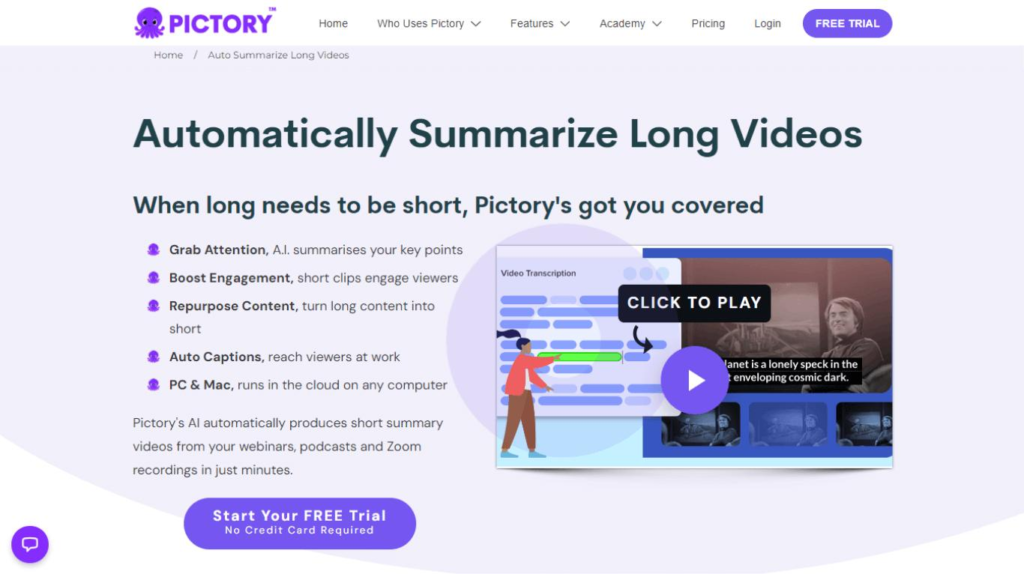
6. Video Highlights & Summarization
Upload long videos, and Pictory extracts short highlights.
Example:
Turn a 1-hour webinar into 10 short clips.
7. Branding Options
Add logos, colors, and fonts to match your brand.
8. Social Media Optimization
Automatically formats videos for:
- YouTube
- TikTok
3. How It Works (Step-by-Step)
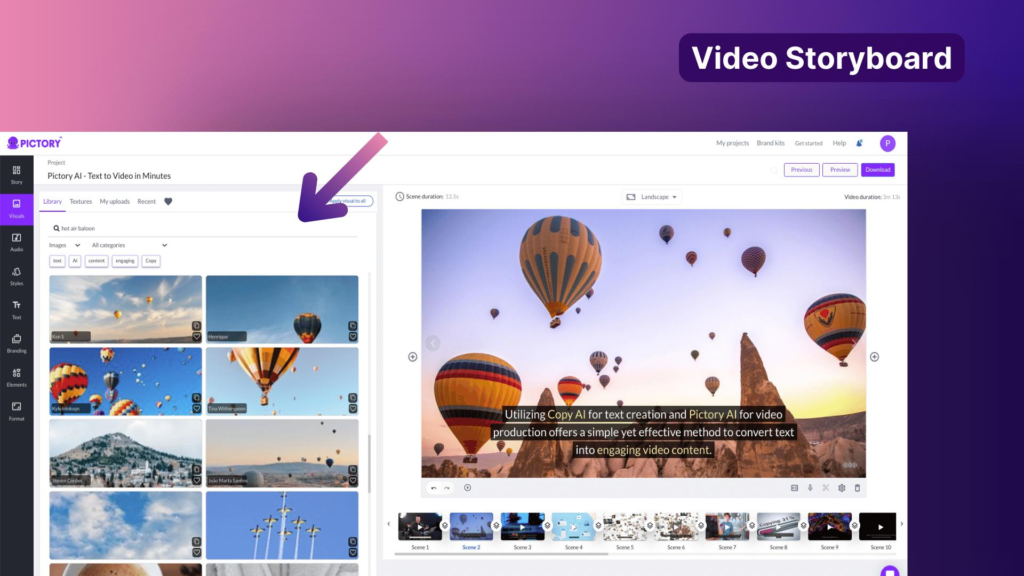
Pictory converts text into videos by analyzing written input to identify keywords and topics, then matching them with relevant stock footage, images, and music. Users can edit the generated video using built-in tools to adjust scenes, voiceovers, and captions. The platform’s AI also automatically adds subtitles and trims long-form content into short clips optimized for social platforms.
Using Pictory is very simple:
Step 1: Sign Up
Go to the official website and create an account.
Step 2: Choose a Tool
Options include:
- Script to Video
- Blog to Video
- Video Highlights
Step 3: Paste Your Content
Add your script or blog link.
Step 4: Customize Video
- Select visuals
- Add voiceover
- Choose music
Step 5: Edit (Optional)
Adjust scenes, text, and clips.
Step 6: Export
Download your video in HD quality.
4. Performance & Speed
Speed
- Videos are generated in minutes
- Faster than traditional editing tools
Output Quality
- Good for social media content
- Not cinematic, but clean and professional
Reliability
- Cloud-based → works on any device
- Stable performance with minimal downtime
Real-life use:
Many creators use Pictory to produce 5–10 videos daily without slowing down.
5. Pricing & Plans
Pictory offers both free and paid plans.
Free Plan
- Limited video length
- Watermark included
Paid Plans (Approx.)
- Basic: Good for beginners
- Standard: Best for regular creators
- Premium: Advanced features + longer videos
Is it worth the money?
Yes, if you:
- Create videos regularly
- Want to save editing time
- Run a content or affiliate business
6. Pros and Cons
✅ Pros
- Beginner-friendly
- No editing skills required
- Fast video creation
- Great for faceless content
- Built-in stock library
- Automatic captions
❌ Cons
- Limited customization compared to pro editors
- AI voices can sound slightly robotic
- The free plan is very limited
- Not ideal for advanced cinematic editing
7. Best Use Cases
Who should use Pictory?
- YouTubers (especially faceless channels)
- Bloggers turning content into videos
- Affiliate marketers
- Social media managers
- Online business owners
Who should avoid it?
- Professional video editors
- Filmmakers need full control
- Users wanting highly custom animations
8. Comparison with Competitors
Pictory vs InVideo
- Pictory: Better for automation
- InVideo: Better for manual editing
Pictory vs Lumen5
- Pictory: Faster and more automated
- Lumen5: Better design flexibility
9. Security & Privacy
Even though Pictory is not a VPN, security still matters.
- Uses secure cloud infrastructure
- No major data breach history
- Content is stored online (cloud-based)
Important:
Avoid uploading sensitive or private content.
10. Final Verdict
Is Pictory worth using in 2026?
Yes — especially if your goal is to create videos quickly without learning complex editing.
Final Recommendation:
- Best for beginners and marketers
- Great for scaling content production
- Not ideal for advanced video professionals
👉 If you want fast, simple, and effective video creation, Pictory is a solid choice.
11. FAQs
1. Is Pictory free to use?
Yes, but the free version has limitations like watermarks and shorter videos.
2. Can I use Pictory for YouTube?
Absolutely. Many creators use it for YouTube Shorts and long videos.
3. Does Pictory require editing skills?
No, it’s designed for beginners.
4. Is Pictory good for affiliate marketing?
Yes. You can create product videos, reviews, and ads quickly.
5. Does Pictory support voiceovers?
Yes, it offers built-in voiceover options.
6. Can I upload my own media?
Yes, you can add your own images, videos, and audio.
7. Is Pictory better than traditional editing tools?
It depends:
- Faster and easier → Yes
- More control → No
8. Does it work on mobile?
Yes, since it’s web-based, it works on mobile browsers.
9. Can I create short videos for Reels and TikTok?
Yes, it supports multiple formats for social media.
10. Is Pictory safe?
Yes, but avoid uploading confidential content.
11. What is Pictory used for?
Pictory is used to create videos from text, blog posts, or scripts. It’s mainly used for social media content, YouTube videos, marketing ads, and educational clips.
12. Is Pictory good for beginners?
Yes, Pictory is very beginner-friendly. You don’t need any video editing experience to create professional-looking videos.
13. Can I use Pictory for YouTube automation?
Yes, many creators use Pictory for faceless YouTube channels. It helps generate videos quickly with subtitles and voiceovers.
14. Does Pictory add watermarks?
Yes, the free plan includes a watermark. Paid plans remove it.
15. How long does it take to create a video?
Most videos can be created in 5–15 minutes, depending on length and customization.
16. Can I upload my own voice or media?
Yes, you can upload:
- Your own voiceovers
- Images and video clips
- Background music
17. Is Pictory better than traditional video editors?
It depends:
- Faster & easier → Yes
- Full control & advanced editing → No
18. Does Pictory support multiple languages?
Yes, Pictory supports multiple languages for subtitles and voiceovers.
19. Is Pictory safe to use?
Yes, it is generally safe. However, since it’s cloud-based, avoid uploading sensitive or private content.
20. Can I use Pictory for business or marketing?
Absolutely. It’s widely used for:
- Product promos
- Social media ads
- Affiliate marketing videos
21. Does Pictory work on mobile devices?
Yes, since it’s web-based, you can use it on mobile browsers, tablets, and desktops without installing any app.
Conclusion
Pictory is a powerful and beginner-friendly tool that makes video creation fast, simple, and scalable. In 2026, when content demand is higher than ever, it helps creators turn ideas, scripts, or blog posts into engaging videos without technical skills.
If your goal is to save time, grow on platforms like YouTube or Instagram, or build a faceless content business, Pictory is definitely worth trying. It may not replace advanced editing software, but for speed and ease of use, it delivers excellent value.