
AskCodi is an AI-powered development tool designed to help programmers write code, solve problems, and improve productivity across different programming tasks. It works as a web-based platform and also integrates with popular environments like Visual Studio Code, making it accessible for both beginners and experienced developers.
AskCodi Review 2026: AskCodi offers a wide range of features beyond simple code completion. It can generate entire code snippets, create SQL queries, write APIs, and even help with frontend code like HTML, CSS, and JavaScript. One of its most useful features is its ability to convert plain English instructions into working code, which is especially helpful for those who are still learning programming.

Another standout feature is its collection of specialized tools. For example, it includes a “Code Generator,” “SQL Generator,” “Regex Generator,” and even a “Unit Test Creator.” These tools make it easy to handle specific tasks quickly without writing everything from scratch. It also provides code explanations, helping users understand complex logic in simple terms.
In real-world scenarios, AskCodi is great for building web applications, automating repetitive coding tasks, debugging issues, and learning new programming concepts. For instance, if you’re working on a database project, it can instantly generate optimized SQL queries based on your requirements.
However, compared to tools like GitHub Copilot or Codeium, AskCodi may feel more like a toolkit rather than a fully integrated coding assistant. Some advanced features are also limited to paid plans, which might be a drawback for users looking for a completely free solution. Amazon CodeWhisperer
Overall, AskCodi is a versatile and beginner-friendly AI coding assistant that combines multiple tools into one platform. It’s a solid choice for developers who want help with a variety of coding tasks, from writing code to generating queries and learning along the way. Pricing
What is AskCodi?
AskCodi is a cloud-based coding assistant that connects to your editor — think VS Code, JetBrains IDEs, Sublime Text, Zed, Void, or Neovim — and helps you write, explain, convert, and fix code. You type a request in plain English (“write a function that validates an email address in Python”), and it hands back working code.
The company behind it, Assistiv AI, built the tool around a simple idea: instead of locking you into one language model, they give you access to several — Claude, Gemini, GPT-4o, Llama, Mistral, Qwen, DeepSeek, and others — through one subscription. You can compare outputs from different models side by side and pick whichever result looks best for your task.
It’s not trying to be a full replacement for a developer. Reviewers on G2 are pretty consistent on this point — it’s a productivity booster, not a hire-nobody solution.
AskCodi is a coding assistant designed to help developers generate code, write documentation, create SQL queries, and even build frontend components—all from simple prompts.
Unlike basic autocomplete tools, AskCodi focuses more on prompt-based coding and automation, making it a versatile tool for different development tasks.
Who is it for?
AskCodi is ideal for:
- Beginners learning programming
- Web developers
- Backend developers
- Freelancers building projects
- Developers who prefer prompt-based tools
Why is it popular in 2026?
In 2026, AskCodi is gaining popularity because:
- Offers multiple tools in one platform
- Easy-to-use prompt interface
- Supports many coding tasks beyond autocomplete
- Saves time on repetitive development work
It’s especially useful for developers who want a multi-purpose coding assistant.
2. AskCodi Review 2026: Key Features
1. Multiple Model Access, One Subscription

Instead of paying separately for ChatGPT Plus, Claude Pro, and Gemini Advanced, AskCodi gives you a single dashboard where you can switch between models depending on the task. One user on G2 put it simply: they use it because running out of tokens on a single provider used to be a constant headache, and AskCodi’s shared credit pool solved that.
2. Codespaces and Projects
You can upload your existing codebase into a Codespace and work on it in smaller chunks without re-explaining your project every time. This is genuinely useful if you’re maintaining an app and just need targeted fixes rather than starting from scratch.
3. Code Explainer
Paste in a chunk of code you don’t understand, and it breaks down what it does, line by line or in broad strokes. Teachers, students, and non-technical founders mention this feature the most — it’s less about writing new code and more about understanding old code someone else wrote.
4. Regex Generator
Regular expressions trip up almost everyone. Describe what pattern you need in plain words, and AskCodi builds the regex for you. Several long-time reviewers call this their most-used feature, which says something, since regex is a small niche compared to general code generation.
5. IDE and Editor Integrations
It plugs directly into VS Code, JetBrains products, Sublime Text, Zed, Void, and Neovim, plus there’s a standalone web app with a chat-style interface. If you’d rather not install anything, the web version covers most of the same ground.
6. Sandbox and WordPress Tools
There’s a Sandbox environment for testing snippets before you commit them, and dedicated tools for generating WordPress functions — handy if you run a WooCommerce store or manage client sites without a dev retainer.
7. Discord-Based Support
Support runs mainly through a Discord server rather than email tickets. Reviewers describe the response times as quick, though a few mention they’d prefer more traditional documentation alongside it.
3. How It Works
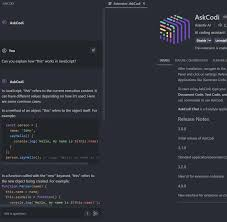
Using AskCodi is simple:
Step-by-Step Guide
- Visit the AskCodi website
- Sign up for an account
- Choose a tool (code generator, SQL generator, etc.)
- Enter your prompt
- Generate code instantly
- Copy and use the output
Beginner Tip:
Use clear prompts like:
“Create REST API using Node.js”
to get better results.
4. Performance & Speed

Speed
- Fast response time
- Code generated within seconds
Accuracy
- Good for standard tasks
- May need editing for complex logic
Reliability
- Stable platform
- Works well with an internet connection
Real-Life Example:
While building a web app, AskCodi can:
- Generate frontend UI
- Create backend APIs
- Write SQL queries
This speeds up development significantly.
5. Pricing & Plans
Pricing has shifted a few times over the years, and it’s worth knowing exactly what you get before signing up, since the free tier is more limited than it used to be.
| Plan | Price | Main purpose |
|---|---|---|
| Free trial | 7 days | Test the desktop application |
| App plan | $60 per year | Desktop orchestration and project workflow |
| API Starter | $20 per month | 16 million API tokens |
| API Pro | $100 per month | 80 million API tokens |
| API Max | $200 per month | 160 million API tokens |
Free Plan: The free tier is there for testing, not daily work. You get 100,000 one-time tokens with a cap of 10 uses per day, plus access to six free models. If you’re using it seriously — say, generating a few functions a day — expect to burn through the free allowance within a couple of days, not weeks.
Flexible Monthly Plan: This is the pay-for-what-you-use option, and it scales with you. Plans start around $5 a month for roughly 4 million tokens and go up to about $200 a month for roughly 160 million tokens. Tokens don’t expire, so unused credit rolls over instead of resetting every billing cycle — a detail a few reviewers specifically called out as fairer than competitors that force you to “use it or lose it.”
Premium and Ultimate Annual Plans: Built for individual developers who want a predictable yearly cost instead of watching token usage. These give you higher or unlimited-feeling usage caps and priority access to newer models, billed once a year.
Older Pricing References: You’ll still see older listings (like Techjockey or Capterra) quoting a starting price around $7.99–$9.99 a month. Treat those as outdated — the current model is token-based, not a flat per-seat fee, so check the official pricing page before you commit to a number you saw on a third-party directory.
A Practical Example: Say you’re a freelance web designer who needs a WordPress function generated maybe twice a week, plus the occasional CSS fix. That’s light usage — the $5/month flexible tier will likely cover you without issue. If you’re a small dev team generating code daily across multiple projects, you’re probably looking at $20–$50/month depending on how token-hungry your prompts are. Current pricing structure
Free Plan
- Limited usage
- Basic features
Paid Plans
- More credits
- Full access to tools
- Faster responses
Is it worth the money?
👉 Yes, if you frequently use prompt-based coding tools.
Is AskCodi Safe? Privacy, Data Handling, and Whether You Need a VPN
This is where a lot of people hesitate, and it’s a fair thing to check before you paste your company’s code into any cloud tool.
Where your code goes: AskCodi is entirely cloud-based — there’s no offline mode. When you submit a prompt or upload a file to a Codespace, that data travels to AskCodi’s servers and then to whichever underlying model you selected (Claude, GPT-4o, Gemini, etc.) to generate a response. G2’s feature list for AskCodi specifically flags GDPR compliance and encryption among its listed capabilities, which is a reasonable baseline, but it’s still worth reading the current privacy policy on their site before uploading anything with client data, API keys, or proprietary business logic in it.
Do you need a VPN to use it? No — a VPN isn’t required to access or use AskCodi normally. It’s a standard web-based SaaS product, not something that’s geo-blocked or restricted in most regions. A VPN would only come into play if:
- You’re on a restrictive corporate or school network that blocks the domain
- You’re in a country where general cloud AI-style tools face access restrictions
- You simply prefer routing all your traffic through a VPN as a personal habit
If none of those apply to you, skip it. A VPN won’t change what AskCodi does with your data once it reaches their servers — it only affects the connection between you and them, not what happens after.
Practical privacy habits, regardless of the tool:
- Don’t paste API keys, passwords, or credentials into any prompt, ever
- Strip or mask sensitive customer data before pasting a function that touches a database
- If your company has a data handling policy, check whether cloud coding tools are approved before uploading proprietary codebases.
- Review whether your plan allows you to opt out of having your prompts used for model training — this varies by provider and sometimes by plan tier.r
None of this is unique to AskCodi — it applies to basically every cloud-based coding tool on the market. The difference is that AskCodi routes your prompt through several possible third-party model providers depending on which one you pick, so it’s worth being a bit more deliberate about what you type in.
6. Pros and Cons
What Users Like
- Access to a wide range of models (Claude, Gemini, GPT-4o, Llama, Mistral, Qwen, DeepSeek) under one subscription, so you’re not locked into a single provider’s quirks or outages.
- Genuinely easy to pick up — several reviewers with zero coding background say they were productive within their first session.n
- Solid IDE coverage: VS Code, JetBrains, Sublime Text, Zed, Void, Neovim
- The Code Explainer is well-liked by non-developers and students specifically
- Discord support is fast, based on repeated mentions across reviews
- Tokens that roll over instead of expiring monthly
- Pricing that scales down to genuinely small budgets ($5/month tier) rather than forcing everyone into a $20+ plan
What Users Don’t Like
- Response times can lag, especially inside the VS Code extension, according to several reviews
- Code quality isn’t always production-ready — expect to manually check and fix logic errors, particularly on complex, multi-file projects
- The free tier’s daily cap and token limits get frustrating fast if you’re using it for real work rather than testing
- Documentation is thin; a few users specifically wish for more visual guides or examples instead of relying on Discord for basic questions
- No true project-wide understanding — it works well on isolated files or functions but can lose track of context across a large codebase
- Occasional forgetfulness — a couple of reviewers noted it drops earlier instructions in longer sessions, particularly around image or file links left blank in follow-up responses
- Weaker support for less mainstream languages (Rust was specifically flagged as a weak point by one reviewer)
✅ Pros
- All-in-one coding assistant
- Easy to use
- Great for generating code quickly
- Supports multiple tasks
- No installation required
❌ Cons
- Limited free plan
- Requires an internet connection
- Needs manual review of the generated code
7. Best Use Cases
Who should use AskCodi?
- Beginners learning coding
- Developers working on web projects
- Freelancers building apps
- Developers needing quick code generation
Who should avoid it?
- Developers needing deep IDE integration
- Users working offline
- Advanced developers needing highly complex logic
Who Should Use AskCodi?
AskCodi may be a good choice for:
- Beginners learning programming.
- Students practising JavaScript, Python, Java, or SQL.
- Freelancers creating websites and small applications.
- SEO professionals who need simple scripts or automation.
- WordPress developers working on snippets.
- Frontend developers building prototypes.
- Small teams that need a central development workflow.
- Experienced developers handling repetitive tasks.
For example, an SEO specialist could use AskCodi to create a JavaScript script that checks broken links, a Python utility that cleans a CSV file, or a regular expression for extracting product IDs from URLs. The person should still inspect the result and test it before using it on a live website.
AskCodi may not be the best fit for:
- Organisations that need guaranteed code accuracy.
- Teams with strict data-residency requirements.
- Developers working only with highly specialised frameworks.
- Users who expect a full VPN or security package.
- People who do not want separate model-usage charges.
- Large enterprises that require extensive administration and compliance controls without negotiating a custom agreement.
8. Comparison with Competitors
AskCodi vs. Alternatives: Price Comparison
If you’re weighing AskCodi against the bigger names, here’s roughly how the monthly cost stacks up for an individual user:
| Tool | Typical Starting Price | Model Access |
|---|---|---|
| AskCodi (Flexible) | ~$5/month (scales by token usage) | Multiple models in one plan |
| GitHub Copilot | ~$10/month | Single underlying model family |
| Cursor Pro | ~$20/month | Multiple models, IDE-native |
| ChatGPT Plus | ~$20/month | Single provider’s models |
The main thing that sets AskCodi apart on price is the low entry point and the ability to compare multiple models without paying for separate subscriptions to each one. Where it loses ground is depth — tools built specifically around full-project context (like Cursor) tend to handle large, sprawling codebases more reliably, based on user feedback across review platforms.
1. GitHub Copilot
- Real-time IDE integration
- More advanced suggestions
- Better for continuous coding
2. Codeium
- Free for individuals
- Strong autocomplete features
- Less focus on prompt-based tools
Key Difference:
AskCodi focuses on prompt-based coding and multiple tools, while others focus on real-time autocomplete.
9. Security & Privacy
Data Handling
- Prompts and code are processed online
- Standard security practices applied
Encryption
- Secure connections used
- Data protection in transit
Safety
- Safe for general use
- Avoid sensitive code in free plans
Best Practice
Use paid plans or enterprise options for better control.
10. Final Verdict
AskCodi is a powerful and flexible coding assistant.
Should you use it?
👉 Yes, if you prefer prompt-based coding and automation
It’s especially useful for developers who want an all-in-one tool.
Who Should Actually Use AskCodi
Good fit:
- Freelancers and small agency owners who need occasional code (WordPress functions, small scripts, regex) without hiring a developer
- Students and self-taught coders who want explanations alongside generated code, not just raw output
- Marketers or founders who touch code occasionally but aren’t full-time developers
- Anyone who wants to compare outputs across several models without juggling multiple subscriptions
Probably not the right fit:
- Enterprise teams needing deep, whole-codebase context and refactoring across dozens of files
- Developers working heavily in Rust or other less-common languages, based on reported gaps
- Teams that need guaranteed low-latency responses for tight development sprints
- Anyone who needs strict, contractually guaranteed data handling terms for regulated industries (always confirm directly with the vendor rather than relying on review summaries)
11. FAQs
1. Is AskCodi free?
It offers a free plan with limited features.
2. What is AskCodi used for?
It’s used for generating code, SQL queries, documentation, and more from prompts.
3. Is AskCodi good for beginners?
Yes, it’s very beginner-friendly and easy to use.
4. Does AskCodi work offline?
No, it requires an internet connection.
5. Which languages does it support?
It supports Python, JavaScript, Java, SQL, HTML, and more.
6. Is AskCodi better than GitHub Copilot?
It depends. AskCodi is better for prompt-based tasks, while Copilot is stronger for real-time coding.
7. Can AskCodi generate full apps?
It can generate parts of apps, but full development still requires manual work.
8. Is AskCodi safe to use?
Yes, but avoid using it for sensitive code unless using secure plans.
9. Is AskCodi worth it in 2026?
Yes, especially for developers who want a versatile, all-in-one coding assistant.
10. What is AskCodi used for?
AskCodi is used to generate code, write SQL queries, create documentation, and automate development tasks using simple prompts.
11. Is AskCodi free?
Yes, it offers a free plan with limited usage. Paid plans unlock more features and higher usage limits.
12. Is AskCodi good for beginners?
Yes, it’s very beginner-friendly. You can generate code just by describing what you want in plain English.
13. Which programming languages does AskCodi support?
It supports popular languages like Python, JavaScript, Java, SQL, HTML, and CSS.
14. Does AskCodi work offline?
No, it is a web-based tool and requires an internet connection.
15. Can AskCodi generate full applications?
It can generate parts of applications, but you still need to design, test, and manage the full project.
16. Is AskCodi better than GitHub Copilot?
It depends on your needs. AskCodi is better for prompt-based coding, while GitHub Copilot is stronger for real-time coding inside IDEs.
17. Is AskCodi safe to use?
Yes, but avoid using it for sensitive or confidential code unless using secure or enterprise plans.
18. Can AskCodi help with debugging?
Yes, it can suggest fixes and improvements for your code.
19. Who should use AskCodi?
Beginners, freelancers, and developers who want quick code generation and automation tools will benefit the most.
20. Is AskCodi worth it in 2026?
Yes, especially if you want a flexible and easy-to-use coding assistant for everyday development tasks.
21. Is AskCodi free to use?
There’s a free tier, but it’s limited — 100,000 one-time tokens and a 10-use daily cap. It’s enough to test the product, not to rely on for regular work. AskCodi moved away from a fuller freemium model toward this trial-style free tier in recent years.
22. Does AskCodi require a VPN?
No. It’s a standard cloud-based web tool with no regional restrictions in most countries. You’d only need a VPN if your specific network blocks the site or you have a personal preference for routing traffic through one.
23. Is my code safe with AskCodi?
AskCodi lists GDPR compliance and encryption among its features, which is a reasonable baseline for a cloud tool. That said, avoid pasting credentials, API keys, or sensitive customer data into any prompt-based tool, and check the current privacy policy directly if you’re handling regulated or proprietary data.
24. How much does AskCodi cost per month?
The Flexible plan starts around $5/month for roughly 4 million tokens and scales up to about $200/month for heavier use. There are also annual Premium and Ultimate plans for individual developers who prefer a fixed yearly cost.
25. Which models can I access through AskCodi?
Depending on your plan, you can access Claude, Gemini, GPT-4o, Llama, Mistral, Qwen, DeepSeek, and several smaller free-tier models, all through one account.
26. Does AskCodi work with VS Code?
Yes, along with JetBrains IDEs, Sublime Text, Zed, Void, and Neovim. There’s also a web app if you’d rather not install an extension.
27. Is AskCodi good for beginners with no coding background?
Based on reviews, yes — several non-developers (marketers, teachers, founders) report getting real value from it, particularly the Code Explainer feature for understanding code they didn’t write themselves.
28. How does AskCodi compare to GitHub Copilot?
Copilot is tightly integrated into your editor for inline autocomplete and generally costs more per month for single-model access. AskCodi’s angle is giving you a choice of several models under one lower-cost plan, though it’s less deeply integrated for continuous autocomplete-style suggestions.
Conclusion
AskCodi is a versatile and user-friendly coding assistant that stands out for its prompt-based approach and all-in-one functionality. It helps developers generate code, write SQL queries, create documentation, and speed up development without needing a complex setup. Pricing
While it may not replace advanced IDE-based tools, its flexibility and ease of use make it a great choice for beginners, freelancers, and developers looking for quick solutions. Pricing