
Introduction
Notion AI is an advanced productivity tool built within the popular Notion platform, designed to help users manage notes, documents, tasks, and projects more efficiently. Unlike traditional task managers, Notion AI blends smart content suggestions, automation, and organization in one interface.
Notion AI Review 2026 -It is ideal for professionals, students, content creators, and teams who want to save time, streamline workflows, and generate high-quality work quickly. In 2026, Notion AI has gained popularity due to its seamless integration with Notion’s existing workspace, advanced automation features, and ability to enhance collaboration across teams.
Key Features of Notion AI
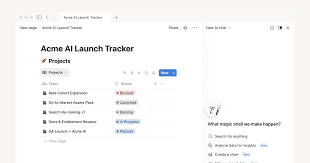
Here are the standout features that make Notion AI a must-try:
- Smart Writing Assistance
- Helps draft content, summarize notes, or improve existing text.
- Example: Transform rough meeting notes into clear action points in seconds.
- Task and Project Management
- Automates repetitive tasks, generates to-do lists, and assigns priorities.
- Example: Notion AI can suggest daily task priorities based on your deadlines.
- Content Summarization
- Summarizes long documents, articles, or meeting notes into concise points.
- Example: Summarize a 20-page report into a few bullet points for quick review.
- Database Intelligence
- Suggests database entries, relationships, and analytics for organized tracking.
- Example: Automatically categorize client data or sales leads for easy access.
- Idea Generation & Brainstorming
- Offers creative suggestions for content, business ideas, or project plans.
- Example: Generate blog topics or campaign ideas without starting from scratch.
- Custom Templates & Workflows
- Pre-built templates enhanced with AI recommendations for faster setup.
- Example: Use an AI-enhanced project tracker template that adjusts automatically.
- Collaborative Features
- Supports real-time collaboration with intelligent suggestions for teams.
- Example: Notion AI proposes improvements to shared project documents.
How Notion AI Works
Using Notion AI is beginner-friendly. Here’s a simple guide:
- Sign up for Notion and enable the AI features.
- Open a workspace and create a new page or document.
- Activate AI tools by clicking the AI button or typing.
/AI. - Choose an action: write, summarize, brainstorm, or analyze.
- Review suggestions and edit as needed before finalizing your content.
- Save or share your work with colleagues or collaborators.
With these steps, even first-time users can leverage Notion AI’s capabilities without a steep learning curve.
Performance & Speed
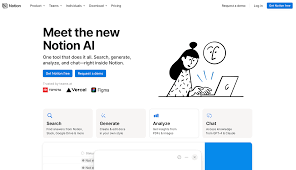
- Output Quality: Notion AI delivers clear, concise, and context-aware suggestions. It reduces time spent on drafting, summarizing, or brainstorming.
- Speed: Most tasks are processed almost instantly. Large documents may take a few seconds, but overall, the performance is smooth.
- Reliability: Notion AI operates within Notion’s platform, which has high uptime and minimal downtime, ensuring your workflow is uninterrupted.
Pricing & Plans
Notion AI offers flexible pricing:
- Free Plan: Limited AI features with basic writing and summarization. Ideal for casual users.
- Paid Plans: Start at $10–$20 per month for individuals, including advanced AI writing, templates, and database suggestions.
- Team Plans: Starting at $25 per user per month, designed for collaboration with full AI features.
Is it worth it? For individuals who rely on productivity tools daily or teams seeking efficiency, the paid plans justify the cost with significant time savings.
Pros and Cons
Pros:
- Easy-to-use interface integrated within Notion
- Accelerates writing, summarizing, and project management
- Real-time collaboration support
- Customizable templates and workflows
- Reliable and fast
Cons:
- Limited features on the free plan
- AI suggestions may need manual refinement
- Learning curve for advanced database automation
Best Use Cases
Who should use Notion AI:
- Content creators and writers
- Project managers and team leads
- Students managing research and notes
- Entrepreneurs planning ideas and strategies
Who should avoid it:
- Users needing offline-only tools (Notion is cloud-based)
- People looking for heavy coding or technical AI analytics
Comparison with Competitors
| Feature | Notion AI | Evernote AI | ClickUp AI |
|---|---|---|---|
| Note-taking & Writing | ✅ Advanced AI | ✅ Basic AI | ✅ Task-focused |
| Task Management | ✅ Smart automation | ❌ Limited | ✅ Advanced |
| Collaboration | ✅ Strong | ❌ Moderate | ✅ Strong |
| Templates & Workflow | ✅ Customizable | ❌ Few | ✅ Moderate |
| Pricing | $10–$25/month | $8–$15/month | $9–$20/month |
Notion AI stands out for its combination of writing assistance and workflow automation.
Security & Privacy
- Encryption: All data is encrypted in transit and at rest.
- Privacy Policy: Notion AI does not store personal writing data permanently.
- Safety: Ideal for businesses and individuals, but always avoid sensitive data in shared workspaces.
Final Verdict
In 2026, Notion AI is a must-have productivity tool for anyone looking to save time, organize projects, and collaborate efficiently. Its versatility, speed, and smart suggestions make it a strong choice for both individuals and teams.
Recommendation: If you are already using Notion or need an integrated productivity solution, upgrading to Notion AI is worth it.
FAQs
1. Is Notion AI free?
Yes, but free users have limited features. Paid plans unlock advanced AI suggestions and templates.
2. Can Notion AI replace a human writer?
It helps speed up writing and brainstorming, but works best as an assistant, not a replacement.
3. Is it secure for team collaboration?
Yes, Notion AI uses encryption and has a strict privacy policy, making it safe for work documents.
4. Does it work offline?
Not fully. Notion AI relies on cloud processing, so internet access is required.
5. Can I use it for project management?
Absolutely. It can generate tasks, suggest priorities, and track progress within your workspace.
6. How fast is Notion AI?
Most suggestions appear instantly, even for large documents.
7. Can I customize AI templates?
Yes, you can modify existing templates or create your own workflows.
8. Is Notion AI free to use?
Yes, the free plan offers basic AI features, but advanced tools like custom templates and deep summarization require a paid plan.
9. Can Notion AI improve my writing?
Absolutely. It can help refine text, generate ideas, summarize content, and make your writing more clear and professional.
10. Is it safe to use for sensitive work documents?
Yes, Notion AI encrypts data and follows strict privacy policies. Avoid sharing highly confidential info in shared workspaces.
11. Does Notion AI work offline?
Not fully. AI features require an internet connection since processing happens in the cloud.
12. Can teams collaborate using Notion AI?
Yes, it supports real-time collaboration and suggests improvements to shared documents, making team projects more efficient.
13. How fast is Notion AI at generating suggestions?
Most AI suggestions appear almost instantly, even for long notes or documents.
14. Who should use Notion AI?
Ideal for content creators, students, project managers, and teams seeking faster workflows and better organization.
Conclusion
In 2026, Notion AI is one of the most versatile productivity tools available. It combines smart writing, task automation, and collaboration in a single platform, saving users time and improving workflow efficiency. Whether you’re a content creator, student, or team leader, it’s worth exploring the paid plan for full features. For casual users, the free version still provides useful AI-assisted tools. Overall, Notion AI is a smart investment for anyone looking to organize, create, and collaborate better.