
Opera Mini is one of the most downloaded browsers in India — popular for its data compression, speed on slow connections, and compatibility with budget Android phones. It also includes a built-in VPN feature. But Opera Mini’s VPN works differently from what most users expect, and understanding exactly what it does is important before relying on it for privacy or security.
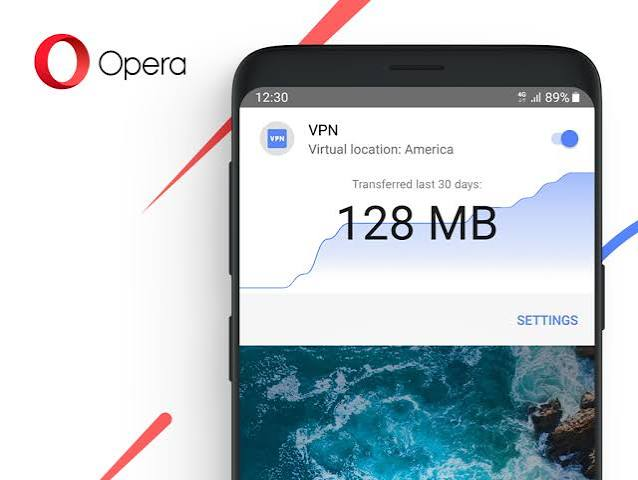
This guide covers how Opera Mini’s VPN works on Android in 2026, what it actually protects, how it differs from Opera Browser’s VPN, and when you need a separate VPN app instead.
Opera Mini VPN for Android: Opera Mini VPN can be a convenient option for Android users who want a simple way to add an extra layer of privacy while browsing. Because the VPN feature is integrated into the Opera browser, users can access it without installing a separate VPN application. This makes it particularly useful for beginners who want straightforward privacy protection while using public Wi-Fi or browsing websites.
The main advantages include easy activation, encrypted browser traffic, IP address masking, and convenient access without a separate VPN app. Opera also offers a free VPN option, allowing users to try the service without immediately paying for a subscription. However, because the browser VPN is primarily designed to protect traffic within Opera, it should not be treated as a replacement for a full device-wide VPN.
Key Features
- Built-in VPN functionality
- Simple activation from browser settings
- IP address masking
- Encrypted browser traffic
- No separate VPN app required
- Easy-to-use interface
- Suitable for everyday browsing
Advantages
Easy to use: The integrated design makes it straightforward for beginners.
Convenient: You don’t need to switch between a separate VPN application and your browser.
Privacy-focused browsing: Masking your IP address can make it harder for websites to identify your original network location.
Free option: Opera provides VPN functionality within its browser without requiring a separate paid VPN subscription for the basic browser feature.
Limitations
The most important limitation is that Opera’s browser VPN does not function like a traditional device-wide VPN. It is primarily intended to protect traffic generated through the Opera browser rather than every application installed on your Android phone. Therefore, users who want VPN protection for apps such as messaging, streaming, or other applications may need a dedicated VPN service.
Pros
- ✅ Free to use for basic browser VPN functionality
- ✅ Built directly into the Opera browser
- ✅ Easy to activate and use
- ✅ Masks your IP address while browsing
- ✅ No separate VPN app required
- ✅ Useful for everyday browsing and public Wi-Fi
- ✅ Beginner-friendly interface
Cons
- ❌ Primarily protects traffic inside the Opera browser
- ❌ Not a complete device-wide VPN
- ❌ Fewer advanced features than dedicated VPN services
- ❌ Not ideal for users who need VPN protection across all Android apps
- ❌ Server/location choices may be limited compared with premium VPN providers
- ❌ Advanced VPN features may require a paid service
Opera Mini VPN for Android in 2026
Opera Mini vs Opera Browser: Two Different Apps
First, an important distinction that many users miss:
Opera Mini — Lightweight data-saving browser. Designed for slow connections and budget Android phones. Uses server-side compression to load pages faster and use less data. Available on the Play Store separately.
Opera Browser (standard) — Full-featured Chromium-based browser with more features. Includes a built-in HTTPS proxy marketed as “VPN.” Different app, different Play Store listing.
Both have VPN-like features, but they work differently. This guide focuses specifically on Opera Mini.
Does Opera Mini Have a Built-In VPN?
Opera Mini includes a privacy feature labelled “VPN” in its settings. However, it is important to understand exactly what this is:
Opera Mini’s “VPN” is a combination of:
- Server-side page compression and rendering
- A data proxy that routes browser traffic through Opera’s servers
- Basic privacy filtering
What it is NOT:
- A true encrypted VPN tunnel (like WireGuard or OpenVPN)
- System-wide protection for all Android apps
- A no-logs anonymity service with audited privacy credentials
Opera Mini has always worked by rendering web pages on Opera’s servers and sending compressed versions to your device. This server-side processing inherently means your browsing goes through Opera’s infrastructure — which provides some privacy from your ISP but routes traffic through Opera’s servers instead.
How to Enable VPN in Opera Mini for Android
Step 1: Download Opera Mini from the Google Play Store (published by Opera)
Step 2: Open Opera Mini → tap the Opera Mini logo or menu at the bottom
Step 3: Go to Settings (gear icon)
Step 4: Find VPN under the Privacy & Security section
Step 5: Toggle VPN to On
Step 6: A VPN indicator appears in the browser bar when active
No account required: Opera Mini’s VPN feature activates without creating an account or providing any personal information.
What Opera Mini’s VPN Actually Does
What It Protects
Your ISP cannot see which websites you visit in Opera Mini — When the VPN is active, your Jio or Airtel ISP sees traffic going to Opera’s servers, not to individual websites. This provides basic browsing privacy within Opera Mini.
Basic geo-unblocking in the browser — If a website is blocked in India at the ISP level, Opera Mini’s proxy can sometimes bypass this block for content accessed within the browser.
Partial protection on public Wi-Fi — Public Wi-Fi operators cannot directly see which websites you visit in Opera Mini (though Opera’s servers can).
What It Does NOT Protect
All other Android apps — WhatsApp, Instagram, Gmail, banking apps, YouTube app — none of these are protected. Opera Mini’s VPN only covers traffic within the Opera Mini browser itself.
Your real IP address from websites — Websites see Opera Mini’s server IP rather than your own, which provides some anonymity. However, this is the same server IP shared by millions of Opera Mini users worldwide.
Deep packet inspection — Opera Mini’s proxy may not fully protect against advanced DPI by ISPs or governments.
DNS queries outside the browser — Your Android device’s DNS queries for other apps go through your normal connection.
Opera Mini VPN vs Opera Browser VPN: Key Differences
| Feature | Opera Mini VPN | Opera Browser VPN |
|---|---|---|
| Type | Server-side compression proxy | HTTPS proxy |
| Data saving | Yes — page compression reduces data | No compression |
| Speed on slow connections | Faster due to compression | Standard speed |
| Server location choice | Limited/automatic | Europe, Americas, Asia |
| Data limit | No limit | No limit |
| System-wide protection | No | No |
| Target devices | Budget/low-spec Android | Any Android |
| App size | Much smaller | Larger |
For Indian users on slow connections or budget phones: Opera Mini is the better choice — it is faster and uses less data due to server-side compression.
For users who want more server location control: Opera Browser offers Europe/Americas/Asia region selection.
Opera Mini Data Saving and VPN: How They Work Together
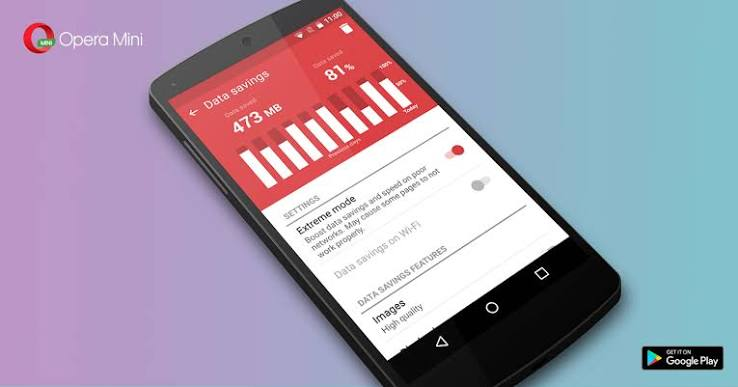
Opera Mini’s core feature is data saving — it can reduce data usage by 50–90% by compressing web pages on its servers before sending them to your device. This is distinct from but related to the VPN feature:
Without VPN: Your traffic goes through Opera’s compression servers. Opera can see your browsing. Your ISP sees traffic going to Opera’s servers.
With VPN enabled: Your traffic goes through Opera’s compression servers via an encrypted channel. Your ISP still sees traffic going to Opera’s servers, but the channel is encrypted. Opera still processes your browsing for compression.
Data saving impact: The VPN feature in Opera Mini does not eliminate data saving — the compression still happens, you still save data, and the VPN layer adds privacy on top.
Opera Mini Performance on Indian Networks
Opera Mini was designed with markets like India in mind — where 4G/5G coverage is improving but slow connections, high latency, and data limits remain relevant, especially in Tier 2 and Tier 3 cities.
On Jio: Opera Mini’s data compression works well on Jio’s network. Heavy pages (news sites, e-commerce) load significantly faster and use less data.
On Airtel: Similar performance improvements for data-heavy pages.
On 2G/slow 3G connections: Opera Mini’s server-side rendering is particularly valuable — pages load when a full browser would time out.
On budget Android phones (2-4GB RAM): Opera Mini is significantly lighter than Chrome, Firefox, or Opera Browser. Suitable for phones where other browsers struggle.
Privacy Considerations for Opera Mini in India
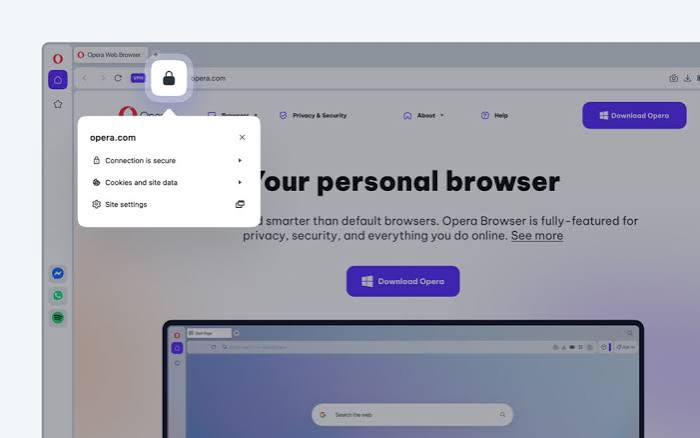
Opera’s Ownership
Opera (including Opera Mini) is owned by a Chinese consortium (Kunlun Tech and others). This has raised privacy concerns among security researchers:
- Chinese companies are subject to Chinese laws requiring cooperation with government data requests
- Opera’s server-side processing means Opera can see your browsing activity
- Opera’s privacy policy allows some data collection
Practical implications for Indian users:
- For casual browsing where privacy from your ISP is the main concern, Opera Mini’s VPN is functional
- For sensitive activities (banking research, confidential work, journalism), a more privacy-credible VPN is advisable
- For complete anonymity, dedicated audited VPN apps (Proton VPN) offer stronger guarantees
What Opera Mini Collects
Opera Mini’s server-side processing means pages pass through Opera’s infrastructure. Review Opera’s current privacy policy at opera.com/privacy for the latest data collection details before use.
When Opera Mini VPN Is Good Enough
Opera Mini with VPN enabled is appropriate for:
Daily casual browsing on a budget phone — News, entertainment, social media browsing where basic ISP privacy is sufficient.
Data saving on limited Jio/Airtel plans — The compression benefit often outweighs VPN privacy concerns for cost-conscious users.
Accessing ISP-blocked websites in the browser — Opera Mini’s proxy often bypasses basic ISP-level website blocks.
Slow connection situations — Server-side rendering makes Opera Mini usable on connections where other browsers fail.
When You Need More Than Opera Mini’s VPN
Opera Mini’s browser-level proxy is insufficient for:
Public Wi-Fi at cafes, airports, and railway stations — Only Opera Mini browser traffic is protected. WhatsApp, banking apps, email — all unprotected on the same network. Use Proton VPN Free for complete device protection.
Sensitive transactions and financial activities — For banking app research, stock trading, or financial planning, a system-wide VPN provides proper protection.
Complete IP masking across all apps — If you need all Android apps to use a different IP address, Opera Mini’s VPN does not help.
Privacy from Opera itself — Opera’s servers process your Opera Mini browsing. If you need to keep browsing private from the proxy provider itself, use a VPN with an audited no-logs policy.
Best Free System-Wide VPN for Android (When Opera Mini Is Not Enough)
Proton VPN Free:
- Unlimited data, system-wide protection
- All Android apps protected (WhatsApp, banking, everything)
- Swiss jurisdiction, audited no-logs policy
- Play Store: search “Proton VPN”
Using both Opera Mini and Proton VPN together:
- Enable Proton VPN Free system-wide on your Android phone
- Open Opera Mini with VPN also enabled
- All apps protected by Proton VPN; Opera Mini browsing additionally compressed and proxied
This combination gives you data savings (Opera Mini compression) plus complete device protection (Proton VPN) — both free.
Setting Up Opera Mini for Maximum Privacy on Android
Step 1: Install Opera Mini Play Store → search “Opera Mini” → Install (published by Opera)
Step 2: Enable VPN Open Opera Mini → Menu → Settings → VPN → toggle On
Step 3: Enable Ad Blocker Settings → Ad Blocking → toggle On. Reduces data consumption further and blocks tracking pixels
Step 4: Configure Privacy Settings Settings → Privacy → enable:
- Block third-party cookies
- Clear cookies on exit
- Do Not Track
Step 5: Set as Default Browser (Optional) Android Settings → Apps → Default Apps → Browser → select Opera Mini
Step 6: Add Proton VPN for System-Wide Protection Play Store → Proton VPN → Install → Create free account → Enable system-wide
FAQs
Q: Does Opera Mini VPN protect my WhatsApp?
No. Opera Mini’s VPN only protects traffic within the Opera Mini browser. WhatsApp, Instagram, and all other Android apps use your regular connection unprotected.
Q: Is Opera Mini VPN free?
Yes. Opera Mini is free, and the VPN feature within it is included at no cost with no data limits.
Q: Does Opera Mini VPN save data?
Yes — Opera Mini’s data compression continues to work with VPN enabled. The proxy and compression work together, so you benefit from both privacy (from ISP) and data saving simultaneously.
Q: Which is better — Opera Mini or Opera Browser for privacy?
Both provide browser-level proxy protection. Opera Browser gives more server location control (Europe/Americas/Asia). Opera Mini provides data compression — useful for Indian users on limited data plans or slow connections. Neither protects your whole Android device.
Q: Can Opera Mini VPN bypass Jio’s website blocks?
Often yes, for ISP-level blocks on specific websites accessed within the Opera Mini browser. It does not bypass all blocks and is not reliable for streaming platforms or apps.
Q: Is Opera Mini safe to use in India?
Opera Mini is widely used in India and is functional for everyday browsing. The main consideration is that Chinese-owned Opera processes your browsing on its servers. For sensitive activities, use a privacy-audited VPN (Proton VPN) instead of or alongside Opera Mini.
Q: Does Opera Mini work on budget Android phones?
Yes — Opera Mini is designed for low-spec devices. It runs well on phones with 1–2GB RAM and Android 5.0+, where Chrome and other browsers may be slow or laggy.
Q: What is the difference between Opera Mini’s VPN and Proton VPN?
Opera Mini VPN: browser proxy, no account needed, data compression included, browser-only protection, Chinese-owned infrastructure. Proton VPN: true system-wide VPN, all apps protected, Swiss jurisdiction, audited no-logs, unlimited free data, requires a free account. Both are free — Proton VPN provides significantly stronger privacy guarantees.
Conclsion
Opera Mini’s VPN feature is a useful bonus for Indian Android users who already use the browser for its data-saving capabilities. It adds a layer of ISP privacy for your Opera Mini browsing, often bypasses basic website blocks, and requires zero setup or account creation.
Its limitations are real: browser-only protection, Chinese-owned infrastructure, no audited privacy policy, and no system-wide coverage. For everyday casual browsing on a budget Android phone with a limited Jio or Airtel data plan, these limitations are acceptable trade-offs.
For complete Android privacy — protecting WhatsApp, banking apps, and all other apps on public Wi-Fi — download Proton VPN Free from the Play Store alongside Opera Mini. Both are free, and together they cover what neither does alone.
Opera Mini handles the data saving. Proton VPN handles the security. Use both.

