
Free VPN for your Windows PC in 2026: Opera VPN is one of the easiest options to get started with. Unlike traditional VPN services that require a separate app, Opera VPN is built directly into the Opera browser. You can enable it in just a few clicks and browse the web with an extra layer of privacy without creating an account or paying a subscription.

While Opera VPN is convenient for casual browsing, it’s important to understand its limitations. It only protects traffic inside the Opera browser, meaning apps such as Steam, Zoom, Outlook, or other browsers won’t be covered. For users who mainly want to access websites more privately or reduce online tracking, Opera VPN offers a simple and completely free solution. In this guide, we’ll explore Opera VPN’s features, advantages, drawbacks, and whether it’s the right free VPN for your PC in 2026.
If you’ve been searching for a free VPN for your PC and keep seeing Opera mentioned, you’re not alone. Opera browser has a built-in VPN that costs nothing, requires no sign-up, and works right out of the box.
Well — it depends on what you’re trying to do. Opera’s free VPN is genuinely useful for some things and not great for others. This guide covers everything you need to know about using Opera VPN on PC in 2026: how to set it up, what it actually does, where it falls short, and whether it’s worth your time.
What Is Opera VPN?
Opera VPN is a built-in feature inside the Opera browser. It’s not a separate app you download — it’s already inside the browser, waiting to be switched on.

When you turn it on, your internet traffic inside the Opera browser gets routed through Opera’s servers. To any website you visit, it looks like you’re coming from a different location — not your real one.
This is useful for a few things:
- Bypassing region-locked content
- Adding a layer of privacy on public Wi-Fi
- Accessing websites blocked in your country or network
It’s completely free. No payment, no email signup, no subscription. You just open the browser, flip a switch, and you’re connected.
Is Opera VPN a Real VPN?
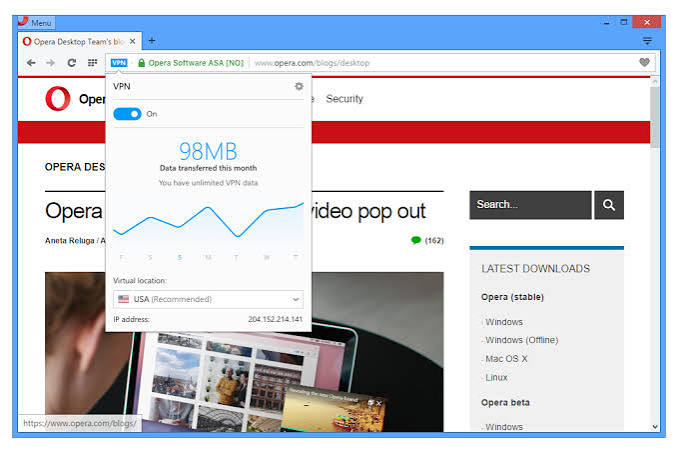
Here’s where things get a little technical — but it’s worth understanding.
A traditional VPN (like NordVPN or ExpressVPN) encrypts all of your internet traffic at the system level. Every app on your computer — Chrome, WhatsApp, Spotify, your torrent client — routes through the VPN tunnel.
Opera VPN doesn’t work like that.
It only protects traffic inside the Opera browser. If you open Chrome, Edge, or any other app while Opera VPN is on, those apps are NOT covered. Your real IP address is still visible to those services.
Opera also calls its VPN a “browser proxy” in its own documentation — which is technically more accurate. It uses HTTPS proxy technology, not the same tunneling protocol that full VPNs use.
So is it a real VPN? Partially. It protects your browsing inside Opera. Nothing outside it.
How to Enable Opera VPN on PC in 2026
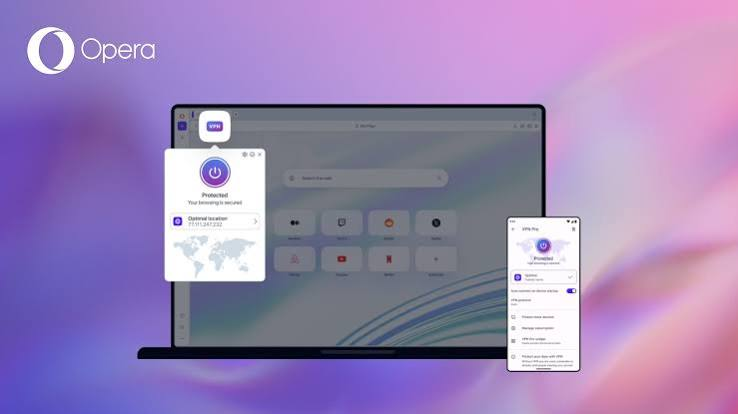
Setting it up takes less than a minute. Here’s exactly how:
Step 1: Download and install the Opera browser from opera.com if you don’t have it already.
Step 2: Open Opera and click the Settings icon (the gear symbol) in the left sidebar, or press Alt + P.
Step 3: In the Settings menu, go to Basic → scroll down to find VPN.
Step 4: Toggle on “Enable VPN”.
Step 5: Once enabled, you’ll see a blue VPN badge appear in the address bar on the left side.
Step 6: Click that VPN badge. A small panel opens where you can:
- Turn VPN on or off
- Choose your virtual location (Americas, Europe, or Asia)
That’s it. No account needed. No password. Just toggle and go.
What Locations Does Opera VPN Offer?
Opera VPN gives you three broad regional options:
- Americas (routes through servers in the US region)
- Europe (routes through servers in European locations)
- Asia (routes through servers in Asian locations)
You can’t pick a specific country or city. If you need a German IP address specifically, or want to appear as if you’re in Japan versus Singapore, Opera VPN won’t give you that level of control.
For most casual use cases — unblocking a geo-restricted YouTube video, hiding your location from a website, or browsing privately on public Wi-Fi — the three region options are enough.
What Can You Use Opera VPN For?
Accessing Region-Restricted Content
Some websites and streaming platforms show different content depending on where you are. With Opera VPN, you can switch your apparent location to access content that’s blocked in your country.
Practical example: A student in India wants to watch a documentary series that’s only available on a US streaming platform’s free tier. They switch Opera VPN to “Americas,” open the platform in Opera, and the content is available.
Browsing on Public Wi-Fi
Public networks — at cafes, airports, hotels — are not secure. Anyone on the same network can potentially snoop on unencrypted traffic. Opera VPN adds a layer of protection when you’re browsing in these situations.
Practical example: You’re at an airport and need to check your email or log into a work portal. Turning on Opera VPN means your browsing session inside Opera is encrypted and less exposed.
Bypassing Network Restrictions
Some schools, offices, or countries block certain websites at the network level. Opera VPN can help bypass these blocks since your traffic appears to come from a different location.
Practical example: A user on a college campus finds that certain social media or gaming sites are blocked by the campus network. Switching on Opera VPN gets them through.
Basic Privacy from Websites
When Opera VPN is active, websites you visit see the VPN server’s IP address, not yours. This prevents basic IP-based tracking and location detection.
What Opera VPN Cannot Do
Being honest about the limits here matters more than just listing features.
It doesn’t protect other apps. As mentioned earlier, Opera VPN only covers the Opera browser. Your other apps — streaming apps, game clients, messengers — are completely unaffected.
It doesn’t make you anonymous. Opera knows who you are if you’re signed into an Opera account, and their privacy policy allows them to collect some usage data. It hides your IP from websites, but it doesn’t make you invisible online.
It doesn’t work well for high-demand streaming. Netflix, Disney+, and other premium platforms actively block VPN traffic. Opera VPN’s servers are well-known, so these platforms often detect and block them. Don’t count on it for reliable streaming of premium content.
It won’t protect you on torrents. Since torrent clients operate outside the browser, Opera VPN offers zero protection for P2P file sharing.
Speed can be inconsistent. Free services don’t prioritize bandwidth the way paid VPNs do. During peak hours, speeds through Opera VPN can drop noticeably.
Key Features
- Completely free with no subscription required
- Unlimited browsing data inside the Opera browser
- No account or login needed
- Built directly into the Opera browser
- Encrypts browser traffic over public Wi-Fi
- Helps hide your IP address while browsing
- Simple one-click VPN activation
- Available for Windows, macOS, Linux, Android, and iOS (through Opera browsers where supported)
Opera VPN: Pros and Cons
Pros
- Completely free — no credit card, no signup, no hidden cost
- Built into the browser — nothing extra to download or install
- Easy to use — one toggle to turn on
- No data limits — unlike many free VPN apps, Opera doesn’t cap how much you can use.
- Decent for basic privacy — hides your IP from websites within the browser
- Works on Windows, Mac, and Linux — any PC that can run Opera
- No ads inside the VPN feature — no upsells or pop-ups to deal with
Cons
- Browser-only protection — doesn’t cover any other apps or system traffic
- Only three location options — no country-specific targeting
- Not reliable for streaming — major platforms often block it
- Owned by a Chinese consortium — Opera was acquired by a Chinese company in 2016, which raises data privacy questions for some users
- Not independently audited — unlike paid VPNs that publish third-party security audits, Opera VPN has no publicly available audit
- Proxy technology, not true VPN — less secure than a full encrypted VPN tunnel
- Slower speeds on congested servers — free infrastructure, so bandwidth isn’t guaranteed
Best For
Opera VPN is best suited for users who want a simple, no-cost way to browse more privately on a Windows PC. It’s ideal for students, casual internet users, travelers using public Wi-Fi, and anyone who wants basic browser protection without installing a full VPN application.
Pricing
- Free Plan: Included with the Opera browser at no additional cost.
- Premium Version: Opera VPN itself is free, though Opera also offers separate paid security products in some regions with additional features.
Why Choose Opera VPN in 2026?
Opera VPN remains an excellent choice for users who value simplicity and convenience. Because it’s built directly into the browser, setup takes only a few minutes, and there are no subscriptions or data limits for browser usage. Although it isn’t a replacement for a full-device VPN, it provides a practical level of privacy for everyday browsing and is one of the best free browser VPN options available in 202
Is Opera VPN Safe to Use?
For casual browsing, yes — Opera VPN is safe enough. It adds more protection than browsing with no VPN at all, especially on public networks.
But there are a few things to keep in mind:
Ownership: Opera was bought by a Chinese tech consortium (Kunlun Tech and others) back in 2016. The browser is still used by hundreds of millions of people, but some users — particularly those concerned about government data requests — prefer to avoid services with Chinese ownership when it comes to privacy tools.
Data policy: Opera’s privacy policy states that it does collect some usage data. It’s not the same as a zero-log VPN. If you’re doing something that requires strict no-logging, Opera VPN isn’t the tool for that.
No independent audit: Reputable paid VPNs like Mullvad or ProtonVPN publish independent security audits proving their no-log policies. Opera hasn’t done this for their VPN feature.
Bottom line: For hiding your IP from a website, staying safer on public Wi-Fi, or unblocking a non-sensitive piece of content — Opera VPN is fine. For serious privacy needs, journalism, or anything where anonymity actually matters — use a dedicated VPN with a verified no-log policy.
Opera VPN vs Paid VPNs: Quick Comparison
| Feature | Opera VPN (Free) | Paid VPN (e.g. NordVPN) |
|---|---|---|
| Cost | Free | ₹200–500/month |
| App coverage | Browser only | All apps + system |
| Location options | 3 regions | 60+ countries |
| Speed | Variable | Consistently fast |
| Streaming support | Unreliable | Strong |
| No-log audit | No | Yes (most providers) |
| Torrent support | No | Yes |
| Setup | Instant | 5–10 minutes |
If you just need something quick and free for light browsing, Opera wins on convenience. If you need full protection across your PC, a paid VPN is the better investment.
Best Alternatives to Opera VPN for PC (Free Options)
If Opera VPN doesn’t quite fit your needs, here are other free options worth looking at:
ProtonVPN Free: ProtonVPN’s free plan is one of the best in the market. It has no data limit, covers your entire system (not just a browser), and has a verified no-log policy with independent audits. The downside: only three server locations and slower speeds on the free tier.
Windscribe Free: Windscribe gives you 10GB of free data per month and a decent selection of server locations. It works at the system level, so all your apps are covered. A solid option if you don’t need heavy daily usage.
Hotspot Shield Free: The free version of Hotspot Shield gives you access to a US server with a daily data limit. It’s fast and easy to use, though the free plan is quite limited.
Tor Browser:r Not a VPN, but if anonymity is the main goal, Tor routes your traffic through multiple relays, making it much harder to trace. It’s slow but strong on privacy. Good for sensitive browsing, not for streaming or everyday use.
Who Should Use Opera VPN?
Good fit for:
- Students who want to unblock websites on a restricted school or college network
- Occasional travellers who need quick privacy on hotel or airport Wi-Fi
- Casual users who want to check region-locked content without paying for anything
- People who already use Opera as their main browser
Not a good fit for:
- Anyone who needs full-device VPN protection
- People trying to reliably unblock Netflix, Disney+, or similar platforms
- Users who download torrents and need P2P privacy
- Anyone with serious privacy or security requirements
FAQs
Does Opera VPN work on Windows 11?
Yes. Opera browser runs on Windows 11, Windows 10, and older versions. The built-in VPN works the same regardless of which Windows version you’re on.
Does Opera VPN slow down my internet?
It can, slightly. Routing your traffic through an extra server adds some latency. On a fast connection, you may not notice much. On slower connections, the difference is more noticeable — especially during peak hours when the servers are busy.
Can I use Opera VPN on my phone too?
Yes. Opera also has a mobile browser for Android and iOS with the same built-in VPN feature. It works the same way — free, no signup, toggle to enable.
Does Opera VPN work in India?
Yes, Opera VPN is accessible in India. There are no restrictions on using it. However, like all VPNs, Indian users should be aware that the government has been tightening regulations around VPN providers. Since Opera VPN routes through offshore servers and is browser-based, it currently falls outside the strictest compliance requirements aimed at full-system VPN apps.
Can I use Opera VPN to unblock YouTube?
Yes, for region-restricted YouTube videos, Opera VPN works reasonably well. Switch to the region where the content is available and reload the video.
Will Opera VPN unblock Netflix?
Usually not reliably. Netflix blocks most free VPN servers, and Opera’s servers are widely known. You may get lucky occasionally, but don’t rely on it for consistent Netflix access.
Is there a data limit on Opera VPN?
No. Opera doesn’t cap your data on their VPN feature. You can browse as much as you want. The limitation is speed and location choice, not data volume.
Do I need to create an account to use Opera VPN?
No. Opera VPN works without any account or registration. Just enable it in the settings and use it.
Is Opera VPN legal to use in India?
Yes, using a VPN in India is legal. The government has pushed for VPN providers to log user data, but using a VPN itself is not illegal for regular browsing purposes.
What happens to my data when I use Opera VPN?
Your traffic within Opera is routed through Opera’s servers, masking your IP. Opera does collect some usage data according to their privacy policy. They are not a zero-log provider, so keep that in mind if privacy is a top concern.
Conclsion
Opera VPN is one of the most convenient free tools you’ll find for basic browsing privacy. There’s nothing to install, nothing to pay for, and no account to create. For someone who just wants to hide their IP while checking a website, bypass a simple regional block, or stay safer on a public network — it works fine.
The limitations are real, though. It’s browser-only, it has only three location options, it doesn’t hold up to serious privacy scrutiny, and it’s not reliable for streaming premium content.
Think of it as a quick privacy layer for light use — not a replacement for a full VPN. If you find yourself needing more than what Opera gives you, ProtonVPN’s free plan or an affordable paid VPN will serve you much better.
For now, if you haven’t tried it, it takes thirty seconds to turn on. That alone makes it worth knowing about.

