The best AI image generator is the one you can use right now — without creating an account, without entering a credit card, and without waiting for email verification. In 2026, several genuinely capable AI image generators allow you to create images immediately with zero registration.
The no-sign-up requirement matters for specific reasons: privacy (no personal data stored), speed (immediate access), and simplicity (no forgotten passwords). Whether you need a quick image for a presentation, a social media post, or just want to experiment with AI art, this guide covers every legitimate free AI image generator that requires no account in 2026.
Creating images with AI no longer has to mean creating an account, verifying an email address, or entering payment details. In 2026, several AI image generators let you type a prompt and start creating images directly from your browser.
This is especially useful if you only need a quick image for a blog post, social media, presentation, thumbnail, school project, or creative experiment. However, there is an important difference between genuinely free tools and those that simply offer a limited free trial.
Free AI Image Generators. For this list, the main things to consider are whether sign-up is required, image quality, free usage limits, watermarks, generation speed, and how easy the tool is for beginners. Current comparisons show that Perchance is particularly strong for unlimited no-account generation, while Raphael AI is a stronger option when image quality and photorealism matter more.
Best No Sign Up Free AI Image Generators in 2026
1. Microsoft Bing Image Creator — Best Overall No Sign Up AI Image Generator
Bing Image Creator (powered by DALL-E 3) is the highest quality free AI image generator available without mandatory sign-up — and it delivers genuinely impressive results.
No sign-up details:
- ✅ Works without a Microsoft account for limited generations
- Microsoft account provides more daily credits (free)
- Guest mode available — limited generations without login
Quality: DALL-E 3 — best prompt understanding of any free image generator
Generation speed: 10–20 seconds per image
Images per day (no account): Limited — approximately 5–10 images
Images per day (free account): 100 daily boosts, then slower unlimited
How to use without sign-up:
- Visit bing.com/create
- Type image description in prompt box
- Click Create — generates 4 image variants
- Download desired image
- No account required for initial generations
Prompt examples that work well:
- “Professional Indian businesswoman presenting in modern office, photorealistic, warm lighting”
- “Futuristic city skyline at night, neon lights, rain reflection, cinematic”
- “Cute cartoon dog sitting in garden, watercolor style, pastel colors”
Best for: Highest quality free AI images without an account — DALL-E 3’s prompt understanding is unmatched among free no-registration tools.
2. Adobe Firefly (Limited Free) — Best for Commercial Safe Images
Adobe Firefly allows limited image generation without a full Adobe account — its commercially safe training data makes it unique.
No sign-up details:
- Free account (email only) provides 25 monthly credits
- Limited guest preview available without full account
- No credit card required for free tier
Why it stands out:
Adobe Firefly is trained exclusively on licensed content — generated images are commercially safe to use without copyright concerns. Every other free AI image generator has potential copyright risk for commercial use.
How to use:
- Visit firefly.adobe.com
- Try limited free generation without full sign-up
- Create a free Adobe account for 25 monthly credits
Best for: Users who need commercially safe images for business use — Firefly’s licensed training data is unique among free tools.
3. Craiyon (formerly DALL-E Mini) — Best Unlimited No Sign Up
Craiyon is one of the most permissive free AI image generators — unlimited generations, no sign-up required, completely free.
No sign-up details:
- ✅ Zero registration required
- ✅ Unlimited generations (with wait times)
- Completely free forever
Quality: Lower than DALL-E 3 or Midjourney — adequate for casual use
Generation speed: 30–60 seconds (free tier) — slower than premium tools
Images per generation: 9 image variants simultaneously
How to use:
- Visit craiyon.com
- Type prompt → click Draw
- Wait 30–60 seconds
- Download any of the 9 generated images
- No account, no limit
Limitation: Image quality is significantly lower than Bing Image Creator — watermark on free-tier images.
Best for: Unlimited casual image generation without any registration — Craiyon’s unlimited free use makes it the go-to for high-volume casual generation.
4. Ideogram — Best for Text in AI Images
Ideogram solves one of AI image generation’s biggest problems — generating readable text within images. It allows free generation without an account.
No sign-up details:
- Free tier accessible without an account for limited generations
- Free account (email) provides more daily generations
- No credit card required
Unique capability:
Ideogram generates accurate, readable text within images — logos, posters, signage, and text-heavy designs. All other free AI image generators struggle with text accuracy.
Generation quality: High — comparable to Midjourney for photorealistic content
How to use:
- Visit ideogram.ai
- Type a prompt including any text you want in the image
- Select style (photorealistic, illustration, etc.)
- Generate — 4 image variants.
Example prompts for text images:
- “Minimalist logo for ‘ResearchVPN’ with shield icon, blue and white, clean design”
- “Restaurant menu header with text ‘Spice Villa’, Indian decorative border, elegant typography”
- “Social media post with text ‘New Launch’, bold modern font, gradient background”
Best for: Anyone needing AI images with accurate text — Ideogram is the only free tool that handles this reliably without a sign-up requirement.
5. Stable Diffusion (via Multiple Free Platforms) — Most Customizable
Stable Diffusion is open-source — multiple platforms host it for free with no sign-up:
Mage.space (No sign-up):
- ✅ Generate without an account
- Multiple Stable Diffusion models
- NSFW filter toggleable
- 4 free images, then slow queue
- Visit mage.space → type prompt → generate
Dezgo (No sign up):
- ✅ Zero registration
- Multiple SD models
- Good quality output
- Visit dezgo.com → prompt → generate
Clipdrop (by Stability AI):
- Limited free use without an account
- Multiple image tools beyond generation
- Visit clipdrop.co
Why Stable Diffusion platforms stand out:
More artistic control than DALL-E-based tools — style, model selection, negative prompts, and generation parameters accessible even without an account.
Best for: Users who want creative control over AI image style — Stable Diffusion’s customizability exceeds DALL-E for artistic applications.
6. Canva AI Image Generator (Free) — Best for Design Integration
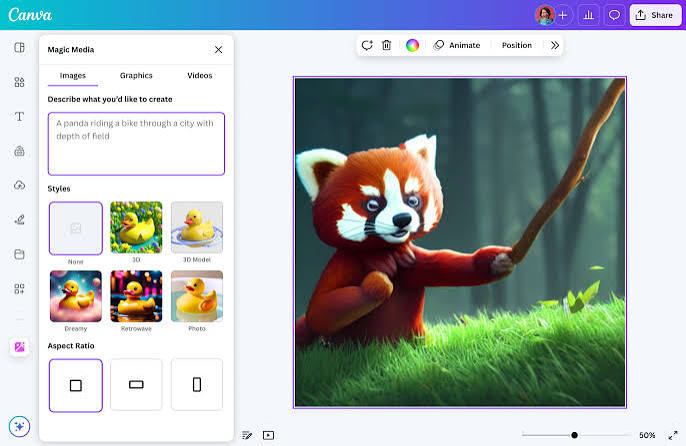
Canva’s AI image generator integrates directly into Canva’s design environment — generate images and immediately use them in presentations, social posts, and documents.
No sign-up details:
- Canva free account required (email only — no credit card)
- Generous free generation allowance
- Images immediately usable in Canva designs
How to use:
- Visit canva.com → sign up for free (email only)
- Create new design
- Click Apps → AI Image Generator
- Describe image → generate
- Image inserts directly into design
Integration advantage:
Generated image appears directly in your Canva design — no download/upload required. For users creating social media posts, presentations, or marketing materials, this workflow is significantly faster than external image generators.
Best for: Users who will use generated images in Canva designs — workflow integration saves significant time vs external generators.
7. Leonardo AI (Free Tier) — Best Quality Free AI Images
Leonardo AI offers the highest quality free tier among AI image platforms — generous free daily credits with no credit card required.
No sign-up details:
- Free account (email only) — no credit card
- 150 tokens daily (approximately 30 images)
- No watermark on free generations
Quality: Exceptional — comparable to paid Midjourney tiers
Features on free tier:
- Multiple AI models (Leonardo Diffusion, Alchemy, Phoenix)
- Upscaling — enhance the resolution of generated images
- Image-to-image generation
- Inpainting — edit specific parts of an image
How to use:
- Visit leonardo.ai
- Create a free account (email, no credit card)
- Select a model → type a detailed prompt
- Generate → download without watermark
Best for: Users who want the highest-quality free AI images — Leonardo’s free tier quality exceeds most paid tools from just two years ago.
8. Playground AI — Best for Unlimited Photorealistic Images
Playground AI provides genuinely unlimited free image generation with account creation — the most generous free tier for high-quality images.
No sign-up details:
- Free account required (Google login or email)
- 500 images per day FREE — the most generous free tier
- No credit card required
Quality: High-quality photorealistic output
Daily limit: 500 images — practically unlimited for most users
Models available for free:
- Playground v2.5
- Stable Diffusion XL
- DALL-E 2 (limited)
How to use:
- Visit playground.com
- Sign in with Google (fastest — no new account)
- Type prompt → select model → generate
- Download without watermark
Best for: High-volume image generation — 500 images daily covers virtually any professional or personal use case.
9. Freepik AI Image Generator — Best for Stock Photo Style
Freepik’s AI image generator produces stock-photo quality images — professional, clean, and immediately usable for business applications.
No sign-up details:
- Free account (email) — no credit card
- Limited free daily generations
- No watermark on free images
Quality: Professional stock photo aesthetic — clean, polished output
Style strengths:
- Business photography
- Product mockups
- Professional portraits
- Marketing imagery
How to use:
- Visit freepik.com/pikaso
- Create a free account
- Describe the desired image in a professional context
- Generate → download
Best for: Business users needing professional stock-photo style images — Freepik’s aesthetic suits corporate and marketing applications better than artistic alternatives.
Completely Free, Unlimited, and Sign-Up — Honest Comparison
| Tool | Sign Up | Daily Limit | Quality | Watermark |
|---|---|---|---|---|
| Craiyon | ❌ None | ✅ Unlimited | ⚠️ Basic | ✅ Yes (free) |
| Bing Image Creator | ⚠️ Optional | ⚠️ Limited | ✅ Excellent | ❌ None |
| Mage.space | ❌ None | ⚠️ Limited free | ✅ Good | ❌ None |
| Dezgo | ❌ None | ⚠️ Limited | ✅ Good | ❌ None |
| Leonardo AI | ✅ Email only | 150 tokens (~30 imgs) | ✅ Excellent | ❌ None |
| Playground AI | ✅ Google login | 500 images | ✅ Good | ❌ None |
| Ideogram | ⚠️ Optional | ⚠️ Limited | ✅ Very Good | ❌ None |
| Canva AI | ✅ Email only | ⚠️ Limited | ✅ Good | ❌ None |
Writing Effective Prompts for Free AI Image Generators
The difference between mediocre and impressive AI images is almost entirely in prompt quality — not which tool you use.
Prompt Structure Formula
[Subject] + [Style] + [Lighting] + [Composition] + [Technical details]
Basic prompt: “Dog in garden”
Improved prompt: “Golden retriever sitting in sunlit English garden, photorealistic, soft golden hour lighting, shallow depth of field, professional photography, Canon 5D”
Subject Descriptions
Be specific:
- ❌ “Woman” → ✅ “Indian woman in her 30s, wearing traditional saree, confident expression”
- ❌ “City” → ✅ “Mumbai skyline at dusk, Bandra-Worli Sea Link visible, orange sky”
- ❌ “Logo” → ✅ “Minimalist shield logo, navy blue and white, geometric design, vector style”
Style Modifiers That Work
Photography: photorealistic, DSLR photo, professional photography, shot on Sony A7R, 35mm film
Illustration: digital art, vector illustration, flat design, cartoon, anime, watercolor, oil painting
3D: 3D render, octane render, blender, cinema 4D, unreal engine
Artistic: impressionist, art nouveau, Bauhaus, minimalist, surrealist
Lighting Descriptors
- Golden hour — warm, dramatic outdoor light
- Studio lighting — clean, professional, shadows controlled
- Cinematic lighting — dramatic, high contrast
- Soft diffused light — gentle, flattering
- Neon lighting — vibrant, nighttime, urban
Negative Prompts (Stable Diffusion Tools)
Tell AI what NOT to include — dramatically improves quality:
- “blurry, low quality, distorted, ugly, watermark, text, extra fingers, deformed”
Best Use Cases — Which Tool for What
Social Media Images
Best tool: Bing Image Creator (highest quality) or Playground AI (500/day)
Prompt tip: Include platform — “Instagram post style, square format, vibrant colors”
Blog Post Illustrations
Best tool: Leonardo AI (quality) or Freepik (professional style)
Prompt tip: “Wide format banner image, 1920×1080 ratio, relevant to [topic]….”
Logo and Brand Design
Best tool: Ideogram (handles text) or Adobe Firefly (commercially safe)
Prompt tip: “Minimalist logo, [brand name] text, [colors], vector style, white background”
Product Mockups
Best tool: Freepik AI or Canva AI
Prompt tip: “Product mockup, [product] on white background, studio lighting, e-commerce style”
Presentation Slides
Best tool: Canva AI (integrates directly into presentation)
Prompt tip: “Clean infographic style, [topic] concept, blue and white, minimal, professional”
Creative Art
Best tool: Stable Diffusion via Mag e.space or Dezgo
Prompt tip: Detailed artistic style — “oil painting style, impressionist brushstrokes, [subject], [artist] inspired”
Profile Pictures / Avatars
Best tool: Leonardo AI (highest quality portraits)
Prompt tip: “Professional headshot, [description], neutral background, studio lighting, 8K quality”
Privacy Considerations for No-Sign-Up Tools
When using AI image generators without an account:
Data collection without sign-up:
- Most free tools log IP addresses and prompts regardless of sign-up
- Generated images may be used for training data — check terms
- Incognito/private browsing provides minimal additional privacy
Most privacy-friendly options:
- Stable Diffusion self-hosted (completely private — run locally)
- Mage.space or Dezgo (no account, minimal data collection)
- Avoid tools that require phone number verification
Commercial use rights:
- Bing Image Creator: Microsoft’s terms allow personal use; check commercial terms
- Adobe Firefly: Commercially safe — specifically designed for commercial use
- Craiyon: Check current terms for commercial use rights
- Leonardo AI: Free tier images are commercially usable under their terms
Stable Diffusion — Truly Unlimited No Sign Up (Self-Hosted)
For truly unlimited, completely free, no-account AI image generation — run Stable Diffusion locally on your computer:
Requirements:
- Windows/Mac/Linux PC
- NVIDIA GPU with 4GB+ VRAM (optimal) — CPU generation is possible but slow
- 10GB storage
Easiest setup — Automatic1111:
- Install Python 3.10
- Download Automatic1111 WebUI from GitHub
- Run launch script
- Browser interface opens at localhost
- Generate unlimited images — completely offline, completely free, no account, no usage limits.
Monthly cost: ₹0 after initial setup
Best for: Power users and developers who want truly unlimited, private AI image generation without any external service dependency.
Frequently Asked Questions
Which AI image generator is completely free with no sign-up?
Craiyon (craiyon.com) offers unlimited free generation with zero registration — no email, no account. Mage.space and Dezgo also allow Stable Diffusion generation without an account. Bing Image Creator works without sign-in for limited generations. For the highest quality without a mandatory account, start with Bing Image Creator.
Which free AI image generator has no watermark?
Bing Image Creator, Leonardo AI free tier, Playground AI, and Mage. space all generate images without watermarks on free plans. Craiyon’s free tier adds a watermark — remove it with a paid plan or use alternative tools.
Which free AI image generator produces best quality?
Bing Image Creator (DALL-E 3) and Leonardo AI produce the highest quality free images — both significantly better than alternatives. Bing Image Creator requires minimal or no sign-up; Leonardo AI requires email registration but no credit card.
Can I use free AI-generated images commercially?
Depends on the tool. Adobe Firefly images are specifically commercially safe. Bing Image Creator and Leonardo AI have terms allowing personal use — verify commercial terms before business use. Self-hosted Stable Diffusion gives you full control over image use rights.
Which free AI image generator works best in India?
All tools listed work from India without a VPN. Bing Image Creator, Craiyon, Ideogram, and Leonardo AI all have Indian user bases and function without geographical restrictions. Canva AI with INR pricing is particularly accessible for Indian users.
How many free images can I generate per day?
Playground AI: 500/day (most generous). Craiyon: Unlimited (slower). Leonardo AI: ~30 images daily. Bing Image Creator: 100 fast generations, then unlimited slow. Mage.space and Dezgo: Limited without an account, more with a free account.
Conclusion
The best free AI image generator without sign-up in 2026 depends on your priority:
Best quality, minimal sign-up: Bing Image Creator — DALL-E 3 quality, works with an optional Microsoft account, no credit card ever.
Truly unlimited, zero registration: Craiyon — unlimited generations, no account, lower quality but genuinely unrestricted.
Best quality with a free account (no credit card): Leonardo AI — 30 images daily, exceptional quality, no watermark.
Most generous free tier: Playground AI — 500 images daily with Google sign-in.
Best for text in images: Ideogram — the only free tool that generates readable text accurately.
Best for commercial use: Adobe Firefly — commercially safe training data.
Truly unlimited private generation: Stable Diffusion self-hosted — zero cost, zero limits, zero data sharing after setup.
Start with Bing Image Creator for immediate high-quality generation. Add Craiyon when you need unlimited volume. Use Ideogram when text in images is required. Install Stable Diffusion locally when you want complete freedom and privacy.