
Creating great videos and photos no longer requires expensive software or years of editing experience. In 2026, AI-powered editing tools are making it much easier to turn raw photos and video clips into polished, professional-looking content with just a few clicks.
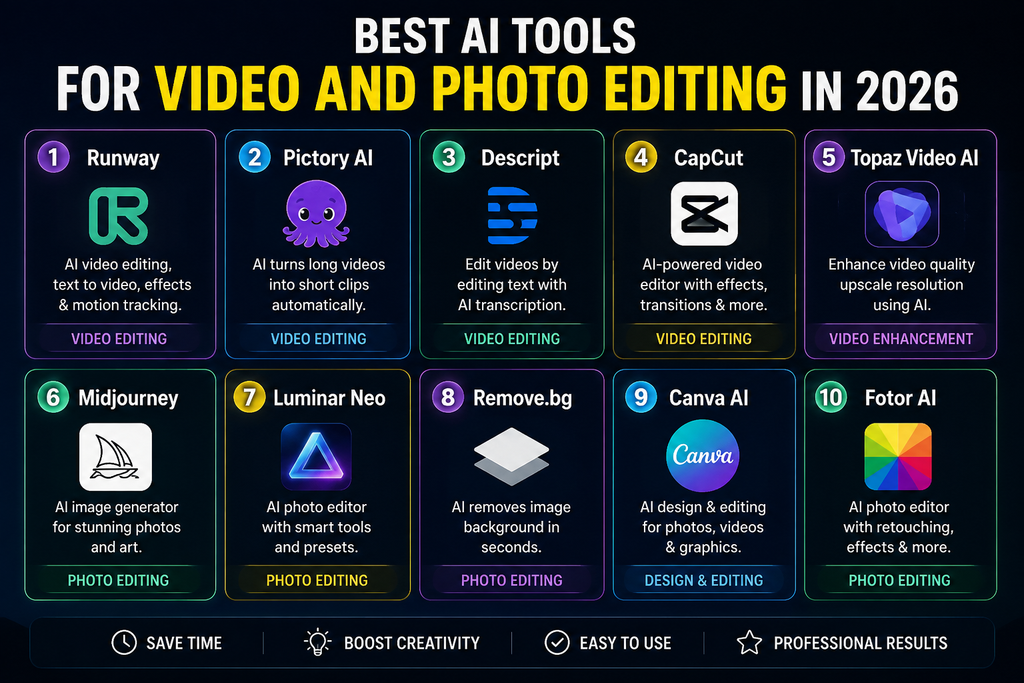
Whether you’re a YouTuber, social media creator, student, marketer, or simply someone who enjoys editing, the right tool can save hours of work. From automatically removing backgrounds and improving image quality to generating captions, trimming videos, applying effects, and enhancing audio, modern editing tools can handle many time-consuming tasks for you.
But with so many options available, choosing the right one can be confusing. In this guide, we’ll explore the best AI tools for video and photo editing in 2026, comparing their key features, ease of use, pricing, strengths, and limitations. Whether you need a simple editor for quick social media posts or a more advanced solution for professional projects, you’ll find options worth considering.
Paid AI creative tools get all the attention — but in 2026, the free tier options for video and photo editing have become genuinely powerful. You no longer need to spend ₹2,000–₹5,000 per month on creative software subscriptions to produce professional-quality content. The best free AI tools for video and photo editing now rival what professional studios were producing just three years ago.
This guide covers only the free options — tools with genuinely useful free plans, free tiers, or completely free access — tested specifically for Indian creators who need professional results without monthly subscription costs.
What “Free” Actually Means in 2026
Before diving in, a quick note on what “free” means for AI creative tools in 2026:
Genuinely free: No payment ever required — open source tools, ad-supported tools, or tools with permanently free tiers (Canva free, CapCut free).
Free tier with limits: Free plan available with monthly usage caps — credits, exports, watermarks, or feature restrictions (Runway ML free, Adobe Firefly free credits).
Free trial: Time-limited free access — typically 7–30 days. Not covered in depth here since they’re not sustainably free.
This guide focuses on the first two categories — tools you can use indefinitely for free, even if with some limitations.
Best AI Tools for Video and Photo Editing in 2026: (all Tools)
Best Free AI Tools for Video Editing in 2026
1. CapCut — Best Free AI Video Editor Overall

Free tier: Fully functional free plan — no watermark on most exports, no time limit
CapCut remains the most powerful genuinely free AI video editor available in 2026. ByteDance has continued investing heavily in CapCut’s free tier — keeping it competitive with paid tools to drive user adoption globally.
Free AI features:
- Auto captions in Hindi and English — 95%+ accuracy ✅
- AI background removal — no green screen needed ✅
- Smart cut — removes silences and filler words automatically ✅
- Auto reframe — converts 16:9 to 9:16 vertical automatically ✅
- AI enhance — upscales low-resolution video ✅
- Face enhancement — skin smoothing, eye brightening ✅
- AI voiceover in Hindi and English ✅
- Script to video — type script, get complete video ✅
- Trending template library — thousands of free templates ✅
What’s NOT free:
- Some premium templates require CapCut Pro
- Certain AI effects have daily free usage limits
- Cloud storage limited on free plan
Free plan limits:
- Export: Up to 1080p free (4K requires Pro)
- Storage: 1GB cloud free
- Templates: Majority free, some Pro-only
For Indian creators: CapCut’s Hindi caption accuracy and India-specific template collection make it the single most valuable free AI video tool for Indian content creators. Works on mid-range Android phones common in India.
Best for: Instagram Reels, YouTube Shorts, WhatsApp Status, product demos, vlogs
2. InVideo AI — Best Free AI Video Generator for Indian Creators
Free tier: Free plan with 10 video exports per week (watermarked)
InVideo AI’s free plan is one of the most generous among AI video generation tools — 10 exports per week gives Indian creators meaningful production capacity without paying.
Free AI features:
- Text to video — describe video in plain English or Hindi, AI generates complete video ✅
- 5,000+ free templates ✅
- AI voiceover in Hindi and English ✅
- Auto subtitles in Hindi and English ✅
- 8 million+ stock footage assets (limited on free) ✅
- Brand preset — basic version free ✅
- One-click social media resizing ✅
What’s NOT free:
- Watermark on free exports
- Premium stock footage library restricted
- Advanced AI features limited
- Export quality capped at 720p on free plan
For Indian creators: InVideo’s INR pricing on paid plans and strong Hindi support make it the most India-friendly AI video generator. The free plan is sufficient for creators producing 1–2 videos per day.
Best for: Social media content, YouTube videos, educational content, business explainers
3. Runway ML — Best Free AI Video Generation Tool
Free tier: 125 free credits on signup — ongoing 3 free credits/day after
Runway ML’s free tier is limited but gives you access to the most advanced AI video generation technology available — Gen-3 Alpha — without paying. 3 credits per day allow approximately 3 short video generations daily.
Free AI features (within credit limits):
- Text to video generation (Gen-3 Alpha) ✅
- Image to video animation ✅
- Video to video style transfer ✅
- AI background removal in video ✅
- Motion brush — animate specific elements ✅
- Inpainting — remove objects from video ✅
What’s NOT free:
- Limited to 3 credits/day on ongoing free plan (125 credits on signup)
- Videos limited to 5 seconds on free tier
- Watermark on free exports
- Lower resolution on free tier
Credit system:
- 1 credit = approximately 1 second of generated video
- 3 daily free credits = ~3 short clips per day
- 125 signup credits = ~125 seconds of generated video (generous head start)
For Indian creators: Runway’s free credits are best used for generating premium B-roll footage — short cinematic clips that elevate social media content without needing expensive stock footage. Use daily free credits consistently for maximum value.
Best for: Cinematic B-roll, social media content enhancement, creative storytelling clips
4. Pictory AI — Best Free Blog-to-Video Tool
Free tier: 3 free video projects on signup
Pictory’s free tier is limited to 3 projects — but those 3 projects let you experience the full blog-to-video conversion workflow before committing. For content marketers wanting to repurpose existing articles, 3 free conversions demonstrate the value clearly.
Free AI features:
- Article URL to video conversion ✅
- Script to video ✅
- AI voiceover preview ✅
- Auto captions ✅
- Stock footage matching ✅
What’s NOT free:
- Only 3 projects free total — not ongoing
- Watermark on free exports
- Limited stock footage access
- Export quality limited
Maximizing 3 free projects:
Use your 3 free Pictory projects for your highest-traffic existing blog posts — convert your best-performing articles into videos for YouTube and social media. Maximum value from limited free access.
For Indian creators: Pictory is particularly valuable for researchvpn.com and foundorasystems.com content — converting top-performing articles into YouTube videos extends content reach without additional writing work.
Best for: Blog post repurposing, YouTube content from articles, social media video from written content
5. Canva Video — Best Free AI Video Tool for Non-Editors
Free tier: Genuinely free forever — Canva’s free plan is one of the most generous in creative software
Canva’s video editing capabilities have expanded significantly in 2026 — the free plan now includes AI-powered video features that make it the best option for creators who aren’t comfortable with traditional video editors.
Free AI features:
- Magic Media — text-to-video generation (limited free credits) ✅
- Background remover for video (limited on free) ✅
- Auto captions ✅
- Beat sync — automatically syncs video to music ✅
- 250,000+ free templates including video ✅
- Free stock video library ✅
- Magic Resize — resize video for any platform ✅
- Trim, cut, and basic editing ✅
- Transitions and animations ✅
What’s NOT free:
- Magic Media AI generation credits limited on free plan
- Premium stock video library requires Pro
- Background remover has a monthly free limit
- Some AI features are Pro-only
For Indian creators: Canva’s free plan with Hindi interface, India-specific templates, and intuitive drag-and-drop interface makes it the most accessible free AI video tool for Indian creators with no prior editing experience.
Best for: Social media videos, presentations, marketing content, YouTube thumbnails combined with video, educational content
6. DaVinci Resolve — Best Free Professional Video Editor with AI
Free tier: Completely free — no watermark, no time limit, professional grade
DaVinci Resolve’s free version is the most powerful completely free video editor available — and its AI features in 2026 are genuinely professional grade. Unlike most “free” creative tools, DaVinci Resolve’s free version has no watermark and no export limitations.
Free AI features:
- Magic Mask — AI automatically masks and tracks any object in video ✅
- Speed Warp — AI-powered smooth slow motion from any footage ✅
- Super Scale — AI upscaling to 4K from lower resolution footage ✅
- Face Refinement — AI-powered facial detail enhancement ✅
- Background replacement using AI ✅
- Dialogue detection — automatically detects and labels dialogue ✅
- Voice isolation — separates voice from background noise ✅
- Auto color matching between shots ✅
- Scene cut detection — automatically finds cuts in raw footage ✅
What’s NOT free (Studio version only):
- Magic voice isolation (advanced version)
- Collaborative features
- Some advanced noise reduction
- Cloud sync
Learning curve: DaVinci Resolve has a steeper learning curve than CapCut or Canva — but YouTube has extensive free tutorials. Worth learning for creators serious about video quality.
For Indian creators: DaVinci Resolve is completely free with no limitations — ideal for Indian creators producing high-quality YouTube content who want professional results without software costs. Requires a reasonably capable computer (minimum 8GB RAM recommended).
Best for: Professional YouTube content, short films, commercial video production, high-quality social media content
Best Free AI Tools for Photo Editing in 2026
7. Canva AI — Best Free AI Photo Editor for Non-Designers
Free tier: Genuinely free forever with generous limits
Canva’s photo editing capabilities on the free plan are extensive — and the AI features available without paying make it the most accessible free photo tool for Indian creators.
Free AI features:
- Magic Eraser — removes unwanted objects (limited monthly uses) ✅
- Background Remover — one-click background removal (limited) ✅
- Magic Edit — replace elements with text prompts (limited credits) ✅
- Magic Resize — resize designs for any platform ✅
- Photo filters and adjustments ✅
- 250,000+ free templates ✅
- Free stock photo library (1 million+ images) ✅
- Text on photo with hundreds of free fonts ✅
- Blur and focus effects ✅
What’s NOT free:
- Magic Studio AI credits limited on free plan
- Premium stock photo library
- Background remover has a monthly limit
- Brand Kit requires Pro
For Indian creators: Canva free is the single most used creative tool among Indian small business owners and content creators — familiar, accessible, and genuinely powerful on the free plan for photo editing needs.
Best for: Social media graphics, marketing materials, product photos, thumbnails, infographics
8. Adobe Firefly — Best Free AI Photo Generation and Editing
Free tier: 25 free generative credits per month on a free Adobe account
Adobe Firefly’s free tier gives you 25 monthly generative credits — enough for meaningful creative work without paying. Firefly’s integration with Photoshop (even on the web version) makes these credits particularly powerful.
Free AI features (within 25 credits/month):
- Generative Fill — add, remove, replace photo elements with text prompts ✅
- Generative Expand — extend photos beyond original borders ✅
- Text to image generation ✅
- Text effects — AI generates stylized text ✅
- Recolor — change colors of design elements ✅
- Firefly web app — no Photoshop installation required ✅
Credit breakdown:
- 1 Generative Fill operation = 1 credit
- 1 Text to image generation = 1 credit
- 25 credits/month = approximately 25 meaningful AI operations
Maximizing free credits:
Use Firefly credits for your highest-impact photo operations — background replacements, object removal from product photos, and expanding photos for social media formats. Avoid using credits for experimentation — plan each operation.
For Indian creators: Adobe Firefly’s web app works in any browser — no software installation required. 25 free monthly credits are sufficient for Indian e-commerce sellers needing clean product photos and Indian bloggers needing custom featured images.
Best for: Product photography editing, background replacement, object removal, custom image generation for blog posts
9. Remove.bg — Best Free Background Removal Tool
Free tier: Free for low-resolution previews — 1 free high-resolution download per month (via credits)
Remove.bg does one thing — removes backgrounds from photos — and does it better than any other tool. The free tier is limited but sufficient for occasional use.
Free features:
- Instant background removal — results in 5 seconds ✅
- Free low-resolution preview download ✅
- API free tier (50 free API calls/month) ✅
- Works on any device — browser-based ✅
What’s NOT free:
- High-resolution downloads require credits or subscription
- Bulk processing requires a paid plan
Workaround for free high-res:
- Take a screenshot of the preview at full browser zoom — not perfect but usable for social media
- Use Canva’s background remover for a high-res free alternative (monthly limit applies)
- Use remove.bg free API for developer integrations
For Indian e-commerce sellers: Remove.bg’s free preview is sufficient for checking background removal quality before deciding whether to pay for high-res. For Amazon India and Flipkart product listings needing clean white backgrounds, the paid credits (₹17/image) are very affordable.
Best for: Product photography, e-commerce listings, profile photos, social media cutouts
10. Luminar Neo — Free Trial + Affordable Entry
Free tier: 7-day free trial (full features, no watermark)
Luminar Neo isn’t permanently free — but its 7-day full-access trial is the most generous photo editor trial available. Use it strategically for batch-processing photos during the trial period.
Free trial AI features (7 days full access):
- Sky AI — replace and enhance skies ✅
- Portrait AI — skin retouching, eye enhancement ✅
- Structure AI — enhance detail and texture ✅
- Relight AI — change lighting after the photo ✅
- Noiseless AI — remove grain from high-ISO photos ✅
- Remove Powerlines AI ✅
- Upscale AI — enlarge photos 6x ✅
Maximizing the 7-day free trial:
- Download Luminar Neo at the start of a photography project
- Batch process your entire photo library during the trial
- Export all edited photos before the trial ends
- No watermark on trial exports — full quality output
For Indian photographers: The 7-day trial is genuinely valuable for Indian wedding photographers, travel photographers, and product photographers wanting professional AI editing without ongoing subscription costs. Process an entire event’s photos during the trial.
Pricing after trial: One-time purchase from $69 (~₹5,750) — no subscription required.
Best for: Landscape photography, portrait photography, wedding photography, product photography
11. Photopea — Best Free Photoshop Alternative with AI Features
Free tier: Completely free — browser-based, no installation, no account required
Photopea is the most powerful completely free photo editor available — a browser-based Photoshop alternative that handles PSD files natively and includes AI-powered features without any payment.
Free AI features:
- Neural Filter equivalents — basic AI filters ✅
- Background removal (AI-assisted selection) ✅
- Content-aware fill — removes objects and fills background ✅
- Smart selection tools — AI-assisted subject selection ✅
- Face-aware Liquify — AI-powered face reshaping ✅
- Opens Photoshop PSD files natively ✅
- Works entirely in browser — no installation ✅
What’s NOT free:
- Ad-supported (ads displayed in interface)
- No cloud storage
- Some advanced AI features less polished than Photoshop
For Indian creators: Photopea is the best free Photoshop alternative for Indian creators — no installation, no account, no payment, works on any computer including low-spec laptops common in India. Opens on any browser including Chrome on Android.
Best for: Professional photo editing, PSD file editing, product photo retouching, digital art, graphic design
12. Pixlr — Best Free Mobile AI Photo Editor
Free tier: Free plan available with AI features (ad-supported)
Pixlr is the best free mobile AI photo editor — working well on Android and iOS for on-the-go photo editing with AI-powered tools.
Free AI features:
- AI Cutout — background removal ✅
- AI Remove Object — removes unwanted elements ✅
- AI Photo Enhance — one-tap quality improvement ✅
- AI Sky Replacement ✅
- Filters and effects ✅
- Basic retouching tools ✅
What’s NOT free:
- Premium AI features require a Pixlr One subscription
- Ad-supported free experience
- Some export options limited
For Indian mobile creators: Pixlr’s Android app works well on mid-range phones — important for Indian creators editing photos on Redmi, Realme, or OPPO devices rather than high-end flagships.
Best for: Mobile photo editing, social media photo enhancement, quick edits on Android
Free AI Creative Tools — Complete Comparison Table
| Tool | Category | Truly Free | Watermark | Hindi Support | India-Friendly |
|---|---|---|---|---|---|
| CapCut | Video editing | ✅ | Some Pro templates | ✅ | ✅ |
| InVideo AI | Video generation | Limited (10/week) | ✅ (free) | ✅ | ✅ |
| Runway ML | AI video gen | 3 credits/day | ✅ (free) | ❌ | Limited |
| Pictory AI | Blog to video | 3 projects total | ✅ (free) | ❌ | Limited |
| Canva Video | Video + design | ✅ | ❌ | ✅ | ✅ |
| DaVinci Resolve | Pro video editor | ✅ | ❌ ✅ | ❌ | ✅ |
| Canva AI | Photo editing | ✅ | ❌ | ✅ | ✅ |
| Adobe Firefly | AI photo gen | 25 credits/month | ❌ | ❌ | Limited |
| Remove.bg | Background removal | Preview only | N/A | ❌ | ✅ |
| Luminar Neo | Photo editing | 7-day trial | ❌ | ❌ | Limited |
| Photopea | Photo editing | ✅ | ❌ | ❌ | ✅ |
| Pixlr | Mobile photo | ✅ (ads) | ❌ | ❌ | ✅ |
Best Free AI Creative Stack for Indian Creators in 2026
Stack 1 — Social Media Creator (Zero Budget)
- CapCut — video editing and Reels
- Canva free — graphics and thumbnails
- Remove.bg — product photo backgrounds
- Photopea — detailed photo editing
- Total cost: ₹0/month ✅
Stack 2 — YouTube Creator (Zero Budget)
- DaVinci Resolve — professional video editing
- CapCut — Shorts and social clips
- Canva free — thumbnails and channel art
- Adobe Firefly free — custom featured images (25/month)
- Total cost: ₹0/month ✅
Stack 3 — E-Commerce Seller (Zero Budget)
- Canva free — product graphics and banners
- Remove.bg — product background removal
- Photopea — detailed product photo retouching
- CapCut — product demo videos
- Total cost: ₹0/month ✅
Stack 4 — Content Marketing Team (Minimal Budget)
- CapCut — social video (free)
- InVideo AI — bulk video generation (free plan — 10/week)
- Runway ML — premium B-roll (3 free credits/day)
- Canva Pro — graphics and photos (₹333/month)
- Total cost: ₹333/month ✅
Tips for Getting Maximum Value from Free AI Creative Tools
Stack free tools strategically: No single free tool covers everything. Use CapCut for video, Canva for graphics, Photopea for detailed editing, and Remove.bg for backgrounds — combined, they cover 90% of creative needs at zero cost.
Time your usage around monthly credit resets: Tools like Adobe Firefly (25 credits/month) and InVideo AI (10 exports/week) reset on a schedule. Plan high-priority projects for the start of each credit cycle.
Download everything before trial ends: For time-limited free trials like Luminar Neo (7 days), batch process and export everything before the trial expires. Schedule trial periods around photography events or projects.
Use free tiers for experimentation, paid for production: Use free tiers of tools like Runway ML to experiment with AI video concepts. Once you’ve validated the approach works, upgrade temporarily for final production.
Leverage student and nonprofit discounts: Many paid AI creative tools offer significant discounts for students and nonprofits — Adobe Creative Cloud (60% off for students), Canva Pro (free for nonprofits and education). Worth checking before paying full price.
Frequently Asked Questions
Q: What is the best completely free AI video editor in 2026?
CapCut is the best free AI video editor — no watermark on most exports, powerful AI features including Hindi captions, and works on Android. DaVinci Resolve is the best professional-grade completely free option for desktop.
Q: Which free AI photo editing tool is best for Indian creators?
Canva Free is the most accessible and versatile for Indian creators — Hindi interface, India-specific templates, and a generous free plan. Photopea is the best free option for professional-level editing without any account or payment.
Q: Can I create professional videos without paying for any tools in 2026?
Yes — CapCut (AI editing) + DaVinci Resolve (professional editing) + Canva (graphics) + Photopea (photos) = complete professional video production stack at zero cost.
Q: Does CapCut add watermarks on free exports?
CapCut’s standard video exports don’t add watermarks on the free plan. Some Pro template-based exports include watermarks — use non-Pro templates to avoid watermarks on the free plan.
Q: Is Adobe Firefly free to use?
Adobe Firefly offers 25 free generative credits per month with a free Adobe account — no Creative Cloud subscription required. Access at firefly.adobe.com in any browser.
Q: Which free AI tools support Hindi for Indian creators?
CapCut (Hindi captions and voiceover), InVideo AI (Hindi voiceover), and Canva (Hindi interface and text) are the best free AI tools with genuine Hindi support for Indian creators.
Q: Is DaVinci Resolve really free?
Yes — DaVinci Resolve’s free version is completely free with no watermark, no export limitations, and no time limit. It’s professional-grade software used by Hollywood productions. The paid Studio version ($295 one-time) adds some advanced features, but the free version is sufficient for most creators.
Q: Can I use Runway ML for free permanently?
Yes — Runway ML gives 3 free credits per day on an ongoing basis after your initial 125 signup credits. This allows approximately 3 short video generations daily at no cost.
Q: What is the best free background removal tool for product photos?
Remove.bg for quick preview and occasional use. Canva Free’s background remover for higher quality with monthly limits. Photopea for unlimited manual background removal using AI-assisted selection tools.
Q: Which free AI video tool is best for YouTube Shorts in India?
CapCut is the clear winner for YouTube Shorts — automatic vertical reframe, trending templates, Hindi captions, and optimized export settings for Shorts format. All free on the standard plan.
Coclsion
The best free AI tools for video and photo editing in 2026 are genuinely capable — not watered-down versions designed to frustrate you into paying. CapCut and Canva are the two most powerful permanently free tools for Indian creators, covering the majority of video and photo editing needs at zero cost.
For professional video editing without any payment: DaVinci Resolve is unmatched — completely free, no watermark, professional grade. For advanced photo editing: Photopea runs in any browser, handles PSD files, and costs nothing.
The zero-budget creative stack — CapCut + Canva + DaVinci Resolve + Photopea + Remove.bg — gives Indian creators everything needed for professional social media content, YouTube production, and e-commerce visuals without spending a single rupee on software.
Start with these free tools, build your workflow, and only upgrade to paid plans when your content operation grows large enough that the free tier limits genuinely hold you back.

