
If you’ve heard the term VPN but aren’t quite sure what it does — or if you’ve been using one for years and want to know what’s changed — this guide is for you.
VPNs have come a long way. What started as a tool mainly used by corporate IT teams is now something millions of regular people use every day — to stay private online, access content from other countries, secure their connection on public Wi-Fi, or just avoid being tracked by advertisers.
In 2026, VPNs are more relevant than ever. Internet restrictions are tightening in several countries. Data privacy concerns aren’t going away. And with more people working remotely, secure connections have become a basic need, not a luxury.
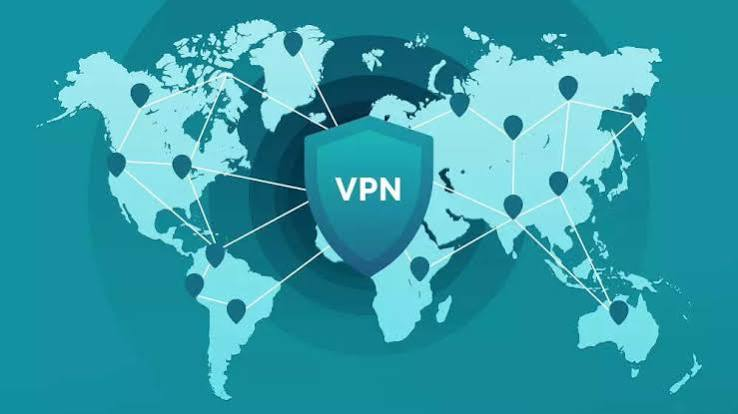
Here’s everything you need to know about VPNs in 2026 — explained simply, without the technical jargon.
Best Virtual Private Network or VPN in 2026 A Virtual Private Network (VPN) remains one of the most important online privacy and security tools in 2026. As internet users face increasing concerns about data tracking, cyber threats, public Wi-Fi risks, and regional content restrictions, VPNs provide a simple and effective way to protect online activity. A VPN creates an encrypted connection between your device and a secure server, helping keep your browsing data private from hackers, internet service providers (ISPs), and other third parties.
Modern VPN services do much more than hide your IP address. They offer advanced features such as malware protection, tracker blocking, encrypted DNS, split tunneling, and multi-device support. Many people use VPNs to access geo-restricted content, improve privacy while traveling, secure remote work connections, and protect sensitive information when using public networks.
In 2026, VPN technology has become faster, more reliable, and easier to use than ever before. Whether you’re using a smartphone, laptop, tablet, smart TV, or gaming console, a VPN can help improve both security and online freedom. With hundreds of VPN providers available, understanding how VPNs work and choosing the right service is essential for anyone who values privacy, security, and unrestricted internet access.
What Is a VPN, Exactly?
A VPN — short for Virtual Private Network — is a service that hides your internet activity by routing your connection through a secure server in another location.
Here’s a simple way to think about it:
Normally, when you visit a website, your internet provider (like Jio, Airtel, or Comcast) can see what you’re doing. The website you visit can also see your IP address — which reveals your approximate location. Any app or advertiser tracking your activity can build a profile of your browsing habits.
When you turn on a VPN, your connection goes through an encrypted tunnel to a server somewhere else — say, a server in the UK or Singapore. From that point, the internet sees the VPN server’s IP address, not yours. Your actual location and identity are hidden.
That’s the core of it. Everything else — speed, features, privacy policies — builds on top of this basic idea.
How Does a VPN Work in Practice?
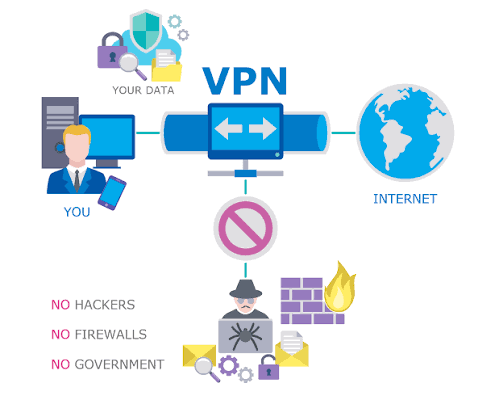
Let’s say you’re sitting in a café in Mumbai, using the free Wi-Fi to check your bank account. That public Wi-Fi is shared with dozens of other people, and without protection, someone on the same network could potentially intercept your data.
You turn on a VPN. Your connection is now encrypted. Even if someone tries to intercept it, all they see is scrambled data — useless to them.
Or here’s another example: You want to watch a show that’s available on Netflix US but not on Netflix India. You connect your VPN to a US server. Netflix now thinks you’re browsing from the United States and gives you access to that content.
That’s VPN in real life — privacy, security, and access, all in one tool.
Best Virtual Private Network or VPN in 2026:-
Why VPNs Matter More in 2026
A few trends have made VPNs more important this year than they were even two or three years ago:
1. More data tracking, not less Advertisers, apps, and websites have become more sophisticated at tracking users. Even incognito mode doesn’t protect your real IP address or stop your internet provider from logging your activity.
2. More public Wi-Fi use With hybrid work now the norm, people connect from coffee shops, airports, hotels, and co-working spaces constantly. These networks are convenient but often poorly secured.
3. Government-level internet restrictions Several countries have blocked or throttled access to certain websites, social platforms, and streaming services. VPNs are frequently the only practical way to get around these restrictions.
4. Remote work security Companies that allow remote work still need employees to access internal systems securely. VPNs remain one of the most widely used tools for securing that access.
5. Rise in cybercrime Phishing, data theft, and network attacks have all increased. A VPN isn’t a complete security solution, but it adds a meaningful layer of protection against certain types of attacks.
Types of VPNs in 2026
Not all VPNs are the same. Here are the main types you’ll encounter:
Personal VPNs (Consumer VPNs) These are the ones most people use — apps you download on your phone or laptop from providers like NordVPN, ExpressVPN, or Surfshark. You pay a subscription, connect to a server of your choice, and your internet traffic is protected.
Business VPNs (Corporate VPNs) Used by companies to give employees secure access to internal networks. If your office has a VPN that IT set up for you, this is what you’re using. It’s not designed for privacy from your employer — it’s designed to protect company data.
Free VPNs There are free VPN options available, but they come with significant caveats (covered in the pros/cons section below). Some are genuinely useful for light use; others have serious privacy issues.
Browser-Based VPNs Some VPNs work only inside your browser (like the one built into Opera). They protect your browsing traffic but not apps running in the background on your device.
Key Features to Look for in a VPN in 2026
If you’re choosing a VPN this year, these are the things that actually matter:
No-logs policy A trustworthy VPN doesn’t store records of what you do online. Look for providers that have had their no-logs claims independently audited — not just companies that say it but have never proved it.
Kill switch If your VPN connection drops unexpectedly, a kill switch cuts your internet immediately so your real IP address never gets exposed. This is especially important for journalists, activists, or anyone in a high-risk privacy situation.
Number and location of servers More servers in more countries means more flexibility. If you specifically need a US server for streaming, or a Singapore server for gaming with lower latency, make sure the provider covers that.
Speed and performance A VPN always adds some overhead — data has to travel a longer route. Good VPNs minimize this. In 2026, most top providers use the WireGuard protocol, which is significantly faster than older protocols like OpenVPN.
Device support You’ll want a VPN that works on your phone, laptop, and maybe your router or smart TV. Most top providers support 6–10 simultaneous connections on a single account.
Price Monthly plans are expensive. Long-term plans (1–2 years) bring the cost down to ₹150–₹350/month for most top providers. Free trials and money-back guarantees are common — use them.
Pros and Cons of Using a VPN
Pros
Privacy from your ISP Your internet provider cannot see what websites you visit or what you download when a VPN is active. This is one of the most underrated benefits — ISPs in many countries are legally allowed to log and even sell your browsing data.
Security on public Wi-Fi Airports, hotels, and cafés — anytime you’re on a shared network, a VPN keeps your connection encrypted and your data safe.
Access to geo-restricted content Watch shows from Netflix libraries in other countries, access services blocked in your region, or use platforms that aren’t available where you live.
Bypass censorship and throttling In countries with internet restrictions, VPNs are often the only way to reach certain websites or platforms. ISPs sometimes also throttle (slow down) streaming — a VPN can help bypass this.
Peace of mind Sometimes it’s just about knowing your connection is private. That reassurance has real value, especially if you handle sensitive work or personal data online.
Cons
Slower speeds Routing traffic through an external server adds latency. Premium VPNs minimize this, but there’s always some speed reduction — typically 10–30% even on fast servers. For streaming and browsing, it’s usually unnoticeable. For competitive gaming, it can matter.
Not completely anonymous A VPN hides your IP address, but it doesn’t make you invisible online. If you’re logged into Google or Facebook, those platforms still know who you are. A VPN is one layer of privacy, not a complete solution.
Free VPNs carry real risks Many free VPN providers make money by logging and selling your data — which is the opposite of what you want from a privacy tool. Some free VPNs have been caught injecting ads, leaking DNS requests, or using users’ devices as exit nodes for other traffic. If you use a free VPN, stick to well-known ones with transparent privacy policies.
Some services block VPNs Netflix, Disney+, and other streaming platforms actively try to detect and block VPN traffic. Premium VPNs stay ahead of these blocks, but cheaper or free ones often get blocked quickly.
Legal considerations VPNs are legal in most countries, including India. But they’re restricted or banned in a handful of countries. Always check the legal status in your country before using one. Even where legal, using a VPN to do something illegal is still illegal.
Best VPN Providers in 2026 (Quick Overview)
Here’s a quick look at some of the most reliable options this year:
NordVPN — Consistently one of the top performers for speed, security, and server count. Strong no-logs record. Good for streaming and privacy alike. Around ₹270/month on a 2-year plan.
ExpressVPN — Premium pricing but excellent performance. Known for reliability and customer support. Works well in restrictive regions. Around ₹500/month on an annual plan.
Surfshark — Budget-friendly with unlimited device connections. Good streaming performance. Solid for families or people with lots of devices. Around ₹200/month on a 2-year plan.
Proton VPN — Based in Switzerland with a strong privacy focus. Has a genuinely usable free tier (no data cap, no logs). Ideal if privacy is your primary concern.
Windscribe — Another solid option with a meaningful free plan (10GB/month). Good transparency about how the service operates.
Free VPNs: Worth It or Not?
This comes up constantly, so let’s address it directly.
Free VPNs can be useful in certain situations — particularly for light, occasional use like accessing a blocked site once in a while. But there are real trade-offs.
The main issue is the business model. Running VPN servers costs money. If you’re not paying, the provider needs to make money some other way. That often means:
- Collecting and selling your browsing data
- Showing you ads
- Limiting your speed or data so much the service is barely usable
- Using your device’s bandwidth to route other users’ traffic
That said, a few free VPNs are backed by legitimate business models — either they’re loss leaders for a premium product, or they’re run by privacy-focused organizations. Proton VPN’s free tier is the most credible example. Windscribe’s free plan is another solid option.
If you just need a VPN occasionally and don’t want to pay, those two are the ones to try first.
VPN vs. Proxy: What’s the Difference?
A lot of people confuse VPNs with proxies. They’re related but not the same.
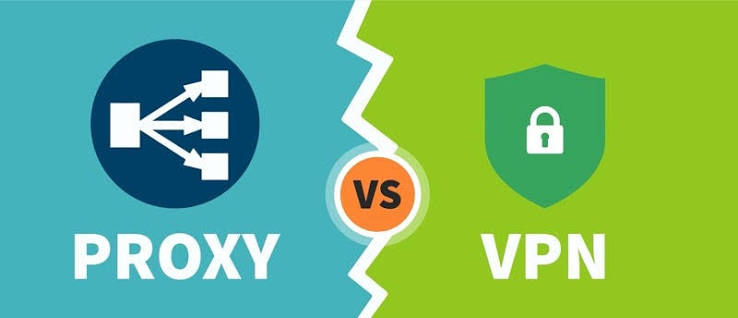
A proxy reroutes your browser traffic through a different IP address — but it doesn’t encrypt the connection. It can help you appear to be browsing from a different location, but it offers no real security.
A VPN does both — it changes your apparent location AND encrypts your traffic. For anything involving sensitive data, a VPN is the right tool.
Think of a proxy as a disguise and a VPN as both a disguise and a bulletproof vest.
Can a VPN Be Detected?
Yes, sometimes. Streaming services like Netflix use technology to detect known VPN IP addresses and block them. Some corporate networks also detect and block VPN usage.
Premium VPN providers work around this by rotating their IP addresses frequently and using obfuscated servers — servers that disguise VPN traffic as regular HTTPS traffic, making it much harder to detect.
If you’re in a region with heavy internet censorship and need a VPN to work reliably, look for providers that specifically mention “obfuscated servers” or “stealth mode.”
Frequently Asked Questions
Q: Is using a VPN legal in India?
Yes, VPNs are legal in India. However, in 2022, India’s CERT-In introduced rules requiring VPN providers to store user data for five years. Several major providers (including ExpressVPN and Surfshark) removed their Indian servers in response, while still offering service in India via servers in nearby countries like Singapore. Always check the latest regulations before assuming anything has changed.
Q: Will a VPN slow down my internet?
Some speed reduction is expected, but good VPNs minimize it significantly. On a fast connection (50 Mbps or above), most users don’t notice the difference during streaming, browsing, or video calls. The WireGuard protocol, now used by most major providers, is much faster than older VPN protocols.
Q: Can I use a VPN on my phone?
Yes. Every major VPN provider has apps for Android and iPhone. Setup usually takes under two minutes — download the app, log in, and tap connect. Some providers also have browser extensions that work alongside the app.
Q: Does a VPN protect me from hackers?
Partly. A VPN encrypts your connection, which protects you from certain types of attacks — especially on public Wi-Fi where someone might try to intercept your traffic. But a VPN doesn’t protect you from phishing links, malware, or data breaches at the website level. Think of it as one useful layer of protection, not a complete solution.
Q: Can I use a VPN to watch US Netflix in India?
Yes, but results vary by provider. Netflix actively blocks many VPN IP addresses. Premium providers like NordVPN and ExpressVPN typically stay ahead of these blocks, but cheaper or free VPNs often get blocked quickly. If streaming is your main goal, choose a VPN that specifically advertises Netflix compatibility.
Q: How many devices can I use a VPN on?
Most paid VPN plans allow 5–10 simultaneous connections. Surfshark allows unlimited devices on a single account. If you want to protect your entire home network without installing the app on every device, you can also set up the VPN directly on your router.
Q: What’s the difference between VPN protocols — WireGuard, OpenVPN, IKEv2?
These are the underlying systems that VPNs use to create secure connections. WireGuard is the newest and fastest — it’s what most providers recommend for everyday use in 2026. OpenVPN is older but highly reliable and widely trusted. IKEv2 is good for mobile devices because it reconnects quickly when you switch between Wi-Fi and mobile data. Most VPN apps let you choose, but the default setting is usually the right one for most people.
Conclsion
A VPN isn’t just for tech-savvy people or people doing something secretive online. It’s a practical tool for anyone who values their privacy, wants to browse securely on public networks, or wants to access content from other regions.
In 2026, the options are better than ever. Speeds are faster, interfaces are simpler, and even free plans from reputable providers have become genuinely useful.
If you’re just starting, try Proton VPN’s free plan to see how it works. If you’re ready to invest in something more reliable, NordVPN or Surfshark offer solid value on long-term plans.
The most important thing is to use one from a provider that actually respects your privacy. Read their policy, check if they’ve been independently audited, and pick something you can trust. That’s the whole point.

