
If you spend hours writing blogs, social media posts, product descriptions, or scripts, you already know how exhausting it can get. In 2026, there are now dozens of writing and content creation tools that can help you work faster without spending a rupee (or a dollar).
But here’s the problem: too many options, too much confusion. Some tools look free but lock the good stuff behind a paywall. Others are genuinely useful, but nobody talks about them.
This guide cuts through all of that. Below, you’ll find the best free tools for writing and content creation in 2026 — tested, compared, and explained in plain language so you can pick what actually works for your needs.
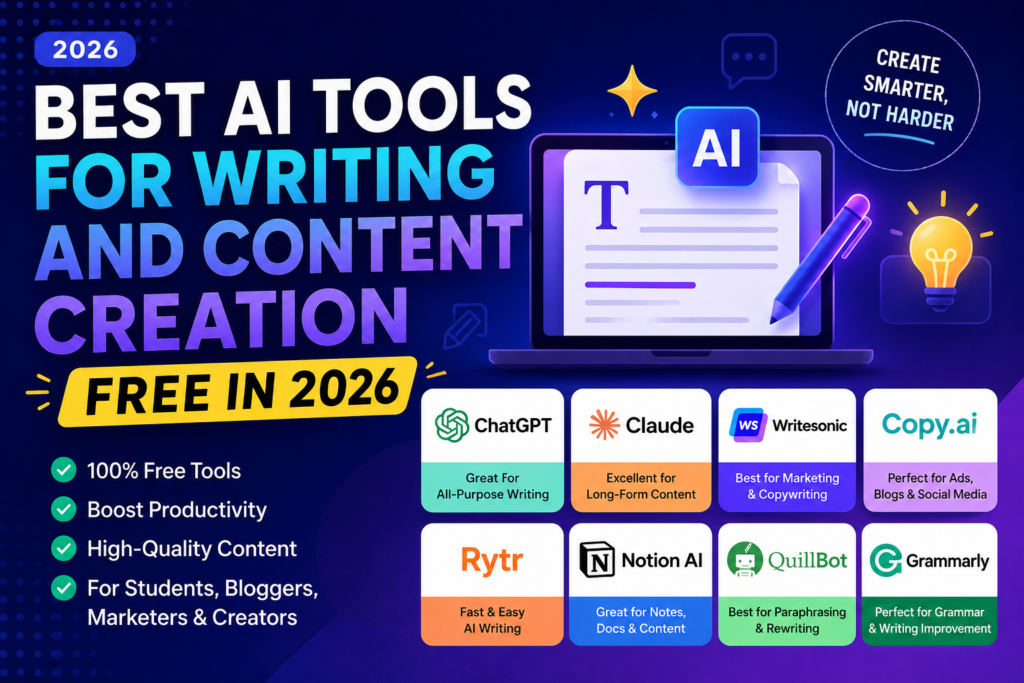
Writing and Content Creation, free Artificial Intelligence has completely changed how people create content in 2026. Whether you’re a blogger, student, freelancer, marketer, YouTuber, or business owner, AI writing tools can help you produce high-quality content faster and more efficiently than ever before. From generating blog posts and social media captions to creating emails, scripts, product descriptions, and marketing copy, modern AI tools can save hours of work while improving creativity and productivity.
The best part is that many powerful AI writing tools now offer generous free plans, making professional content creation accessible to everyone. These tools use advanced language models to understand context, generate natural-sounding text, fix grammar mistakes, suggest content ideas, and even optimize articles for search engines.
With dozens of AI writing platforms available, choosing the right one can be challenging. Some tools are better for long-form blog writing, while others excel at social media content, copywriting, or academic assistance. In this guide, we’ll explore the best free AI tools for writing and content creation in 2026, comparing their features, strengths, limitations, and ideal use cases to help you find the perfect tool for your needs.
Why Free Writing Tools Are Good Enough Now
A few years ago, free tools were limited. You’d get a sentence or two, then hit a wall. That’s changed a lot.
Today, many platforms offer generous free plans that let bloggers, freelancers, students, and small business owners create real content — without upgrading. The tools covered here all have meaningful free tiers, not just trial periods.
Best AI Tools for Writing and Content Creation free in 2026:-
1. ChatGPT (Free Plan) — Best All-Rounder for Writing
What it does: ChatGPT is the most widely used writing assistant in the world right now. On the free plan, you get access to GPT-4o mini, which handles everything from blog drafts to email rewrites to product descriptions.
Practical example: You’re writing a 1,500-word blog post about budget travel in Southeast Asia. You type a rough outline into ChatGPT, ask it to expand each section in a conversational tone, and you get a solid first draft in under two minutes. You edit it from there.
Best for: Bloggers, freelancers, students, content marketers
Pros:
- Handles almost any writing task
- Understands context well across a long conversation
- Can mimic tones — formal, casual, persuasive, etc.
- Available on web and mobile
Cons:
- The free plan has usage limits during peak hours
- Doesn’t browse the web automatically on the free tier
- Output sometimes needs heavy editing for factual content
Free plan includes: Unlimited basic usage with GPT-4o mini; limited access to GPT-4o
2. Google Gemini (Free) — Best for Research-Backed Writing
What it does: Gemini is Google’s writing assistant, and the free version is genuinely impressive. What makes it stand out is its ability to pull in current information from the web while it writes, which is something most free tools don’t do well.
Practical example: You’re writing a roundup article about the best budget smartphones in India for 2026. Instead of researching separately and then writing, you ask Gemini to help you draft the piece. It pulls recent data, names actual models, and gives you a working draft with real context.
Best for: Journalists, content writers who need up-to-date info, students writing research papers
Pros:
- Connected to Google Search — content is more current
- Works well inside Google Docs (via Gemini sidebar)
- Strong at summarizing long documents
- Multi-language support
Cons:
- Can sometimes be overly cautious or add too many disclaimers
- Less creative than some other tools for storytelling or marketing copy
- Quality varies depending on how specific your prompt is
Free plan includes: Full access to Gemini 1.5 Flash, web browsing, Google Workspace integration
3. Notion AI (Free Trial / Freemium) — Best for Organized Content Workflows
What it does: If you use Notion already, you already have one of the best writing tools sitting right there. Notion AI helps you draft, rewrite, summarize, and brainstorm content directly inside your workspace — without jumping between tabs.
Practical example: You manage a content calendar in Notion. Instead of writing your social media captions in a separate tool, you highlight your blog post title, click “Write with AI,” and get five caption options instantly. You pick one, edit it, and it’s done.
Best for: Content teams, solo creators who plan content in Notion, freelancers managing multiple clients
Pros:
- Seamlessly integrated into Notion pages
- Great for turning rough notes into polished copy
- Helps with meeting summaries, action items, and emails
- Clean, distraction-free writing environment
Cons:
- Free Notion AI is limited — most features need a paid plan
- Not ideal if you don’t already use Notion
- Slower than standalone writing tools
Free plan includes: 20 Notion AI responses on the free tier; more with a paid Notion subscription
4. Rytr (Free Plan) — Best for Short-Form Content
Rytr remains one of the most popular free AI writing tools in 2026, especially for users who need quick, high-quality short-form content. Whether you’re creating social media posts, email campaigns, product descriptions, ad copy, captions, or website content, Rytr helps generate ideas and polished text within seconds.
One of Rytr’s biggest strengths is its simplicity. The platform is designed for beginners and does not require any technical knowledge. Users simply select the content type, choose a tone of voice, enter a brief description, and Rytr generates multiple content variations instantly. This makes it an excellent choice for freelancers, marketers, small business owners, and content creators who need fast results.
The free plan provides enough features for casual users to experiment with AI writing before upgrading. Rytr supports multiple languages and writing tones, allowing users to create content for different audiences and platforms. It also includes built-in editing tools that help improve readability, shorten text, expand ideas, and refine content without switching between multiple applications.
For social media managers, Rytr is particularly useful because it can quickly generate engaging captions, promotional posts, and marketing messages. Bloggers can also use it to create introductions, outlines, meta descriptions, and content ideas. While it may not be as powerful as some premium AI platforms for long-form articles, it excels at producing concise, engaging content quickly.
What it does: Rytr is a straightforward writing tool built specifically for marketing copy. It supports over 40 use cases — from product descriptions to cold emails to Instagram captions — and has a clean, simple interface that gets out of your way.
Practical example: You run a small online store and need 20 product descriptions written fast. You paste in your product names and features, pick the “Product Description” use case, set the tone to “convincing,” and Rytr generates ready-to-use copy in seconds. It’s not perfect, but it gets you 80% of the way there.
Best for: E-commerce sellers, social media managers, small business owners
Pros:
- Very easy to use, even for beginners
- Supports multiple languages
- Templates for almost every marketing format
- Free plan is actually useful, not just a teaser
Cons:
- Free plan limited to 10,000 characters per month
- Less capable for long-form content like full blog posts
- Output can feel formulaic after a while
Free plan includes: 10,000 characters/month, access to all use cases, and tones
5. Canva Magic Write (Free) — Best for Visual Content Creators
What it does: Canva is the go-to design tool for creators, and its built-in Magic Write feature adds a writing layer on top. If you’re already making graphics, social posts, or presentations in Canva, Magic Write helps you write the copy directly inside your design — no copy-pasting needed.
Practical example: You’re building a pitch deck for a client. Instead of writing slide text separately, you click on a text block in Canva, open Magic Write, and generate a punchy headline or a three-point benefit statement in seconds. Then you tweak it to match the brand voice.
Best for: Social media creators, designers who write their own copy, and small marketing teams
Pros:
- Works inside Canva — no switching tools
- Great for headlines, taglines, and slide copy
- Supports multiple languages
- Free plan includes limited but usable access
Cons:
- Not suitable for long articles or in-depth content
- 25 free uses per month — runs out quickly if you’re a heavy user
- Writing quality is good, but not exceptional compared to dedicated tools
Free plan includes: 25 Magic Write uses/month on the free Canva plan
6. Grammarly (Free Plan) — Best for Editing and Polishing
What it does: Grammarly doesn’t write content for you — it makes your existing writing better. It catches grammar mistakes, awkward phrasing, unclear sentences, and tone mismatches. It works as a browser extension, desktop app, or inside Google Docs and Microsoft Word.
Practical example: You wrote a 1,200-word article quickly and want to clean it up before publishing. You paste it into Grammarly, and it highlights 30+ suggestions — fixing punctuation, rewriting passive sentences, and even flagging where your tone shifts unexpectedly. You accept the ones that make sense and reject the rest.
Best for: Everyone — especially non-native English writers, students, and professionals
Pros:
- Works everywhere — browser, email, Word, Docs
- Excellent at catching grammar and style issues
- The tone detector is genuinely helpful
- Free plan catches the most common mistakes
Cons:
- Free plan doesn’t include clarity rewrites or full-sentence suggestions (those are paid)
- Can over-correct casual or creative writing
- The plagiarism checker is locked behind the premium plan
Free plan includes: Grammar, spelling, and basic style checks; tone detection
7. Copy.ai (Free Plan) — Best for Marketing Copy
What it does: Copy.ai is one of the earliest dedicated writing tools, and it’s still one of the best for marketing-focused content. It has templates for ads, emails, landing pages, social posts, and more. The free plan now includes a decent workflow builder that non-technical users can actually use.
Practical example: You’re launching a new product and need ad copy for Facebook, a short email announcement, and three Instagram captions. Instead of writing each separately, you run them through Copy.ai’s templates one by one and get working drafts in about 10 minutes.
Best for: Marketers, startup founders, freelance copywriters
Pros:
- Strong template library for marketing content
- Good for generating multiple variations of the same copy
- The free plan is generous compared to older versions
- Intuitive interface
Cons:
- Long-form blog content isn’t its strongest suit
- The free plan has monthly word limits
- Some templates produce very generic output without detailed prompts
Free plan includes: 2,000 words/month, access to most templates
Quick Comparison Table
| Tool | Best For | Free Limit | Long-Form? | Web Access? |
|---|---|---|---|---|
| ChatGPT | All-round writing | Moderate usage | ✅ Yes | ❌ Limited |
| Google Gemini | Research-backed content | Generous | ✅ Yes | ✅ Yes |
| Notion AI | Organized workflows | 20 responses | ✅ Yes | ❌ No |
| Rytr | Short-form marketing copy | 10K chars/month | ⚠️ Partial | ❌ No |
| Canva Magic Write | Visual content copy | 25 uses/month | ❌ No | ❌ No |
| Grammarly | Editing & proofreading | Unlimited basics | N/A | ❌ No |
| Copy.ai | Marketing copy & ads | 2K words/month | ⚠️ Partial | ❌ No |
How to Choose the Right Tool for You
Don’t try to use all seven. Pick based on what you actually make:
- You write long articles or blogs → Start with ChatGPT or Google Gemini
- You need up-to-date information in your content → Use Google Gemini
- You design and write social posts → Canva Magic Write
- You write marketing copy — ads, emails, product pages → Copy.ai or Rytr
- You want to improve your own writing → Grammarly, always on
- You plan and manage content in Notion → Notion AI
A good setup for most creators: ChatGPT for drafting + Grammarly for editing. That’s free, fast, and covers most use cases.
Tips to Get More Out of Free Plans
1. Be specific in your prompts. “Write a blog post” gives weak output. “Write a 600-word intro for a blog post about VPN security tips for Indian users in a friendly tone” gives much better results.
2. Use the tool for the first draft only. None of these tools produces final content. They give you a starting point. Your edits are what make it good.
3. Stack tools. Use one tool to draft, another to edit. Grammarly works well on top of anything you write with ChatGPT or Gemini.
4. Save your best prompts. If you find a prompt that works well, save it in Notion or a text file. Reuse it across different topics to get consistent quality.
5. Check your facts. Free tools can be wrong about specific numbers, dates, or claims. Always verify before publishing anything factual.
Frequently Asked Questions
Q: Are these tools really free, or do they have hidden charges?
All tools listed here have genuine free plans. Some have monthly limits (like Rytr’s 10K characters or Copy.ai’s 2K words), but you can use them without entering a credit card. Just check the signup page before assuming — upgrade prompts can be pushy.
Q: Can I use these tools to write full blog posts for free?
Yes. ChatGPT and Google Gemini are the best for full-length articles on their free plans. Both can handle 1,500–3,000-word articles without hitting limits too quickly if you’re a regular (not heavy) user.
Q: Which tool is best for writing in Hindi or other Indian languages?
Google Gemini has the strongest support for Indian languages, including Hindi, Tamil, Bengali, and Telugu. ChatGPT also handles Hindi well. Rytr supports multiple languages, but quality varies.
Q: Is the free version of Grammarly enough for daily writing?
For most users, yes. The free plan catches grammar mistakes, spelling errors, and basic clarity issues. If you write professionally and need deeper feedback on tone, readability, and plagiarism, the paid plan adds value — but the free version is solid for everyday use.
Q: Do these tools work on mobile?
ChatGPT, Gemini, and Grammarly all have well-designed mobile apps. Canva works on mobile,e too. Rytr and Copy.ai are primarily web-based but work in mobile browsers.
Q: Can I use these tools for commercial content — like content I’m paid to write?
Generally, yes, but always read the terms of service of each tool. Most platforms allow commercial use on their free plans. The content you create is typically yours to publish and monetize.
Q: Which is better for beginners — ChatGPT or Google Gemini?
Both are beginner-friendly, but Google Gemini has a slight edge if you’re already using Gmail, Docs, or other Google tools. ChatGPT has a slightly better interface for exploring different writing styles. Try both and stick with the one that feels more natural to you.
Conclsion
You don’t need an expensive subscription to create good content in 2026. The free versions of these tools — especially ChatGPT, Gemini, and Grammarly together — give you a fully working content creation setup at zero cost.
The real secret isn’t the tool. It’s your prompts and your editing. A great prompt gets you a great draft. A good edit turns that draft into something worth publishing.
Start with one or two tools from this list, learn how to use them well, and build from there. That’s the approach that actually works — not collecting every free tool and using none of them properly.

