
Finding a reliable free VPN for your MacBook in India can be challenging, especially since many free services impose data limits, offer slow speeds, or have questionable privacy practices. In 2026, the best free VPNs for Mac users are those that offer strong security, a strict no-logs policy, fast performance, and a smooth macOS experience. Independent reviews consistently highlight Proton VPN Free, Windscribe Free, PrivadoVPN Free, and hide.me as the safest and most trustworthy options for MacBook users.
These VPNs help protect your online privacy, secure your connection on public Wi-Fi, and allow you to browse the web more safely without spending money. While free VPNs have some limitations compared to premium services, choosing a reputable provider can give you excellent protection and performance for everyday use on your MacBook.
If you own a MacBook and live in India, you’ve probably run into moments where a website just refuses to load — or content you want to watch is blocked in your region. Maybe you tried accessing a streaming service, a gaming platform, or even some research tool and got hit with a “not available in your country” message. That’s where a VPN comes in. India
But here’s the thing — most good VPNs cost money. And if you’re not sure whether a VPN is worth paying for, trying a free one first makes complete sense.
This guide covers the best free VPNs for MacBook users in India in 2026 — what actually works, what to avoid, and how to pick the right one for your needs. India
Why MacBook Users in India Need a VPN
India has seen a lot of changes in internet policy over the past few years. Websites get blocked. Streaming libraries on Netflix and other platforms are much smaller in India compared to the US or the UK. Public Wi-Fi at cafes, airports, and co-working spaces is often unsecured, which means your browsing data is sitting out in the open.
A VPN (Virtual Private Network) solves all three problems:
- It hides your real IP address and location
- It encrypts your internet connection, even on public Wi-Fi
- It lets you connect to servers in other countries to access geo-restricted content
For MacBook users specifically, you also want something that works cleanly with macOS — no clunky installs, no performance drag, and ideally something that doesn’t break your battery life.
What to Look for in a Free VPN for MacBook
Before jumping into the list, here’s what separates a decent free VPN from a sketchy one:
No-log policy — The VPN shouldn’t store records of what you browse. Always check if they have an audited privacy policy.
Data limit — Most free VPNs cap how much data you can use per day or month. For casual browsing, 500MB–1GB per day is fine. For streaming, you’ll need more.
Speed — Free servers are often crowded. Look for VPNs that don’t throttle speed too aggressively.
macOS compatibility — The app should support the latest macOS version and ideally have a native Mac app (not just a browser extension).
Server locations — You want at least the US, UK, and Singapore servers to cover most use cases from India.
Trustworthy company — Avoid random free VPNs you find in obscure app stores. Stick to names with a real company and privacy track record behind them.
Best Free VPNs for MacBook in India 2026
1. Proton VPN Free — Best Overall Free VPN for Mac
Proton VPN‘s free plan is the most generous in the market, and it’s the one most Indian MacBook users should start with. Unlike most free VPNs, Proton VPN Free has no data limit. You can browse all day without hitting a cap.
The free plan gives you access to servers in the US, the Netherlands, and Romania. It’s not the fastest option because free users share servers, but for general browsing, reading, research, and light streaming, it holds up well.
Proton is a Swiss company with a strong legal privacy framework — Switzerland doesn’t fall under US or EU surveillance laws, which is a genuine benefit. Their no-log policy has been independently audited.
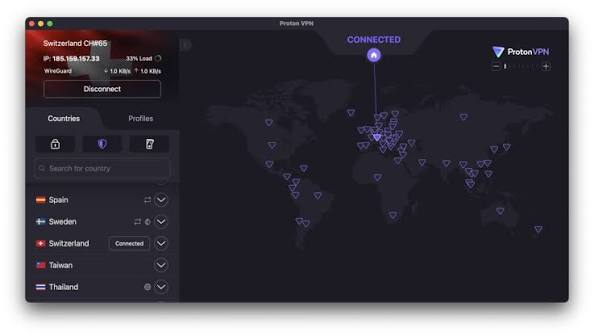
Proton VPN Free is widely considered the best free VPN for Mac users because it combines strong privacy protection, unlimited data, and an easy-to-use macOS application. Unlike many free VPNs that restrict monthly bandwidth, Proton VPN Free allows unlimited browsing, streaming, and downloading without worrying about data caps. This makes it an excellent choice for students, remote workers, and everyday MacBook users who need reliable online privacy.
The VPN is developed by Proton, a company known for its privacy-focused services. It follows a strict no-logs policy, meaning your browsing activity is not tracked or stored. For Mac users, the app integrates seamlessly with macOS and offers a clean, beginner-friendly interface that makes connecting to a secure server simple.
Security is another major strength. Proton VPN Free uses advanced encryption protocols to protect your internet traffic from hackers, trackers, and surveillance. Whether you’re connected to public Wi-Fi at a café, airport, or hotel, your data remains protected. The service also includes features such as a kill switch and DNS leak protection, helping maintain your privacy even if the VPN connection drops unexpectedly.
While the free plan provides access to a limited number of server locations compared to the premium version, the available servers generally offer stable performance and reliable speeds for everyday browsing, video streaming, and online communication. Users who later need more server options, faster speeds, or streaming support can upgrade to a paid plan, but many MacBook owners find the free version sufficient for daily use.
Practical example: A student in Pune using a MacBook Air for research can use Proton VPN Free to access US-based academic resources or bypass ISP-level content filters without paying anything.
Pros:
- No data limit
- Strong privacy and no-logs policy
- Clean macOS app
- Trusted Swiss company
- Open-source apps
Cons:
- Only 3 server locations on the free plan
- Slower speeds during peak hours
- No streaming optimisation on the free tier
2. Windscribe Free — Best for Power Users Who Need More Locations
Windscribe gives you 10GB of data per month on its free plan — and if you sign up with your email, you can get up to 15GB. That’s a lot more than most competitors. The free plan also unlocks servers in 10+ countries, which is rare.
For a MacBook user in India, having access to servers in Canada, the US, the UK, Germany, France, and Hong Kong on a free plan is genuinely useful. You can watch YouTube content that’s geo-blocked in India, or use a UK server for BBC iPlayer — though streaming reliability varies.
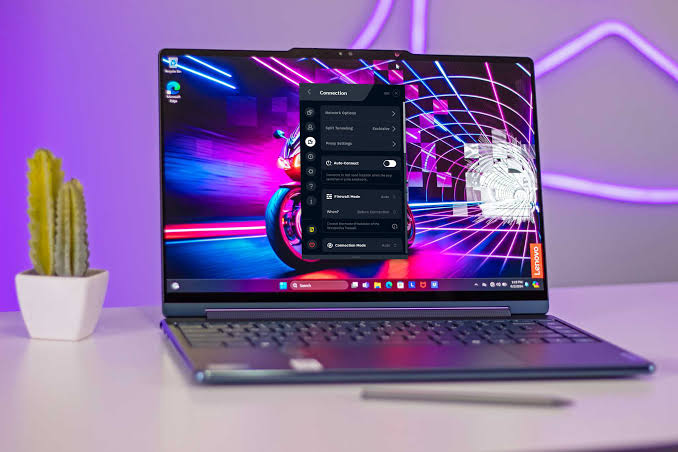
Windscribe also has a decent firewall feature called ROBERT that blocks ads and malware at the VPN level, which is a nice bonus.
Practical example: A freelance designer in Bengaluru uses Windscribe’s Hong Kong server to access client files hosted on platforms that are slow via Indian ISPs.
Pros:
- 10–15GB monthly data
- 10+ server countries on the free plan
- Built-in ad and tracker blocker
- Good macOS app
- No account required for basic use
Cons:
- 10GB can run out if you’re streaming frequently
- Some free servers are congested
- Streaming is hit or miss
3. TunnelBear Free — Best for Beginners
TunnelBear is probably the most beginner-friendly VPN on this list. The app is simple, fun to use, and works well on macOS. There’s no technical setup — you install it, pick a country, and toggle it on.
The downside is the data limit: only 500MB per month on the free plan. That’s enough for light browsing or checking a few geo-blocked articles, but not much more. However, TunnelBear runs periodic Twitter promotions where you can earn an extra 1GB of data, so keep an eye on that.
TunnelBear is audited annually by independent security firms, making it one of the most transparent VPNs available. It’s Canadian, and they’ve published their audit results publicly.
Practical example: Someone in Delhi who just wants a VPN to use once a week when working from a café — just for peace of mind on public Wi-Fi — will find TunnelBear more than adequate.
Pros:
- Very easy to use, great for beginners
- Annual independent security audits
- Clean and lightweight macOS app
- Servers in 47+ countries
Cons:
- Only 500MB per month — very limiting
- No streaming on the free plan, practically
- Can’t do heavy use without upgrading
4. hide.me Free — Best for Privacy-Focused UsersHide
hide.me is a Malaysia-based VPN with a solid free plan. You get 10GB of data per month, and access to 5 server locations,s including servers in the US, Netherlands, Germany, East and West USA, and Singapore — the Singapore server is particularly useful for Indian users since it’s low latency.
What sets hide.me apart is its strict no-log policy and the fact that it’s been around since 2012. The free plan doesn’t show ads, doesn’t sell your data, and doesn’t throttle speed artificially. It supports all major VPN protocols and has a clean macOS app that feels responsive.
Practical example: A journalist in Mumbai using a MacBook Pro wants to securely communicate with sources over encrypted connections. hidMy’s focus on privacy makes it a reliable choice.
Pros:
- 10GB monthly data
- Singapore server (low latency from India)
- No ads on the free plan
- Strong privacy track record
- Supports multiple VPN protocols
Cons:
- Only 5 server locations
- No P2P support on the free plan
- Customer support is limited for free users
5. UrbanVPN — Decent for Casual Use, But With Caveats
UrbanVPN offers unlimited bandwidth on its free plan, which sounds great — but it works on a peer-to-peer model, meaning your device also serves as a node for other users. This is a privacy trade-off. It works fine for casual use like unblocking YouTube or checking websites, but you shouldn’t use it for sensitive tasks.
Speed can be inconsistent since it depends on other users in the network. The macOS app works, but it’s not as polished as Proton or TunnelBear.
Pros:
- Unlimited data
- Easy to use
- Works for basic browsing
Cons:
- P2P model — privacy concerns
- Not suitable for sensitive browsing
- Speeds are unpredictable
Quick Comparison Table
| VPN | Data Limit | Server Locations | macOS App | Best For |
|---|---|---|---|---|
| Proton VPN Free | Unlimited | 3 countries | ✅ Excellent | All-round daily use |
| Windscribe Free | 10–15GB/month | 10+ countries | ✅ Good | Power users, more locations |
| TunnelBear Free | 500MB/month | 47 countries | ✅ Excellent | Beginners, occasional use |
| hide.me Free | 10GB/month | 5 locations | ✅ Good | Privacy-focused users |
| UrbanVPN | Unlimited | Many | ⚠️ Basic | Casual, non-sensitive use |
Should You Trust Free VPNs?
This is a fair question. Free VPNs have a bad reputation in some circles — and for good reason. Some shady ones log your traffic, inject ads, or sell your browsing data to third parties. There have been documented cases of free VPN apps mining user data.
The ones on this list are from established companies with real privacy policies and — in some cases — independent audits. Proton VPN, Windscribe, TunnelBear, and hide.me are all credible choices that treat user privacy seriously.
The red flags to watch out for:
- No listed company or headquarters
- No privacy policy (or a vague one)
- Asks for unnecessary device permissions
- Not on the official Mac App Store and has no independent reviews
Stick to verified names, and you’ll be fine for everyday use.
How to Install a Free VPN on Your MacBook
Here’s a quick walkthrough using Proton VPN as the example:
- Go to protonvpn.com from your MacBook’s browser
- Click “Get Proton VPN Free” and create a free account
- Download the macOS app from their website or the Mac App Store
- Open the app, log in, and select a free server (US, Netherlands, or Romania)
- Click “Connect” — you’ll see a green connected indicator
That’s it. Your traffic is now encrypted,d and your IP is masked.
Most other VPNs on this list follow a similar install process. Always download from the official website or the Mac App Store, not from third-party sources.
Free VPN vs Paid VPN — When to Upgrade
Free VPNs work for light tasks, but here’s when you’ll want to pay:
- Streaming: Netflix, Disney+, and Amazon Prime regularly block free VPN servers. Paid VPNs rotate IPs specifically to stay ahead of these blocks.
- Torrenting: Most free plans don’t allow P2P traffic.
- Speed: Free servers are shared by many users. Paid plans give you faster, dedicated servers.
- More server locations: If you need a specific country not on the free plan, you’ll need to upgrade.
- Business use: If you’re handling client data, financial transactions, or sensitive communications, a paid plan with a proper no-log audit is worth it.
For casual browsing, public Wi-Fi protection, and occasional geo-unblocking, free plans are completely adequate.
Frequently Asked Questions
Is using a free VPN on a MacBook legal in India?
Yes, using a VPN in India is legal. However, in 2022, India’s CERT-In issued a directive requiring VPN providers to store user data for five years. Many reputable VPN companies (including Proton VPN) responded by removing their Indian servers rather than comply. This means your VPN traffic routes through servers outside India, which is entirely legal for personal use.
Will a free VPN slow down my MacBook’s internet speed?
Some slowdown is normal because your data is being encrypted and routed through an additional server. On a good free VPN like Proton, the slowdown is barely noticeable for browsing. For HD video streaming, you may see buffering on free plans due to congested servers.
Can I use a free VPN to watch Netflix US on my MacBook in India?
Streaming services actively block VPN IPs, and free plans are the most likely to be blocked because their IP ranges are widely known. You may get lucky occasionally, but reliable Netflix unblocking generally requires a paid plan.
Which free VPN is fastest for MacBook users in India?
Proton VPN Free and hide.me Free tend to perform best for Indian users, partly because hide.me has a Singapore server (lower latency from India), and Proton uses high-quality infrastructure. Speeds will still vary based on time of day and how congested the server is.
Do I need to set up anything on my MacBook for the VPN to work?
No special setup is needed. All the VPNs listed here have native macOS apps that you install and run like any other Mac app. There’s no manual configuration required unless you want to use advanced features.
Is Proton VPN Free really unlimited? What’s the catch?
Yes, no data cap. The catch is that you’re limited to three countries (the US, the Netherlands Roand mania, and you’re on slower free servers since priority goes to paid users. But for daily browsing, it genuinely works without limits.
Can I use a free VPN on multiple devices, like my iPhone and MacBook together?
Most free plans limit you to one simultaneous connection. If you want to use a VPN on both your MacBook and iPhone at the same time, you’d typically need a paid plan. Check each provider’s terms — some l,,iliketon, allow one free connection at a time.
Conclsion
For most MacBook users in India, Proton VPN Free is the best place to start — no data cap, solid privacy, and a clean macOS app make it hard to beat at zero cost. If you need more server options, Windscribe Free is the next best pick with its 10+ countries and 10–15GB monthly data.
TunnelBear is worth considering if you’re new to VPNs and just want something simple, and hide.me is a strong choice if privacy is your main concern and the Singapore server appeals to you.
Avoid random free VPNs you find in sketchy forums or third-party sites — the well-known ones listed here are free for a reason (they have paid tiers too), and they have reputations to protect.
Try one, see if it fits your browsing habits, and if you find yourself hitting limits or needing streaming access consistently, that’s your sign to consider a paid plan.

