
Unlimited free internet VPN for Android? You’re not alone. Millions of Android users want a VPN that offers unlimited data, fast speeds, and strong privacy without paying a monthly subscription. Whether you’re browsing on public Wi-Fi, protecting your personal information, or accessing content securely while traveling, a reliable free VPN can make a big difference.
The challenge is that many “free unlimited VPN” apps come with hidden limitations such as slow speeds, data collection, excessive ads, or weak security. That’s why choosing a trustworthy VPN is essential. The best free VPNs combine unlimited or generous data allowances with strong encryption, a no-logs policy, and dependable performance.
In this guide, you’ll discover the best unlimited free internet VPNs for Android in 2026, compare their features, understand their pros and cons, and learn how to choose the safest option for your needs. Whether you’re a student, casual user, or frequent traveler, this article will help you find a VPN that keeps your connection private without costing you anything.
If you’ve ever tried to access a blocked website, save mobile data, or keep your browsing private on Android, you’ve probably searched for a free VPN. And honestly? The market is flooded with apps that all claim the same thing — unlimited free internet, no limits, no charges.
But here’s the truth most of those apps won’t tell you upfront: “unlimited free” and “actually good” don’t always go together.
This guide breaks down how free VPNs actually work, which ones are worth installing on your Android phone, what the real limitations are, and how to get the most out of them without putting your data at risk.
What Does “Unlimited Free Internet VPN” Actually Mean?
When an app says “unlimited free internet VPN,” it usually means one of two things:
- Truly unlimited data with no monthly cap — rare in the free tier
- Free with limits — like 500MB/day or 10GB/month — which is technically free, just not unlimited
Some apps use clever tricks. For example, they might offer unlimited bandwidth but throttle your speed after a certain point, or only give you access to a handful of servers with heavy congestion.
A few, like ProtonVPN’s free plan, genuinely offer unlimited data with no cap — but they restrict you to servers in three countries and slower speeds compared to their paid users.
So before downloading any app, know what you’re actually signing up for.
Why People Use a VPN on Android
Let’s skip the tech jargon. Here are the actual reasons people look for a VPN:
- Unblocking apps and websites — Maybe PUBG got banned in your region, or you can’t access a streaming service that’s not available in India.
- Free public Wi-Fi safety — At a café or airport, your phone’s data is visible to anyone snooping on the same network. A VPN encrypts it.
- Bypassing ISP throttling — If your Airtel or Jio connection slows down when you’re watching YouTube or playing games, a VPN can sometimes help.
- Accessing region-locked content — Netflix US has a different library than Netflix India. A VPN can change which version you see.
- General privacy — Not wanting your ISP or apps to track every site you visit.
Best Free VPNs for Android in 2026 (Honest Breakdown)
1. ProtonVPN Free
Proton VPN Free is one of the few VPN services that offers truly unlimited data on its free plan, making it an excellent choice for Android users who need reliable privacy without worrying about daily or monthly data limits. Developed by the team behind Proton Mail, the service focuses on security, transparency, and user privacy rather than displaying intrusive ads or selling user data.
Unlike many free VPN apps that restrict bandwidth after a few hundred megabytes, Proton VPN Free lets you browse, stream, and use apps for as long as you need. The free version uses AES-256 encryption, supports the WireGuard and OpenVPN protocols, and follows a strict no-logs policy, helping keep your online activities private even when connected to public Wi-Fi.
The Android app features a clean, beginner-friendly interface that makes connecting to a secure server simple with a single tap. While free users can access servers in a limited number of countries and may experience slower speeds during peak hours, the service remains stable enough for everyday browsing, social media, online banking, and messaging.
Best for: Privacy-first users who want truly unlimited data
ProtonVPN’s free plan is probably the most honest in the industry. You get:
- Unlimited data — no monthly cap whatsoever
- Servers in the US, Netherlands, and Japan
- No ads, no logs, no data selling
- Slower speeds during peak hours (paid users get priority)
The catch? You can’t connect to Indian servers on the free plan, so if you need a local IP address, this won’t help. But for basic privacy and unblocking, it’s solid.
Practical example: If you’re traveling abroad and want to keep your banking app working as if you’re in India, ProtonVPN free won’t help (wrong server location). But for private browsing or accessing blocked content, it works well.
2. Windscribe Free
Best for: Users who want more server choices
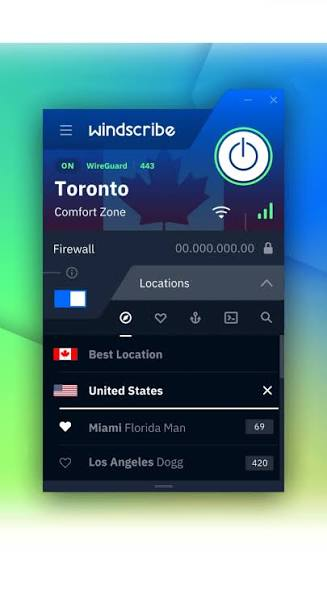
Windscribe gives you 10GB per month for free, and if you tweet about them (seriously), they’ll bump it to 15GB. You also get:
- Servers in 10+ countries including Canada, US, UK, France, Germany
- A built-in ad blocker
- No session logs
- Works on Android with a clean app
Practical example: If you’re a student who uses a VPN mainly for research or accessing geo-restricted academic resources a few times a week, 10GB/month is more than enough.
3. Hotspot Shield Free
Best for: Fast speeds for short sessions
Hotspot Shield offers 500MB per day free — which works out to about 15GB a month. It’s one of the faster free VPNs out there, which matters if you’re streaming or gaming.
Downsides: You’re limited to US servers only, and the free version has ads. It’s not great for privacy either — their data practices have been questioned in the past.
Practical example: If you need to quickly unblock a website and don’t care much about privacy, Hotspot Shield gets the job done fast.
4. TunnelBear Free
Best for: Casual users and beginners
TunnelBear is friendly, easy to use, and trustworthy. The free plan gives you 2GB per month — small, yes, but they’re transparent about it. No hidden upsells, no shady background data collection.
They undergo annual independent security audits and publish the results publicly, which is rare even among paid VPNs.
Practical example: If you’re new to VPNs and want to try one without committing, TunnelBear is a good starting point. Just know the 2GB cap is used up fast if you’re streaming video.
5. Hide.me Free
Best for: No-account VPN access
Hide.me offers 10GB/month free with servers in 5 locations. What’s unusual: you don’t need to create an account to use the free plan. Just download, install, and connect.
This is a real privacy benefit — no email address linked to your activity.
6. Urban VPN / Betternet (Use With Caution)
These apps show up a lot in search results and promise “unlimited free” VPN with no limits. They’re not recommended for anything sensitive.
Many of these apps monetize by collecting your browsing data and selling it to advertisers, or by using your device’s bandwidth as part of a residential proxy network (meaning other people’s traffic runs through your phone). That’s a real thing, not a conspiracy theory — Betternet, Hola VPN, and similar apps have been called out for this.
If you’re just unblocking a blocked game server and you’re fine with ads and data sharing, fine. But for banking, passwords, or anything private — avoid them.
Pros and Cons of Free VPNs for Android
Pros
- Zero cost — obvious, but real. You can protect your connection without spending a rupee.
- Easy to set up — most Android VPN apps take under two minutes to install and connect.
- Useful for occasional use — if you only need a VPN once in a while, a free plan often covers that.
- Access geo-blocked content — unblock YouTube videos, apps, or streaming content not available in your country.
- Encrypt public Wi-Fi — even a basic free VPN protects you better than no VPN on an open network.
Cons
- Data caps — most free plans cap you at 500MB/day to 10GB/month. Streaming one HD movie uses 3GB+.
- Speed throttling — free users are last in the queue. Expect slower connections.
- Limited server locations — you might only get 2–5 countries to choose from.
- Privacy risks — shady free VPNs sell your data or hijack your bandwidth.
- Ads — many free VPN apps bombard you with ads or push hard to upgrade.
- No customer support — if something breaks, you’re usually on your own.
- Connection drops — free servers tend to be more crowded and unstable.
How to Choose a Free VPN for Android (Without Getting Burned)
Here’s a simple checklist before you install anything:
1. Check who makes it. Look up the company. Is it a known name with a real website, a privacy policy, and a history? Or is it a random developer with 50 apps all claiming to be “100% free unlimited VPN”?
2. Read the privacy policy (seriously). Look for these phrases — they’re red flags:
- “We may share data with third-party partners”
- “We collect browsing history for analytics”
- “Your device may be used as a relay node”
ProtonVPN, Windscribe, and TunnelBear all have clear, clean policies. That’s a good sign.
3. Check permissions.ns When you install a VPN on Android, it will ask for VPN permission — that’s normal. But if an app also asks for access to your contacts, photos, or SMS, something’s off. Reject and uninstall.
4. Look at the reviews — but critically. A 4.8 rating with 10 million downloads sounds great. But look at the 1-star reviews. Are people complaining about data leaks, slow speeds, or billing issues? That tells you more than the average score.
5. Test with a free DNS leak checker.r After connecting, go to dnsleaktest.com on your browser. A proper VPN should show the VPN server’s location, not your real IP or your ISP. If it shows your real details, the VPN is leaking — bin it.
Tips to Stretch Free VPN Data on Android
If you’re on a capped free plan, here’s how to make it last longer:
- Use VPN only when needed — don’t leave it on all day if you’re just scrolling social media. Turn it on specifically for blocked content or sensitive browsing.
- Lower video quality — if you’re streaming through a VPN, drop the resolution to 480p or 720p. You’ll use far less data.
- Use split tunneling — some VPN apps let you choose which apps go through the VPN and which don’t. Route only what you need (a specific browser or app) through the VPN.
- Connect to nearby servers — a server in a nearby country is usually faster and uses bandwidth more efficiently than one on the other side of the world.
- Clear app cache regularly — some VPN apps accumulate junk data that can slow things down over time.
Free VPN vs. Paid VPN: When Should You Upgrade?
Free is fine if you:
- Use a VPN occasionally
- Only need basic privacy on public Wi-Fi
- Don’t stream a lot through the VPN
- Are just testing VPNs before committing
Consider paying if you:
- Stream regularly and need fast, stable speeds
- Travel frequently and need servers in many countries
- Work with sensitive data (banking, business communications)
- Need a VPN that works reliably on every app, including games
Paid plans from reputable services (NordVPN, ExpressVPN, Surfshark) start around ₹150–₹400/month if you go for a yearly plan — not cheap, but you get genuine unlimited data, fast speeds, and actual customer support.
Frequently Asked Questions
Q: Is a free VPN safe to use on Android?
It depends entirely on which one. Some free VPNs (like ProtonVPN and Windscribe) are genuinely safe and transparent. Others are actively harmful — they track your data, show you intrusive ads, or use your phone as a relay for other people’s traffic. Always check the privacy policy and permissions before installing.
Q: Can a free VPN give me completely unlimited internet?
Very few free VPNs offer truly unlimited data. ProtonVPN is the main exception. Most others cap you at 500MB/day or a few GB per month. “Unlimited” in marketing often means “unlimited number of connections” or “unlimited server switches,” not unlimited data.
Q: Will a free VPN work with Netflix or other streaming apps?
Usually not reliably. Netflix and most streaming platforms actively block known VPN IP addresses. Even paid VPNs struggle sometimes. Free VPNs with limited server pools are almost always blocked. If streaming is your main goal, a paid VPN is worth it.
Q: Does a VPN slow down my internet?
Yes, to some degree — all VPNs add some latency because your traffic is routed through an extra server. Free VPNs tend to be slower because the servers are more crowded. A nearby server with low traffic will have a much smaller impact on speed than a distant, overloaded one.
Q: Is using a VPN legal in India?
Yes, VPNs are legal to use in India for personal privacy and accessing geo-restricted content. However, in 2022, India’s CERT-In issued guidelines requiring VPN providers operating in India to store user data for five years. Many reputable providers (like ExpressVPN and Surfshark) responded by removing their Indian servers rather than comply, while still allowing Indian users to connect through servers in other countries. Using a VPN is fine; using it to conduct illegal activity is not.
Q: Can I use a free VPN to get free internet (bypass mobile data charges)?
No — this is a common misunderstanding. A VPN encrypts and reroutes your traffic, but it doesn’t eliminate data consumption. You still use your mobile data; the VPN just changes where the data appears to come from. Any app claiming to give you “free internet” by bypassing operator charges is either misleading or using an exploit that rarely lasts.
Q: What’s the best free VPN for Android without registration?
Hide.me is a good option — you can use their free plan without creating an account. Windscribe also lets you use a basic mode without registration, though creating an account unlocks more features.
Q: Can I use a free VPN for gaming on Android?
You can, but the experience is usually frustrating on free plans. Gaming needs low latency (ping), and free VPN servers are often overloaded, which adds lag. For gaming, a paid VPN with servers optimized for low latency is a better choice.
Conclsion
Free VPNs for Android can absolutely be useful — but you have to pick carefully. The honest ones (ProtonVPN, Windscribe, TunnelBear) give you real privacy protection with clear limitations. The shady ones use your phone and your data as the product.
If you’re a casual user who needs occasional privacy on public Wi-Fi or just wants to access a blocked site now and then, a free plan from a reputable provider will cover you. If you need something more — streaming, gaming, or daily use — budgeting for a paid plan will save you a lot of frustration.
Start with ProtonVPN or Windscribe. Test them. See what fits your usage. And always run a DNS leak test after connecting — it takes 30 seconds and tells you immediately whether your VPN is actually doing its job.

