
free VPN in 2026, the good news is that you can get one legally and safely without breaking any laws or downloading risky software. Many trusted VPN providers offer free plans or free trials that let you protect your privacy, secure your internet connection, and access the web more safely—all at no cost.
Free VPNs are ideal for casual browsing, using public Wi-Fi, protecting your personal data, or testing a VPN service before upgrading to a premium plan. However, not all free VPNs are created equal. While reputable providers offer strong encryption and transparent privacy policies, some free VPN apps may limit your data, reduce connection speeds, or collect user information to generate revenue.
In this guide, you’ll learn how to get a VPN for free legally in 2026, which providers offer the best free plans, what limitations to expect, and how to choose a secure VPN that protects your privacy. Whether you’re using Android, iPhone, Windows, Mac, or Linux, this guide will help you find a trustworthy free VPN that fits your needs.
Everyone wants online privacy. But not everyone wants to pay ₹500 a month for it.
The good news is you don’t always have to. In 2026, there are several completely legal ways to use a VPN without spending a rupee — through free trials, money-back guarantees, and freemium plans that genuinely work.
The bad news? Most “free VPN” options you find online are either too limited to be useful, or they make money by doing the exact thing you’re trying to avoid — tracking your data and selling it.
This guide walks you through every legitimate method to get a VPN for free in 2026, what you actually get, and what the catch is — so you can make a smart decision.
How to Get a VPN for Free Legally in 2026:-
Method 1: Use a VPN’s Free Tier (Freemium Plans)
Several well-known VPN providers offer a permanent free plan — no credit card, no trial period. You just sign up and use it. The catch is that free tiers usually come with data limits, fewer servers, or slower speeds.
Here are the ones worth your time:
Proton VPN Free — Best Overall Free VPN
Proton VPN is the standout option in the free VPN space, and it’s not particularly close. Unlike most free VPNs, Proton VPN Free has no data limit. You can use it all day, every day, without hitting a cap.
Proton VPN Free is widely regarded as one of the best free VPN services available in 2026 because it offers something that very few free VPNs do—unlimited data. Developed by the team behind Proton Mail, it focuses on privacy, security, and transparency rather than monetizing user data. This makes it an excellent choice for anyone who wants a trustworthy VPN for everyday browsing, protecting connections on public Wi-Fi, or improving online privacy without paying for a subscription.
Unlike many free VPN providers that impose strict monthly data caps, Proton VPN Free lets you browse the internet without worrying about running out of data. It uses strong encryption, follows a strict no-logs policy, and includes essential security features that help keep your online activity private.
What you get on the free plan:
- Unlimited data
- Servers in 3 countries (USA, Netherlands, Romania)
- 1 device at a time
- Medium speeds (slower than paid, but usable)
- No logs, no ads, no data selling
What you don’t get:
- Access to India servers (those are paid only)
- Streaming support — Netflix, Hotstar, etc. are blocked on free servers
- High-speed connections
- Multi-device support
Practical example: If you’re a student who just wants to browse securely on public Wi-Fi at a café or college campus, Proton VPN Free is more than enough. You won’t hit any data wall, and your connection is genuinely private.
Pros:
- Truly unlimited data — rare for a free VPN
- Open-source and independently audited
- No ads, no tracking
- Backed by the same team behind ProtonMail
Cons:
- Only 3 server locations on free plan
- Can’t unblock Indian streaming platforms
- Slower speeds during peak hours
Windscribe Free — Best for Data-Light Users
Windscribe gives you 10 GB of free data per month if you verify your email — enough for casual browsing and some light usage, but not for streaming or heavy downloads.
Windscribe Free is one of the most popular free VPN services in 2026, offering an excellent balance of privacy, security, and server variety. It is especially well suited for users who don’t need unlimited data but want reliable performance for everyday browsing, occasional streaming, and secure public Wi-Fi access. With generous monthly data, servers in multiple countries, and strong privacy protections, Windscribe Free is a solid choice for light internet users.
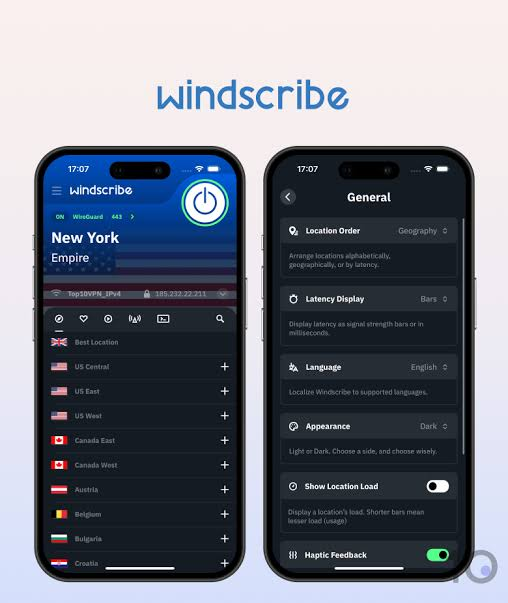
Unlike many free VPNs that compromise on security, Windscribe Free includes industry-standard encryption, a strict no-identifying-logs policy, and built-in tools to block ads, trackers, and malicious websites. Its user-friendly apps make it easy to get started on smartphones, laptops, and desktops.
What you get:
- 10 GB/month data
- Servers in 10+ countries (including some solid locations)
- Works on multiple devices
- Built-in ad and tracker blocker
What you don’t get:
- Indian servers on the free plan
- Consistent streaming access
- Priority support
Practical example: If you use a VPN mainly to check news sites, use public Wi-Fi securely, or occasionally access region-blocked content, Windscribe’s 10 GB stretches reasonably far for a month of light use.
Pros:
- More server locations than most free VPNs
- Ad blocker included — useful on its own
- Works on desktop and mobile simultaneously
- Generous compared to competitors offering only 500 MB
Cons:
- 10 GB runs out fast if you stream anything
- Speeds are inconsistent
- No India servers without upgrading
hide.me Free — Reliable for Basic Privacy
hide.me offers a free plan with 10 GB of data per month and servers in 5 locations. It’s a straightforward option with no registration required to start.
hide.me Free is a dependable free VPN service for users who want strong privacy and security without paying for a premium subscription. In 2026, it remains a popular choice thanks to its transparent privacy practices, solid encryption, and easy-to-use apps. Whether you’re browsing on public Wi-Fi, protecting personal information, or accessing the internet more securely, hide.me Free provides essential VPN protection with no advertisements or intrusive tracking.
The free plan is designed for light to moderate use and includes access to selected server locations. While it has some limitations compared to the paid version, it delivers reliable performance and a user-friendly experience for everyday online privacy.
What you get:
- 10 GB/month
- 1 device at a time
- Servers in the Netherlands, USA, Canada, Germany, and Singapore
- No logs policy
Pros:
- No account needed to start (anonymous sign-up option)
- Clean, easy interface
- Reliable connection stability
Cons:
- No streaming support
- 10 GB limit is tight for regular use
- Limited server selection
Method 2: Use a Free Trial
Some premium VPNs offer a genuine free trial — you get full access to the paid service for a limited number of days with no restrictions. This is the best way to experience a top-tier VPN for free.
ExpressVPN — 7-Day Free Trial (Mobile Only)
ExpressVPN offers a 7-day free trial on its Android and iOS apps. You get full access — every server, every feature, streaming support, high speeds — for one week. No charges if you cancel before the trial ends.
How to claim it:
- Download the ExpressVPN app on Android or iPhone
- Sign up with your email
- Start the trial — no payment required upfront on mobile
- Cancel within 7 days if you don’t want to continue
Practical example: You’re travelling to another city for a week and want to access your home region’s streaming content, or you need a secure connection for work. A 7-day full-access trial covers that trip entirely.
Pros:
- Full premium features with zero restrictions
- Works with Netflix India, Hotstar, and most streaming platforms
- No credit card needed on mobile trial
Cons:
- Only 7 days — short if you want a longer evaluation
- Mobile only for the free trial
- Premium pricing kicks in after the trial (around ₹800–900/month)
Surfshark — 7-Day Free Trial (Mobile Only)
Similar to ExpressVPN, Surfshark offers a 7-day free trial through the Google Play Store and Apple App Store. You get full access, including their CleanWeb ad blocker and unlimited device support.
How to claim it:
- Install Surfshark fromthe Play Store or App Store
- Create an account
- Select the free trial option at checkout
- Use freely for 7 days
Pros:
- Unlimited devices — connect your phone, laptop, tablet, all at once
- Full streaming access
- Very beginner-friendly app
Cons:
- 7-day window goes fast
- Need to remember to cancel to avoid being charged
Method 3: Money-Back Guarantees (The Smartest Free Method)
This is the most underused method, and it works perfectly legally. Most premium VPNs offer a 30-day money-back guarantee. You sign up, use the service for up to 30 days with full access, and if you request a refund, you get your money back — no questions asked.
This is not a loophole or a trick. It’s a standard consumer policy that VPN companies offer because they’re confident you’ll stick around. But if you genuinely just need a VPN for a month, this gives you 30 days of premium service for free.
NordVPN — 30-Day Money-Back Guarantee
NordVPN is one of the most popular VPNs globally, and their 30-day refund policy is genuinely hassle-free. You get access to 6,000+ servers across 60+ countries, fast speeds, and full streaming support.
How it works:
- Sign up for any NordVPN plan (monthly or annual)
- Use it for up to 30 days
- Contact support via live chat and request a refund
- Refund processed within 5–10 business days
Practical example: You’re spending a month studying abroad and need a VPN to access Indian content (Hotstar, JioCinema, Sony LIV). Sign up for NordVPN, enjoy 30 days of full access, then request a refund when you’re back.
Pros:
- Full premium access — no restrictions
- Works with Indian and international streaming platforms
- Refund process is smooth and well-documented
- 24/7 live chat support
Cons:
- You do need to pay upfront and wait for the refund
- Annual plan refunds can take slightly longer to process
- Not ideal if you repeat this across multiple VPNs
ExpressVPN — 30-Day Money-Back Guarantee
Same policy applies to ExpressVPN’s desktop plans. Sign up, use for 30 days, request a refund via live chat if you want. They don’t ask why — it’s their standard policy.
Surfshark — 30-Day Money-Back Guarantee
Surfshark also has a 30-day refund window. Given that it supports unlimited devices, you could cover your entire household — phones, laptops, smart TVs — for 30 days and refund if needed.
Method 4: Student and Special Discounts (Nearly Free)
If you’re a student, you can often get VPN access for extremely low prices — sometimes close to free.
- NordVPN Student Discount: Up to 15% additional off through student discount portals like UNiDAYS
- Surfshark Student Deal: Occasional 85% off promotions targeting students
- Proton VPN: Free plan is already permanent — no discount needed
These won’t get you to ₹0, but plans can drop to as low as ₹80–100/month on annual billing during sale periods, which is cheaper than a cup of coffee.
What to Watch Out For: Free VPNs That Aren’t Safe
Not every “free VPN” deserves your trust. Here’s what to avoid:
VPNs that sell your data: Some free VPNs make money by logging your browsing activity and selling it to advertisers. This is literally the opposite of privacy. Hola VPN was caught doing exactly this — routing users’ traffic through other users’ devices and selling bandwidth.
VPNs with no transparency: If a VPN doesn’t publish a privacy policy, hasn’t been audited, or has no information about who runs it — stay away.
Random APKs and third-party downloads: Never download a VPN from outside the official app stores. These are often bundled with malware.
Red flags to watch for:
- No privacy policy or vague language about “data sharing with partners”
- Based in a country with mandatory data retention laws and no clear no-logs claim
- Unlimited claims with no explanation of how they sustain that for free
- Excessive permissions on mobile (access to contacts, camera, etc.)
Safe free options stick to: Proton VPN, Windscribe, and hide.me. These are established, audited, and transparent about how they operate.
Which Method Should You Choose?
| Your Situation | Best Method |
|---|---|
| Need a permanent free VPN with no data cap | Proton VPN Free |
| Light browsing, don’t need much data | Windscribe Free (10 GB/month) |
| Need a premium VPN for one week | ExpressVPN or Surfshark 7-day trial |
| Need 30 days of full access | NordVPN or Surfshark money-back guarantee |
| Student on a tight budget | NordVPN/Surfshark student discounts |
| Need streaming access (Netflix, Hotstar) | Money-back guarantee method — free tiers don’t unblock streaming |
FAQs
Q: Is using a free VPN legal in India?
Yes. Using a VPN is legal in India as of 2026. However, VPN providers are required to maintain user logs under CERT-In regulations. Reputed providers like Proton VPN have moved servers outside India to avoid storing logs while still allowing Indian users to connect.
Q: Can a free VPN unblock Netflix or Hotstar?
Generally, no. Free VPN servers are well-known to streaming platforms and are usually blocked. If you need to unblock streaming services, use the 7-day free trial from ExpressVPN or Surfshark, or the 30-day money-back guarantee from NordVPN — those use premium servers that can bypass geo-restrictions.
Q: Is Proton VPN Free really unlimited?
Yes — Proton VPN’s free tier genuinely has no data limit. This is unusual and is part of why it’s consistently ranked as the best free VPN. The limitation is speed and server selection, not data.
Q: Can I use multiple money-back guarantees from different VPNs?
Technically yes — each VPN is a separate company with its own policy. But repeatedly signing up just for refunds isn’t a sustainable or fair practice. These guarantees exist for users who genuinely want to evaluate the service.
Q: Will a free VPN slow down my internet?
Almost certainly yes, to some degree. Free servers handle more users with fewer resources. For basic browsing, the slowdown is usually manageable. For streaming or gaming, you’ll notice a significant difference.
Q: Is my data safe with Proton VPN Free?
Yes. Proton VPN is built by the same Switzerland-based team behind ProtonMail. The free plan uses the same no-logs infrastructure as the paid plan. It’s open-source and has been independently audited multiple times.
Q: How do I cancel a VPN trial or subscription before being charged?
Go to the VPN’s official website, log in to your account, navigate to “Billing” or “Subscription,” and cancel before the trial or guarantee window ends. For mobile trials, cancel through Google Play or App Store subscription settings — not just by uninstalling the app.
Final Thoughts
Getting a VPN for free in 2026 is genuinely possible — you just need to pick the right method for your situation.
If you want something permanent with no hassle: Proton VPN Free is your answer. No data caps, no payment, no compromise on privacy.
If you need full premium features for a month: use the NordVPN or Surfshark 30-day money-back guarantee. You get everything a paid user gets, and if you request a refund, you pay nothing.
Just stay away from random free VPN apps that promise unlimited everything with no explanation — they’re almost always monetizing your data in some way, which defeats the entire purpose of using a VPN in the first place.

