
If you’ve been searching for a free VPN for your iPhone, you already know the problem. Most “free” VPNs either slow your connection to a crawl, show you ads every five minutes, or give you so little data that you run out before the week is over.

But a few genuinely useful free VPNs do exist — ones that won’t sell your browsing data or lock you out after 200MB.
This guide walks you through the best free VPNs for iPhone in 2026, what each one is good for, and what to watch out for before you download anything.
Why You Might Need a VPN on Your iPhone
Your iPhone does a decent job protecting your data on its own, but it’s not bulletproof — especially on public Wi-Fi.
Free VPN for iPhone 2026 Here’s a common scenario: You’re at a coffee shop, connected to the café’s free Wi-Fi, and you check your bank account or log into your work email. Without a VPN, anyone on that same network with basic tools can potentially see your traffic. A VPN encrypts that connection so your data is unreadable to outsiders.
Beyond security, people use VPNs on iPhone for things like:
- Accessing content while traveling — Streaming services like Netflix or BBC iPlayer show different content depending on your country. A VPN lets you connect through a server back home.
- Getting past school or office restrictions — Some networks block social media or certain websites. A VPN routes around those blocks.
- Keeping your location private — VPNs mask your real IP address, making it harder for websites and advertisers to track where you are.
- Safer browsing on hotel Wi-Fi — Hotel networks are notoriously easy to sniff. A VPN keeps your sessions private.
What “Free” Actually Means With VPNs
Before diving into the list, it’s worth being honest about what free VPNs can and can’t do.
A completely free VPN with no limits doesn’t exist — the servers, bandwidth, and staff all cost money. So every free VPN makes tradeoffs. The most common ones are:
- Data caps — You get a set amount of data per month (500MB, 1GB, 10GB). Once it’s gone, you either pay or wait.
- Speed throttling — Free users are often on slower servers.
- Limited server locations — You might only get 2–3 countries to choose from.
- Ads — Some apps show ads to free users to generate revenue.
The VPNs on this list are ones where the tradeoffs are reasonable, and importantly, where the company has a clear, audited no-logs policy. That last part matters — if a VPN logs your activity and sells it, you’ve gained nothing.
Free VPN for iPhone 2026: Best Free VPNs for iPhone in 2026
1. Proton VPN — Best Overall Free VPN for iPhone
Proton VPN is the standout choice for iPhone users who want a free VPN that doesn’t compromise on privacy. What makes it different from almost every other free VPN is this: no data cap. You can use it all day, every day, without hitting a limit.
Proton VPN is one of the most reliable free VPN options available for iPhone users who want strong privacy without paying for a subscription. It stands out because it offers unlimited data on its free plan, which is rare compared to many other free VPNs that restrict daily or monthly usage. This makes it a great choice for browsing, streaming light content, or using public Wi-Fi without worrying about hitting a data cap.
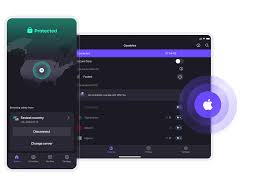
The app is very easy to use on iOS. You can connect with just one tap, and the clean interface makes it beginner-friendly. Proton VPN also focuses heavily on security. It uses strong encryption and follows a strict no-logs policy, meaning your online activity is not tracked or stored.
While the free version gives access to limited server locations, the connection is generally stable and safe for everyday use. However, you may experience slightly slower speeds compared to premium plans, especially during peak times.
Overall, Proton VPN is perfect for iPhone users who want a safe, trustworthy, and completely free VPN without compromising on privacy.
What you get on the free plan:
- Unlimited data
- Servers in 3 countries (US, Netherlands, Japan)
- One device connection
- No ads
- Open-source apps, independently audited
The catch: Free users are on the slower servers. During peak hours, speeds can drop noticeably. You also can’t access streaming services like Netflix on the free tier — that requires a paid plan.
Practical example: If you’re a student using your iPhone to do research and general browsing on campus Wi-Fi, Proton VPN free tier works perfectly. You won’t run out of data, and your connection stays private. For HD video streaming, though, you’ll feel the speed limits.
Pros:
- No data cap — genuinely unlimited
- Strong privacy credentials (based in Switzerland, outside US/EU jurisdiction)
- Open-source and audited
- No ads
Cons:
- Only 3 server locations on the free plan
- Slower speeds for free users
- No streaming support on the free tier
2. Windscribe — Best for Generous Data Allowance
Windscribe gives free users 10GB of data per month if you confirm your email during signup. That’s one of the highest free allowances available. It also supports a wider range of server locations than most free VPNs — around 10 countries on the free plan.
Windscribe is a popular free VPN choice for iPhone users who want a balance between data limits and useful features. Unlike many free VPNs that offer very restricted usage, Windscribe provides up to 10 GB of free data per month, which is considered generous for everyday browsing, social media, and occasional streaming.
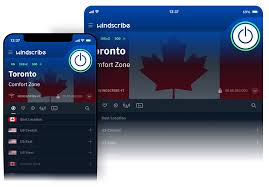
The app is simple to install and works smoothly on iOS devices. Once set up, you can connect to servers in multiple countries, giving you the flexibility to access geo-restricted content. Even on the free plan, Windscribe includes strong security features such as encryption, a strict no-logs policy, and a built-in ad blocker called R.O.B.E.R.T., which helps block ads, trackers, and malicious domains.
Another standout feature is that it allows unlimited device connections, meaning you can use the same account on your iPhone, laptop, and other devices without extra cost. However, since the free version has a monthly data cap, it may not be ideal for heavy streaming or large downloads.
Overall, Windscribe is a great option if you want a free VPN with a generous monthly data allowance, solid security features, and flexibility across devices.
What you get on the free plan:
- 10GB/month (with email confirmation)
- Servers in about 10 countries
- Built-in ad and tracker blocker (called R.O.B.E.R.T.)
- No logs policy
Practical example: If you travel a few times a year internationally and want a VPN mainly for hotel and airport Wi-Fi, 10GB per month is often enough for email, light browsing, and occasional map use. Windscribe’s server list also means you can usually find a nearby server for better speeds.
Pros:
- 10GB/month is generous for a free plan
- Good selection of server locations
- Ad and tracker blocking built in
- Works on iOS without any complicated setup
Cons:
- Data cap still applies — heavy users will run out
- Speeds vary depending on server load
- Streaming is hit-or-miss on free servers
3. Tunnelbear — Best for Beginners
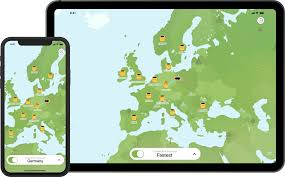
If you’ve never used a VPN before, TunnelBear is probably the easiest to get started with. The app is clean, visual, and takes about 60 seconds to set up on an iPhone. You tap a country on the map, toggle it on, and you’re connected.
What you get on the free plan:
- 2GB/month
- Servers in 47+ countries (yes, even on the free plan)
- No logs (independently audited every year)
- GhostBear feature to bypass VPN blocking
Practical example: You’re visiting a country that restricts certain websites or apps. TunnelBear’s GhostBear mode makes your VPN traffic look like regular HTTPS traffic, which helps get around VPN detection. With 47+ countries available even on the free plan, you have solid flexibility — just manage your 2GB carefully.
Pros:
- Huge server network, even for free users
- Annual independent security audits
- Extremely user-friendly iPhone app
- GhostBear for bypassing VPN blocks
Cons:
- Only 2GB/month — the lowest on this list
- Not suitable for regular daily use on the free tier
- No split tunneling on the free plan
4. hide.me — Best for Privacy-Focused Users
Hide.me has a solid reputation in the privacy community. The free plan is straightforward: 10GB per month, five server locations, and a verified no-logs policy. It’s based in Malaysia, which is outside the 5/9/14 Eyes intelligence-sharing alliances — a plus for the privacy-minded.
What you get on the free plan:
- 10GB/month
- 5 server locations
- No registration required to use the free plan
- Supports IKEv2, OpenVPN, and WireGuard protocols
- No ads, no logs
Practical example: You’re a freelancer who handles client documents on your iPhone and wants basic privacy without registering for yet another service. hide.me lets you use the free plan without even creating an account — download the app, connect, done.
Pros:
- No account required for the free plan
- 10GB/month with no registration
- Based on outside intelligence-sharing alliances
- WireGuard support (faster and more modern protocol)
Cons:
- Only 5 server locations
- Free plan limited to one connection
- Customer support is slower for free users
5. Atlas VPN — Best for Occasional Use
Atlas VPN offers a permanently free plan with unlimited data on a limited number of servers. The catch is that the free servers are in just a few locations (typically US East, US West, and the Netherlands), and speeds can be inconsistent. Still, for occasional use — checking news on public Wi-Fi, masking your IP while browsing — it does the job.
What you get on the free plan:
- Unlimited data
- 3 server locations
- No logs policy
- Data breach monitor included
Practical example: You’re at an airport waiting for a flight and want to check your emails safely on the airport Wi-Fi. Atlas VPN’s free tier connects quickly and doesn’t cap you out — ideal for short sessions.
Pros:
- Unlimited data like Proton VPN
- Data breach monitor is a nice bonus feature
- Quick to connect on iPhone
- No registration needed
Cons:
- Only 3 server locations
- Speed can be unpredictable during peak times
- No streaming or torrenting on free plan
How to Set Up a Free VPN on iPhone
Setting up any of the VPNs above takes under two minutes. Here’s the general process:
- Open the App Store on your iPhone and search for the VPN by name.
- Download and install the official app. Always verify it’s the real developer — fake VPN apps exist.
- Create an account (or skip this for hide.me’s no-account option).
- Allow the VPN configuration when the app asks — iOS will prompt you to add a VPN profile. This is normal and required for it to work.
- Tap Connect and choose a server location.
That’s it. You’ll see a small “VPN” badge in the top status bar when it’s active.
One important tip: always download VPN apps from the official App Store and double-check the developer name matches the company’s actual website. There are lookalike apps with similar names that are either useless or actively harmful.
Free VPN vs Paid VPN: Is It Worth Upgrading?
Here’s an honest comparison:
| Feature | Free VPN | Paid VPN |
|---|---|---|
| Data limit | Usually capped (except Proton/Atlas) | Unlimited |
| Speed | Slower on average | Full speed |
| Server count | 3–10 locations | 50–90+ countries |
| Streaming support | Rare | Common |
| Customer support | Limited | Priority support |
| Price | $0 | $3–$10/month |
If you’re using a VPN mainly for occasional security on public Wi-Fi, the free options on this list are genuinely fine. You don’t need to pay anything.
If you’re trying to unblock streaming services, use a VPN daily for hours at a time, or need servers in specific countries, a paid plan makes more sense. Most of the VPNs above — Proton, Windscribe, Tunnelbear — have affordable paid plans starting around $4–$5/month when billed annually.
Things to Avoid When Choosing a Free VPN
Not all free VPNs are created equal. Some are actively dangerous. Watch out for:
No privacy policy or a vague one — If a VPN doesn’t clearly state what data it collects (and what it doesn’t), assume the worst.
No-name apps with millions of downloads — Some apps with generic names like “Super VPN” or “Turbo VPN Pro” have been caught logging user data or injecting ads into traffic. Stick with established names.
Apps that request unnecessary permissions — A VPN needs network access. It does not need access to your contacts, camera, or photos.
“Unlimited free” with no business model — If you can’t figure out how the company makes money, your data is probably the product.
No independent audit — Proton VPN, Tunnelbear, and hide.me all publish results from third-party security audits. This doesn’t guarantee perfection, but it shows accountability.
FAQs: Free VPN for iPhone
Is it safe to use a free VPN on an iPhone?
It depends entirely on which one you choose. The VPNs listed in this guide — Proton VPN, Windscribe, Tunnelbear, hide.me, and Atlas VPN — are all from reputable companies with documented no-logs policies. Generic or unknown free VPNs are a different story and should generally be avoided.
Will a free VPN slow down my iPhone’s internet?
Some slowdown is normal, especially on free plans where servers are shared by many users. Proton VPN and hide.me with WireGuard protocol tend to hold up better in terms of speed. For basic browsing, most users won’t notice much difference.
Can I use a free VPN to unblock Netflix on my iPhone?
Probably not. Streaming services actively block VPN IP addresses, and free VPN servers are among the first to get blocked since they’re widely shared. If unblocking Netflix is your goal, a paid VPN is a better investment.
Does using a VPN drain my iPhone battery?
A VPN runs in the background and uses some additional battery, usually around 5–15% more, depending on usage. If battery life is a concern, connect the VPN only when you need it (public Wi-Fi, sensitive tasks) rather than keeping it on 24/7.
Is it legal to use a VPN on an iPhone?
In most countries, yes. VPN use is legal in the US, UK, Europe, Australia, and most of Asia. A small number of countries restrict or ban VPN use — Russia, China, and the UAE have varying levels of restrictions. Always check local laws if you’re traveling.
Can I use a free VPN for iPhone without creating an account?
Yes — hide.me allows you to use its free plan without registering. Atlas VPN also has a no-account option. Proton, Windscribe, and Tunnelbear require a free account to use their apps.
How many devices can I connect to a free VPN?
Most free plans allow only one device at a time. That’s fine for personal iPhone use, but if you want to cover your iPad or Mac at the same time, you’ll need a paid plan.
Conclsion
For most iPhone users, Proton VPN is the top pick. Unlimited data, strong privacy, no ads — it’s hard to beat for free. The only real downside is speed, which is manageable for everyday use.
If you want more server flexibility, Windscribe is the next best choice with its 10GB monthly allowance and broader country list.
For beginners who want something dead simple, Tunnelbear walks you through everything in the clearest way possible — just be mindful of the 2GB cap.
Whichever you choose, make sure you’re downloading the official app from the App Store and reading through the privacy policy before you connect. A few minutes of checking upfront will save you from the handful of bad actors in the free VPN space.

