Creating high-quality videos and images no longer requires expensive software or advanced editing skills. In 2025, a growing number of free AI tools can help beginners, content creators, marketers, and YouTubers generate images, create short videos, animate photos, and turn simple ideas into engaging visual content. Many platforms offer free credits or limited free plans, although features, quality, and usage limits can vary.

The challenge is finding tools that are genuinely useful without spending money. Some free tools may add watermarks, limit the number of generations, or restrict video length and resolution. This guide explores some of the best free AI tools for video and image creation in 2025, helping you choose the right option for your needs. Whether you want to create YouTube videos, social media content, thumbnails, product visuals, or creative images, these tools can help you get started quickly and affordably.
Creating high-quality videos and images used to require expensive software, professional designers, or years of training. Not anymore.
Today, a growing number of platforms let you generate, edit, and enhance visual content using artificial intelligence — completely free or with generous free tiers. Whether you run a YouTube channel, manage social media, or need visuals for your blog, these tools can save you hours every week.
This guide covers the best free tools available right now for video creation and image generation — what they do, how they work, and who should use them.
Why Use Free Tools for Visual Content Creation?
Content creators, small business owners, and marketers in India often work with tight budgets. Hiring a video editor or graphic designer can cost anywhere from ₹5,000 to ₹50,000 per project. Free tools powered by modern technology can replace a significant chunk of that work — at zero cost.
The quality has also improved dramatically. What felt like a novelty two years ago now produces results that are genuinely usable for professional content.
Free AI Tools for Video and Image Creation in 2025
Best Free Tools for Image Creation
1. Adobe Firefly (Free Tier)
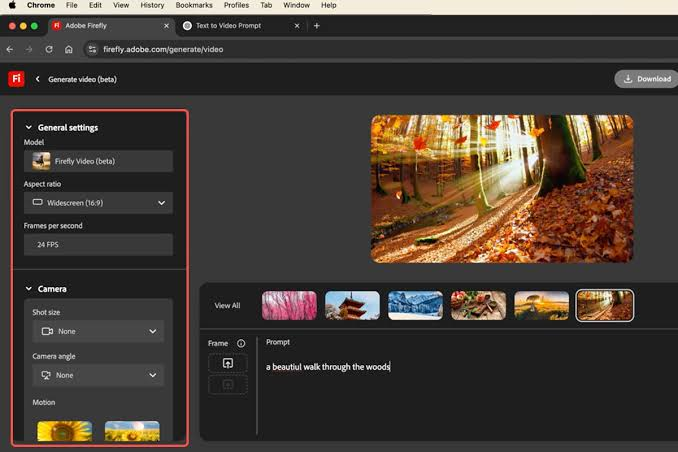
Adobe Firefly is one of the most polished image generation tools available today. It generates images from text prompts and is designed to be commercially safe — meaning the images it produces are trained on licensed content.
What you can do:
- Generate images from text descriptions
- Use Generative Fill to edit photos
- Create text effects with custom styles
- Remove or replace backgrounds instantly
Free plan: 25 generative credits per month. Enough for regular use if you plan your usage wisely.
Best for: Bloggers, marketers, and social media managers who need clean, professional-looking visuals.
2. Canva (Free Plan with Magic Studio)
Canva has been a go-to design tool for years, but its free plan now includes several features powered by its Magic Studio suite.
What you can do:
- Generate images from text prompts
- Use Magic Eraser to remove unwanted objects
- Resize designs automatically for different platforms
- Access thousands of free templates
Free plan: Generous — most features are accessible without paying anything. Some advanced generation tools require Canva Pro.
Best for: Beginners and non-designers who need social media posts, thumbnails, banners, and infographics quickly.
3. Microsoft Designer

Microsoft Designer is a free image creation tool that runs directly in your browser. It is connected to the same image generation technology that powers Bing Image Creator.
What you can do:
- Generate images from detailed text prompts
- Create social media posts, invitations, and posters
- Edit and customize generated designs
Free plan: Fully free with a Microsoft account. Daily generation limits apply but reset every 24 hours.
Best for: Windows users and anyone already in the Microsoft ecosystem who wants quick, clean visuals without installing anything.
4. Bing Image Creator (Microsoft Designer Powered)
Bing Image Creator is the fastest way to generate images for free using the DALL-E model from Microsoft’s partnership with OpenAI.
What you can do:
- Type a detailed prompt and get four image variations
- Download images for personal or commercial use
- Regenerate until you find the right look
Free plan: Free with a Microsoft account. Boosted generations use credits; standard generations are unlimited but slower.
Best for: Quick image generation for blog posts, social media, and content thumbnails without any design skills needed.
5. Ideogram
Ideogram is one of the few image generation tools that handles text inside images accurately — something most other generators struggle with badly.
What you can do:
- Generate images with readable, accurate text overlays
- Create logos, posters, and quote graphics
- Choose from multiple visual styles
Free plan: 10 slow generations per day. Enough for daily content creation.
Best for: Anyone who needs graphics with text — quotes, announcements, event posters, or promotional banners.
6. Pixlr (Free Online Editor)
Pixlr is a browser-based photo editor that works like a lightweight Photoshop. It has added several tools powered by modern technology to help with retouching and compositing.
What you can do:
- Remove backgrounds in one click
- Apply filters and effects
- Cut out objects and combine layers
- Use generative fill to patch or extend images
Free plan: Free with ads. Most editing tools are accessible without payment.
Best for: Creators who need to edit existing images rather than generate new ones from scratch.
Best Free Tools for Video Creation
7. CapCut (Free)
CapCut is one of the most popular free video editing apps globally — and for good reason. It packs a massive feature set into a free app that works on both mobile and desktop.
What you can do:
- Edit videos with cuts, transitions, and effects
- Auto-generate captions and subtitles
- Remove backgrounds from videos automatically
- Use text-to-video templates for Reels and Shorts
- Access a growing library of trending effects
Free plan: Almost everything is free. Some premium templates cost extra, but the core features are more than enough.
Best for: Reels creators, YouTubers, and anyone making short-form video content for Instagram, YouTube Shorts, or WhatsApp Status.
8. Runway (Free Tier)
Runway is one of the most advanced video generation platforms available to the public. It allows you to create short videos from text prompts or transform existing footage using powerful editing tools.
What you can do:
- Generate short video clips from text descriptions
- Use image-to-video to animate still images
- Remove backgrounds from video automatically
- Apply motion blur, slow motion, and other effects
Free plan: 125 one-time credits on signup. Each generation uses a few credits depending on length and quality.
Best for: Creators who want to experiment with text-to-video generation or need professional video effects without expensive software.
9. InVideo (Free Plan)
InVideo is a browser-based video creation platform that makes it easy to turn scripts or ideas into finished videos using templates and stock media.
What you can do:
- Convert blog posts or scripts into videos automatically
- Choose from thousands of templates
- Add voiceovers, music, and subtitles
- Export and share directly to social media
Free plan: Free with watermark on exported videos. Upgrading removes the watermark, but the free version is usable for drafts and previews.
Best for: Bloggers and content marketers who want to repurpose written content into video format quickly.
10. Pika (Free Tier)
Pika is a text-to-video and image-to-video generation tool that has gained a strong following among creators. It produces short, cinematic clips from simple prompts.
What you can do:
- Generate 3-5 second video clips from text or images
- Animate product photos or illustrations
- Experiment with different motion styles
Free plan: Limited free generations per day. Enough for testing and creative experimentation.
Best for: Creators who want to add motion to static images or generate short visual clips for social media.
11. DaVinci Resolve (Free Desktop App)
DaVinci Resolve is a professional-grade video editing software used by Hollywood editors — and it has a completely free version that is more powerful than most paid tools.
What you can do:
- Full timeline-based video editing
- Advanced color grading and correction
- Fairlight audio post-production suite
- Fusion visual effects and motion graphics
Free plan: Fully free forever. The paid Studio version adds a few additional features, but the free version handles everything most creators need.
Best for: Serious video creators, YouTubers, and filmmakers who want professional results without paying for Adobe Premiere or Final Cut Pro.
12. Clipchamp (Free, Built into Windows)
Clipchamp is Microsoft’s free video editor that comes pre-installed on Windows 11. It is a straightforward, browser-based tool perfect for simple edits.
What you can do:
- Trim and combine clips
- Add text, music, and transitions
- Record your screen and webcam
- Export in 1080p for free
Free plan: Fully free. No watermarks on 1080p exports.
Best for: Windows users who need a quick, no-install video editor for basic content creation.
Quick Comparison Table
| Tool | Type | Free Tier | Best For |
|---|---|---|---|
| Adobe Firefly | Image | 25 credits/month | Professional visuals |
| Canva | Image + Design | Generous free plan | Social media graphics |
| Microsoft Designer | Image | Fully free | Quick content |
| Bing Image Creator | Image | Unlimited (slow) | Blog and social images |
| Ideogram | Image | 10/day | Text-heavy graphics |
| Pixlr | Image Editing | Free with ads | Photo editing |
| CapCut | Video | Almost all free | Reels and Shorts |
| Runway | Video Generation | 125 credits | Text-to-video |
| InVideo | Video | Free with watermark | Script-to-video |
| Pika | Video Generation | Limited/day | Animated clips |
| DaVinci Resolve | Video Editing | Fully free | Professional editing |
| Clipchamp | Video Editing | Fully free | Basic Windows editing |
How to Choose the Right Tool
The right tool depends on what you are creating and how much time you want to invest:
For social media graphics and posts: Start with Canva. It is the fastest, most beginner-friendly option with the largest template library.
For unique generated images: Use Bing Image Creator for speed or Adobe Firefly for quality and commercial safety.
For short video content (Reels, Shorts, Status): CapCut is the clear winner. It is built exactly for this use case.
For text-to-video experiments: Try Runway or Pika. Both give you a taste of what modern video generation can do.
For professional video editing: DaVinci Resolve is the gold standard at zero cost.
Tips for Getting Better Results
Be specific with prompts. Instead of “a person running,” try “a young Indian woman running through a busy Mumbai street at golden hour, cinematic lighting.” The more detail you give, the better the output.
Use multiple tools together. Generate a base image in Bing Image Creator, refine it in Pixlr, then use it as a thumbnail after editing in Canva. Combining free tools multiplies what you can create.
Save your credits. Tools with credit limits (Firefly, Runway) work best when you plan generations carefully rather than experimenting randomly.
Stick to 1080p for video. Most free tools export cleanly at 1080p. Do not chase 4K on free plans — the quality difference rarely matters for social media.
Frequently Asked Questions
Are these tools completely free?
All tools listed here have a usable free tier. Some put limits on the number of generations per day or add a watermark on exports. None require a credit card to start.
Can I use generated images commercially?
It depends on the tool. Adobe Firefly is designed for commercial use. Bing Image Creator allows personal use but has restrictions on commercial applications. Always check each platform’s terms before using generated content for business purposes.
Do these tools work in India?
Yes. All tools listed here are accessible in India. Some may require a VPN if your network provider blocks specific domains, but most work without any workaround.
Which tool is best for YouTube thumbnails?
Canva is the most popular choice for YouTube thumbnails thanks to its template library and easy text customization. Bing Image Creator is great for generating unique background images to use inside those templates.
Is there a free tool that creates full-length videos from a script?
InVideo comes closest to this. You can paste a script, and it will build a video using stock footage and templates. The free version adds a watermark, but the result is a functional draft.
Conclusion
The barrier to creating professional-looking video and image content has never been lower. With tools like CapCut, Canva, DaVinci Resolve, and Runway all offering powerful free plans, there is no reason to spend heavily on content production — especially when you are just starting out.
Pick one or two tools from this list, get comfortable with them, and then expand your toolkit as your content needs grow. The best tool is always the one you actually use consistently.