
VPN for your PC that won’t cost you a single rupee or dollar? You’re not alone. Millions of people search for “free VPN” every month, but here’s the catch — most of them are either too slow to use, packed with ads, or quietly selling your browsing data to someone else.
The good news is that a handful of genuinely free VPNs for Windows PCs have earned a real reputation for being safe, fast, and honest about what you’re getting. In this guide, we’ll walk through the best freeware VPNs you can install on your PC in 2026, what each one is actually good for, and where they fall short — because no free VPN is perfect, and you deserve to know that before you download anything.
Finding the best freeware VPN for PC in 2026 is more important than ever as online privacy, public Wi-Fi security, and geo-restricted content continue to be everyday concerns. While premium VPNs offer the most complete experience, several free VPNs provide strong encryption, reliable performance, and trustworthy privacy policies without costing anything. The key is choosing a reputable provider instead of unknown free VPNs that may collect your data or display intrusive ads.
In this guide, we’ll explore the best freeware VPNs for Windows PCs in 2026, comparing their security, speed, data limits, and ease of use. Whether you need a VPN for secure browsing, streaming, remote work, or protecting your personal information, these free options can help you stay safe online without spending a dollar. We’ll also explain each VPN’s pros and limitations so you can choose the one that best fits your needs.
What Does “Freeware VPN” Actually Mean?
Before we jump in, let’s clear up some confusion. Not every VPN that says “free” on its homepage is freeware in the true sense.
There are two very different kinds of free VPNs floating around:
True freeware VPNs — These don’t ask for your card details. You sign up, install the app, and use a permanent free plan with some limits (less data, fewer servers, slower speeds). Proton VPN and Windscribe fall into this category.
Free trial VPNs — These are full premium VPNs that let you try the paid version for free for a set number of days, usually backed by a money-back guarantee. NordVPN and Surfshark work this way. They’re not freeware, but if you only need a VPN for a short trip or a one-time task, the trial route can actually get you more features than a true free plan.
Both have their place, so we’ve covered the best of each below.
Quick Comparison: Best Free VPNs for PC in 2026
| VPN | Data Limit | Servers | Best For | Streaming? |
|---|---|---|---|---|
| Proton VPN Free | Unlimited | 10 locations (auto-pick only) | Privacy & everyday browsing | No |
| Windscribe Free | Limited monthly data | 10+ countries | Bypassing geo-blocks, China access | Limited |
| Hotspot Shield Basic | Unlimited | Fewer locations | Casual browsing | No |
| PrivadoVPN Free | Capped monthly data | Decent spread | Fast browsing, occasional streaming | Yes (limited) |
| TunnelBear Free | 2GB/month | Auto-pick only | Light, occasional use | No |
Now let’s get into the details of each one, because the table only tells half the story.
1. Proton VPN Free — Best for Privacy and Unlimited Data
If privacy is your main reason for wanting a VPN, Proton VPN’s free plan is hard to beat. It’s built by the same team behind Proton Mail, and they’ve made privacy their whole identity — not just a marketing line.
What stands out is that Proton VPN Free comes with no data cap at all. You can use it all day, every day, without watching a usage meter. It also doesn’t show ads or sell your browsing history, and the apps have gone through independent security audits, so the privacy claims aren’t just something the company says about itself — outside experts have actually checked.
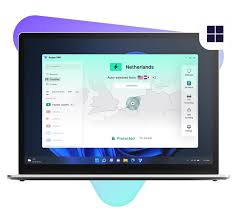
The trade-off is server choice. You get access to free servers in 10 countries, but you can’t pick which one to connect to — the app automatically links you to the fastest one nearby. So if you specifically wanted a UK or Japan server to unlock a particular show, this won’t work for you.
Real example: Say you’re working from a co-working space in Mumbai on public Wi-Fi and want to make sure nobody on that network can snoop on your banking session. Proton VPN Free quietly handles that in the background without slowing your connection down much.
Pros:
- Truly unlimited data, no daily or monthly caps
- Strong, independently audited no-logs policy
- Kill switch included, so your real IP never leaks if the connection drops
- Works well for everyday browsing, email, and banking
Cons:
- Can’t manually choose your server location
- Not built for streaming or torrenting
- Only 10 free server locations
2. Windscribe Free — Best for Getting Around Blocked Sites
Windscribe has built a loyal following among people who need to reach websites that are blocked in their region. It comes with a built-in firewall feature that stops your real IP address from leaking even if your VPN connection unexpectedly drops — a small detail that a lot of free VPNs skip entirely.
It works smoothly across Windows, Mac, iOS, and Android, and there are browser extensions for Chrome and Firefox too, which is handy if you only need quick protection while browsing rather than running the full desktop app.

One thing worth knowing: the free plan comes with a monthly data allowance rather than unlimited use, so it’s better suited for regular browsing and messaging than for binge-watching anything.
Real example: A college student researching international news sources that are restricted in their country can use Windscribe’s free browser extension just for that research session, without installing anything heavier on their laptop.
Pros:
- Solid track record with no IP or DNS leaks in independent testing
- Built-in firewall adds an extra safety layer
- Browser extensions for quick, lightweight use
- Works in regions with strict internet censorship
Cons:
- Monthly data allowance, not unlimited
- Smaller server network compared to paid VPNs
- Some streaming platforms have gotten better at detecting it
3. Hotspot Shield Basic — Best for Simple, No-Fuss Browsing
If you just want something that connects instantly without fiddling around in settings, Hotspot Shield’s free Basic plan does the job. It has no daily or monthly data cap, which already puts it ahead of most “free” VPNs that throttle you after a couple of gigabytes.
It’s genuinely fast, which makes sense since Hotspot Shield has long been known for speed-focused VPN technology. The catch is that streaming services tend to block its free servers quickly, so don’t expect to use it for Netflix or similar platforms. Think of it as a tool for general browsing, checking email on public Wi-Fi, or downloading files without your internet provider watching every site you visit.
Pros:
- No data limits on the free Basic plan
- Fast connection speeds
- One-click connect, beginner-friendly interface
Cons:
- Streaming sites block it almost immediately
- Limited number of free servers
- Fewer device connections allowed on the free tier
4. PrivadoVPN Free — Best for Fast Speeds
PrivadoVPN earns its spot here mostly because of raw speed. In independent testing, it’s clocked connection speeds well over 1,000 Mbps, which is unusually fast for a free VPN plan. That speed makes it one of the better free options if you occasionally want to stream or download something without long buffering waits.
The catch is the same one you’ll find with most genuinely fast free VPNs: a monthly data cap. Once you hit it, you’re either waiting for next month or upgrading to a paid plan. So treat it as your go-to for short, fast sessions rather than all-day use.
Worth noting — PrivadoVPN relocated its base from Switzerland to Iceland in 2026, partly to stay under privacy-friendly data laws that don’t force VPNs to log user activity. That’s a meaningful detail if jurisdiction matters to you.
Pros:
- Excellent speeds compared to other free VPNs
- Works for occasional streaming and torrenting
- Based in a privacy-friendly jurisdiction
Cons:
- Monthly data cap limits regular use
- Hasn’t completed a full third-party security audit
- Smaller server network than premium competitors
5. TunnelBear Free — Best for Very Light, Occasional Use
TunnelBear has always had a friendly, simple design that makes it approachable for people who aren’t tech-savvy. The free plan now auto-selects your server rather than letting you manually pick one, which is a step down from earlier versions, but the encryption strength hasn’t changed — it’s still solid.
The real limitation is the 2GB monthly cap, which is enough for checking email or browsing news securely on a coffee shop Wi-Fi, but it’ll run out fast if you’re streaming or downloading anything sizeable.
Real example: If you only need a VPN once a month — say, to securely log into your bank account while traveling — TunnelBear’s small monthly allowance might be all you ever need.
Pros:
- Simple, beginner-friendly app
- Strong encryption standards
- Good for short, infrequent sessions
Cons:
- Only 2GB of data per month
- No manual server selection on free tier
- Not practical for daily, heavy use
What About NordVPN, ExpressVPN, and Surfshark?
These aren’t freeware in the strict sense, but they deserve a mention because of how their free trial and refund policies work in practice.
NordVPN and Surfshark both offer trial periods (Surfshark gives a 7-day free trial with full features), and all three back their paid plans with a 30-day money-back guarantee. That means you can technically use the full premium service, get unrestricted streaming, larger server networks, and faster speeds — and request a refund before the period ends if it’s not for you.
This route isn’t for everyone. You’ll need to enter payment details upfront, and you have to remember to cancel before the trial or guarantee window closes. But if you need a VPN temporarily — for a trip, a specific show, or a short work project — this can actually give you a better experience than any permanently free plan.
How to Choose the Right Free VPN for Your Needs
There’s no single “best” free VPN for everyone — it really depends on what you’re trying to do.
If your main concern is privacy and security while browsing or banking, go with Proton VPN Free. The unlimited data and audited no-logs policy make it the safest long-term pick.
If you regularly need to access blocked websites or news sources, Windscribe Free is built for exactly that kind of use.
If you just want something quick and simple for daily browsing without thinking too hard about it, Hotspot Shield Basic gets the job done with no data cap.
If you occasionally want to stream or download something quickly, PrivadoVPN Free’s speed makes the most of its limited data allowance.
If you only need a VPN a handful of times a month, TunnelBear’s small but reliable free plan covers the basics without asking much of you.
How to Set Up a Free VPN on Your PC
Getting started is far simpler than most people expect:
- Visit the official website of the VPN you’ve chosen (always download directly from the provider, never a third-party site).
- Create a free account using your email address.
- Download the Windows app and run the installer.
- Open the app, log in, and click connect — most free VPNs will automatically pick the fastest available server for you.
- Check your new IP address by searching “what is my IP” in your browser, just to confirm the VPN is actually working.
That’s it. Most of these apps are designed for people who don’t want to dig through complicated settings menus.
Staying Safe With Free VPNs: A Few Honest Tips
Free VPNs can be useful, but they come with limitations worth keeping in mind:
- Stick to well-known providers that have been independently audited. A lesser-known “100% free, no signup” VPN app is often free because it’s collecting and selling your data instead of charging you money.
- Don’t use a random free VPN for anything sensitive like online banking unless it has a proven no-logs policy and a kill switch.
- Expect slower speeds and data limits — that’s the trade-off for not paying.
- If a free VPN suddenly asks for unusual permissions on your PC, that’s a red flag worth taking seriously.
Frequently Asked Questions
Is it safe to use a free VPN on my PC?
It depends entirely on which one you choose. Established providers like Proton VPN and Windscribe have been independently audited and have clean track records with no data leaks. Unknown or obscure free VPN apps, on the other hand, are often risky and may log or sell your data to make money, since running VPN servers isn’t free for the company either.
Why do free VPNs limit data or servers?
Running VPN servers costs real money. Free plans are usually a way for companies to let you try their service and hopefully upgrade later, so they limit data, speed, or server choice to encourage that upgrade — while still offering something usable for free.
Can I use a free VPN for streaming Netflix or Prime Video?
Mostly no. Streaming platforms actively block known VPN server IP addresses, and free VPN servers get blocked faster than paid ones since fewer total IPs are shared among more users. PrivadoVPN Free is one of the few that occasionally works, but don’t count on consistent access.
Do free VPNs slow down my internet speed?
Some noticeable slowdown is normal with any VPN, free or paid, since your traffic is being rerouted and encrypted. That said, providers like Hotspot Shield and PrivadoVPN are built to minimize the slowdown, while smaller or low-quality free VPNs can cut your speed dramatically.
Is a free VPN good enough for everyday use, or should I pay?
For basic browsing, checking email, and general privacy on public Wi-Fi, a good free VPN is genuinely enough. If you need consistent streaming access, torrenting, or larger data allowances, a paid VPN — or at least a free trial of one — will serve you better.
Does a free VPN protect me from viruses or malware?
No, a VPN encrypts your internet connection and hides your IP address, but it doesn’t scan files or block malware on its own. Some premium plans bundle in extra security features like threat protection, but for actual virus protection, you’ll still need separate antivirus software.
Can I use a free VPN on more than one device?
Most free VPN plans limit you to one or two simultaneous connections. If you need to cover a PC, phone, and tablet at the same time, you’ll likely need to upgrade to a paid plan or stick to a trial offer that allows multiple devices.
Conclsion
The free VPN market has genuinely improved over the past couple of years. A few years ago, “free VPN” almost always meant compromised security and constant ads. Today, providers like Proton VPN and Windscribe have shown that a free plan can still be safe and trustworthy, even if it comes with fewer servers or data limits than the paid version.
If privacy is your top priority, start with Proton VPN Free. If you need to get around blocked content, Windscribe is worth trying. And if you’re only after a short-term solution with full features, a trial from NordVPN or Surfshark might serve you better than any permanently free plan. Whichever you pick, just make sure it’s a name with a real track record — your browsing data is worth protecting properly.

