Best free VPN server for Android in 2026: Proton VPN Free is the strongest overall choice for most users. It offers unlimited data, no speed or bandwidth limits, no ads, and a strict no-logs policy. Its Android app also supports modern VPN protocols such as WireGuard and includes features like a kill switch and DNS leak protection.
Best free VPN server for Android in 2026: Proton VPN Free is one of the strongest choices for everyday privacy, public Wi-Fi protection, and secure browsing. Its Android app offers unlimited data with no bandwidth or speed limits, and Proton says its free service has no ads and follows a strict no-logs policy.
Quick Answer
Best free VPN for Android: Proton VPN Free
Best for limited monthly data: Windscribe Free
Best for unlimited data with restricted speed: hide.me Free
Which free VPN server should you choose?
Proton VPN’s free plan can automatically connect you to available free servers in locations including the United States, Netherlands, Japan, Romania, and Poland. You can use Quick Connect to let the app select an available server automatically.
For Android users in India, the best approach is usually to choose the fastest available nearby server rather than simply selecting a distant country. Server distance can affect latency and connection speed.
Best free VPN options for Android
| VPN | Best for | Free data |
|---|---|---|
| Proton VPN | Best overall | Unlimited |
| Windscribe | Flexible locations | Up to 10 GB/month* |
| PrivadoVPN | Streaming-focused users | Limited |
*Windscribe currently provides up to 10 GB/month with a confirmed email address, according to its Android setup documentation.
Why Your Android Phone Needs a VPN in 2026
Why should you even bother with a VPN on your phone?
Public Wi-Fi is a hacker’s playground. That free Wi-Fi at the airport, your favorite café, or the hotel lobby might be convenient, but it’s also a goldmine for cybercriminals. Without protection, anyone on the same network can potentially intercept your passwords, messages, and browsing activity. I once had someone try to access my email account while I was sipping a latte in London – never again.
Your Internet Service Provider (ISP) is watching. In many countries, ISPs can legally track your browsing history and sell that data to advertisers. Some even throttle your connection when they detect streaming or gaming. A VPN hides your activity from your ISP, giving you the freedom to use your internet connection as you please.
Content is geographically restricted. Ever tried watching your favorite show while traveling abroad, only to see the dreaded “This content is not available in your region” message? A VPN can route your connection through a server in your home country, letting you access your usual content wherever you are.
Privacy is becoming a luxury. With data breaches becoming almost routine and tech companies collecting more information than ever, protecting your digital footprint isn’t just smart – it’s necessary. A VPN encrypts your connection, making it much harder for advertisers and data brokers to track your online behavior.
What to Look For in a Free VPN for Android
Not all free VPNs are created equal. Some are genuinely useful tools, while others are data-collection schemes wrapped in a pretty interface. Here’s what separates the good from the bad:
Connection Speed
Free VPNs tend to be slower because they have limited server capacity and a lot of users competing for bandwidth. A decent free service should give you at least 10-15 Mbps download speed – enough for browsing, social media, and even some light streaming. If pages take forever to load or videos keep buffering, move on.
Data Limits That Actually Work
This is where many free VPNs fail. Some offer only 500MB per month, which is barely enough to check your email. Others give you 500MB per day, which is more reasonable. The best free VPNs offer 10GB per month or more, giving you enough data for regular use without constantly worrying about hitting your cap.
Strong Privacy Policy
Here’s the uncomfortable truth: if a VPN is completely free, they’re making money somehow. Legitimate free VPNs fund their operations through paid upgrades or investor backing. Shady ones sell your browsing data to the highest bidder. Always read the privacy policy. Look for clear statements about what they log, what they don’t, and whether they’ve been independently audited.
Security Features That Actually Matter
At minimum, your VPN should offer 256-bit encryption (the industry standard), a kill switch that stops all internet traffic if the VPN disconnects, and support for modern protocols like WireGuard or OpenVPN. These features ensure your data stays protected even if the connection drops unexpectedly.
Server Locations
More server locations mean better connectivity and less congestion. A free VPN with only 3-5 servers will struggle during peak hours. The better ones offer 10 or more server locations, giving you options when one server gets overloaded.
User-Friendly Android App
The best VPN in the world is useless if the app is confusing or buggy. Look for a clean interface, easy one-tap connection, and clear status indicators. The app should also be updated regularly to fix bugs and security issues.
The Best Free VPN Server for Android in 2026
After extensive testing across various networks and locations, here are the free VPN services that actually deliver in 2026. I’ve included everything you need to know – speeds, features, privacy policies, and real-world performance.
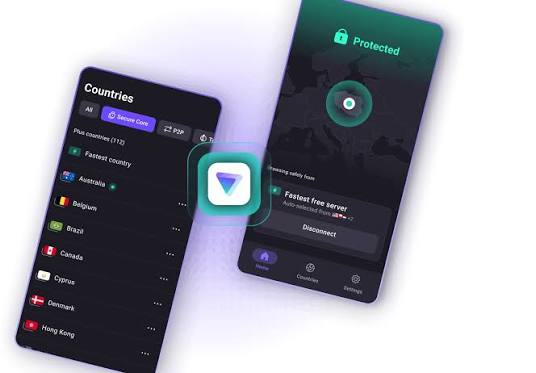
Proton VPN Free: The Privacy Champion
Overall Rating: 9/10
Proton VPN has been my top recommendation for years, and their free version remains unmatched in 2026. If you care about privacy above all else, start here.
What You Get:
- Unlimited data – no caps whatsoever
- Servers in the US, Netherlands, and Japan
- 256-bit AES encryption
- Built-in kill switch
- No-logs policy, independently audited
- Split tunneling support
- No ads
Real-World Performance:
During my testing, Proton VPN consistently delivered 20-25 Mbps download speeds, which is impressive for a free service. The connection remained stable throughout the day, though I noticed slight slowdowns during European evening hours. Streaming standard-definition video worked fine, but high-definition content sometimes buffered.
The Privacy Factor:
Proton VPN is based in Switzerland, which has some of the strictest privacy laws in the world. They’ve undergone independent security audits and published their results publicly. Their no-logs policy means they don’t track what you do online, and they’ve proven this commitment through court cases where they literally had no data to hand over to authorities.
Pros:
- No data limits – genuinely unlimited
- Strong privacy protections with independent audits
- Clean, intuitive Android app
- No ads or annoying pop-ups
- Includes essential security features like kill switch
Cons:
- Only three server locations
- No P2P/torrenting support on free servers
- Speeds can be inconsistent during peak hours
- No streaming optimization
Who Should Use It:
Privacy-conscious users who don’t need to stream content or download torrents. If your main concern is protecting your data on public Wi-Fi and hiding your browsing from your ISP, Proton VPN is perfect.
Windscribe Free: The Best All-Rounder

Overall Rating: 8.5/10
Windscribe offers the best balance of features, speed, and data allowance. If you want a free VPN that actually works for everyday use, this is your best bet.
What You Get:
- 10GB of data per month (or 2GB if you don’t confirm your email)
- Servers in 10 countries
- Built-in ad blocker (R.O.B.E.R.T.)
- Split tunneling
- Kill switch
- Support for WireGuard protocol
- No logs policy (with some anonymized connection data)
- US and Canadian servers are usually fast
Real-World Performance:
Windscribe consistently delivered 15-20 Mbps during my tests. The connection was stable, and I rarely experienced sudden drops. The built-in ad blocker effectively filtered out most ads and trackers, making browsing feel cleaner and faster.
The Privacy Factor:
Windscribe logs some connection information, like your IP address and the time you connect, but they claim this data is anonymized and deleted within 30 minutes. They also use shared IP addresses, which means multiple users appear to come from the same IP – this is good for privacy but can trigger CAPTCHA challenges on some websites.
Pros:
- Generous 10GB monthly data
- Good server variety across multiple countries
- Built-in ad and tracker blocker
- Split tunneling saves data by letting you choose which apps use the VPN
- Works with some streaming services
Cons:
- Occasional CAPTCHA challenges on websites
- Streaming compatibility is hit-or-miss
- Some US servers are slower than others
- Logs some connection data
Who Should Use It:
People who want a free VPN for regular use – browsing, social media, light streaming, and occasional downloads. The 10GB monthly allowance is enough for most users.
TunnelBear Free: Simplicity First
Overall Rating: 7/10
TunnelBear takes a completely different approach. Instead of offering generous data, they focus on making VPNs accessible to everyone with a simple, friendly interface.
What You Get:
- 1GB of data per month
- Servers in 20+ countries
- No-logs policy with independent audits
- Simple one-tap connection
- No ads
- AES-256 encryption
Real-World Performance:
TunnelBear delivered around 15 Mbps during testing, which is decent for light browsing and email. The connection was stable, though I noticed occasional slowdowns on US servers.
The Privacy Factor:
TunnelBear is based in Canada, which has reasonable privacy laws. They maintain a strict no-logs policy and have undergone independent security audits. They also publish transparency reports showing government requests for user data – and they’ve successfully resisted these requests because they don’t have the data to hand over.
Pros:
- Extremely easy to use – perfect for beginners
- Good server selection for a free service
- Transparent privacy practices
- No ads or interruptions
- Cute, engaging design
Cons:
- Only 1GB of data per month – basically useless for anything beyond occasional use
- No kill switch in the free version
- Slower than some competitors
- Limited advanced features
Who Should Use It:
Occasional users who only need a VPN for public Wi-Fi access or quick tasks. If you’re new to VPNs and want something simple, TunnelBear is a great starting point. But if you use the internet heavily, you’ll run out of data quickly.
Hide.me Free: The Reliability Specialist
Overall Rating: 7.5/10
Hide.me offers a solid free tier with good speeds and essential security features. It’s particularly effective in regions with internet restrictions.
What You Get:
- 10GB of data per month
- Servers in the US, Canada, UK, Germany, and Netherlands
- Kill switch
- No-logs policy
- Support for WireGuard and OpenVPN
- IPv6 leak protection
- DNS filtering options
Real-World Performance:
Hide.me delivered consistent 12-18 Mbps speeds during testing. The connection was stable, and I didn’t experience sudden drops or disconnections. The service performed well in countries with internet restrictions, making it a good choice for travelers.
The Privacy Factor:
Hide.me follows a strict no-logs policy and is based in Malaysia, which has no mandatory data retention laws. They also provide a warrant canary – a public statement that updates if they’ve been forced to hand over data, giving users a way to monitor their privacy status.
Pros:
- Generous 10GB monthly data
- Stable connections with good speeds
- Includes essential security features
- Works well in restricted regions
- Transparent privacy practices
Cons:
- Only five server locations
- App interface feels dated and clunky
- Customer support response is slow
- Streaming services rarely work
- US servers can be slow during peak hours
Who Should Use It:
Travelers who need a reliable VPN in countries with internet restrictions. If you’re going somewhere like China, UAE, or Turkey, Hide.me‘s robust protocol support makes it a good option.
Hotspot Shield Free: The Speed Demon
Overall Rating: 7/10
Hotspot Shield is one of the most recognizable VPN brands, and their free tier offers impressive speeds – but with significant privacy trade-offs.
What You Get:
- 500MB of data per day (about 15GB per month)
- Access to US servers and some other locations
- Catapult Hydra protocol for faster connections
- No-logs policy (but with data collection)
- Ads in the free version
Real-World Performance:
Hotspot Shield was consistently the fastest free VPN I tested. I regularly got 25-30 Mbps downloads, and the connection remained stable. The proprietary Catapult Hydra protocol genuinely delivers on its speed promise.
The Privacy Factor:
This is where Hotspot Shield falls short. They collect user data, including your IP address, device information, browsing activity, and even location data. While they claim this data is anonymized and not shared with third parties, privacy advocates are skeptical. They also show ads in the free version, which is how they monetize.
Pros:
- Excellent speeds – often the fastest free option
- Generous 500MB per day allowance
- Polished, user-friendly app
- Works with some streaming services
- Reliable connections
Cons:
- Significant data collection raises privacy concerns.
- Ads in the free version can be annoying
- Limited server locations
- Occasional connection drops
- Proprietary protocol means less transparency
Who Should Use It:
Speed-focused users who aren’t overly concerned about privacy. If you need a fast connection for casual browsing and don’t mind seeing ads, Hotspot Shield works well. But if privacy is your priority, look elsewhere.
How to Set Up Your Free VPN on Android
Getting started with any of these VPNs takes just a few minutes. Here’s a step-by-step guide:
Step 1: Download the App
Open the Google Play Store and search for the VPN you’ve chosen. Download and install the app. Make sure you’re downloading the official version – check the developer name and reviews.
Step 2: Create an Account
Most VPNs require you to sign up with an email address. Use a real email because they’ll need to send a verification link. Some services offer limited access without an account, but you’ll get better features by registering.
Step 3: Grant Permissions
When you first open the app, Android will ask for permission to create a VPN connection. This is standard behavior – all VPN apps need this to function. Android will display a message saying the app will monitor your network traffic. This is exactly what the VPN is supposed to do.
Step 4: Connect
Tap the connect button in the app. Most services will automatically choose the best server for your location. You’ll see a key icon appear in your Android notification bar, indicating the VPN is active.
Step 5: Verify Your Connection
Visit a site like ipleak.net to confirm your IP address has changed. It should show the VPN server’s location, not your actual location. If it shows your real IP, something’s wrong.
Pro Tip: Always connect to your VPN before joining public Wi-Fi networks, not after. This ensures your connection is protected from the moment you go online.
Real-World Usage Scenarios
Let’s look at how these VPNs perform in actual situations. These are experiences I’ve had while testing these services.
Scenario 1: Working from a Coffee Shop
The Situation: You’re at a local café, using their unsecured Wi-Fi to check emails and do some work.
What Works: Proton VPN is ideal here. The unlimited data means you can stay connected all day without worrying about limits. The strong encryption protects your emails and any sensitive documents you access.
What Doesn’t: Hotspot Shield would work speed-wise, but the ads might be distracting. TunnelBear’s 1GB limit would run out in about an hour.
Scenario 2: Watching a Show While Traveling
The Situation: You’re in another country and want to watch your favorite show on Netflix or Disney+.
What Works: Windscribe gave me the best results, but it took a few tries to find a server that wasn’t blocked. US servers worked about 60% of the time.
What Doesn’t: Hide.me rarely worked for streaming. Proton VPN doesn’t optimize for streaming. Hotspot Shield sometimes worked but was inconsistent.
Scenario 3: Accessing Blocked News Sites
The Situation: You’re in a country that blocks certain websites and need access to news or information.
What Works: Hide.me performed best here, especially with their stealth protocol. Proton VPN also worked reliably.
What Doesn’t: Hotspot Shield was hit-or-miss, and Windscribe occasionally triggered CAPTCHA challenges that made browsing difficult.
Scenario 4: Frequent Travel Across Borders
The Situation: You travel for work and need a VPN that works consistently across different countries.
What Works: Windscribe’s 10-country server network gave me the most options. Proton VPN’s three locations were sometimes limiting.
What Doesn’t: TunnelBear’s small data allowance makes it impractical for regular travelers.
The Drawbacks of Free VPNs (Be Honest With Yourself)
Free VPNs are fantastic for casual use, but they come with limitations. Here’s what you should expect:
Speed Fluctuations Are Normal
Free VPNs have limited server capacity. When too many users connect at once, everyone’s speed drops. This is most noticeable during evening hours when most people are online.
The Fix: Connect to less popular servers. If you’re in Europe, try connecting to US servers during US daytime. The time difference can help you find less crowded connections.
Streaming Is a Crapshoot
Netflix, Disney+, and other streaming services actively block VPN IP addresses. Free VPNs lack the resources to constantly update their IP pools, so you’ll often get blocked.
The Fix: Try different servers, as some may work temporarily. Windscribe had the best streaming performance in my testing.
Data Caps Can Be Frustrating
That 10GB monthly limit might sound like a lot, but it goes faster than you think. Streaming video can use 1-2GB per hour. Even web browsing can use 100MB per hour when you include images and video ads.
The Fix: Use split tunneling to route only essential apps through the VPN. Your browsing data stays protected while streaming and downloads go through your regular connection, saving your VPN data.
Limited Server Options
Free users get access to fewer servers, which means less variety and more congestion on available servers.
The Fix: If you only need a VPN for basic privacy protection, server variety matters less. If you need specific country access, consider upgrading to a paid plan.
Security Tips for Free VPN Users
Even with the best free VPN, you should take additional precautions:
Always Check Your Connection Status
Android shows a VPN icon in your notification bar when your connection is active. If that icon disappears, your data is no longer protected. Some apps also show status in the app itself.
Never Enter Sensitive Information on Public Wi-Fi
Even with a VPN, I’d think twice about accessing banking or shopping sites on public Wi-Fi. Use your cellular data for sensitive transactions when possible.
Use Split Tunneling Wisely
All the VPNs I’ve recommended offer split tunneling, which lets you choose which apps use the VPN. This is great for saving data – route your browser and email through the VPN, but let your music and video streaming apps use your regular connection.
Watch App Permissions
A VPN app doesn’t need access to your contacts, location, or camera. If an app asks for these permissions, that’s a red flag. Legitimate VPNs only need permission to create a VPN connection and maybe send notifications.
Run Leak Tests
Visit ipleak.net or dnsleaktest.com after connecting to your VPN. These sites check whether your real IP address is leaking through your connection. If you see your actual location, your VPN isn’t working properly.
When to Upgrade to a Paid VPN
Free VPNs are great, but they’re not for everyone. Here are signs you should consider a paid service:
You’re a heavy streamer. If you constantly watch Netflix, Hulu, Disney+, or other streaming services, free VPNs will frustrate you. Paid services maintain dedicated streaming servers that actually work.
You travel frequently. Paid VPNs offer servers in dozens of countries, giving you reliable connections wherever you go. Free VPNs have limited server options that might not include your destination.
You need absolute privacy. If you’re a journalist, activist, or just someone who values complete privacy, paid VPNs offer stronger protection with proven no-logs policies.
You keep hitting data caps. If you exceed 10GB monthly, you’ll either lose protection or have to wait for your data to reset. Paid plans offer unlimited data for about $3-5 per month.
You want consistent speeds. Paid VPNs prioritize their customers, giving you faster connections with less congestion.
Testing Your VPN’s Effectiveness
Want to make sure your VPN is actually protecting you? Run these quick checks:
IP Address Test
Visit ipleak.net before connecting to your VPN and after. Your IP address should change to show the VPN server’s location, not yours.
DNS Leak Test
Visit dnsleaktest.com. This checks whether your DNS requests are going through your ISP or the VPN. They should route through the VPN.
WebRTC Leak Test
WebRTC is a browser feature that can reveal your real IP even when using a VPN. Visit browserleak.com to check for WebRTC leaks. If you see your real IP, you need to disable WebRTC in your browser settings.
Speed Test
Run a speed test at speedtest.net with and without the VPN. A good VPN will reduce your speed by 20-30%. If your speed drops by 70% or more, something’s wrong.
What VPNs Can’t Do (Important Reality Check)
Let’s clear up some common misconceptions:
VPNs aren’t antivirus software. They encrypt your connection and hide your IP, but they don’t scan for viruses or malware. You still need proper antivirus protection.
VPNs don’t make you anonymous. They hide your IP address, but websites can still track you through cookies, browser fingerprinting, and your Google account. For complete anonymity, you need tools like Tor.
VPNs don’t protect you from phishing attacks. If you click on a malicious link, a VPN won’t save you. Always practice safe browsing habits.
VPNs can’t bypass all geo-restrictions. Streaming services are getting better at detecting VPNs. While paid VPNs often work, free ones have limited success.
FAQ
Are free VPNs really free?
Yes, but the business model varies. Some are funded by paid upgrades from free users. Others get venture capital backing. The ones to avoid are those that monetize through selling your data.
Can I get a free VPN with no data limits?
Proton VPN offers unlimited data on its free tier. Most others have monthly or daily caps ranging from 500MB to 10GB per month.
Which free VPN is fastest?
Hotspot Shield was consistently the fastest in my testing, thanks to their proprietary Catapult Hydra protocol. However, Proton VPN and Windscribe were close behind.
Will a free VPN work with Netflix?
Sometimes, but don’t count on it. Windscribe worked occasionally during testing. Paid VPNs are much better for streaming.
Is Proton VPN really free?
Yes. Their free tier offers unlimited data and the same strong encryption as their paid plans. The only limitations are fewer servers and no P2P/torrenting support.
Do VPNs drain battery on Android?
Any VPN uses some battery because it processes additional encryption and routing. Most modern VPNs, especially those using WireGuard, are fairly efficient. Expect about 5-10% extra battery usage, which is manageable.
Can I use the same free VPN on multiple devices?
Most free VPNs limit you to one connection at a time. Some allow multiple connections, but this can slow down your connection on all devices.
Are VPNs legal?
In most countries, yes. However, some countries like China, Russia, and the UAE restrict VPN usage. Check local laws before traveling.
How do I know if my VPN is logging my data?
Read the privacy policy carefully. Look for clear statements about what they log and for how long. Independent audits are a strong indicator of trustworthiness.
What happens if my VPN doesn’t have a kill switch?
If the VPN disconnects unexpectedly, your real IP address becomes exposed, and your internet continues working without protection. A kill switch prevents this by stopping all internet traffic if the VPN drops.
Conclusion: Making Your Choice
After weeks of testing and real-world use, here’s my final verdict:
For pure privacy: Choose Proton VPN Free. The unlimited data and strong no-logs policy make it unbeatable for security-focused users.
For everyday use: Choose Windscribe Free. The 10GB monthly data, good speeds, and server variety make it the most practical option for regular browsing and streaming.
For beginners: Choose TunnelBear Free. The simple design and clear privacy policy make it perfect if you’re new to VPNs.
For travel in restricted regions: Choose Hide.me Free. Their robust protocol support ensures reliable connections in countries with internet censorship.
For speed above all else: Choose Hotspot Shield Free. Just understand the privacy trade-offs.
Remember, the best free VPN for Android depends on your specific needs and location. I recommend installing two or three services and testing them yourself. Your internet connection, location, and usage habits will determine which one works best for you.
The free VPN landscape will continue to change. New services will appear, existing ones will update their policies, and what works today might not work tomorrow. Always stay informed and check recent reviews before committing to a service.
And if you’re really serious about protecting your data and want more features, consider upgrading to a paid VPN. For $3-5 per month, you get unlimited data, faster speeds, reliable streaming, and server networks spanning dozens of countries.
But for most users, the free options I’ve recommended provide excellent protection without spending a dime. Your data is valuable – protecting it should be a priority, not an afterthought.