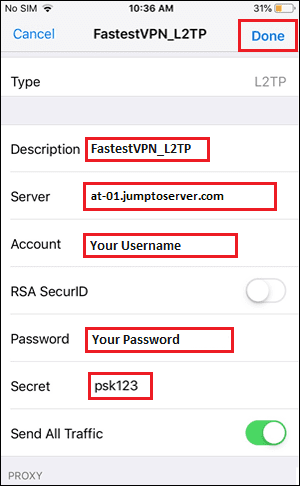
L2TP/IPSec (Layer 2 Tunneling Protocol with IPSec encryption) is one of the most widely supported VPN protocols on iPhone — natively built into iOS without requiring any app installation. iPhone users can manually configure L2TP VPN directly in Settings → General → VPN & Device Management, making it particularly useful when App Store access is restricted, when a specific server is needed without a dedicated app, or when connecting to a specific organization’s VPN server.
While newer protocols like WireGuard offer better performance, L2TP remains relevant in 2026 for its universal iOS compatibility, no-app-required setup, and support from many free VPN server providers. This guide provides the most comprehensive free L2TP VPN server list for iPhone in 2026 with complete manual configuration steps.
A free L2TP VPN server for iPhone allows users to create a VPN connection using the built-in VPN settings in iOS, without installing a separate VPN app. L2TP is usually paired with IPsec for encryption, so you may also see it listed as L2TP/IPsec.
What is L2TP VPN?
L2TP stands for Layer 2 Tunneling Protocol. By itself, L2TP does not provide encryption, so it is commonly combined with IPsec. The combination creates an encrypted tunnel between your iPhone and the VPN server.
Older iPhones and many other devices supported L2TP/IPsec directly through system settings. However, L2TP/IPsec is now considered an older VPN technology, and many modern VPN providers have moved to WireGuard, IKEv2, or other protocols.
How does a free L2TP VPN work on iPhone?
The basic connection requires:
- Server: VPN server address or hostname
- Account: VPN username
- Password: VPN password
- Secret: IPsec shared secret
- Description: Any name you want for the VPN
After entering these details, the iPhone attempts to establish an L2TP/IPsec connection with the server.
How to configure L2TP on iPhone
If your iOS version and network support the protocol, the general process is:
- Open Settings.
- Go to General → VPN & Device Management → VPN.
- Select Add VPN Configuration.
- Choose L2TP if it is available.
- Enter a description, server address, account, password, and IPsec secret.
- Save the configuration.
- Turn on the VPN connection.
The exact menu wording can vary by iOS version.
Where can you get free L2TP servers?
Free L2TP servers may be offered by public VPN projects, universities, organizations, or temporary VPN services. However, you should not enter random server credentials from unknown websites because the server operator controls the VPN endpoint and could potentially observe unencrypted traffic leaving the VPN tunnel.
For regular personal use, a reputable VPN provider or your own VPN server is generally easier to manage.
Free vs. paid L2TP VPN
| Feature | Free L2TP VPN | Paid VPN |
|---|---|---|
| Cost | Free | Usually subscription |
| Server locations | Often limited | Usually many |
| Speed | Can vary considerably | Usually more consistent |
| Data limits | Possible | Often higher/unlimited |
| Privacy | Depends heavily on provider | Depends on provider |
| iPhone setup | Manual in many cases | Often app-based |
| Support | Limited | Usually available |
L2TP vs Modern Protocols — Honest Assessment
Before diving into server lists, honest comparison:
| Protocol | Speed | Security | Battery | iOS Support |
|---|---|---|---|---|
| WireGuard | ✅ Fastest | ✅ Best | ✅ Best | ✅ Via app |
| IKEv2 | ✅ Fast | ✅ Good | ✅ Good | ✅ Native iOS |
| L2TP/IPSec | ⚠️ Moderate | ⚠️ Acceptable | ⚠️ Moderate | ✅ Native iOS |
| OpenVPN | ⚠️ Moderate | ✅ Good | ❌ High drain | ✅ Via app |
| PPTP | ❌ Slow | ❌ Insecure | ❌ Poor | ❌ Removed iOS 10+ |
When to use L2TP:
- No App Store access (restrictions)
- Connecting to corporate/school VPN using L2TP
- Simple manual configuration without an app
- Legacy VPN server compatibility
When NOT to use L2TP:
- Daily privacy protection (use WireGuard/IKEv2 instead)
- Sensitive data (IKEv2 is more secure)
- Battery-sensitive mobile use
iPhone L2TP Manual Configuration — Complete Steps
iOS L2TP Setup
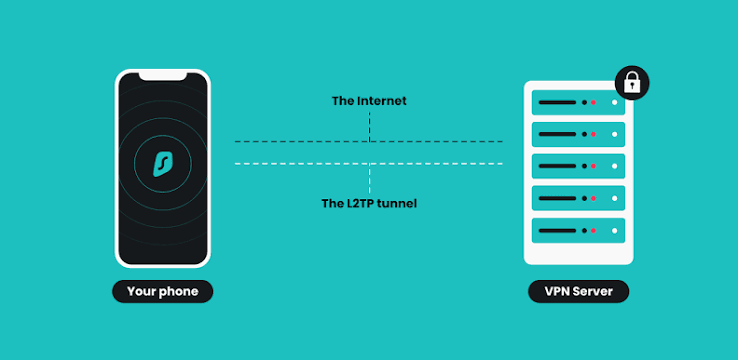
- Open Settings
- Tap General
- Tap VPN & Device Management
- Tap VPN
- Tap Add VPN Configuration
- Type: Select L2TP
Fill in fields:
- Description: Name for this VPN (e.g., “Free L2TP US”)
- Server: L2TP server address
- Account: VPN username
- Password: VPN password (optional — can enter each time)
- Secret: L2TP shared secret/pre-shared key
- Tap Done
- Toggle VPN On
- Enter password if not saved
- VPN connects → VPN icon appears in status bar
Free L2TP VPN Server List for iPhone 2026
VPNBook — Free L2TP Servers
VPNBook provides free L2TP servers — credentials change weekly; check vpnbook.com for the current password.
VPNBook L2TP Server List:
| Server Address | Location | Username | Secret |
|---|---|---|---|
| us1.vpnbook.com | USA | vpnbook | vpnbook |
| us2.vpnbook.com | USA | vpnbook | vpnbook |
| uk.vpnbook.com | United Kingdom | vpnbook | vpnbook |
| ca222.vpnbook.com | Canada | vpnbook | vpnbook |
| pl.vpnbook.com | Poland | vpnbook | vpnbook |
| de233.vpnbook.com | Germany | vpnbook | vpnbook |
| fr.vpnbook.com | France | vpnbook | vpnbook |
Password: Changes weekly — visit vpnbook.com → L2TP tab → current password shown.
iPhone setup with VPNBook:
- Settings → General → VPN → Add VPN Configuration → L2TP
- Description: “VPNBook US”
- Server: us1.vpnbook.com
- Account: vpnbook
- Password: [check vpnbook.com for current]
- Secret: vpnbook
- Done → toggle On
VPN Gate — Community L2TP Servers
VPN Gate provides volunteer-operated L2TP servers globally — the largest free L2TP server list available.
Finding VPN Gate L2TP servers:
- Visit vpngate.net on an iPhone browser
- The server list shows all available servers
- Filter by L2TP support (look for L2TP column)
- Note the server IP, username, password, and secret
Standard VPN Gate L2TP credentials:
- Username: vpn
- Password: vpn
- Secret: vpn (or blank)
VPN Gate server locations (change constantly):
| Country | Typical Available Servers |
|---|---|
| Japan | 30–80+ L2TP servers |
| USA | 10–30+ L2TP servers |
| South Korea | 10–25+ L2TP servers |
| Thailand | 5–15+ L2TP servers |
| Russia | 5–15+ L2TP servers |
| Various | 100+ total |
iPhone VPN Gate L2TP setup:
- vpngate.net → find server → copy IP address
- Settings → General → VPN → Add VPN Configuration → L2TP
- Server: [VPN Gate server IP]
- Account: vpn
- Password: vpn
- Secret: vpn
- Done → connect
Note: VPN Gate server IPs change frequently — check vpngate.net for current available servers.
FreeVPN.me — Free L2TP Servers

FreeVPN.me provides free L2TP servers with registration:
Server list: Check freevpn.me for current server addresses
Standard configuration:
- Account: Your registered email
- Password: Your registered password
- Secret: Provided on freevpn.me after registration
VPNJantit — Asia-Pacific L2TP Servers
VPNJantit specializes in Asian L2TP servers — particularly useful for Indian iPhone users:
VPNJantit process:
- Visit vpnjantit.com
- Select country → Create Account
- Receive server details:
- Server address
- Username
- Password
- Secret key
- Valid for 3–7 days (free renewal
Available locations:
- Japan (multiple servers)
- USA (multiple servers)
- Germany
- Singapore
- UK
- And more
iPhone setup:
Use provided credentials in Settings → VPN → L2TP configuration.
HideIPVPN — Free L2TP Trial Servers
HideIPVPN offers free L2TP access:
- Visit hideipvpn.com → Free Trial
- Register → receive L2TP credentials
- Server addresses provided after registration
- Valid for a limited period
Free L2TP Server List — By Country
USA L2TP Servers
| Provider | Server | Username | Password | Secret |
|---|---|---|---|---|
| VPNBook | us1.vpnbook.com | vpnbook | [weekly] | vpnbook |
| VPNBook | us2.vpnbook.com | vpnbook | [weekly] | vpnbook |
| VPN Gate | [check vpngate.net] | vpn | vpn | vpn |
UK L2TP Servers
| Provider | Server | Username | Password | Secret |
|---|---|---|---|---|
| VPNBook | uk.vpnbook.com | vpnbook | [weekly] | vpnbook |
| VPN Gate | [check vpngate.net] | vpn | vpn | vpn |
Germany L2TP Servers
| Provider | Server | Username | Password | Secret |
|---|---|---|---|---|
| VPNBook | de233.vpnbook.com | vpnbook | [weekly] | vpnbook |
| VPN Gate | [check vpngate.net] | vpn | vpn | vpn |
Japan L2TP Servers
| Provider | Server | Username | Password | Secret |
|---|---|---|---|---|
| VPN Gate | [check vpngate.net — 30-80+ servers] | vpn | vpn | vpn |
| VPNJantit | [check vpnjantit.com] | [registered] | [registered] | [provided] |
Canada L2TP Servers
| Provider | Server | Username | Password | Secret |
|---|---|---|---|---|
| VPNBook | ca222.vpnbook.com | vpnbook | [weekly] | vpnbook |
| VPN Gate | [check vpngate.net] | vpn | vpn | vpn |
Multiple L2TP Configurations on iPhone
iPhone allows saving multiple L2TP VPN configurations:
Save multiple servers:
- Add VPNBook US → save
- Add VPNBook UK → save
- Add VPN Gate Japan → save
- All configurations listed under Settings → VPN
- Tap any → toggle On → switches between servers
Quick switching:
Settings → VPN → tap different configuration → toggle → switches instantly.
L2TP iPhone Troubleshooting
“The L2TP-VPN server did not respond” Error
Most common error on iPhone L2TP
Fix sequence:
- Verify server address — no typos, correct capitalization
- Check password — VPNBook password changes weekly
- Verify secret — “vpnbook” or “vpn” depending on provider
- Toggle Airplane Mode on → 30 seconds → off → retry
- Try a different server from the list
- Restart iPhone → retry
L2TP Connected But No Internet
Cause: Routing issue — VPN connected but traffic not flowing through VPN
Fix:
- Settings → General → VPN → tap active VPN → verify “Send All Traffic” enabled
- Disconnect → reconnect
- Try a different server
- Flush DNS: Settings → General → Transfer or Reset → Reset → Reset Network Settings (saves VPN configs but resets DNS)
L2TP Keeps Disconnecting on iPhone
Cause: iOS battery management or VPN server instability
Fix:
- Settings → Battery → disable Low Power Mode
- Keep screen active during initial connection
- Try more stable VPNBook server vs VPN Gate community server
- Consider switching to IKEv2 — more stable on iPhone than L2TP
Wrong Password Error on L2TP iPhone
VPNBook password changes weekly:
- Visit vpnbook.com
- Scroll to L2TP/PPTP section
- Find current password (changes every week)
- Settings → VPN → tap VPNBook config → edit → update password
- Retry connection
L2TP vs IKEv2 on iPhone — Which to Choose
Both are native iOS protocols (no app needed):
Choose L2TP when:
- VPN provider only offers L2TP
- Legacy corporate VPN requirement
- Specific L2TP server credentials provided by organization
Choose IKEv2 when:
- Privacy and security priority
- Better battery life needed
- Modern VPN service (most support IKEv2)
- Faster connection required
IKEv2 iPhone setup (same location):
Settings → General → VPN → Add VPN Configuration → IKEv2 (instead of L2TP)
IKEv2 is strongly recommended over L2TP for new configurations — better security, better performance, same no-app-required setup.
Free IKEv2 Servers — Better L2TP Alternative for iPhone
Since IKEv2 is superior to L2TP for iPhone — free IKEv2 alternatives:
hide.me Free IKEv2
Servers: India (Mumbai), USA, Netherlands, Germany, Canada, Singapore
Credentials: Create a free account at hide.me → profile section → IKEv2 configuration details
iPhone IKEv2 setup with hide.me:
- hide.me → account → VPN servers → select server → IKEv2 tab
- Settings → General → VPN → Add VPN Configuration → IKEv2
- Server: [hide.me server address]
- Remote ID: [from hide.me]
- Username + Password: [hide.me credentials]
- Done → connect
VPNBook IKEv2
VPNBook also provides IKEv2 servers — same locations as L2TP:
vpnbook.com → IKEv2 tab → current credentials
Configure as IKEv2 in iPhone Settings → better performance than L2TP; same credentials.
iPhone L2TP Performance Expectations
Speed (Compared to WireGuard)
| Protocol | Speed | Latency Overhead | Battery |
|---|---|---|---|
| WireGuard (via app) | 100% | +5–8ms | Best |
| IKEv2 (native) | 80% | +8–12ms | Good |
| L2TP/IPSec (native) | 60% | +12–18ms | Moderate |
| OpenVPN (via app) | 55% | +15–20ms | Poor |
L2TP adds approximately 12–18ms latency overhead — acceptable for browsing and streaming, suboptimal for gaming.
Frequently Asked Questions
What is the best free L2TP VPN server for iPhone in 2026?
VPNBook provides the most reliable free L2TP servers for iPhone — us1.vpnbook.com, uk.vpnbook.com, de233.vpnbook.com available without registration. Password changes weekly — check vpnbook.com for the current password. VPN Gate provides the largest L2TP server list globally (100+ servers) via vpngate.net — Japan has the most servers (30–80+).
How do I set up L2TP VPN on iPhone without an app?
Settings → General → VPN & Device Management → VPN → Add VPN Configuration → L2TP → enter server address, account (username), password, and secret → Done → toggle On. No App Store download needed — iOS has native L2TP support. Use VPNBook credentials: server us1.vpnbook.com, account vpnbook, secret vpnbook, password from vpnbook.com.
Why does my L2TP VPN keep disconnecting on iPhone?
Most common cause: VPNBook password changed (updates weekly) — check vpnbook.com for the current password and update it in Settings. Other causes: Low Power Mode killing VPN, server overload, network interruption. L2TP is less stable than IKEv2 on iPhone — consider switching to an IKEv2 configuration for better connection stability.
Is L2TP VPN safe on iPhone in 2026?
L2TP/IPSec provides acceptable but not optimal security — IPSec encryption is solid, but the L2TP protocol has known weaknesses. For casual browsing privacy: acceptable. For sensitive data or financial transactions: use IKEv2 (native iOS, more secure) or WireGuard (via app, most secure). L2TP is not recommended as a primary security VPN in 2026 — better options available.
What is the L2TP shared secret for free VPN servers?
VPNBook shared secret: “vpnbook”. VPN Gate shared secret: “vpn”. Some servers use a blank/empty secret. The shared secret (pre-shared key) authenticates the VPN connection — it must match the server configuration exactly. VPNBook and VPN Gate both use simple, consistent secrets for their free servers.
Conclusion
Free L2TP VPN servers for iPhone in 2026 remain accessible — VPNBook (7 server locations, weekly password) and VPN Gate (100+ community servers) provide the most comprehensive free L2TP options for iOS manual configuration.
Best free L2TP iPhone VPN servers:
Most reliable: VPNBook — us1.vpnbook.com, uk.vpnbook.com, de233.vpnbook.com → consistent servers, simple credentials → check vpnbook.com weekly for updated password.
Most variety: VPN Gate → vpngate.net → 100+ servers globally → Japan has the most (30–80+) → username/password/secret are all “vpn”.
Asia-Pacific: VPNJantit → vpnjantit.com → free registration → Japanese, US, Singapore servers → valid for 3–7 days.
Important recommendation: L2TP is functional but outdated — if an iOS native protocol is preferred, configure IKEv2 instead (same Settings location, better security and speed). If app installation is possible, WireGuard with Proton VPN free (unlimited) or hide.me (no account) delivers significantly better iPhone VPN performance than any L2TP configuration.