
Finding a free VPN app that actually gives you useful internet access — without selling your data or flooding you with ads — is harder than it looks in 2026. This guide covers the best free VPN apps to download, what each actually offers, how to install them on Android, iPhone, Windows, and Mac, and what to realistically expect from each.

free internet app with VPN features has become more important than ever in 2026. Whether you want to protect your privacy on public Wi-Fi, access content securely while traveling, or browse the web with an extra layer of security, a trusted VPN app can help. While no VPN can magically provide unlimited free mobile data, many free VPN apps offer secure encrypted connections and generous free plans that are suitable for everyday browsing.
In this guide, we’ll review the best free internet VPN apps available in 2026 for Android, iPhone, Windows, and Mac. We’ll compare their security features, free data limits, speeds, server locations, ease of use, and overall performance. Whether you’re a student, remote worker, traveler, or casual internet user, this guide will help you choose a free VPN app that fits your needs without compromising your privacy.
What “Free Internet VPN App” Means in 2026
When people search for a free internet VPN app, they typically want one of three things:
1. A free VPN app with included data — Apps like Proton VPN Free or Windscribe give you real encrypted internet access at zero cost, within a data limit.
2. A VPN app to secure existing internet — Using a free VPN to encrypt your connection on public Wi-Fi or your existing mobile data plan.
3. A VPN trick to get free carrier data — Using apps like HTTP Injector to exploit carrier loopholes. These are unreliable and often patched in 2026 — covered honestly in a separate section below.
Understanding which you need determines which app is right for you.
Best Free VPN Apps to Download in 2026-Free Internet App
1. Proton VPN Free — Best Free VPN App Overall
Proton VPN is the most trustworthy free VPN app available in 2026 — and the only one with truly unlimited data.
Proton VPN Free is one of the best free VPN apps available in 2026, offering strong privacy protection, unlimited bandwidth, and a strict no-logs policy. Unlike many free VPN services that limit your monthly data, Proton VPN lets you browse, stream, and work online without data caps, making it an excellent choice for everyday use.
Built by the team behind Proton Mail, Proton VPN uses AES-256 encryption, secure VPN protocols such as WireGuard and OpenVPN, and DNS leak protection to keep your internet traffic private. The free plan includes servers in multiple countries and is available on Android, iPhone, Windows, macOS, and Linux, allowing you to protect all your major devices.
While the free version doesn’t include every premium feature—such as the fastest servers, Secure Core, or broad streaming support—it delivers reliable performance for web browsing, online banking, email, and general internet use. Its clean interface also makes it easy for beginners to connect with a single tap.
Download links:
- Android: Google Play Store → search “Proton VPN”
- iPhone: App Store → search “Proton VPN”
- Windows: proton.me/vpn → Download for Windows
- Mac: Mac App Store → search “Proton VPN” or proton.me/vpn
Free plan:
- Unlimited data — no monthly cap
- 3 server locations (US, Netherlands, Japan)
- 1 device at a time
- AES-256 encryption with WireGuard
- Audited no-logs policy (Swiss jurisdiction)
- Kill switch on desktop apps
- No ads, no data selling
Setup (all platforms):
- Download from your platform’s store
- Create a free account at proton.me (no payment required)
- Verify email address
- Open app → log in → tap Quick Connect
- Allow VPN configuration when prompted
- Green icon = connected and protected
Best for: Anyone who wants always-on VPN protection at zero cost. Unlimited data is the decisive advantage over every other free option.
2. Windscribe Free — Best for Server Variety
Windscribe Free is one of the most feature-rich free VPN apps in 2026, making it an excellent choice for users who want access to a wide range of server locations without paying for a subscription. The free plan offers servers in multiple countries, giving you more flexibility than many competing free VPNs for browsing, accessing region-specific websites, and maintaining online privacy.
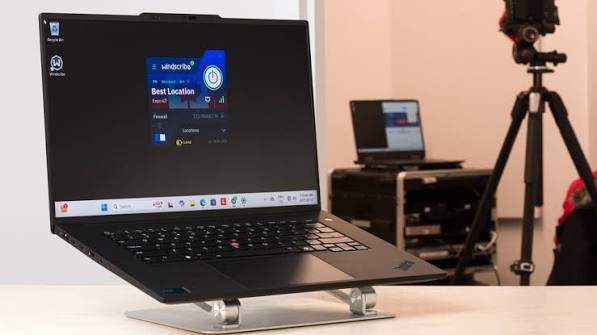
The VPN uses AES-256 encryption, supports modern protocols like WireGuard, OpenVPN, and IKEv2, and follows a strict no-identifying-logs policy. It also includes useful privacy features such as a built-in firewall (kill switch), DNS and IPv6 leak protection, and an ad, tracker, and malware blocker called R.O.B.E.R.T. (with limited access on the free plan).
Windscribe Free is available for Android, iPhone, Windows, macOS, Linux, and popular web browsers. Free users typically receive up to 10 GB of data per month with a verified email address, which is enough for regular browsing, social media, and occasional video streaming.
Download links:
- Android: Play Store → search “Windscribe VPN”
- iPhone: App Store → search “Windscribe VPN”
- Windows: windscribe.com → Download for Windows
- Mac: windscribe.com or Mac App Store
Free plan:
- 10GB data per month (up to 15GB with bonus)
- 10+ server locations
- Built-in ad and tracker blocker
- AES-256 encryption
- No-logs policy
- Firewall (kill switch equivalent)
Setup:
- Download from your platform’s store
- Create a free account at windscribe.com
- Open app → sign in → select server → connect
Best for: Users who want variety in server locations and can stay within 10GB per month. The built-in ad blocker saves additional data by blocking ads before they load.
3. Hide.me Free — Best for Speed
Hide.me Free is one of the fastest free VPN apps available in 2026, making it an excellent choice for users who prioritize speed without compromising security. Whether you’re browsing the web, attending video meetings, downloading files, or streaming content, Hide.me delivers stable connections with minimal slowdowns on its free plan.
The VPN protects your online activity with AES-256 encryption, supports modern protocols including WireGuard, OpenVPN, IKEv2, and SoftEther, and follows a verified no-logs policy. It also includes essential privacy features such as a kill switch, DNS leak protection, split tunneling (on supported platforms), and IPv6 support.
Hide.me Free is available for Android, iPhone, Windows, macOS, Linux, and major web browsers. The free plan includes 10 GB of high-speed data per month, access to multiple server locations, and no advertisements, making it a strong option for users who want a premium-like experience without paying.

Download links:
- Android: Play Store → search “Hide.me VPN”
- iPhone: App Store → search “Hide.me VPN”
- Windows: hide.me → Download for Windows
- Mac: hide.me → Download for Mac
Free plan:
- 10GB data per month
- 5 server locations (including 1 in India)
- WireGuard protocol — fastest available
- AES-256 encryption
- No-logs policy
- No registration required
Setup:
- Download from Hide. the App Store or me
- Open app → select Free plan (no account needed)
- Choose India or another server location
- Tap Connect
Best for: Users who find other free VPNs too slow. WireGuard protocol delivers noticeably faster speeds. Indian server on the free plan is rare and valuable for Indian users.
4. Hotspot Shield Free — Best for Daily Light Browsing
Download links:
- Android: Play Store → search “Hotspot Shield VPN”
- iPhone: App Store → search “Hotspot Shield VPN”
- Windows: hotspotshield.com → Download for Windows
- Mac: hotspotshield.com or Mac App Store
Free plan:
- 500MB data per day (approximately 15GB per month)
- 1 server location (US)
- Hydra protocol (fast, proprietary)
- AES-128 encryption
- Ads displayed in app
- No credit card required
Setup:
- Download from the App Store or hotspotshield.com
- Create free account with email
- Open app → tap Connect (auto-connects to US server)
Best for: Light daily browsing where 500MB per day is sufficient. The Hydra protocol delivers good speeds even on the free plan.
5. TunnelBear Free — Best for Security Transparency
Download links:
- Android: Play Store → search “TunnelBear VPN”
- iPhone: App Store → search “TunnelBear VPN”
- Windows: tunnelbear.com → Download for Windows
- Mac: Mac App Store → search “TunnelBear”
Free plan:
- 2GB data per month
- 47+ server locations
- AES-256 encryption
- GhostBear obfuscation
- Published annual independent security audit
- No-logs policy
Setup:
- Download from the store or tunnelbear.com
- Create free account
- Open app → tap the bear to connect
- Select server location
Best for: Users who prioritise security trustworthiness over data volume. Tunnelbear’s annual published security audits make it the most transparently safe free VPN available.
6. PrivadoVPN Free — Best for Streaming Access
Download links:
- Android: Play Store → search “PrivadoVPN“
- iPhone: App Store → search “PrivadoVPN“
- Windows/Mac: privadovpn.com → Download
Free plan:
- 10GB high-speed data per month
- Unlimited throttled data after 10GB
- 12 server locations
- AES-256 encryption
- Swiss no-logs policy
- Netflix access on select free servers
Setup:
- Download from privadovpn.com or the App Store
- Create free account
- Select server → connect
Best for: Users who want occasional streaming access. The throttled unlimited data after the cap means you are never fully cut off.
Free VPN Apps Comparison Table
| App | Data | Servers | Speed | Ads | Platforms | Download |
|---|---|---|---|---|---|---|
| Proton VPN | Unlimited | 3 | Medium | None | All | proton.me/vpn |
| Windscribe | 10GB/month | 10+ | Good | None | All | windscribe.com |
| Hide.me | 10GB/month | 5 | Fast | None | All | hide.me |
| Hotspot Shield | 500MB/day | 1 (US) | Fast | Yes | All | hotspotshield.com |
| Tunnelbear | 2GB/month | 47+ | Good | None | All | tunnelbear.com |
| PrivadoVPN | 10GB + slow | 12 | Good | None | All | privadovpn.com |
How to Download and Install Free VPN Apps: Platform-by-Platform
Android
Play Store method (recommended):
- Open Google Play Store
- Search for your chosen VPN (e.g., “Proton VPN”)
- Tap Install on the official app
- Open the app after installation
- Create an account or sign in
- Tap Connect
- Tap OK when Android asks to allow VPN connection
Direct APK method (not recommended): Downloading VPN APKs from outside the Play Store carries significant security risk. Malicious APKs disguised as VPN apps are common. Always use the Play Store for VPN apps.
iPhone / iOS
- Open App Store
- Search for your chosen VPN
- Tap Get to download (free)
- Open the app
- Create an account or sign in
- Tap Connect
- Tap Allow when iOS asks to add VPN configuration
Note: Some VPN features may require a subscription in the App Store version. The free plan is always accessible — do not purchase anything unless you intend to upgrade.
Windows
Method 1 — Direct download:
- Go to the VPN provider’s official website (proton.me/vpn, windscribe.com, etc.)
- Click Download for Windows
- Run the .exe installer
- Follow installation prompts
- Open the app and sign in
- Click Connect
Method 2 — Microsoft Store: Some VPNs (Proton VPN, Tunnelbear) are available on the Microsoft Store. Search there for a simpler installation process.
Windows-specific note: After installation, Windows may show a security prompt about the VPN adapter. Click Install to allow — this is required for the VPN to function.
Mac
Method 1 — Mac App Store:
- Open Mac App Store
- Search for your VPN
- Click Get (free)
- Open the app and sign in
- Click Connect
- Allow VPN configuration in System Settings when prompted
Method 2 — Direct download:
- Go to the VPN provider’s website
- Download the .dmg file
- Open the .dmg and drag the app to Applications
- Launch and sign in
macOS note: Go to System Settings > Privacy & Security > Network Extensions and approve the VPN if it asks for permission.
Free VPN Apps for Getting Free Internet: What Actually Works in 2026
Some users want VPN apps specifically to get free mobile internet through carrier loopholes. Here is the honest situation in India in 2026:
HTTP Injector and Similar Apps
Apps:
- HTTP Injector (Play Store)
- HA Tunnel Plus (Play Store)
- HTTP Custom (Play Store)
- Dark Tunnel (Play Store)
How they work: These apps route traffic through carrier-free zones (zero-rated domains like WhatsApp or government portals) to tunnel regular internet traffic through them at no data cost.
Reality in India in 2026:
- Jio: Most loopholes patched. Configurations that worked in 2022–2023 largely fail in 2026. Jio’s DPI systems actively detect tunneling attempts.
- Airtel: Similar situation. Most free internet configs circulating on Telegram are outdated.
- BSNL: Some older configurations occasionally work but are extremely inconsistent by circle and time.
- Vi: Rare working configurations exist but are unreliable.
Risks of these methods:
- Violates carrier terms of service — account suspension risk
- Config files from Telegram groups often contain malware
- No encryption — your traffic may be exposed
- Carriers can detect and throttle or block accounts
Verdict: Not recommended. The effort and risk are not worth the unreliable results in 2026.
Free Internet Through Legitimate Means
Instead of risky carrier tricks, these legitimate sources provide free internet access in India:
PM-WANI Hotspots — Government-backed public Wi-Fi deployed at thousands of locations across India. Free or very low-cost access.
Railway Station Wi-Fi — RailTel provides free Wi-Fi at 6,000+ stations. Connect, verify with an OTP, and browse freely.
Airport Wi-Fi — Most Indian airports provide free Wi-Fi with time limits.
Jio Free Data Rewards — MyJio app daily check-ins, quizzes, and offers provide free data vouchers legitimately.
Airtel Thanks Rewards — Airtel Thanks app provides data bonuses and cashback through engagement and referrals.
Using a VPN on free Wi-Fi — Install Proton VPN Free and use it on any of the above free Wi-Fi sources for both free internet and privacy protection simultaneously.
Free VPN Apps to Avoid Downloading
These apps appear in app store searches but should not be downloaded:
Super VPN — Multiple security researchers have flagged it for data logging and privacy violations.
Turbo VPN / Snap VPN / Thunder VPN — Repeatedly flagged for data harvesting. Avoid all variants.
Hola VPN — Routes your traffic through other users’ devices. Serious privacy and security risk.
VPN Master / Touch VPN — Poor privacy policies and histories of data collection.
Any VPN claiming “100% free unlimited” with no explanation of business model — If the app is completely free with no premium tier and no ads, your data is almost certainly the product.
Red flags:
- App requests access to contacts, SMS, or call logs
- No identifiable company behind the app
- Overwhelmingly positive reviews with suspiciously low review count
- App downloaded from outside official app stores
Making Free VPN Data Last Longer
If you are using a free VPN with a data cap (Windscribe 10GB, Hide.me 10GB), these tips help:
Use data saver in Chrome — Settings > Lite Mode reduces data by up to 60% for browsing.
Lower video quality — Set YouTube to 360p or 480p. Video consumes the most data.
Disable auto-play — Turn off auto-play videos in Instagram, Facebook, and Twitter settings.
Connect VPN selectively — Only activate VPN on public Wi-Fi or for sensitive tasks. Disconnect at home on trusted networks.
Use Windscribe’s ad blocker — Blocks ads at the VPN level, reducing data consumed by advertising content.
Download on Wi-Fi — Download music, podcasts, and videos on home Wi-Fi before switching to your VPN data.
FAQs
Q: Which free VPN app gives unlimited internet?
Proton VPN Free is the only mainstream free VPN app with unlimited data — no monthly cap. Available on Android, iPhone, Windows, and Mac at no cost.
Q: Is downloading a free VPN app safe?
From official app stores (Play Store, App Store, Microsoft Store, Mac App Store), yes — for the reputable providers listed in this guide. Avoid downloading VPN APKs from third-party websites or Telegram groups.
Q: Which free VPN app works best in India?
Proton VPN Free for unlimited data and privacy. Hide.me Free for speed and an Indian server. Both are available on all platforms and are widely used by Indian users.
Q: Can a free VPN app give me free mobile data in India?
Legitimate free VPN apps do not give you free mobile data — they encrypt your existing connection. Apps that claim to give free carrier data through loopholes (HTTP Injector, etc.) are unreliable in India in 2026 and carry account suspension risk.
Q: Which free VPN app has no ads?
Proton VPN, Windscribe, Hide.me, Tunnelbear, and PrivadoVPN all have no ads on their free plans. Hotspot Shield Free displays ads in the app.
Q: Do free VPN apps slow down internet speed?
Yes — all VPNs add some speed overhead from encryption. Hide.me Free with WireGuard protocol has the smallest speed impact among free options. Proton VPN Free is slower due to shared server load on the free tier.
Q: Which free VPN app works on both Android and iPhone?
All five recommended apps — Proton VPN, Windscribe, Hide.me, Tunnelbear, and PrivadoVPN — are available on both Android and iPhone.
Conclsion
The best free internet VPN app to download in 2026 is Proton VPN Free — unlimited data, no ads, strong encryption, and available on every platform. Download it from your app store, create a free account, and you have professional-grade VPN protection at zero cost.
For faster speeds, Hide.me Free with WireGuard is the strongest alternative. For server variety, Windscribe Free offers 10+ locations with 10GB of data per month.
Avoid random free VPN apps from unknown developers — the ones that do not charge money often make their revenue by selling your data. The safest free VPNs are the ones with legitimate paid tiers and a clear business model that does not depend on your browsing history.
Download from official app stores only. Start with Proton VPN. It is the most complete free VPN app available in 2026.

