
Short answer: CapCut is the best free video editing app for PC in India in 2026 for most creators — especially for Hindi auto-captions, Indian social media formats, and fast content production. For professional YouTube quality, DaVinci Resolve is the clear choice. For the simplest experience on Windows, Clipchamp is already installed.
This guide is written specifically for Indian PC users — with Hindi language support, Indian content formats, budget hardware realities, and Indian platform needs in mind.
best free video editing app for PC in India in 2026 depends on what you want to create, your computer’s hardware, and whether you need basic editing or professional features. Fortunately, several free desktop video editors now offer powerful tools for YouTube videos, Instagram Reels, Shorts, tutorials, gaming videos, and other content without requiring an expensive subscription.
For most users who want professional-level editing without paying, DaVinci Resolve is one of the strongest choices. It provides advanced editing, color correction, visual effects, and audio tools in its free version. For Windows users who prefer a simpler interface, Microsoft Clipchamp is another convenient option, particularly for quick 1080p projects and beginner-friendly editing.
However, the “best” app is not the same for everyone. A beginner may prioritize an easy interface and fast exports, while a YouTube creator may need multi-track editing, subtitles, effects, and better audio controls. In this guide, we’ll compare the best free video editing apps for PC in India in 2026, including their features, free-plan limitations, performance, ease of use, watermark policies, and ideal use cases, so you can choose the right editor for your needs.
Why India Needs a Different Answer
The global “best free video editor” answer does not fully account for what Indian creators actually need in 2026:
Hindi and regional language captions — Auto-caption accuracy in Hindi, Tamil, Telugu, Marathi, and Bengali is critical for Indian content creators. Not all editors support Indic languages.
Indian social media formats — Instagram Reels (India is one of the largest Reels markets), YouTube Shorts, ShareChat, and Moj content have specific format requirements. Templates designed for Indian trending formats matter.
Budget hardware — Many Indian creators use mid-range PCs with 8GB RAM and integrated graphics. Heavy software like DaVinci Resolve requires more capable hardware. Lightweight alternatives are important.
Data efficiency — Indian creators often upload content on Jio or Airtel connections. Some editing tools consume data during cloud processing — relevant for users on limited data plans.
InVideo AI Hindi voiceover — India-specific AI voiceover support is a meaningful differentiator for faceless content creators targeting Hindi-speaking audiences.
Best Free Video Editing App for PC in India in 2026
1. CapCut for PC — Best for Indian Social Media Creators
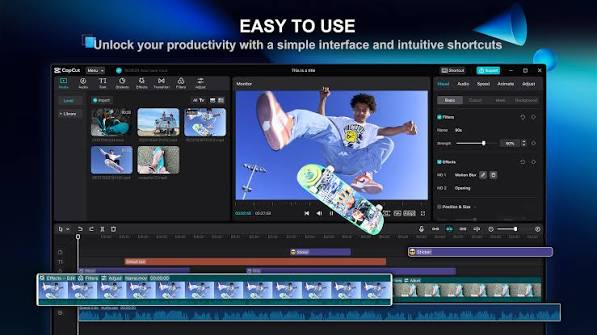
CapCut is the most widely used free video editor among Indian content creators in 2026. It is purpose-built for the content formats that Indian audiences consume most — Instagram Reels, YouTube Shorts, and short-form video.
CapCut for PC is a strong choice for Indian creators who mainly produce YouTube Shorts, Instagram Reels, Facebook videos, and other short-form content. Its simple interface makes it easier for beginners to cut clips, add text, apply transitions, synchronize music, and create engaging social-media videos without needing advanced editing experience.
Why CapCut Is Good for Indian Creators
CapCut is particularly useful when your priority is fast, engaging, mobile-style content on a PC. Creators can combine multiple video clips, add background music, captions, effects, stickers, transitions, and other visual elements from a relatively straightforward editing workflow.
It can also be useful for creators making content in Hindi, Odia, English, or other Indian languages, especially when subtitles and on-screen text are an important part of the video.
Available on: Windows, Mac, browser, Android, iOS
Free features most relevant to Indian creators:
- Hindi auto-captions — Accurate automatic caption generation in Hindi. Also supports Tamil, Telugu, Marathi, Bengali, and other Indian languages
- Regional language text-to-speech — Generate voiceovers in Hindi and select regional languages without recording
- Indian trending templates — Templates updated weekly based on trending formats on Indian Instagram and YouTube
- Beat sync — Auto-cuts footage to trending Indian music rhythms
- 4K export — no watermark on standard exports
- AI background removal, speed ramp, keyframe animation
- Green screen support
PC specs: Minimum 4GB RAM, Windows 10 64-bit. Runs well on most Indian mid-range PCs.
Download: capcut.com → Download for PC (Windows installer)
What makes it best for India: Hindi auto-captions alone save hours per video for Hindi content creators. The template library mirrors what is performing on Indian Instagram and YouTube. For creators making content in Hindi for audiences in Uttar Pradesh, Bihar, Madhya Pradesh, Rajasthan, and other Hindi-belt states — CapCut has no free peer.
Privacy note: CapCut is developed by ByteDance (TikTok’s parent company). For creators with data privacy concerns, Kdenlive or DaVinci Resolve are privacy-respecting alternatives.
Best for: Hindi content creators, Instagram Reels makers, YouTube Shorts creators, faceless channel operators, social media managers.
Verdict: Best free PC video editor for Indian social media content in 2026.
2. DaVinci Resolve — Best for Professional Indian YouTube Creators
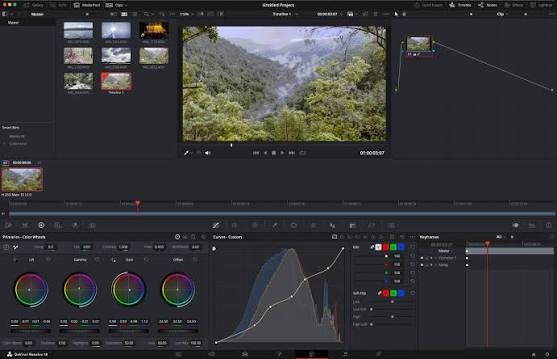
DaVinci Resolve is Hollywood-grade video editing software — completely free, 4K export, no watermark, no subscription. For serious Indian YouTubers who want cinematic quality, nothing else comes close at zero cost.
DaVinci Resolve is one of the best free video editing apps for PC in India in 2026 for creators who want professional-level editing without immediately paying for expensive software. Developed by Blackmagic Design, it combines video editing, color correction, visual effects, motion graphics, and audio post-production in one application.
For Indian YouTubers creating long-form videos, tutorials, documentaries, gaming content, educational videos, reviews, or cinematic content, DaVinci Resolve offers significantly more advanced tools than most beginner-focused editors.
Why DaVinci Resolve Is Good for Indian YouTubers
The biggest advantage of DaVinci Resolve is that you can start with the free version and gradually learn professional editing techniques. This makes it suitable for creators who want to build long-term editing skills instead of relying only on templates and basic effects.
You can use it to edit 1080p and 4K projects, depending on your hardware and the features available in your version. Its professional timeline, color-grading tools, audio controls, and visual-effects capabilities make it suitable for creators who want their YouTube videos to look more polished.

Available on: Windows 10/11, Mac, Linux
Free features:
- Full professional multi-track timeline
- Fairlight audio suite (professional audio mixing built in)
- Fusion visual effects and motion graphics
- Professional colour grading (same tools used in Bollywood productions)
- AI tools: Magic Mask, Speed Warp, noise reduction
- 4K export — no watermark
- No project or time limits
PC specs: This is where Indian creators need to be careful:
- Minimum 8GB RAM (16GB recommended)
- Dedicated GPU with 2GB VRAM (integrated graphics will struggle)
- Windows 10 64-bit or Windows 11
- Most budget Indian PCs with integrated Intel/AMD graphics will have performance issues.
Download: blackmagicdesign.com/products/davinciresolve → free version
What makes it strong for India: Colour grading tools that rival professional Bollywood post-production software, at zero cost. For Indian YouTube channels covering travel, cooking, education, or cinematic vlogging — the visual quality difference versus other free editors is significant.
Limitation for India: Hardware requirements exclude many budget Indian PCs. If your PC has less than 8GB RAM or no dedicated GPU, consider CapCut or Kdenlive instead.
Best for: Serious Indian YouTubers, film students, creators who want Bollywood-level colour quality, video production courses.
Verdict: Best free PC editor for professional Indian YouTube content — requires capable hardware.
3. Clipchamp — Best Built-In Free Editor for Indian Windows Users
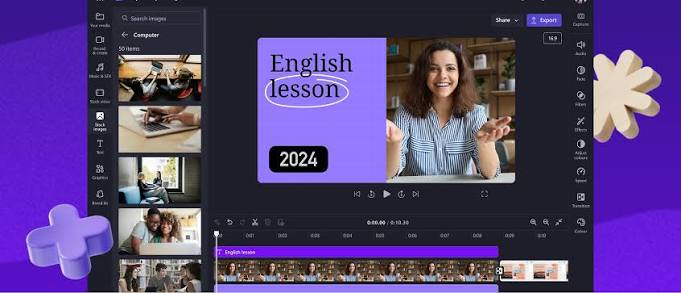
Clipchamp is Microsoft’s free video editor — built into Windows 11 and downloadable on Windows 10. For Indian creators who want zero complexity, it is already on their PC.
Available on: Windows 11 (built-in), Windows 10 (download from Microsoft Store), browser
Free features:
- Multi-track timeline editing
- Text-to-speech (English voices primarily — limited Indian language support)
- Built-in stock footage and music library
- Auto-captions (primarily English)
- Green screen support
- Templates for YouTube, Instagram Reels, LinkedIn
- 1080p export — no watermark
- Direct export to YouTube and OneDrive
PC specs: Very low — runs on any Windows PC with 4GB RAM. Excellent for older Indian PCs.
Access on Windows 11: Press Start → type Clipchamp → open. Already installed. Access on Windows 10: Microsoft Store → search Clipchamp → download.
Indian language limitation: Clipchamp’s auto-captions and text-to-speech are primarily English-focused. Hindi and regional Indian language support is limited compared to CapCut. For English-language Indian content (tech channels, finance channels, English education), Clipchamp works well.
Best for: Indian creators making English-language content, Windows 11 users who want zero setup, beginners making their first video, business and corporate video creation.
Verdict: Best zero-setup free editor for Indian Windows users — ideal for English-language content.
4. InVideo AI — Best for Hindi Faceless YouTube Channels
InVideo AI generates complete videos automatically from a script or topic — with Hindi voiceover support. For Indian faceless YouTube channel operators targeting Hindi audiences, this is the fastest content production tool available.
Available on: Browser (works on any Indian Windows PC)
Free features:
- 10 video exports per week
- AI script generation from Hindi or English topic
- Automatic stock footage matching
- Hindi AI voiceover — generate Hindi narration without recording
- Auto-captions in Hindi
- 1080p export (InVideo watermark on free plan)
- Templates for YouTube India formats
No installation required: Works entirely in the browser on any Indian PC.
What makes it essential for India: Hindi AI voiceover + auto-script generation is a combination no other free tool offers. For Indian creators running faceless YouTube channels on topics like finance (paisa), health (swasthya), tech reviews, or motivational content in Hindi — InVideo AI eliminates the need for a microphone, recording space, or voice talent.
Limitation: InVideo watermark on free exports. 10 exports per week cap. Paid plans start at approximately ₹1,500/month.
Best for: Hindi faceless YouTube channel operators, Indian content farms, creators targeting Tier 2 and Tier 3 city Hindi audiences, news-style Hindi content.
Verdict: Best free tool for Hindi AI-generated video content for Indian audiences.
5. Kdenlive — Best Privacy-Respecting Free Editor for Indian PCs
Kdenlive is a free, open-source video editor that collects no user data — important for Indian creators who are concerned about ByteDance (CapCut) or Microsoft (Clipchamp) data practices.
Available on: Windows, Mac, Linux
Free features:
- Multi-track professional timeline
- Keyframe animation
- Colour correction with scopes
- Audio mixing and filters
- Proxy editing — crucial for older Indian PCs with limited performance
- 4K export — no watermark
- No account required, no data collection
PC specs: 4GB RAM minimum. Proxy editing makes it usable on older Indian PCs (Core i3, 4GB RAM, integrated graphics) that cannot smoothly play back high-resolution footage — Kdenlive creates lower-resolution proxies for editing, then uses the original files for export.
Download: kdenlive.org → Download for Windows.
What makes it strong for India: Proxy editing is uniquely valuable for Indian creators on budget PCs. A creator editing 1080p footage on a Core i3 with 8GB RAM can use Kdenlive’s proxy mode to edit smoothly — something that is impossible in DaVinci Resolve on the same hardware. No data collection means no ByteDance or Microsoft privacy concerns.
Best for: Privacy-conscious Indian creators, Linux users (many Indian developers prefer Linux), creators on older/budget PCs, open-source advocates.
Verdict: Best privacy-respecting free PC editor for India with proxy editing support for budget hardware.
6. Shotcut — Best for Older Indian PCs
Shotcut is a lightweight, open-source editor that runs on Windows PCs with as little as 2GB RAM — accessible even on older Indian computers.
Available on: Windows, Mac, Linux
Free features:
- Multi-track timeline
- Wide format support — handles any video format without conversion
- Audio filters and mixing
- Colour grading
- 4K export — no watermark
- Portable installation (run from USB pen drive without installing)
PC specs: 2GB RAM minimum. Runs on Windows 7, 8, 10, and 11. Works on very old Indian PCs.
Download: shotcut.org → Download for Windows
Portable version: Shotcut’s portable version runs directly from a USB pen drive without installation — useful for Indian creators who share a family computer or use a restricted office PC.
What makes it strong for India: Many Indian households still use older computers (Core 2 Duo, 4GB RAM, no GPU). Shotcut is the most capable free editor that runs on this hardware. Wide format support means footage from Indian phones (Samsung, Realme, Redmi) in any format imports directly.
Best for: Indian creators on very old or budget PCs, creators sharing family computers, anyone who needs a lightweight editor on minimal hardware.
Verdict: Best free video editor for old or low-spec Indian PCs.
Indian PC Hardware Reality: Which Editor to Choose
| Your Indian PC | Recommended Editor |
|---|---|
| Core i7/i9 or Ryzen 7/9, 16GB+ RAM, dedicated GPU | DaVinci Resolve |
| Core i5 or Ryzen 5, 8GB RAM, dedicated GPU | CapCut or DaVinci Resolve |
| Core i5 or Ryzen 5, 8GB RAM, integrated graphics | CapCut or Kdenlive |
| Core i3 or equivalent, 8GB RAM, integrated graphics | CapCut or Kdenlive (proxy mode) |
| Core i3 or older, 4GB RAM | Kdenlive (proxy) or Shotcut |
| Very old PC (Core 2 Duo, 2-4GB RAM) | Shotcut |
| Any PC with internet (no installation) | Clipchamp (browser) or InVideo AI |
Indian Content Platform Requirements
| Platform | Best Editor |
|---|---|
| YouTube long-form (Hindi) | DaVinci Resolve + InVideo AI (script) |
| YouTube Shorts (Hindi) | CapCut |
| Instagram Reels (India) | CapCut |
| Faceless Hindi YouTube | InVideo AI |
| ShareChat / Moj | CapCut |
| English-language tech YouTube | DaVinci Resolve |
| Corporate/educational video | Clipchamp or DaVinci Resolve |
Hindi Language Support Comparison
| Editor | Hindi Auto-Captions | Hindi TTS | Hindi Templates |
|---|---|---|---|
| CapCut | Yes ✓ | Yes ✓ | Yes ✓ |
| InVideo AI | Yes ✓ | Yes ✓ | Yes ✓ |
| Clipchamp | Limited | No | No |
| DaVinci Resolve | No | No | No |
| Kdenlive | No | No | No |
| Shotcut | No | No | No |
FAQs for Indian Creators
Q: Which free PC video editor is best for Hindi YouTube channels?
CapCut for editing with Hindi auto-captions. InVideo AI for generating complete Hindi videos automatically without recording. For serious Hindi YouTubers, use both — InVideo for scripts and basic video, CapCut for editing and captions.
Q: Can I use DaVinci Resolve on a budget Indian PC?
Only if you have a dedicated GPU (even an entry-level GTX 1050 or RX 550) and at least 8GB RAM. On integrated graphics with 4–8GB RAM, DaVinci Resolve will be extremely slow and may crash. Use Kdenlive with proxy editing instead.
Q: Which free editor works on a Jio data connection without heavy downloads?
InVideo AI runs in the browser — no installation needed, no heavy downloads. Clipchamp also runs in the browser via clipchamp.com. For offline editing, Shotcut (lightweight download) or Kdenlive are best.
Q: Is CapCut banned in India?
As of 2026, CapCut is available in India. However, given its ByteDance ownership, there is ongoing regulatory scrutiny. If you are concerned about this, Kdenlive or DaVinci Resolve are the strongest alternatives with no such concerns.
Q: Which editor is best for Instagram Reels for Indian audiences?
CapCut — it has trending Indian Reels templates, Hindi auto-captions, beat sync for popular Indian music, and 9:16 vertical video optimisation built in.
Q: Can I edit videos for freewithout at watermark in India? Yes. DaVinci Resolve, CapCut (standard exports), Clipchamp, Kdenlive, and Shotcut all export without watermarks on their free versions. InVideo AI adds a watermark on the free plan.
Q: Which free editor supports Tamil, Telugu, or Marathi captions?
CapCut supports auto-captions in multiple Indian languages including Tamil, Telugu, Marathi, and Bengali alongside Hindi. This is its strongest differentiator for regional Indian content creators.
Conclsion
For Indian PC users in 2026, the answer depends on your hardware, your language, and your content type:
Hindi social media and Reels: CapCut — Hindi auto-captions, trending Indian templates, 4K export, free.
Professional Hindi or English YouTube: DaVinci Resolve — if your PC can handle it.
Hindi faceless channels: InVideo AI — Hindi voiceover, auto-script, no recording needed.
Budget or older Indian PC: Kdenlive with proxy editing or Shotcut.
Simplest possible start on Windows: Clipchamp — already installed on Windows 11.
The Indian creator economy is one of the fastest-growing in the world. The tools to compete with the best — zero-cost, Hindi-capable, optimised for Indian platforms — are all available right now. Download the one that matches your hardware and content, and start creating.

