
Creating professional-quality videos no longer requires advanced editing skills or expensive production equipment. In 2026, text-to-video AI tools have transformed the way creators, marketers, educators, and businesses produce engaging video content. With just a simple text prompt or script, these platforms can generate realistic visuals, animations, voiceovers, subtitles, background music, and smooth transitions in minutes.
Whether you’re making YouTube videos, TikTok and Instagram Reels, product advertisements, training materials, or presentations, today’s AI-powered video generators can significantly reduce production time while maintaining high-quality results. Many platforms also include customizable templates, multilingual voiceovers, and AI avatars, making video creation accessible to beginners and professionals alike.
In this guide, we’ve selected the best AI tools for creating videos from text in 2026 based on video quality, ease of use, editing capabilities, pricing, and overall value. Whether you’re looking for a free solution to get started or a premium platform for commercial content creation, you’ll find the right tool to match your needs.
Not long ago, turning a script into a finished video meant hiring an editor, sitting through hours of footage, or learning software that felt like it needed an engineering degree. That’s changed a lot. Today you can type out a paragraph, pick a style, and watch a full video come together in minutes — narration, visuals, captions, and all.
If you’re a content creator, small business owner, teacher, or just someone who wants to turn blog posts into short videos for social media, this guide breaks down the best text-to-video tools available in 2026, what makes each one worth using, and how to pick the right one for your specific project.
Why Text-to-Video Tools Are Booming in 2026
A few reasons this space has exploded lately:
- Short-form video is still king. Reels, Shorts, and TikTok clips get more reach than almost any other content format right now, and creators need a faster way to keep up with the volume.
- Written content is everywhere already. Blogs, newsletters, product descriptions — repurposing that text into video saves a massive amount of time compared to starting from scratch.
- Voice and visual quality have improved dramatically. Narration used to sound robotic and stiff. Now it’s genuinely close to a real person reading naturally, with proper pacing and emotion.
- Small teams need to do more with less. Not every business can afford a video production team, so these smart tools have become the practical stand-in.
- Localization is easier. Many tools now translate and dub scripts into multiple languages automatically, which matters a lot for creators trying to reach global audiences.
What to Look for in a Text-to-Video Tool
Before jumping into specific platforms, it helps to know what actually separates a good tool from a mediocre one:
- Voice quality — Does the narration sound natural, or robotic and flat?
- Visual variety — Can you access a wide stock library, or does it feel repetitive after a few videos?
- Customization — Can you adjust fonts, colors, pacing, and branding, or are you stuck with rigid templates?
- Export quality — Does it support at least 1080p, ideally 4K, without a heavy watermark on free plans?
- Turnaround time — How long does rendering actually take for a 2–3 minute video?
- Pricing structure — Is it a flat monthly fee, credit-based, or does it charge per video minute?
Keep these in mind as you go through the list below, since the “best” tool really depends on what you’re making — a product ad, an explainer video, a YouTube short, or a full-length tutorial.
Best Tools for Creating Videos from Text in 2026
1. Synthesia
Synthesia remains one of the most polished options for anyone who wants a presenter-style video without hiring an actor. You type your script, choose from a large library of realistic on-screen presenters, and it generates a full video with lip-synced narration.
Synthesia is one of the leading AI-powered text-to-video platforms in 2026, designed for businesses, educators, marketers, and content creators who need professional videos without cameras, microphones, or video editing expertise. Instead of recording yourself, you simply enter a script, choose an AI avatar, and Synthesia automatically generates a polished video with realistic voice narration and synchronized lip movements.
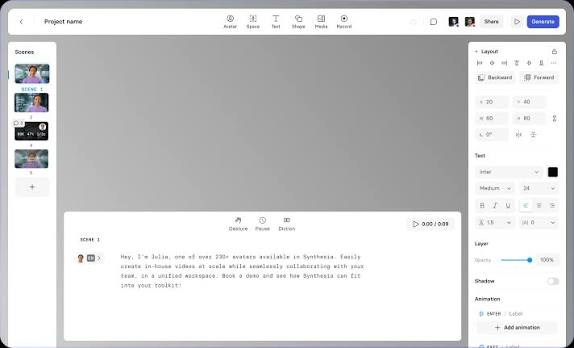
One of Synthesia’s biggest strengths is its extensive library of AI presenters. Users can select from hundreds of realistic avatars or create a custom avatar for brand consistency. The platform also supports more than 140 languages and accents, making it an excellent choice for organizations producing multilingual training videos, product tutorials, customer support content, and marketing campaigns for a global audience.
Creating a video is straightforward. Start by selecting a template or a blank project, paste your text into the editor, choose an AI avatar and voice, and customize the background, branding, colors, images, icons, and animations. Synthesia then converts your script into a professional-quality video within minutes, eliminating the need for filming or complex editing software.
The platform includes features such as automatic subtitles, screen recording, media uploads, collaborative editing, brand kits, and presentation-style layouts. Teams can work together on projects, making it especially useful for businesses creating onboarding videos, internal communications, sales presentations, and educational content.
Best for: Corporate training videos, onboarding content, and explainer videos where a “talking head” presenter builds trust.
Practical example: A small SaaS company writes a 300-word script explaining a new feature, picks a presenter that matches their brand tone, and has a polished explainer video ready in under 20 minutes — no camera, no studio, no editor needed.
2. Pictory
Pictory is built specifically for repurposing long-form content into short video clips. Paste in a blog post or podcast transcript, and it automatically pulls out the key points, matches them with stock footage, and adds captions.
Pictory is a powerful AI-powered text-to-video platform that helps creators, marketers, educators, and businesses transform written content into engaging videos within minutes. In 2026, it remains one of the most popular tools for converting blog posts, articles, scripts, and text prompts into professional-looking videos without requiring advanced editing skills. Its intuitive, browser-based interface makes it accessible to beginners while offering enough customization options for experienced content creators.

To create a video, users simply paste their script or article into Pictory. The platform automatically analyzes the text, selects relevant stock footage, images, transitions, and background music, and generates a complete video draft. Users can then customize visuals, replace clips, edit text overlays, adjust branding elements, and choose AI-generated voiceovers or upload their own narration. Automatic subtitles and captions are included, making videos more engaging and accessible across platforms.
Pictory also excels at repurposing existing content. It can turn long-form blog posts into short promotional videos, summarize webinars, convert Zoom recordings into social media clips, and create highlight reels for YouTube, LinkedIn, Instagram, TikTok, and Facebook. The platform supports team collaboration, cloud-based editing, and a large royalty-free media library.
Best for: Bloggers and content marketers turning articles into social media clips.
Practical example: A food blogger pastes their “10 easy weeknight dinners” article into Pictory, and within minutes gets a 60-second video with relevant cooking clips, captions, and background music, ready to post on Instagram Reels.
3. InVideo
InVideo leans more toward template-based creation, with a massive library covering everything from YouTube intros to product showcases. Its text-to-video workflow lets you drop in a script, and it suggests scene structures and visuals to match.
Best for: Marketers and small business owners who want more design control without starting from a blank canvas.
Practical example: An online store writes a short promotional script for a seasonal sale, and InVideo turns it into a 30-second ad with product placeholders, ready to swap in the actual product photos.
4. HeyGen
HeyGen has carved out a strong niche in personalized video, particularly for sales outreach and marketing. You write your script, choose an avatar, and it produces a video that feels tailored — some users even personalize videos with a viewer’s name baked into the script.
Best for: Sales teams and marketers running personalized outreach campaigns at scale.
Practical example: A sales rep writes one script template, then generates dozens of slightly personalized versions for different prospects, each one addressing the recipient by name and mentioning their company.
5. Fliki
Fliki focuses heavily on natural-sounding voiceovers paired with stock visuals, and it supports a wide range of languages and accents. It’s a solid pick if narration quality matters more to you than fancy animation.
Best for: Podcasters and educators converting written scripts into narrated video lessons.
Practical example: A tutor writes out a lesson script on basic algebra, picks a clear, friendly voice, and Fliki builds a narrated slideshow-style video that’s ready to upload to a course platform.
6. Canva’s Video Suite
Canva has quietly built one of the most accessible text-to-video workflows, especially for people who already use it for graphic design. It’s simple, drag-and-drop, and doesn’t require any learning curve.
Best for: Beginners, freelancers, and anyone who wants a quick, decent-looking video without a steep learning curve.
Practical example: A freelance coach writes a short script about their coaching program, picks a Canva template, adds their script as captions with matching visuals, and has a shareable video in about 15 minutes.
Comparison at a Glance
| Tool | Best For | Standout Feature | Free Plan? |
|---|---|---|---|
| Synthesia | Corporate/training videos | Realistic presenter avatars | Limited trial |
| Pictory | Blog-to-video repurposing | Automatic content summarizing | Limited trial |
| InVideo | Marketing and ads | Large template library | Yes, with watermark |
| HeyGen | Personalized sales videos | Name/detail personalization | Limited trial |
| Fliki | Narrated lessons/podcasts | Natural multilingual voices | Limited trial |
| Canva | Quick, simple videos | Easiest learning curve | Yes, generous free tier |
Step-by-Step: How to Turn a Script into a Video
Here’s a general workflow that applies across most of these platforms:
- Write or paste your script. Keep sentences short and clear — narration tools handle simple sentences better than long, complex ones.
- Choose your visual style. Decide between a presenter-led video, stock footage, or animated slides depending on your content type.
- Select a voice. Most platforms let you preview several voice options before committing.
- Add captions. Since a huge chunk of social media viewers watch with sound off, captions aren’t optional anymore — they’re essential.
- Adjust pacing and scene breaks. Review where the tool splits your script into scenes, and tweak if it feels rushed or too slow.
- Export and review. Always watch the full video before publishing — small pronunciation errors or mismatched visuals slip through occasionally.
Pros and Cons of Text-to-Video Tools
Pros
- Massive time savings compared to traditional filming and editing
- No equipment needed — no camera, microphone, or studio space required
- Consistent output, which is great for brands that need a uniform look across many videos
- Cost-effective for solo creators and small businesses that can’t afford a full production team
- Fast turnaround, often producing a finished video in minutes rather than days
- Multilingual support on many platforms, making it easier to reach international audiences
Cons
- Voice can still sound slightly off on complex or emotional scripts, even with improved quality
- Limited creative control compared to hand-editing footage frame by frame
- Stock footage repetition — if you use a tool heavily, viewers may start recognizing the same clips across different creators
- Subscription costs add up if you’re producing high volumes of video regularly
- Templates can look generic unless you invest time customizing branding elements
- Not ideal for highly emotional or nuanced storytelling, where a human touch still does it better
Choosing the Right Tool for Your Project
Your best pick really depends on what you’re making:
- Training or onboarding videos → Synthesia, thanks to its realistic presenters
- Turning blog content into social clips → Pictory, built exactly for that purpose
- Ad creatives and marketing videos → InVideo, for its flexible templates
- Sales outreach at scale → HeyGen, for personalization features
- Narrated educational content → Fliki, for clean multilingual voice options
- Quick, low-effort videos → Canva, for its beginner-friendly design
If you’re just starting and don’t want to commit to a paid plan right away, most of these offer free trials or limited free tiers, which is a good way to test the interface and voice quality before deciding.
Common Mistakes People Make
- Overloading the script. Cramming too much information into one video makes narration feel rushed and hard to follow. Keep each video focused on one clear idea.
- Ignoring caption styling. Default caption fonts and colors don’t always match your brand — a small tweak here makes videos look far more professional.
- Skipping the voice preview. Different voices suit different tones. A voice that works for a serious training video won’t necessarily fit a fun product promo.
- Not reviewing before publishing. Mispronounced words or mismatched visuals are easy to miss if you don’t watch the full render before posting.
FAQs
Do I need any video editing experience to use these tools?
No. Most text-to-video platforms are built for people with zero editing background. If you can type a script and click a few buttons, you can produce a video.
Which tool is best for beginners?
Canva is usually the easiest starting point because of its drag-and-drop interface and generous free tier. Once you’re comfortable, you can explore more specialized tools like Pictory or Synthesia.
Can these tools handle long-form videos, or just short clips?
Most are optimized for short to medium-length videos (30 seconds to 10 minutes). For full-length YouTube videos or documentaries, traditional editing software still tends to give more control.
Is the narration voice customizable?
Yes, on nearly all platforms listed here. You can usually adjust tone, pacing, and pick from a range of accents or languages before finalizing your video.
Are these tools expensive?
Pricing varies widely. Canva has a solid free tier, while tools like Synthesia and HeyGen tend to run higher monthly costs due to their advanced avatar and personalization features. Most offer tiered plans based on how many video minutes you need per month.
Can I use my own footage alongside generated visuals?
Yes, most platforms let you upload your own clips and mix them with stock footage or presenter segments, giving you more flexibility for branded content.
Will viewers be able to tell the video wasn’t traditionally filmed?
It depends on the tool and how much you customize it. Presenter-based videos have gotten remarkably realistic, though very close attention sometimes reveals subtle cues. For most everyday content — social clips, explainers, ads — viewers generally focus on the message, not the production method.
Do these tools support vertical video for Reels and Shorts?
Yes, all the major platforms mentioned here support vertical (9:16) formats specifically built for Instagram Reels, YouTube Shorts, and TikTok.
Conclsion
Turning text into a finished video used to be one of the biggest bottlenecks in content creation. In 2026, that bottleneck has mostly disappeared, thanks to tools that handle narration, visuals, and captions in a single workflow. The right choice comes down to what you’re building — a corporate training module, a quick social clip, or a personalized sales pitch each point toward a different platform.
Start with a free trial on one or two tools from this list, test how the voice and visuals hold up for your specific content, and build from there. Once you find the one that fits your workflow, turning a written script into a polished video becomes a genuinely quick process rather than a production headache.

