Artificial intelligence has fundamentally transformed architecture in 2026. AI tools have accelerated design ideation, technical documentation, structural analysis, rendering, and client presentation— tasks that once consumed thousands of hours of architects’ time.

For architects and architectural firms, AI is not replacing design creativity — it is amplifying it. AI handles the mechanical production work: generating initial design options, producing technical documentation, creating photorealistic renders, checking building code compliance, and preparing client presentations. This frees architects to focus on what they do best: solving complex spatial problems, understanding client needs, and creating meaningful built environments.
This guide covers the best AI tools for architects in 2026 — organized by architectural workflow stage, with honest assessments of how each tool fits professional practice.
How AI Has Changed Architecture in 2026
Design generation: AI generates dozens of design options from brief descriptions — spatial requirements, site constraints, style preferences — giving architects a starting point that previously required days of sketching.
BIM automation: AI populates Building Information Models from architectural drawings, adds element metadata, checks for clashes, and generates specifications automatically.
Rendering: AI creates photorealistic renders in minutes rather than hours — and generates variations in lighting, materials, and seasons instantly.
Code compliance: AI checks designs against local building codes, fire regulations, accessibility standards, and energy codes automatically — catching issues before construction.
Structural analysis: AI performs preliminary structural analysis on conceptual designs — identifying potential issues early when changes are least expensive.
Documentation: AI generates construction documents, schedules, specifications, and client reports from design data automatically.
Best AI Tools for Architects in 2026

Design Ideation and Generation
1. Midjourney — Best for Architectural Concept Visualization
Midjourney produces the most architecturally sophisticated AI-generated concept images — used by leading architectural firms globally for client presentations, competition entries, and design exploration.
Architectural capabilities:
Concept generation from brief:
/imagine prompt: Contemporary museum building,
parametric facade, sustainable design,
located in Mumbai waterfront, evening lighting,
architectural visualization, photorealistic,
Herzog de Meuron inspired, 8K quality
Exterior rendering concepts:
- Generate multiple design alternatives from the same brief
- Explore different architectural styles simultaneously
- Test facade material options visually
- Study massing and form relationships
Interior visualization:
- Lobby and public space concepts
- Material palette exploration
- Lighting studies — natural and artificial
- Furniture arrangement concepts
Urban context visualization:
- Building-in-context aerial views
- Street-level perspective studies
- Day and night condition exploration
- Seasonal variation studies
Workflow in practice:
Many architectural firms now begin concept design with Midjourney — generate 20–30 images from client brief → identify most promising directions → develop selected concepts in Rhino/Revit → use Midjourney again for refined visualization.
Pricing: Basic $10/month. Standard: $30/month. Pro: $60/month.
Best for: Concept design and client presentation imagery — Midjourney’s architectural output quality is unmatched for early-stage design exploration and competition visualization.
2. Stable Diffusion with Architecture LoRAs — Best for Customized Architectural AI
Stable Diffusion with architecture-specific LoRA models provides the most customizable AI image generation for architects — trained on specific architectural styles, building types, and regional contexts.
Architecture-specific capabilities:
Specialized LoRAs available:
- Brutalist architecture LoRA — concrete, bold forms
- Japanese architecture LoRA — traditional and contemporary Japanese styles
- Sustainable architecture LoRA — green roofs, biophilic design
- Indian vernacular architecture LoRA — regional styles and materials
- Industrial adaptive reuse LoRA
ControlNet for architecture:
Use existing floor plans, sections, or elevations as control input → AI generates rendered visualization matching your actual design geometry.
img2img for design development:
Upload rough sketch or 3D model screenshot → AI transforms into photorealistic architectural visualization while maintaining design intent.
Self-hosted unlimited:
Architecture firms with GPU-equipped workstations run unlimited generations at zero ongoing cost — no per-image fees for high-volume visualization needs.
Best for: Firms wanting maximum customization and control over architectural AI output — Stable Diffusion’s flexibility and self-hosting capability make it the professional’s choice for systematic AI integration.
3. Spacemaker (Autodesk) — Best for Site Planning AI
Spacemaker is the most sophisticated AI tool for urban planning and early-stage site design — acquired by Autodesk and integrated into the AEC workflow.
Architectural capabilities:
Generative site planning:
Input site boundaries, zoning requirements, program brief → Spacemaker generates dozens of site layout options:
- Optimal building placement for sunlight
- Wind analysis across alternatives
- View corridor studies
- Maximum developable area calculations
Performance-based design:
Each generated option comes with quantified performance metrics:
- Daylight factor per unit
- Shadow impact on neighboring properties
- Energy consumption estimate
- View quality score per apartment
Regulatory compliance:
Spacemaker checks generated options against:
- Setback requirements
- Height limits
- Floor area ratio compliance
- Parking requirements
Collaboration:
Cloud-based — multiple architects and planners explore options simultaneously on the same site model.
Best for: Large residential and mixed-use development projects — Spacemaker’s AI-generated options with performance data dramatically accelerate early feasibility studies.
4. TestFit — Best for Rapid Building Feasibility AI
TestFit provides real-time AI building configuration — instantly generating optimized building layouts for multifamily residential, parking structures, and mixed-use development.
Architectural capabilities:
Real-time layout generation:
Draw site boundary → TestFit instantly calculates:
- Maximum unit count
- Parking configuration
- Corridor efficiency
- Amenity placement
- Development cost estimate
Unit mix optimization:
Adjust studio/1BR/2BR/3BR mix → AI reconfigures building layout in real time → see impact on unit count and revenue instantly.
Structural grid optimization:
AI suggests optimal structural grid for efficient construction → reduces structural cost while maximizing leasable area.
Financial integration:
Real-time pro forma — as design changes, financial metrics update instantly:
- Cost per unit
- Revenue per square foot
- Return on cost estimate
Best for: Residential and mixed-use developers and their architects — TestFit’s real-time feasibility removes weeks from early project assessment.
BIM and Technical Documentation
5. Autodesk Revit with AI Features — Best BIM AI for Architects
Revit remains the dominant BIM platform — and Autodesk’s AI investments have made it significantly more intelligent in 2026.
AI-powered BIM capabilities:
Revit Generative Design:
Define design goals and constraints → Generative Design generates multiple BIM-compliant building options:
- “Maximize daylight while meeting program requirements”
- “Minimize structural cost while achieving target floor area”
- “Optimize apartment layouts for market preferences”
Each option is a complete BIM model — not just an image.
Automated documentation:
AI reads BIM model → automatically generates:
- Room schedules with areas and finishes
- Door and window schedules
- Material quantity takeoffs
- Structural element schedules
Clash detection AI:
AI analyzes architectural, structural, and MEP models simultaneously → identifies and prioritizes clashes by severity → suggests resolution options.
Specification writing:
AI generates project specifications from BIM model element data — NBS, MasterSpec, or custom specification formats.
Energy analysis:
AI performs preliminary energy analysis from BIM model → identifies energy improvement opportunities → quantifies performance gains from interventions.
Pricing: Revit included in Autodesk AEC Collection (~$3,700/year). Individual Revit from $2,900/year.
Best for: Architectural practices already using Revit — AI features within existing BIM workflow deliver highest impact with no learning curve for new software.
6. Archistar — Best AI for Planning and Development Assessment
Archistar combines property data, planning regulations, and AI to assess development potential and generate compliant design options.
Architectural capabilities:
Automated planning assessment:
Enter any address → Archistar instantly shows:
- Applicable zoning and planning controls
- Development potential (dwelling yield, heights permitted)
- Required setbacks and site coverage limits
- Heritage and environmental overlays
AI design generation:
For residential development sites — AI generates compliant design options within the planning envelope:
- Multiple dwelling configurations
- Optimal orientation for solar access
- Streetscape compliance checking
Australian and Global Coverage:
Strongest coverage in the Australian market — particularly relevant for Australian architectural practices.
Best for: Architectural practices involved in feasibility assessment and residential development — Archistar eliminates manual planning research that previously consumed hours per site.
Rendering and Visualization
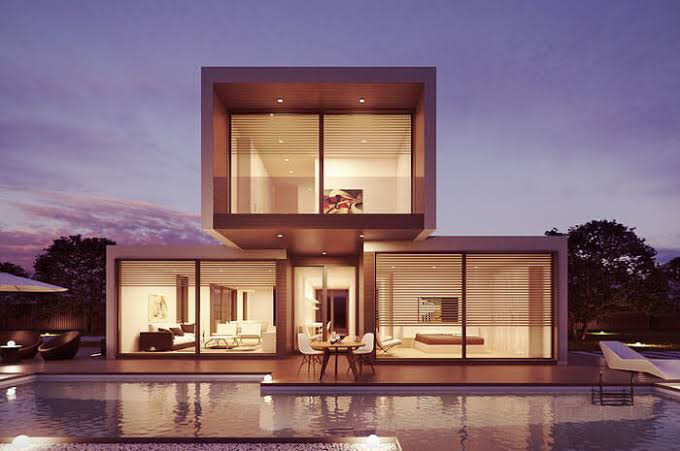
7. Veras (Evolvelab) — Best AI Rendering for Architects
Veras is the most architect-specific AI rendering tool — integrating directly with Revit, SketchUp, and Rhino to transform 3D models into photorealistic renderings using AI.
Architectural rendering capabilities:
Direct model integration:
- Works inside Revit, SketchUp, Rhino — no model export needed
- AI reads existing geometry → generates photorealistic render
- Maintains architectural accuracy of AI output
Style control:
- Architectural photography — photorealistic exterior shots
- Watercolor — competition submission aesthetic
- Pencil sketch — conceptual design presentation
- Diagram — analytical drawing style
- Multiple styles from same model view
Material and lighting intelligence:
AI automatically applies contextually appropriate materials and lighting to architectural elements — sky, landscaping, people, and context added intelligently.
Speed:
90 seconds to a photorealistic render from a Revit model — vs. hours for traditional rendering workflows.
Pricing: Pro from $49/month.
Best for: Architects who want AI rendering without leaving their BIM/CAD environment — Veras’s direct integration is the most seamless AI rendering workflow for established architectural practices.
8. Lumion with AI — Best Real-Time Architectural Visualization
Lumion is the most widely used real-time architectural visualization software — and its AI features in 2026 make it faster and more intelligent than ever.
AI visualization capabilities:
AI Sky:
Lumion’s AI-powered sky system generates contextually appropriate atmospheric conditions — automatically matching the sky to the time of day, location, and architectural style.
Smart Placement:
AI places trees, people, vehicles, and street furniture contextually — trees grow at appropriate scale, people populate spaces naturally.
AI Style:
One-click artistic styles transform a technical architectural model into:
- Nordic cool light
- Warm Mediterranean afternoon
- Overcast London conditions
- Tropical Southeast Asian light
LiveSync:
Real-time sync with Revit, SketchUp, ArchiCAD — design changes appear in Lumion visualization instantly.
Pricing: Lumion Standard $1,500/year. Pro:$3,000/year.
Best for: Architectural firms producing regular client presentations — Lumion’s speed and quality make it the most practical visualization tool for practice environments.
9. Adobe Firefly for Architecture — Best for Marketing Imagery
Adobe Firefly‘s commercially safe AI image generation is increasingly used by architectural firms for marketing material and concept imagery.
Architectural marketing capabilities:
Context visualization:
Generate photorealistic context photos for building sites — surrounding buildings, street life, landscape — to composite with technical renderings.
Interior lifestyle photography:
AI-generated lifestyle images showing furnished interiors with appropriate occupants and atmosphere — for marketing brochures.
Material sampling:
Generate photorealistic material samples — stone finishes, wood species, metal cladding — for presentation boards.
Commercial safety:
Firefly trained on licensed content — generated images safe for commercial architectural marketing use without copyright concerns.
Best for: Architectural marketing teams producing high-quality marketing material — Firefly’s commercial safety is important for client-facing materials.
Structural and Engineering AI

10. Autodesk Forma — Best for Climate and Performance AI
Autodesk Forma (formerly Spacemaker) provides the most sophisticated early-stage climate and performance analysis for architectural design.
Performance analysis capabilities:
Wind analysis:
AI simulates wind conditions around proposed buildings:
- Pedestrian comfort at ground level
- Wind pressure on facades
- Natural ventilation potential
- Wind tunnel effect between buildings
Sunlight and daylight:
- Annual sunlight hours per facade
- Daylight factor inside spaces
- Shadow impact on neighboring buildings
- Solar panel potential assessment
Noise analysis:
AI maps noise levels around site from traffic, industry, and other sources — informs acoustic design decisions.
Carbon analysis:
Preliminary embodied carbon assessment from material quantities — supports early-stage sustainability decision-making.
Best for: Architectural practices working on urban-scale projects or sustainability-focused design — Forma’s performance analysis at concept stage prevents costly design changes later.
11. Hypar — Best for Structural Conceptual Design AI
Hypar is an AEC platform for automated building systems design — AI generates structurally rational design options from architectural constraints.
Structural AI capabilities:
Automated structural layout:
Input floor plan → Hypar generates structurally efficient column and beam layouts:
- Optimized for span efficiency
- Coordinated with architectural program
- Multiple structural system options (steel, concrete, timber)
MEP coordination:
AI generates preliminary MEP routing coordinated with structural layout — reduces major coordination conflicts before detailed design.
Quantity extraction:
Automated structural quantity takeoffs from generated layouts → early cost estimation.
Best for: Architects working on conceptual structural coordination — Hypar’s automation reduces the structural consultant input needed at early design stages.
Client Communication and Presentation AI
12. Canva AI — Best for Architectural Presentation Design
Canva’s AI tools make creating professional architectural presentations faster — particularly useful for smaller practices without dedicated graphic designers.
Architectural presentation capabilities:
Presentation generation:
Describe project → Canva AI generates presentation structure with appropriate layouts for:
- Cover slide
- Site analysis
- Concept development
- Design proposal
- Technical details
- Next steps
Image enhancement:
AI background removal, enhancement, and color correction for architectural photographs and renders.
Brand consistency:
Brand Kit maintains consistent typography, colors, and logo across all client presentations.
Floor plan diagrams:
Canva’s diagram tools + AI generate clean, presentation-quality floor plan diagrams from rough inputs.
Best for: Architectural practices producing regular client presentations — Canva AI reduces presentation production time from hours to minutes.
13. ChatGPT / Claude — Best for Architectural Writing
AI assistants handle the significant writing workload that architectural practice generates — from project briefs to planning statements to construction specifications.
Architectural writing capabilities:
Design statements:
“Write a 500-word design statement for this contemporary residential project. Key concepts: connection to landscape, material honesty, passive solar design. Client: professional couple, empty nesters.”
→ Complete, professional design statement generated.
Planning application statements:
“Write a planning statement supporting this residential extension application addressing: impact on neighbors, design quality, compliance with local planning policy.”
Project briefs:
“Create a detailed project brief for a 500-seat community theater including program requirements, technical requirements, sustainability targets, and procurement strategy.”
Specification sections:
“Write a specification section for an external wall insulation system, including materials, installation requirements, and quality assurance provisions.”
Client reports:
“Write a monthly project progress report for a commercial office fit-out at 60% construction stage. Key issues: delayed steel delivery, window installation complete, mechanical rough-in in progress.”
Best for: All architects — AI writing assistance saves 2–3 hours weekly on documentation tasks across every architectural practice.
AI for Building Code Compliance
14. Archilyse — Best for Automated Building Analysis
Archilyse provides AI-powered building analysis — automatically calculating key performance metrics from floor plans.
Compliance analysis capabilities:
Space efficiency analysis:
AI calculates net-to-gross ratios, circulation efficiency, and space utilization from floor plan drawings.
Residential quality metrics:
- Daylight access per room
- Noise exposure estimates
- View quality scores
- Accessibility compliance checking
Automated area schedules:
AI reads floor plans → generates complete area schedules → verifies compliance with planning consent areas.
Best for: Residential architectural practices — Archilyse’s automated analysis replaces manual quality checking that consumes significant architect time.
AI Tools by Architectural Practice Size
Solo Architect / Small Practice (1–5 people)
Essential free/low cost stack:
- Midjourney ($10/month) — concept visualization
- ChatGPT/Claude free — writing and documentation
- Veras ($49/month) — quick AI renders
- Canva AI (₹4,000/year) — presentations
- Stable Diffusion (self-hosted free) — unlimited concept images
Monthly cost: ~$60–70/month
Time saved: 10–15 hours/week on visualization and documentation
Mid-Size Practice (5–20 people)
Professional stack:
- Midjourney Pro ($60/month) — team visualization
- Revit with Autodesk AI — BIM documentation
- Lumion Pro ($3,000/year) — presentation rendering
- Spacemaker/Forma — site analysis
- ChatGPT Team ($25/user/month) — practice-wide writing assistance
Monthly cost: ~$500–800/month
Large Practice (20+ people)
Enterprise stack:
- Autodesk AEC Collection ($3,700/user/year) — Revit + Forma + generative design
- Lumion Enterprise — visualization
- Spacemaker — site planning
- Custom Stable Diffusion deployment — unlimited visualization
- GitHub Copilot for computational design team
- Midjourney Pro — concept work
Indian Architecture — Specific AI Considerations
Vastu Shastra compliance:
AI tools can be prompted to consider Vastu principles in design generation — though specialized Vastu AI tools are emerging in India.
Climate-responsive design:
Stable Diffusion LoRAs trained on Indian vernacular architecture help generate climate-appropriate design responses forfor Indian context.
Documentation:
ChatGPT and Claude understand Indian building code frameworks — NBC (National Building Code), local municipal regulations — when prompted with relevant context.
Cost estimation:
AI tools trained on Indian construction costs (CSR rates, DSR rates) are emerging — watch for Indian-specific construction cost AI tools.
BIM adoption:
Indian architectural practice is rapidly adopting BIM — Revit with AI is as relevant for Indian firms as global practices.
Frequently Asked Questions
Which AI tool is most useful for architects in 2026?
Midjourney for concept visualization and Revit with Autodesk AI for BIM documentation deliver the highest combined impact. For solo architects and small practices, Midjourney + ChatGPT/Claude free + Veras cover the most critical AI-assisted workflows at minimal cost.
Can AI design buildings without architects?
No — AI tools generate options, imagery, and documentation assistance but cannot replace the complex spatial problem-solving, regulatory navigation, structural coordination, and clientrelations thatcdefineelationssectural practice. AI makes architects faster and more capable — it does not replace them.
Which free AI tools are most useful for architects?
ChatGPT/Claude free for writing and documentation. Stable Diffusion (self-hosted) for unlimited concept visualization. Canva free for basic presentations. GitHub Copilot free tier for computational design work. These free tools alone save 5–8 hours weekly for most architectural practices.
How does AI affect architectural fees?
AI-enabled practices can either maintain fees while delivering more value and faster turnaround, or reduce fees to win more projects while maintaining margins. Most practices are using AI to improve quality and speed rather than primarily reduce fees — particularly in competitive tender situations where quality differentiation matters.
Which AI rendering tool is best for architectural firms?
Veras (direct BIM integration) is best for practices wanting AI rendering within existing Revit/SketchUp workflow. Lumion (real-time, higher quality) is best for practices with regular visualization needs. Midjourney is best for concept-stage imagery and competition submissions.
Conclusion
AI tools have made 2026 the most significant year of change in architectural practice since CAD replaced drawing boards. The firms embracing AI are delivering faster, producing more design options, and creating better client communication — while the firms ignoring it are already feeling the competitive pressure.
For concept design: Midjourney — generates the most architecturally sophisticated AI imagery for client presentations and design exploration.
For BIM and documentation: Revit with Autodesk AI — generative design, automated documentation, and clash detection within the industry-standard BIM platform.
For rendering: Veras for quick BIM-integrated renders, Lumion for high-quality client presentations.
For site planning: Spacemaker/Forma — AI-generated options with performance data for urban-scale projects.
For writing and documentation: ChatGPT or Claude — design statements, planning applications, specifications, and client reports generated from brief descriptions.
Start with Midjourney and ChatGPT — both immediately improve daily architectural practice at low cost. Add Veras for rendering. Integrate Autodesk AI features within your existing BIM workflow. Build the stack progressively as each tool’s value becomes clear in your specific practice context.