ABAP (Advanced Business Application Programming) remains the primary programming language for SAP system customization and development in 2026 — powering thousands of enterprises globally across ERP, S/4HANA, and Business Technology Platform (BTP) implementations. While ABAP is a niche language compared to Python or JavaScript, it is enormously valuable — ABAP developers command premium salaries in the SAP ecosystem, and any productivity improvement has immediate financial impact on enterprise SAP projects.
AI tools have arrived in the ABAP development ecosystem — from SAP’s own Joule AI assistant to GitHub Copilot’s growing ABAP support and Claude’s ability to reason about ABAP code and SAP architecture. For Indian SAP developers — one of the world’s largest SAP consulting communities — AI tools provide competitive advantages in project delivery speed and code quality.
This guide covers the best AI tools for ABAP coding in 2026 — from SAP-native AI to general-purpose AI assistants that understand ABAP.
What Is ABAP Coding?
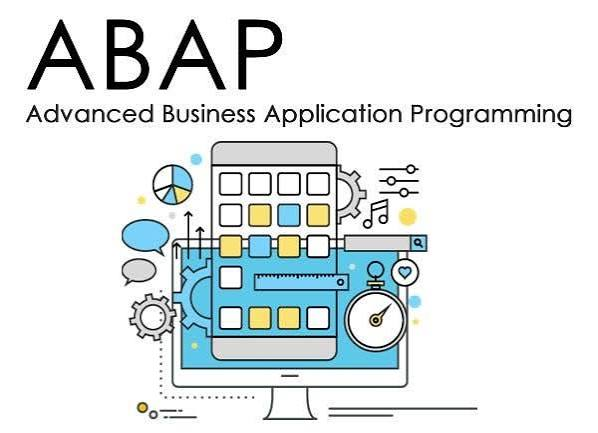
ABAP (Advanced Business Application Programming) is a programming language developed by SAP for building and customizing business applications that run on SAP systems. It is mainly used to create reports, automate business processes, develop custom applications, process business data, and extend standard SAP functionality.
ABAP is especially common in areas such as finance, accounting, sales, purchasing, inventory, manufacturing, and human resources. Developers use ABAP to work with SAP databases and business objects while following the business rules configured in an SAP environment.
History of ABAP
ABAP has a long history within SAP. It was originally developed in the 1980s as a programming language for creating reports and working with SAP’s business applications. The name originally referred to Allgemeiner Berichts-Aufbereitungs-Prozessor, which can be translated roughly as “General Report Creation Processor.”
As SAP’s software became more sophisticated, ABAP evolved from mainly a reporting language into a full development platform. It gained support for procedural programming, object-oriented programming, database operations, interfaces, web technologies, and other enterprise-development requirements.
With the development of SAP S/4HANA, ABAP continued to evolve. Modern ABAP development increasingly uses ABAP Objects, Core Data Services (CDS), ABAP SQL, APIs, and the ABAP RESTful Application Programming Model (RAP).
Why Use ABAP Coding?
There are several reasons organizations use ABAP:
- SAP customization: Businesses can customize SAP applications according to their specific requirements.
- Business reporting: ABAP can generate reports from business data stored in SAP systems.
- Process automation: Repetitive business tasks can be automated with ABAP programs.
- Data processing: Developers can retrieve, transform, validate, and process large amounts of enterprise data.
- Integration: ABAP can help connect SAP applications with other systems through interfaces and APIs.
- Extensions: Companies can add functionality without completely replacing standard SAP applications.
- Enterprise applications: ABAP is designed around the complex business processes commonly handled by SAP.
- S/4HANA development: Modern ABAP supports development patterns designed for SAP’s current enterprise platform.
Where Is ABAP Used?
ABAP coding can be found across many business functions, including:
| Area | Example Use |
|---|---|
| Finance | Financial reports and data processing |
| Accounting | Invoice and accounting automation |
| Sales | Sales reports and order processing |
| Purchasing | Purchase-order workflows |
| Inventory | Stock and material reports |
| Manufacturing | Production-related applications |
| HR | Employee-related business processes |
| Data Management | Data extraction and transformation |
| Integration | SAP-to-external-system communication |
ABAP Development Context — Why AI Matters
ABAP Developer Challenges
Large legacy codebase: Most SAP systems have decades of ABAP code — AI helps navigate and understand unfamiliar code.
Complex debugging: ABAP debugging across function modules, BAPIs, and enhancement spots is time-consuming — AI accelerates diagnosis.
Documentation gaps: Legacy ABAP code is often undocumented — AI generates documentation from code.
Performance optimization: ABAP database access patterns significantly impact performance — AI identifies inefficient SELECT statements.
S/4HANA migration: Moving from classic ABAP to S/4HANA-compatible code — AI identifies compatibility issues and suggests rewrites.
ABAP RESTful Application Programming (RAP): New BTP development paradigm — AI accelerates adoption of RAP model.
Best AI Tools for ABAP Coding in 2026
SAP-Native AI Tools
1. Joule — Best AI for SAP ABAP Development
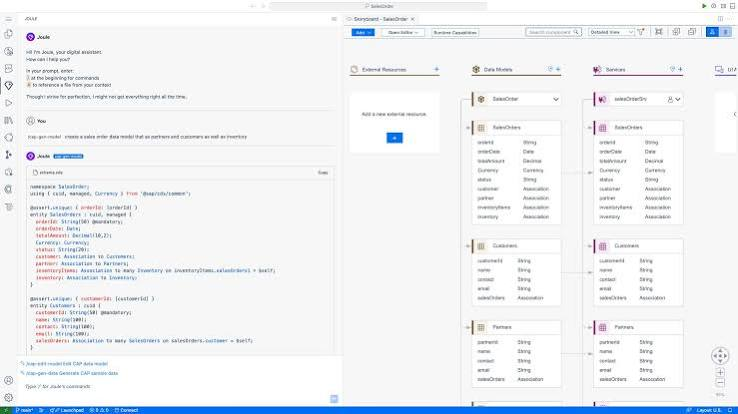
SAP’s Joule AI assistant is the most important AI tool for ABAP developers — deeply integrated into SAP BTP and ABAP development environments.
ABAP-specific capabilities:
ABAP code generation:
Describe business requirement → Joule generates ABAP code:
“Create a function module that reads customer data from KNA1 table with filtering by customer group and company code, returns structured table with BAPI-compatible output”
→ Complete function module with proper parameter declarations, SELECT statement, error handling.
S/4HANA compatibility check:
Paste classic ABAP code → Joule identifies:
- Obsolete statements (SELECT * FROM)
- Pool/cluster table access (no longer supported)
- Old field names (pre-S/4HANA)
- Performance issues for HANA database
RAP model generation:
Describe business object → Joule generates:
- CDS views (define, consumption, interface)
- Behavior definition
- Behavior implementation
- Service definition and binding
ABAP in BTP:
Joule integrated into BTP ABAP environment → AI assistance directly in cloud ABAP development.
Fiori elements guidance:
Generate UI annotations → Joule suggests OData service structure → Fiori app scaffolding.
Integration with ABAP Development Tools (ADT):
Joule accessible within Eclipse ADT → AI suggestions within existing ABAP developer workflow.
Availability:
Joule available through SAP BTP subscription — check current licensing with SAP account team.
Best for: SAP customers with a BTP subscription — Joule’s SAP-native training provides the most accurate ABAP and SAP-specific suggestions.
2. SAP Build Code with AI — Best for Low-Code ABAP
SAP Build Code integrates AI into SAP’s low-code development environment — accelerating ABAP-adjacent development.
ABAP development capabilities:
Joule in Build Code:
Natural language → application logic → generated code.
OData service generation:
Describe service requirements → Build Code generates OData service → consumed by Fiori apps.
Integration flow generation:
Describe integration requirements→ AI generates SAP Integration Suite flow → connects ABAP backend to external systems.
Extension development:
Extend standard SAP apps → AI suggests extension points → generates extension code → BTP-compatible.
Best for: Developers building SAP extensions and integrations — Build Code AI accelerates the growing BTP-focused ABAP work.
General AI Assistants for ABAP
3. GitHub Copilot — Best General AI for ABAP

GitHub Copilot has growing ABAP support — generates ABAP code from comments and provides inline suggestions in supported editors.
ABAP Copilot capabilities:
ABAP in Eclipse ADT:
Copilot plugin for Eclipse → inline ABAP suggestions → works with ABAP Development Tools.
Code generation from comments:
abap
"Write a method to calculate total order value
"from VBAP table for given sales order number
"including all line items, exclude rejected items
"return total amount in document currency
METHOD calculate_order_total.
Copilot generates complete method implementation.
SELECT statement generation:
abap
"Select all open purchase orders from EKKO/EKPO
"where delivery date is in next 30 days
"join with LFM1 for vendor info
"filter by company code 1000
SELECT
Copilot generates correct JOIN syntax with proper WHERE conditions.
BAPI call generation:
abap
"Call BAPI_SALESORDER_CREATEFROMDAT2
"to create sales order with header and item data
"handle return messages, commit work if success
DATA:
Complete BAPI call with proper parameter mapping.
Exception handling:
abap
"Add proper exception handling to this method
"catch CX_SY_OPEN_SQL_DB exceptions
"log to application log (SLG1)
"raise business exception with message
Complete TRY-CATCH-ENDTRY block with SAP-appropriate error handling.
Limitations:
Copilot’s ABAP knowledge is less comprehensive than Python/JavaScript — suggestions require more verification. SAP-specific tables (KNA1, VBAK, EKKO) are generally recognized. Custom Z-tables are not known.
ABAP in Copilot Chat:
“Explain what this ABAP code does”
“Why is this SELECT statement slow on HANA?”
“Convert this classic ABAP to ABAP OO”
Pricing: $10/month. Free for students.
Best for: ABAP developers wanting AI assistance in Eclipse ADT — Copilot’s ABAP support is growing in 2026 with meaningful productivity improvement for standard ABAP patterns.
4. Claude — Best AI for ABAP Code Analysis and Architecture
Claude provides the deepest analytical reasoning for ABAP problems — code review, architecture guidance, performance analysis, and migration planning.
ABAP-specific capabilities:
Code review:
Review this ABAP code for:
1. Performance issues (especially HANA-relevant)
2. Security vulnerabilities (SQL injection, authorization)
3. S/4HANA compatibility
4. Coding standards compliance
5. Missing error handling

[paste ABAP code]
Performance analysis:
This ABAP SELECT is slow on our S/4HANA system.
Table has 50M rows. Current runtime: 45 seconds.
[paste SELECT statement]
Identify performance issues and suggest optimizations. Consider: indexes, HANA-specific hints, code pushdown.
S/4HANA migration:
Analyze this classic ABAP for S/4HANA compatibility:[paste code]
Identify: obsolete statements; pool/cluster table references; old field names (pre-S/4HANA renames); performance issues on HANA; enhancement spot opportunities.
RAP model design:
“Design a RAP business object for [business process]. Include CDS view hierarchy, behavior definition structure, and key decisions around draft handling and side effects.”
BAPI/RFC understanding:
“Explain all parameters of BAPI_SALESORDER_CREATEFROMDAT2 and which are mandatory for creating a standard sales order. Common pitfalls?”
ALV report generation:
Write ABAP code for an ALV report that:
- Reads from VBAK/VBAP (sales orders)
- Filters by date range and sales org
- Shows header + item data in hierarchical ALV
- Includes subtotals by customer
- Export to Excel functionality
Free plan: Claude free handles complex ABAP analysis — Pro for heavy daily use.
Best for: Complex ABAP analysis, architecture decisions, and S/4HANA migration guidance — Claude’s reasoning depth produces the most insightful ABAP technical advice.
5. ChatGPT — Best for ABAP Learning and Documentation
ChatGPT excels at ABAP explanation and documentation generation — particularly useful for explaining complex SAP concepts and generating code comments.
ABAP documentation capabilities:
Code documentation:
Add comprehensive documentation to this ABAP code:
- Method header comment (purpose, parameters, exceptions)
- Inline comments explaining business logic
- Performance notes
- Modification history placeholder

[paste ABAP code]
ABAP concept explanation:
“Explain ABAP enhancement framework — implicit enhancements, explicit enhancement spots, customer exits, BADIs — with examples of when to use each.”
“Explain the difference between ABAP class-based exceptions and classical ABAP exceptions. When to use each in modern ABAP?”
SAP table relationships:
“Explain the relationship between VBAK, VBAP, VBEP, VBKD in SAP sales order data model. Which fields link tables?”
Learning ABAP:
“Create a structured learning path for a Java developer learning ABAP OO for S/4HANA development. Week-by-week curriculum with focus areas.”
Interview preparation:
“Generate 20 ABAP technical interview questions covering: performance optimization, OO ABAP, RAP model, HANA-specific programming, debugging techniques.”
Best for: ABAP learning, documentation generation, and SAP concept explanation — ChatGPT’s breadth of SAP knowledge handles most ABAP knowledge questions.
AI for Specific ABAP Development Tasks
6. AI for ABAP Performance Optimization
ABAP performance on HANA requires specific patterns — AI helps identify and fix performance issues.
Common ABAP performance issues AI detects:
Nested SELECT in loops (most critical):
abap
"Anti-pattern Copilot/Claude identifies:
LOOP AT lt_orders INTO ls_order.
  SELECT * FROM vbap WHERE vbeln = ls_order-vbeln.
  "This runs SELECT N times!
ENDLOOP.
Claude identifies: “This is a SELECT inside LOOP anti-pattern — generates N database calls. Replace with a single SELECT…FOR ALL ENTRIES.”
Non-HANA-optimized queries:
abap
"Problematic for HANA:
SELECT * FROM vbak INTO TABLE lt_orders.
"Selects all fields — increases data transfer
Claude suggests: “Select only required fields. Use CDS views for complex queries — pushes logic to HANA.”
Missing indexes:
Paste table name and WHERE conditions → Claude/ChatGPT identifies if a proper database index exists.
7. AI for ABAP Object-Oriented Refactoring
Converting procedural ABAP to OO ABAP is a common migration task — AI accelerates it significantly.
Refactoring with Claude:
Convert this procedural ABAP report to
ABAP OO design:
- Create appropriate classes
- Separate concerns (data access, business logic, UI)
- Use dependency injection where appropriate
- Follow ABAP OO naming conventions

[paste procedural ABAP code]
Design pattern guidance:
“Implement Factory pattern in ABAP for creating different types of document processors based on document category.”
Interface design:
“Design ABAP interface hierarchy for a payment processing framework that supports multiple payment methods (bank transfer, credit card, mobile payment).”
8. AI for ABAP RAP Model Development
RAP (RESTful ABAP Programming) model is the future of SAP development — AI accelerates learning the steep curve.
RAP with Claude:
CDS view design:
Design CDS view hierarchy for RAP business object:
Entity: Sales Order
Key: Sales Order Number

Include:
- Define view (database layer)
- Interface view (business object)
- Consumption view (UI layer)

Fields from: VBAK, VBAP
Include: semantic annotations for Fiori
Behavior definition:
Generate behavior definition for Sales Order RAP BO:
- Standard operations: Create, Update, Delete
- Validations: Check customer credit limit
- Determinations: Set default values on create
- Action: Approve sales order
- Draft handling: Enable
Behavior implementation:
Complete ABAP class implementing behavior definition → complex, but AI generates framework code.
ABAP Code Quality Tools
9. SAP Code Inspector with AI Analysis
SAP Code Inspector (SCI) provides static analysis — combine with AI for deeper insights.
AI-enhanced code quality:
Export SCI results → paste to Claude:
“These are Code Inspector findings for our ABAP codebase. Prioritize which to fix first and explain the business impact of each finding: [paste SCI results].”
Finding explanation:
“Explain what this Code Inspector finding means and how to fix it: [paste finding].”
Batch remediation:
“Here are 20 instances of the same Code Inspector finding. Generate a find-and-replace approach or mass correction script.”
10. ABAP Test Cockpit (ATC) + AI
ABAP Test Cockpit provides code analysis — AI helps interpret and remediate findings.
AI for ATC findings:
Interpretation:
“Explain this ATC finding in business terms and estimate effort to fix: [paste ATC finding].”
Auto-fix generation:
“Generate corrected ABAP code that resolves this ATC finding: [paste finding + code].”
Exemption justification:
“Write a technical justification for exempting this ATC finding in our legacy system: [paste finding].”
ABAP AI Workflow — Practical Examples
Daily ABAP Development Workflow
Morning — New development:
- Get requirement from functional consultant
- Claude: “Help me design the technical approach for this ABAP requirement: [paste requirement.”
- Copilot: Generate code structure → fill in business logic
- Claude: Code review before transport
Debugging session:
- Identify error from system log (SM21/SLG1)
- Claude: “Analyze this ABAP dump: [paste ST22 content]. What caused it and how to fix it?”
- Implement fix → Copilot generates missing error handling
S/4HANA migration check:
- Export ABAP code
- Claude: Full S/4HANA compatibility analysis
- Fix identified issues → transport to quality
Free AI ABAP Tools
| Tool | ABAP Support | Cost | Best Use |
|---|---|---|---|
| Claude free | ✅ Good | Free | Analysis, review |
| ChatGPT free | ✅ Good | Free | Documentation, learning |
| GitHub Copilot free | ⚠️ Limited | Free | Basic code generation |
| Joule | ✅ Best | SAP BTP subscription | SAP-native development |
Indian ABAP Developer Context
India’s SAP Ecosystem
India is the world’s largest SAP consulting market after Germany:
- Major SAP practices at TCS, Infosys, Wipro, HCL, Accenture India
- Large SAP developer community in Bangalore, Hyderabad, Pune, Chennai
- Strong demand for S/4HANA migration expertise
AI Competitive Advantage for Indian SAP Developers
Productivity: Indian ABAP developers using AI deliver 30–50% more development capacity → competitive advantage in global SAP projects.
S/4HANA expertise: AI helps Indian consultants navigate S/4HANA migration complexity → rapidly growing skill set with AIance.
Documentation: AI generates English-language technical documentation for international clients → better deliverable quality.
Knowledge transfer: AI explains complex SAP concepts → faster junior developer onboarding.
ABAP Prompts — Ready to Use
Prompt 1 — ABAP Code Review
Review this ABAP code as a senior SAP architect:

1. Performance (especially HANA-specific)
2. Security (authorization, SQL injection)
3. S/4HANA compatibility
4. ABAP OO best practices
5. Error handling completeness
6. Documentation quality

Rate each area 1-10 and provide specific fixes.

[paste code]
Prompt 2 — SELECT Optimization
Optimize this ABAP SELECT for S/4HANA HANA database:

Current performance: [runtime]
Table size: [rows]
Current indexes: [list]
[paste SELECT statement]
Provide optimized SQL, recommended indexes, and a CDS view alternative if appropriate.
Prompt 3 — RAP BO Generation
Generate complete RAP business object for:
Entity: [name]
Database table: [table name]
Key field: [key]
Required operations: [list]
Validations needed: [list]

Include:
- Define CDS view
- Interface CDS view
- Behavior definition
- Class skeleton for behavior implementation
Frequently Asked Questions
Which AI tool is best for ABAP coding in 2026?
Joule (SAP’s native AI) is best for SAP customers with a BTP subscription — deepest SAP-specific training. Claude is the best general AI for complex ABAP analysis, code review, and S/4HANA migration guidance. GitHub Copilot is best for inline code generation within Eclipse ADT. ChatGPT is best for ABAP learning and documentation generation. Most ABAP developers benefit from the Claude + Copilot combination.
Does GitHub Copilot support ABAP?
Yes — GitHub Copilot has growing ABAP support in 2026, accessible via the Eclipse ADT plugin. Support is less comprehensive than for Python/JavaScript — suggestions require more verification for SAP-specific patterns. Copilot handles standard ABAP patterns (SELECT statements, LOOP processing, BAPI calls) reasonably well. Custom Z-objects and organization-specific patterns are not recognized without additional context.
Can AI help with S/4HANA migration of ABAP code?
Yes — Claude is particularly effective for S/4HANA migration analysis. Paste classic ABAP code → Claude identifies obsolete statements, pool/cluster table references, old field names, HANA performance issues. Claude cannot know your specific system configuration but identifies standard migration requirements. SAP’s own Joule provides most SAP-specific migration guidance.
Which free AI tool is best for learning ABAP?
ChatGPT free for ABAP concept explanation — strong SAP knowledge base, explains ABAP OO, RAP, BAPIs, and SAP data models clearly. Claude free for technical ABAP analysis — best for understanding complex code and architecture. GitHub Copilot free (2,000 completions/month) for hands-on coding practice — generates ABAP examples.
Can AI write ABAP code for BADIs and user exits?
Yes — Claude and ChatGPT understand BADI and user exit concepts well. Provide: BADI name, enhancement requirement, available methods/parameters → AI generates implementation skeleton with business logic. Always verify generated code in SAP sandbox before production transport.
Conclusion
AI has arrived in the ABAP development ecosystem — and Indian SAP developers who leverage these tools are delivering projects faster with better code quality.
Best AI tools for ABAP coding:
SAP-native: Joule — deepest SAP knowledge, BTP integrated, RAP model support. Essential for SAP customers with BTP access.
Code generation: GitHub Copilot — inline ABAP suggestions in Eclipse ADT, growing SAP knowledge base. $10/month investment delivers meaningful ABAP productivity improvement.
Complex analysis: Claude — best for code review, S/4HANA migration analysis, performance optimization, architecture guidance. Free plan handles most ABAP analysis needs.
Learning and documentation: ChatGPT — best for understanding SAP concepts, generating documentation, interview preparation.
Free ABAP AI stack: Claude free + ChatGPT free + GitHub Copilot free (2,000/month) = comprehensive free AI for ABAP development covering code generation, analysis, learning, and documentation. Add Joule if an SAP BTP subscription is available — provides the most accurate SAP-native AI for production ABAP development.