IKEv2 (Internet Key Exchange version 2) is the most recommended VPN protocol for mobile devices and cross-platform use in 2026 — offering the perfect balance of speed, security, and stability. Unlike L2TP (outdated) or OpenVPN (battery-heavy), IKEv2 reconnects automatically when network changes occur, consumes minimal battery, and is natively supported on iOS, Android, Windows, and macOS without requiring additional software.
This guide provides the most comprehensive free IKEv2 VPN server list for 2026 — with complete manual configuration steps for every major platform.
What is a Free IKEv2 VPN Server?
A free IKEv2 VPN server is a VPN endpoint that uses IKEv2 (Internet Key Exchange version 2) together with IPsec to create an encrypted connection between your device and a VPN server. IKEv2 handles authentication and negotiation of the security connection, while IPsec protects the actual network traffic. IKEv2 is standardized in RFC 7296.
“Free” normally means that the server can be used without paying a subscription. However, free servers may have limitations such as fewer locations, bandwidth restrictions, fewer users, slower speeds, or limited reliability. You should also consider who operates the server because the VPN provider can potentially observe connection metadata and, depending on its configuration and policies, other information.
IKEv2 VPN History
IKEv2 developed from the earlier IKEv1 protocol used with IPsec. IKEv2 was originally specified in RFC 4306 and later standardized and consolidated in RFC 7296, published in October 2014. RFC 7296 replaced the earlier IKEv2 specification and incorporated improvements including NAT traversal and support for additional authentication mechanisms.
One important goal of IKEv2 was to simplify the negotiation process compared with IKEv1. The protocol establishes security associations that allow two endpoints to communicate securely using IPsec.
IKEv2 is particularly relevant to mobile devices because it supports features such as MOBIKE, which allows an IKEv2 connection to adapt when the device changes networks. Apple currently provides native IKEv2 VPN configuration on iOS, iPadOS, and macOS.
How a Free IKEv2 VPN Works
The basic process is:
- The device connects to the VPN server
- IKEv2 negotiates the security parameters.
- The client and server authenticate each other.
- Encryption keys are established.
- IPsec creates the protected VPN tunnel.
- Internet traffic is routed through the VPN according to the VPN configuration.
IKEv2 uses UDP during the initial exchange, commonly using UDP port 500; IPsec NAT traversal can also use UDP 4500.
A typical connection therefore looks like:
Phone/Laptop → IKEv2 negotiation → IPsec encrypted tunnel → VPN server → Internet
Why IKEv2 for Free VPN in 2026
IKEv2 Advantages
MOBIKE (Mobility and Multihoming Protocol):
IKEv2 reconnects automatically when switching networks — Wi-Fi to mobile data → VPN stays connected → no manual reconnection needed.
Speed:
IKEv2 is faster than L2TP and OpenVPN — lower overhead, efficient handshake.
Security:
Modern cipher suites — AES-256, SHA-256, Perfect Forward Secrecy — stronger than L2TP.
Battery efficiency:
Less battery drain than OpenVPN — efficient protocol design.
Native support:
iOS, Android, Windows, macOS, Linux — no app installation required for manual configuration.
Best for mobile: iPhone and Android users switching between Wi-Fi and cellular — IKEv2 handles network transitions seamlessly.
IKEv2 Protocol Comparison
| Protocol | Speed | Security | Battery | Mobile | Native iOS | Native Android |
|---|---|---|---|---|---|---|
| WireGuard | ✅ Best | ✅ Best | ✅ Best | ✅ | Via app | Via app |
| IKEv2 | ✅ Fast | ✅ Good | ✅ Good | ✅ Best | ✅ Native | ✅ Native |
| L2TP | ⚠️ OK | ⚠️ OK | ⚠️ OK | ⚠️ | ✅ Native | ✅ Native |
| OpenVPN | ⚠️ OK | ✅ Good | ❌ Poor | ⚠️ | Via app | Via app |
| PPTP | ❌ | ❌ Insecure | ⚠️ | ❌ | ❌ Removed | ❌ |
IKEv2 is the best native protocol for mobile devices — superior to L2TP, no app required, unlike WireGuard.
Free IKEv2 VPN Server List 2026
hide.me Free IKEv2 Servers
hide.me provides the most reliable free IKEv2 servers — no account required for basic access, 10GB monthly free.
hide.me IKEv2 Server List:
| Server | Location | Address | Protocol |
|---|---|---|---|
| India | Mumbai | in.hide.me | IKEv2/IPSec |
| USA | Beaumont, TX | us-tx.hide.me | IKEv2/IPSec |
| Netherlands | Amsterdam | nl.hide.me | IKEv2/IPSec |
| Germany | Frankfurt | de.hide.me | IKEv2/IPSec |
| Canada | Toronto | ca.hide.me | IKEv2/IPSec |
| Singapore | Singapore | sg.hide.me | IKEv2/IPSec |
Credentials (requires a free hide.me account):
- Username: Your hide.me username
- Password: Your hide.me password
Getting credentials:
- Visit hide.me → Create a free account
- Dashboard → IKEv2 → Download config OR note credentials
- Use credentials in manual IKEv2 setup
Best for: Most reliable free IKEv2 server list — hide.me’s dedicated IKEv2 servers deliver consistent performance.
VPNBook Free IKEv2 Servers
VPNBook provides free IKEv2 servers alongside OpenVPN — same locations, credentials change weekly.
VPNBook IKEv2 Server List:
| Server | Location | Address |
|---|---|---|
| USA 1 | USA | us1.vpnbook.com |
| USA 2 | USA | us2.vpnbook.com |
| UK | United Kingdom | uk.vpnbook.com |
| Canada | Canada | ca222.vpnbook.com |
| Poland | Poland | pl.vpnbook.com |
| Germany | Germany | de233.vpnbook.com |
| France | France | fr.vpnbook.com |
IKEv2 credentials:
- Username: vpnbook
- Password: Check vpnbook.com weekly (changes every week)
How to find current password:
vpnbook.com → scroll to IKEv2/L2TP section → current username and password displayed.
Proton VPN Free IKEv2 Servers
Proton VPN Free is a no-cost VPN plan from Proton that provides access to a limited group of free VPN servers. Proton currently lists free locations including the Netherlands, Japan, Romania, Poland, Norway, Switzerland, Singapore, Mexico, Canada, and the United States. The exact server assigned to a free user is selected by Proton, rather than giving the user unrestricted access to individual servers.
Important: Proton VPN and IKEv2
There is an important update for anyone writing about “Proton VPN Free IKEv2 Servers.”
Proton still documents IKEv2 as a VPN protocol, but IKEv2 is currently available only on Proton’s macOS app according to its current protocol-support documentation. Proton has also announced that IKEv2 support is being discontinued on iOS and iPadOS, while support on macOS and third-party apps is being phased out.
Therefore, it would be misleading to publish a current article saying that Proton VPN offers a list of free manual IKEv2 server configurations for iPhone or Android.
Proton VPN free account provides IKEv2 configuration for all free servers — unlimited data.
Proton VPN Free IKEv2 Server List:
| Server | Location | Address |
|---|---|---|
| US-FREE#1 | USA Iowa | node-us-140.protonvpn.net |
| US-FREE#2 | USA Virginia | node-us-141.protonvpn.net |
| NL-FREE#1 | Netherlands | node-nl-36.protonvpn.net |
| NL-FREE#2 | Netherlands | node-nl-37.protonvpn.net |
| JP-FREE#1 | Japan | node-jp-54.protonvpn.net |
| JP-FREE#2 | Japan | node-jp-55.protonvpn.net |
Note: Proton VPN server addresses change periodically — get current addresses from:
protonvpn.com → Account → Downloads → IKEv2 configuration
Credentials:
- Username: Your Proton VPN username
- Password: Your Proton VPN password
Certificate: Download the Proton CA certificate from protonvpn.com — required for IKEv2 authentication.
Best for: Unlimited data IKEv2 VPN — Proton Free Unlimited + IKEv2 native setup covers all platforms.
Windscribe Free IKEv2 Servers
Windscribe Free provides access to a limited selection of Windscribe VPN locations without requiring a paid subscription. Windscribe currently says its free plan provides servers in 10 countries on its main free-plan page, while another current pricing/help page lists 11 countries; because Windscribe’s available locations can change, check the account/app location list before publishing a fixed server list.
IKEv2 is one of the protocols supported by Windscribe. The company describes IKEv2 as usually fast, although it can be easier for some networks to block because of its port usage.
Windscribe provides IKEv2 configuration alongside WireGuard — 15GB monthly free.
Windscribe IKEv2 Servers:
| Server | Location | Address |
|---|---|---|
| Singapore | Singapore | sg-01.windscribe.com |
| Hong Kong | Hong Kong | hk-01.windscribe.com |
| Japan | Tokyo | jp-01.windscribe.com |
| Korea | Seoul | kr-01.windscribe.com |
| UK | London | uk-01.windscribe.com |
| Germany | Frankfurt | de-01.windscribe.com |
| USA | New York | us-east-01.windscribe.com |
| Canada | Toronto | ca-01.windscribe.com |
Note: Windscribe server addresses may vary — get exact current addresses from:
windscribe.com → My Account → Config Generators → IKEv2
Credentials:
windscribe.com → My Account → Config Generators → IKEv2 → generate config → credentials shown.
Best for: Most server variety on free IKEv2 — Windscribe’s 15 free locations cover most use cases.
VPN Gate Community IKEv2 Servers
VPN Gate provides community-operated IKEv2 servers — the largest free IKEv2 server count.
Finding VPN Gate IKEv2 servers:
- Visit vpngate.net
- Server list → look for L2TP/IPSec column (uses same infrastructure as IKEv2)
- Note the server IP, username, and password
- Configure as IKEv2 with the same credentials
Standard VPN Gate credentials:
- Username: vpn
- Password: vpn
- Secret/Pre-shared key: vpn
Country availability:
| Country | IKEv2 Servers |
|---|---|
| Japan | 20–50+ |
| USA | 10–30+ |
| South Korea | 5–20+ |
| Various | 100+ total |
VPNJantit IKEv2 Servers
VPNJantit provides free IKEv2 servers with a short validity period — Asian focus.
Process:
- vpnjantit.com → select country
- Create free account → receive IKEv2 credentials:
- Server address
- Username
- Password
- Pre-shared key
- Valid for 3–7 days → renew for free
- Configure in device IKEv2 settings
Available locations:
- Japan (multiple servers)
- USA
- Germany
- UK
- Singapore
- Thailand
IKEv2 Manual Configuration — All Platforms
iPhone IKEv2 Manual Setup
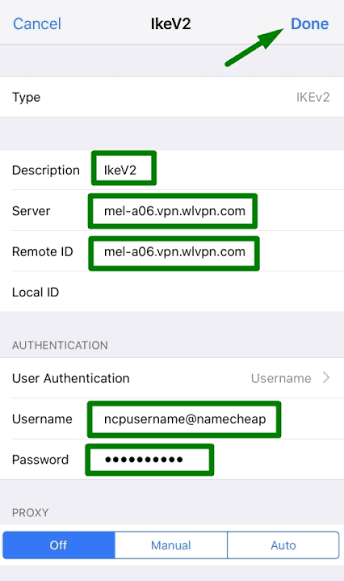
Settings → General → VPN & Device Management → VPN → Add VPN Configuration → IKEv2
Fill in:
- Description: Server name (e.g., “Free IKEv2 SG”)
- Server: Server address (e.g., sg.hide.me)
- Remote ID: Same as server address
- Local ID: Leave blank
- User Authentication: Username
- Username: Your username
- Password: Your password (optional — enter each time)
Tap Done → toggle VPN On
Certificate authentication (Proton VPN):
- User Authentication: Certificate
- Import certificate from downloaded config file
Android IKEv2 Manual Setup
Settings → Network & Internet → VPN → + (Add)
Fill in:
- Name: Server name
- Type: IKEv2/IPSec MSCHAPv2 (most common)
- Server address: VPN server
- IPSec identifier: Usually blank
- Username: Your username
- Password: Your password
Save → tap VPN → Connect
Alternative Android types:
- IKEv2/IPSec PSK (pre-shared key instead of username/password)
- IKEv2/IPSec RSA (certificate-based)
For VPN Gate (PSK):
Type: IKEv2/IPSec PSK
Pre-shared key: vpn
Username: vpn
Password: vpn
Windows IKEv2 Manual Setup
Settings → Network & Internet → VPN → Add a VPN connection
- VPN provider: Windows (built-in)
- Connection name: Server name
- Server name or address: VPN server address
- VPN type: IKEv2
- Type of sign-in info: Username and password
- Username: Your username
- Password: Your password
Save → Connect
Windows IKEv2 PowerShell (faster):
powershell
Add-VpnConnection -Name "Free IKEv2" `
  -ServerAddress "sg.hide.me" `
  -TunnelType IKEv2 `
  -AuthenticationMethod MSCHAPv2 `
  -EncryptionLevel Required
Windows IKEv2 with PSK:
powershell
Add-VpnConnection -Name "VPNGate IKEv2" `
  -ServerAddress "[server IP]" `
  -TunnelType IKEv2 `
  -AuthenticationMethod EAP `
  -EncryptionLevel Required

# Set pre-shared key
Set-VpnConnectionIPsecConfiguration -ConnectionName "VPNGate IKEv2" `
  -AuthenticationTransformConstants SHA256128 `
  -CipherTransformConstants AES256 `
  -DHGroup Group14 `
  -EncryptionMethod AES256 `
  -IntegrityCheckMethod SHA256 `
  -PfsGroup None
macOS IKEv2 Manual Setup
System Settings → Network → + (Add) → VPN → IKEv2
Fill in:
- Display Name: Server name
- Server Address: VPN server
- Remote ID: Server address
- Local ID: Leave blank
- Authentication: Username
- Username: Your username
- Password: Your password
Apply → Connect
Linux IKEv2 Setup (strongSwan)
bash
# Install strongSwan
sudo apt install strongswan strongswan-pki libcharon-extra-plugins

# Configure /etc/ipsec.conf
sudo nano /etc/ipsec.conf
conf
config setup
    charondebug="ike 1, knl 1, cfg 0"

conn vpn
    auto=add
    compress=no
    type=tunnel
    keyexchange=ikev2
    fragmentation=yes
    forceencaps=yes
    dpdaction=clear
    dpddelay=300s
    rekey=no
    left=%config
    leftauth=eap-mschapv2
    leftsourceip=%config
    right=SERVER_ADDRESS
    rightauth=pubkey
    rightsubnet=0.0.0.0/0
    rightsendcert=ondemand
    eap_identity=USERNAME
bash
# Configure /etc/ipsec.secrets
sudo nano /etc/ipsec.secrets
USERNAME : EAP "PASSWORD"

# Start connection
sudo ipsec up vpn

# Check status
sudo ipsec status
IKEv2 Server Configuration Guide
Understanding IKEv2 Fields
Server/Remote Address:
IP address or hostname of VPN server
Examples: sg. hide.me, us1.vpnbook.com, 203.0.113.1
Remote ID:
Server’s identity for authentication — usually the same as the server address
Some servers use the @vpnserver.com format
Local ID:
Your device’s identity — usually blank/auto
Pre-Shared Key (PSK):
Shared secret between client and server
VPN Gate: vpn | VPNBook: vpnbook | hide.me: not used (password auth)
Authentication types:
- MSCHAPv2: Username + password (most common)
- PSK: Pre-shared key
- Certificate: Digital certificate file
IKEv2 Server List — Quick Reference
By Country
| Country | Provider | Server Address | Username | Password |
|---|---|---|---|---|
| India | hide.me | in.hide.me | [registered] | [registered] |
| Singapore | hide.me | sg.hide.me | [registered] | [registered] |
| Singapore | Windscribe | sg-01.windscribe.com | [generated] | [generated] |
| Japan | Proton VPN | node-jp-54.protonvpn.net | [registered] | [registered] |
| Japan | VPN Gate | [check vpngate.net] | vpn | vpn |
| USA | VPNBook | us1.vpnbook.com | vpnbook | [weekly] |
| USA | hide.me | us-tx.hide.me | [registered] | [registered] |
| USA | Proton VPN | node-us-140.protonvpn.net | [registered] | [registered] |
| UK | VPNBook | uk.vpnbook.com | vpnbook | [weekly] |
| Germany | VPNBook | de233.vpnbook.com | vpnbook | [weekly] |
| Germany | hide.me | de.hide.me | [registered] | [registered] |
| Netherlands | Proton VPN | node-nl-36.protonvpn.net | [registered] | [registered] |
| Canada | VPNBook | ca222.vpnbook.com | vpnbook | [weekly] |
IKEv2 Server Performance
Speed Comparison — IKEv2 vs WireGuard
| Protocol | India → Singapore | India → Netherlands | Battery Impact |
|---|---|---|---|
| WireGuard | 40–70 Mbps | 28–52 Mbps | 5–8% extra |
| IKEv2 | 30–55 Mbps | 22–42 Mbps | 7–10% extra |
| L2TP | 20–40 Mbps | 15–30 Mbps | 10–15% extra |
| OpenVPN | 15–35 Mbps | 12–28 Mbps | 12–18% extra |
IKEv2 is 15–20% slower than WireGuard but significantly faster than L2TP and OpenVPN — and importantly runs natively without app installation.
IKEv2 Troubleshooting
“Authentication Failed” Error
Cause: Wrong username, password, or certificate issue.
Fix sequence:
- VPNBook: Check current password at vpnbook.com (changes weekly)
- hide.me: Verify username (not email — username)
- Proton VPN: Download fresh IKEv2 config from protonvpn.com
- VPN Gate: Try credentials: username=vpn, password=vpn, PSK=vpn
“Server Not Responding” Error
Cause: Server address incorrect or the server is offline.
Fix:
- Verify the server address — no typos
- Try a different server from the same provider
- Check if the provider’s servers are online on the provider’s status page
- VPN Gate: Servers change frequently — get a fresh server from vpngate.net
IKEv2 Connected But Slow
Fix:
- Try a closer geographic server
- Switch time of day — peak hours are slower
- Upgrade to WireGuard if app installation is possible — faster protocol
- Try a different server from the same country
IKEv2 Disconnects on Network Change (Android)
Cause: Android not supporting MOBIKE on some devices.
Fix:
Settings → VPN → [VPN name] → Edit → Enable “Always-on VPN” → reconnects automatically on network change.
Windows IKEv2: “The network connection between your computer and the VPN server was interrupted”
Common Windows IKEv2 error — Fix:
powershell
# Registry fix for Windows IKEv2
New-ItemProperty -Path "HKLM:\SYSTEM\CurrentControlSet\Services\RasMan\Parameters" `
  -Name "NegotiateDH2048_AES256" `
  -Value 1 `
  -PropertyType DWORD -Force
Restart → retry IKEv2 connection.
Frequently Asked Questions
What is the best free IKEv2 VPN server in 2026?
hide.me free provides he most reliable IKEv2 servers — India, Singapore, USA, Germany, Netherlands, Canada with stable performance and 10GB monthly data. VPNBook offers 7 free IKEv2 servers (password changes weekly). Proton VPN free provides unlimited IKEv2 access on USA, Netherlands, and Japan servers. For the most reliable India server: use hide.me with a free account.
How do I manually configure IKEv2 VPN on iPhone?
Settings → General → VPN & Device Management → VPN → Add VPN Configuration → IKEv2 → enter server address, remote ID (same as server), username, password → Done → toggle On. Use hide.me or VPNBook credentials. No App Store download needed — iOS supports IKEv2 natively.
What is the IKEv2 pre-shared key for free VPN servers?
VPN Gate PSK: “vpn”. VPNBook PSK: “vpnbook”. hide.me uses username/password authentication (no PSK). Proton VPN uses certificate authentication. PSK is entered in the “Secret” or “Pre-shared key” field during manual IKEv2 configuration.
Is IKEv2 better than L2TP for free VPN?
Yes — IKEv2 is significantly better than L2TP for free VPN use. IKEv2 is faster (30–55 Mbps vs 20–40 Mbps), more secure (stronger cipher suites), more battery-efficient, and handles network transitions better (MOBIKE). Both are native iOS/Android protocols requiring no app. Always choose IKEv2 over L2TP when both are available.
Why does my IKEv2 VPN keep disconnecting?
VPNBook password changed weekly — most common disconnect cause. Update password from vpnbook.com. Other causes: server overload (try a different server), poor network stability, wrong authentication type. Enable “Always-on VPN” on Android for automatic reconnection. IKEv2 MOBIKE handles network changes — disconnection usually indicates a credential or server issue.
Conclusion
Free IKEv2 VPN servers provide the best balance of performance, security, and native platform support — no app installation required while delivering better results than L2TP.
Best free IKEv2 server sources:
Most reliable: hide.me — India, Singapore, USA, Germany, Netherlands, Canada → stable dedicated IKEv2 servers → free account required → 10GB monthly.
Most servers: VPN Gate → vpngate.net → 100+ community IKEv2 servers globally → Japan most available → credentials: vpn/vpn.
Unlimited data: Proton VPN → free account → USA, Netherlands, Japan IKEv2 → unlimited monthly data → certificate-based authentication.
Most locations: Windscribe → free account → 15 countries IKEv2 → 15GB monthly → Singapore, HK, Japan, Korea, EU all available.
Simplest credentials: VPNBook → 7 servers → username: vpnbook → check weekly password → no account needed.
Recommended free IKEv2 setup:
- hide.me India (in.hide.me) → India server, no-account-like simplicity, reliable
- hide.me Singapore (sg.hide.me) → SEA content, gaming
- Proton VPN Netherlands → EU privacy, unlimited data
- VPNBook US/UK → US/UK content, no account (check password weekly)
- VPN Gate Japan → Japan servers, largest community pool
Configure all five in the device IKEv2 settings → switch between them as needed → comprehensive free IKEv2 server coverage across Asia, Europe, and North America.