
free VPN for Android can be challenging, especially with so many apps offering limited features, slow speeds, or questionable privacy policies. In 2026, the best free VPN apps provide a balance of security, performance, and ease of use, helping users protect their online privacy without paying for a subscription. Whether you want to browse securely on public Wi-Fi, access geo-restricted content, or keep your personal data private, a trusted free VPN can make a significant difference.
In this guide, we’ll explore the best free VPN apps for Android in 2026, comparing their features, data limits, server locations, speeds, and privacy protections. From unlimited-data options like Proton VPN to flexible free plans from Windscribe, hide.me, and TunnelBear, this article will help you choose the right VPN app for your Android smartphone or tablet.
VPN Android App Free: Finding a free VPN for Android that actually works is harder than it sounds. Most free VPNs either throttle your speed to the point where nothing loads properly, show you endless ads, or — worse — quietly collect your browsing data and sell it to third parties.
But some free VPNs are genuinely worth using. They have real free tiers (not just 7-day trials), reasonable speed, and solid privacy policies. This guide covers the best free VPN Android apps in 2026 that are worth your time — with honest pros and cons, real-world examples of when to use them, and a clear FAQ at the end.
Why You Might Need a Free VPN on Android
Let’s be real — most people don’t need a VPN running 24/7. But there are very specific situations where having a good free VPN on your Android phone can make a big difference:
Public Wi-Fi. Coffee shops, airports, metro stations — any open Wi-Fi network is a risk. Without a VPN, anyone on the same network can potentially intercept your traffic. A VPN encrypts your connection and keeps your data private.
Accessing blocked content. Some apps and websites are geo-restricted. A VPN lets you connect through a server in another country and access content that’s blocked in your region.
Bypassing network restrictions. Schools, offices, and some ISPs block certain websites or apps. A VPN routes your traffic through an external server and bypasses those restrictions.
Privacy from your ISP. Your internet service provider can see every website you visit. A VPN hides your browsing activity from them.
For any of these use cases, a good free VPN gets the job done — as long as you pick the right one.
What to Look for in a Free Android VPN
Before jumping into the list, here’s what separates a decent free VPN from a bad one:
No-logs policy. The VPN provider should not store records of what you do online. Look for providers that have been independently audited.
Data limit. Most free VPNs cap how much data you can use per month or per day. Check whether the limit is enough for your use case.
Server locations. More server options mean more flexibility — especially if you need to connect to a specific country.
Speed. Free servers tend to be more crowded than paid ones. The best free VPNs still maintain usable speeds even on the free tier.
No intrusive ads. Some free VPNs bombard you with ads or pop-ups. Avoid these — they’re annoying and can be a security risk themselves.
App quality. On Android specifically, the app should be stable, easy to connect, and not drain your battery.
Best VPN Android App Free in 2026
1. ProtonVPN Free
ProtonVPN is hands down the most trustworthy free VPN available for Android in 2026. It comes from the same team behind ProtonMail — a company with a strong reputation in the privacy space — and it’s based in Switzerland, which has strong privacy laws.
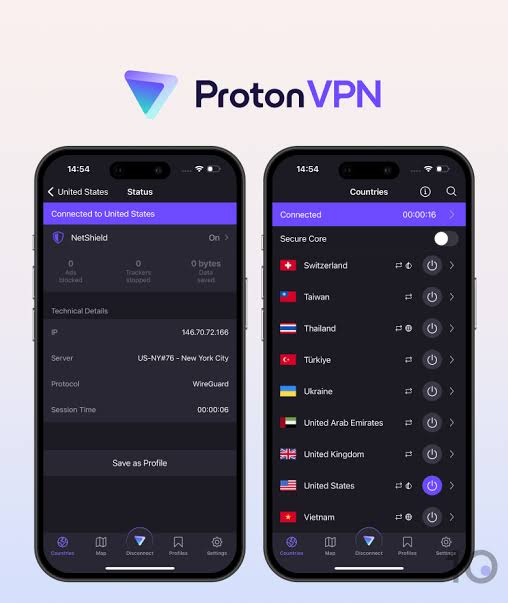
What makes ProtonVPN Free stand out from every other free VPN is the unlimited data. There are no monthly caps, no daily limits, no throttling after you hit a ceiling. You can use it as your everyday VPN without worrying about running out.
What you get on the free plan:
- Unlimited data
- Servers in 3 countries (USA, Netherlands, Japan)
- 1 device connection
- No ads
- No logs (independently audited)
Practical example: You’re traveling and using hotel Wi-Fi to check your bank account. You connect to ProtonVPN Free on your Android, and your connection is encrypted. The bank doesn’t see a suspicious login from a foreign IP, and the hotel network can’t intercept your traffic.
Pros:
- Truly unlimited data — no other major free VPN offers this
- Clean, well-designed Android app
- No ads or pop-ups
- Strong no-logs policy backed by independent audits
- Open-source apps (code is publicly verifiable)
Cons:
- Only 3 server locations on the free plan
- Free servers can be slower during peak hours
- Only 1 simultaneous device connection
- No access to streaming servers on the free plan (Netflix unblocking requires paid)
2. Windscribe Free
Windscribe is one of the most generous free VPNs in terms of features. The free plan gives you 10GB of data per month — which bumps up to 15GB if you confirm your email address. For casual use, that’s often enough to get through a month.
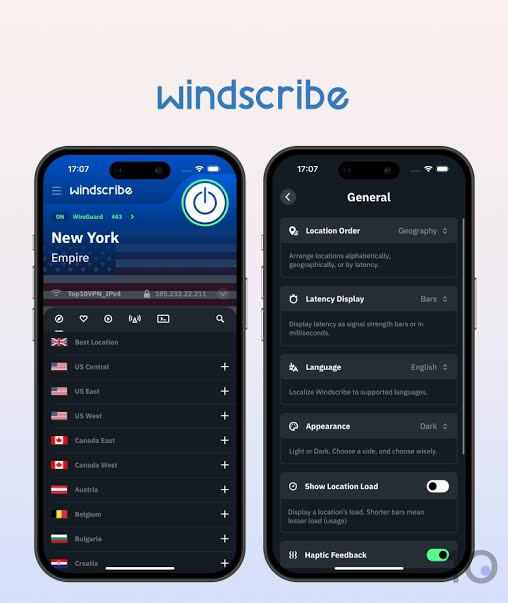
More importantly, Windscribe offers a solid number of free server locations — around 11 countries — which gives you real flexibility when you need to connect to a specific region.
What you get on the free plan:
- 10–15GB data per month
- Servers in 11 countries
- No logs
- Built-in ad and tracker blocker (R.O.B.E.R.T.)
- Unlimited devices
Practical example: A student uses Windscribe to access academic research papers and journals that are geo-restricted in their country. They connect to a US server, access the content they need, and disconnect once done — using maybe 2–3GB in the process.
Pros:
- Generous server selection for a free plan
- Built-in ad blocker is a real bonus
- No device limit — connect as many devices as you want
- Good Android app with a clear, simple interface
- Canadian company with a strong privacy stance
Cons:
- 15GB/month cap isn’t enough for streaming or heavy use
- Some server locations are slower than others
- Free servers can get congested in the evenings
- Customer support is limited on the free plan
3. hide.me Free
hide.me has been around for years and has maintained a consistent reputation for reliability. The free plan gives you 10GB per month and access to 5 server locations, which is solid for a free tier.

What sets hide.me apart is its connection stability. On Android, the app maintains a more consistent connection than many other free VPNs, especially if you’re switching between Wi-Fi and mobile data.
What you get on the free plan:
- 10GB data per month
- 5 server locations (Netherlands, USA, Germany, Canada, Singapore)
- Strict no-logs policy
- 1 device connection
- No ads
Practical example: You’re at an airport and need to stay connected for a few hours while waiting for a flight. You turn on hide.me, connect to the nearest server, and browse freely. The connection holds steady even as you move around the terminal and your phone switches between Wi-Fi zones.
Pros:
- Very stable connection on Android
- No registration required to use the free plan
- Zero-knowledge DNS (extra privacy layer)
- No ads
- Based in Malaysia — outside 5/9/14 Eyes jurisdiction
Cons:
- Only 1 device on the free plan
- 10GB/month runs out quickly if you stream video
- Fewer server locations than Windscribe
- Speed can dip during peak hours on the US server
4. Hotspot Shield Free
Hotspot Shield has one of the largest user bases of any VPN in the world. The free Android app is fast — noticeably faster than most other free options — because it uses Hotspot Shield’s own proprietary Hydra protocol, which is optimized for speed.
However, the free plan is much more restricted than the others on this list. You get 500MB of data per day, access to only the US server, and the app shows ads. Still, if speed is your top priority for short sessions, Hotspot Shield free delivers.
What you get on the free plan:
- 500MB data per day (~15GB/month)
- 1 server location (USA)
- Ad-supported
- 1 device connection
Practical example: You need to quickly unblock a US-only website on your Android while traveling. You open Hotspot Shield, connect in seconds, access the site, do what you need to do, and disconnect. The whole session takes under 10 minutes and barely uses any of your daily allowance.
Pros:
- Very fast connection speeds for a free VPN
- Reliable US server — great for unblocking US content
- Easy one-tap connect on Android
- Daily 500MB reset means consistent availability
Cons:
- Only 1 server location (USA)
- Ad-supported — ads appear regularly
- No server choice whatsoever on the free plan
- Privacy policy is less transparent than ProtonVPN or Windscribe
- Owned by Aura — a US-based company (within 5 Eyes jurisdiction)
5. TunnelBear Free
TunnelBear is famous for its friendly, bear-themed design — but it’s more than just a cute app. It’s one of the few free VPNs that publishes annual independent security audits, which gives it real credibility in the privacy space.
The free plan gives you 2GB of data per month, which is tight. But TunnelBear makes up for it with a wide range of server locations (47+ countries) and a very polished Android app.
What you get on the free plan:
- 2GB data per month
- 47+ server locations
- No logs
- Independent security audits
- Unlimited devices
Practical example: You’re at a café and need to quickly check your email and do some light browsing for 20–30 minutes. TunnelBear connects you in one tap, your 2GB easily covers the session, and you disconnect without having used more than 150MB.
Key Features
- Free access to servers in 45+ countries
- Beginner-friendly Android app
- AES-256 encryption
- Supports WireGuard, OpenVPN, and IKEv2 (platform-dependent)
- VigilantBear kill switch
- GhostBear feature for obfuscating VPN traffic (where available)
- No-activity-logging policy
Pros:
- Most server locations of any free VPN on this list
- Independently audited — trustworthy privacy claims
- Excellent Android app design (clean and intuitive)
- No device limit
- Transparent about its ownership (owned by McAfee, disclosed clearly)
Cons:
- Only 2GB/month — the tightest data cap on this list
- Not suitable for video or heavy browsing
- McAfee ownership may concern some privacy-focused users
- Streaming is not supported on the free plan
Quick Comparison Table
| VPN | Data Limit | Server Locations | Ads | Devices |
|---|---|---|---|---|
| ProtonVPN Free | Unlimited | 3 countries | No | 1 |
| Windscribe Free | 10–15GB/month | 11 countries | No | Unlimited |
| hide.me Free | 10GB/month | 5 countries | No | 1 |
| Hotspot Shield Free | 500MB/day | 1 (USA only) | Yes | 1 |
| TunnelBear Free | 2GB/month | 47+ countries | No | Unlimited |
Which Free Android VPN Should You Pick?
Here’s a simple way to decide:
For everyday privacy use: Go with ProtonVPN Free. Unlimited data, no ads, and a trustworthy name in privacy. It’s the closest thing to a genuinely free full-featured VPN.
For regular but moderate use: Windscribe Free is the best balance — enough data for most casual users, more server options, and a useful ad blocker built in.
For connection stability: hide.me Free holds a steady connection better than most, especially on Android when switching between networks.
For quick speed: Hotspot Shield Free if you just need to unblock something fast and don’t mind ads.
For occasional light use: TunnelBear Free if you only use a VPN a few times a month and want the most server location choices.
When Should You Upgrade to a Paid VPN?
Free VPNs are great for occasional use, but they have real limitations. Consider upgrading if:
- You stream content regularly (Netflix, Disney+, BBC iPlayer)
- You need a VPN running constantly in the background
- You need multiple simultaneous device connections
- You’re torrenting or doing anything bandwidth-intensive
- You need a specific country server not available on the free plan
Paid VPNs like Proton VPN Plus, Surfshark, or NordVPN typically cost $2–$5/month on annual plans and remove all the limitations that come with free tiers.
FAQs
Q: Are free VPNs safe to use on Android?
The ones on this list are safe. The danger comes from lesser-known free VPNs that have no clear privacy policy, no audit history, and make money by selling user data. Stick to established providers like ProtonVPN, Windscribe, or hide.me, and you’ll be fine.
Q: Will a free VPN slow down my internet?
Yes, to some degree — free server infrastructure is shared among more users, so speeds are generally lower than on paid plans. ProtonVPN and Hotspot Shield tend to hold up the best among free options.
Q: Can I use a free VPN to watch Netflix on Android?
Most free VPN servers are blocked by Netflix. Some Windscribe free servers occasionally work, but it’s inconsistent. If streaming is your main goal, a paid VPN is a more reliable option.
Q: Do free VPNs work in India?
Yes. ProtonVPN, Windscribe, and hide.me all work well in India. They encrypt your traffic, hide your browsing from your ISP (Jio, Airtel, BSNL), and let you access region-blocked content. Windscribe’s free plan includes servers in countries like the USA, UK, and Canada — useful for accessing content not available in India.
Q: Is it legal to use a VPN in India?
Yes, using a VPN in India is legal. However, using a VPN to carry out illegal activities is still illegal regardless of whether a VPN is involved. VPN providers operating in India must follow CERT-In logging requirements, which is one reason some privacy-focused providers have removed their India-based servers — but you can still use those VPNs while physically in India by connecting to servers in other countries.
Q: How much data does a VPN use on Android?
A VPN adds a small amount of overhead to your data usage — typically 5–15% more than normal. This means if you use 1GB of data browsing normally, using a VPN might use around 1.05–1.15GB. It’s not significant for most users.
Q: Can I use a free VPN on public Wi-Fi safely?
Yes, and this is actually one of the best use cases for a free VPN. Public Wi-Fi networks are unsecured, and a VPN encrypts your connection so no one on the same network can snoop on your traffic. Turn on the VPN before connecting to any public Wi-Fi hotspot.
Q: Do free VPNs keep logs of my activity?
The reputable ones on this list — ProtonVPN, Windscribe, hide.me, TunnelBear — all have no-logs policies, and most have been independently audited. Hotspot Shield’s privacy policy is less clear-cut, which is worth knowing before using it for sensitive browsing.
Conclsion
There’s no shortage of free VPN apps on the Google Play Store — but most of them are not worth installing. The five options in this guide are the ones that actually deliver on their promises: real privacy, usable speeds, and no shady data practices.
If you’re new to VPNs, start with ProtonVPN Free on your Android. It’s the easiest to recommend because there’s no data cap, no ads, and no compromises on privacy. Once you figure out how often you actually use a VPN and what you need it for, you can decide whether upgrading to a paid plan makes sense.
For now, these free options will serve you well for the situations that matter most — public Wi-Fi, accessing restricted content, and keeping your browsing private.

