
Creating videos used to take a full production team, expensive equipment, and days of editing. That’s not the case anymore. In 2026, a single person sitting at a laptop can produce polished, professional-looking videos in a matter of hours — sometimes minutes. The tools available today handle everything from script writing and voiceovers to animation, subtitles, and final export.
Whether you’re a content creator, a small business owner, or someone who just wants to make YouTube videos without breaking the bank, this list is for you. These are the ten best tools for video creation right now, explained clearly so you can pick the one that actually fits how you work.
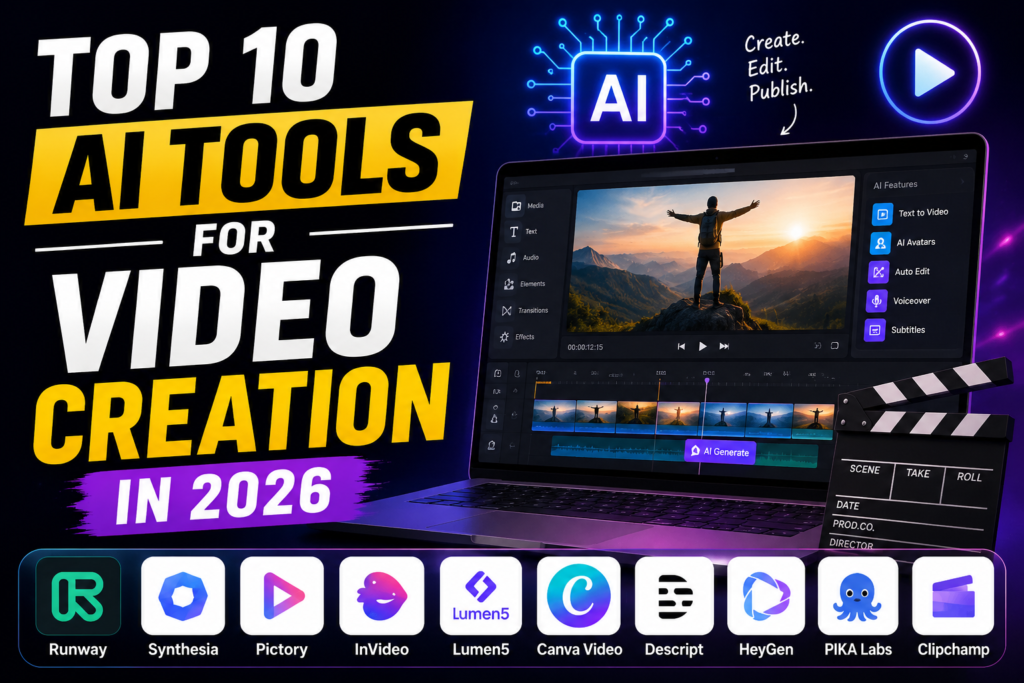
Video creation has evolved dramatically in 2026, thanks to powerful AI tools that make producing professional-quality content faster and easier than ever. Whether you’re a YouTuber, marketer, educator, business owner, or social media creator, AI-powered video platforms can help you generate scripts, edit footage, create animations, add realistic voiceovers, and even produce complete videos from simple text prompts.
With dozens of AI video tools available, choosing the right one can be challenging. Some excel at text-to-video generation, while others focus on AI avatars, automatic editing, subtitles, or cinematic visual effects. The best tool depends on your content goals, budget, and experience level.
In this guide, we’ve rounded up the Top 10 AI Tools for Video Creation in 2026, comparing their key features, strengths, pricing, and ideal use cases. Whether you’re looking for a free AI video generator or a professional platform for high-quality productions, this list will help you find the perfect solution to create engaging videos with less time and effort.
Top 10 AI Tools for Video Creation in 2026:-
1. Synthesia
Synthesia is one of the most popular tools for creating presenter-style videos without showing your face on camera. You type a script, pick an avatar from their library, and the tool produces a video with a realistic-looking person delivering your content.
Best for: Corporate training videos, product explainers, YouTube tutorials
Practical example: A software company uses Synthesia to create onboarding videos for new employees. Instead of recording a manager each time, they update the script and regenerate the video in minutes.
Pros:
- Huge library of avatars and languages (120+)
- No camera or microphone needed
- Custom avatar option available on paid plans
- Clean, professional output
Cons:
- Avatars can look slightly robotic on longer sentences
- Pricing jumps significantly for business plans
- Limited creative control over visual style
2. Runway ML
Runway is a creative powerhouse. It started as a tool for filmmakers and video editors but has grown into one of the most capable platforms for generating and editing video from scratch. You can generate short video clips from a text prompt, remove backgrounds, add motion blur, and edit footage frame by frame.

Best for: Short-form creative content, social media reels, music video production
Practical example: A musician uses Runway to create a surreal visual backdrop for their YouTube channel — no camera, no props, just a text description that gets turned into moving footage.
Pros:
- Text-to-video generation is genuinely impressive
- Powerful editing suite for existing footage
- Great for experimental and creative projects
- Active community with tutorials
Cons:
- Free plan has strict credit limits
- Video quality drops at longer durations
- Steep learning curve for beginners
3. Pictory
Pictory is built for one thing: turning long-form content into short, shareable videos. You paste in a blog post, an article, or a script, and Pictory matches it with stock footage, adds captions, and produces a ready-to-publish video.
Best for: Repurposing blog content, LinkedIn video posts, newsletter summaries
Practical example: A marketing consultant pastes their weekly blog post into Pictory every Monday. In 20 minutes, they have a two-minute video ready for LinkedIn, complete with captions and background music.
Pros:
- Extremely easy to use — no video editing experience needed
- Strong library of stock footage and music
- Auto-captioning works well
- Good value for the price
Cons:
- Limited customization options
- Stock footage can feel generic
- Not ideal for original or highly visual content
4. HeyGen
HeyGen focuses on personalised video at scale. Like Synthesia, it uses digital avatars, but its standout feature is video translation — you can record a video in English and HeyGen will translate it into another language while keeping your lip movements in sync.
Best for: Global content creators, e-commerce product videos, sales outreach
Practical example: An e-commerce brand records one product video in English and uses HeyGen to create Spanish, French, and German versions — same avatar, synced lips, no re-recording.
Pros:
- Lip-sync translation is genuinely impressive
- Clean avatar quality
- Good API access for automation
- Personalised video feature for sales teams
Cons:
- Pricier than some alternatives
- Translation accuracy depends on the language pair
- Custom avatars take time to set up
5. InVideo
InVideo is one of the most feature-rich tools on this list for the price. It combines a drag-and-drop video editor with a large template library and a text-to-video feature, making it very easy to get started.
Best for: Social media marketers, small business owners, YouTube beginners
Practical example: A bakery owner types “promotional video for our new summer cake collection,” and InVideo produces a draft video with stock clips, music, and text overlays — ready to tweak and post.
Key Features
- AI text-to-video generation from prompts or scripts
- AI-generated voiceovers in multiple languages and accents
- Thousands of customizable video templates
- Millions of royalty-free stock videos, images, and music
- Automatic subtitles and captions
- Drag-and-drop video editor
- AI script generation and scene creation
- One-click video resizing for YouTube, TikTok, Instagram, Facebook, and LinkedIn
- HD and 4K video export (depending on the plan)
Pros:
- Massive template library (5,000+)
- Affordable pricing, including a useful free plan
- Works entirely in the browser — no downloads
- Regular updates with new features
Cons:
- Interface feels cluttered with so many options
- Stock footage quality is inconsistent
- Export speed can be slow on free plan
Best For
- YouTubers
- Social media creators
- Digital marketers
- Small businesses
- Educators
- Content creators producing promotional and explainer videos
Pricing: Free plan available; Premium plans start at approximately $25/month (pricing may vary by region).
Overall Rating: ⭐ 4.8/5
InVideo is one of the best AI video creation tools in 2026, offering a powerful combination of AI automation, an extensive media library, and easy-to-use editing features. It is an excellent choice for anyone looking to create high-quality videos quickly without requiring professional video editing experience.
6. Descript
Descript is different from most video editors — instead of working with a timeline, you edit your video by editing the transcript. Delete a word from the script, and it disappears from the video. It’s an incredibly intuitive approach, especially for podcast-style content and talking-head videos.
Best for: Podcasters, interview-style videos, YouTube vloggers
Practical example: A finance YouTuber records a 20-minute talking-head video, pastes the transcript into Descript, and deletes all the umsm”s and long pauses in under five minutes. The video edits itself.
Key Features
- Edit videos and podcasts by editing text
- Automatic speech-to-text transcription
- AI voice cloning and text-to-speech
- Remove filler words (like “um” and “uh”) with one click
- AI Eye Contact for more natural-looking videos
- Studio Sound for enhanced audio quality
- Automatic subtitles and captions
- Screen recording and multi-track editing
- Team collaboration and cloud-based project sharing
Pros:
- Text-based editing is a genuine game-changer
- Excellent for removing filler words automatically
- Screen recording and multi-track audio support
- Overdub feature lets you fix audio without re-recording
Cons:
- Not ideal for highly visual or cinematic content
- Transcription accuracy affects edit quality
- Can be expensive for teams
Best For
- YouTubers
- Podcasters
- Educators
- Business professionals
- Content marketers
- Online course creators
Pricing: Free plan available; Paid plans start at approximately $16/month (pricing may vary by region).
Overall Rating: ⭐ 4.8/5
Descript is one of the best AI tools for video and audio creation in 2026. Its unique text-based editing workflow, combined with advanced AI features like voice cloning, Studio Sound, and automatic transcription, makes it an excellent choice for creators who want to produce professional-quality content quickly and efficiently.
7. CapCut (Pro)
CapCut started as a mobile app and has grown into a robust browser-based editor with features that rival those of desktop software. In 2026, the Pro version includes text-to-video, automatic captions, background removal, and a rich library of effects and transitions.
Best for: Short-form content creators, TikTok and Instagram Reels, beginner editors
Practical example: A travel creator records raw footage on their phone and edits the entire video in CapCut’s mobile app on the way home — captions, music, colour grading, and all.
Key Features
- AI text-to-video and script generation
- Automatic captions and subtitle translation
- AI background removal and green screen effects
- AI object tracking and motion effects
- Voice enhancement and noise reduction
- AI-powered video upscaling and stabilization
- Thousands of templates, transitions, filters, and effects
- Cloud storage and cross-device editing
- Direct export for YouTube, TikTok, Instagram, and other platforms
Pros:
- Free plan is genuinely useful
- Extremely beginner-friendly
- Strong mobile and desktop experience
- Trendy effects and transitions built in
Cons:
- Pro features require a subscription
- Not suitable for long-form or complex projects
- Some features are limited outside certain regions
Best For
- YouTubers
- TikTok and Instagram creators
- Digital marketers
- Small businesses
- Video editors
- Social media managers
Pricing: Free version available; CapCut Pro starts at approximately $9.99/month (pricing may vary by region).
Overall Rating: ⭐ 4.8/5
CapCut Pro is one of the best AI video creation and editing tools in 2026, offering an excellent balance of ease of use, advanced AI features, and professional-quality results. It’s a top choice for creators who want to produce engaging videos quickly while maintaining a polished, high-quality finish.
8. Lumen5
Lumen5 is designed specifically for brands and content teams who need to produce social media videos consistently. It pulls content from URLs, RSS feeds, or pasted text and converts it into video format automatically.
Best for: Content marketing teams, news publishers, brand awareness campaigns
Practical example: A news website connects its RSS feed to Lumen5. Every time a new article is published, Lumen5 automatically generates a 60-second video summary ready for social media.
Key Features
- AI-powered text-to-video conversion
- Automatically summarizes articles into video scenes
- Drag-and-drop video editor
- Large library of stock videos, images, and music
- Custom branding with logos, colors, and fonts
- Automatic captions and subtitles
- Templates optimized for YouTube, Instagram, TikTok, Facebook, and LinkedIn
- HD video exports and team collaboration features
Pros:
- RSS and URL import save huge amounts of time
- Strong brand customisation (colours, fonts, logos)
- Clean, professional output
- Team collaboration features
Cons:
- Limited creative flexibility
- Free plan adds a Lumen5 watermark
- Not suitable for narrative or entertainment-style videos
Best For
- Content marketers
- Bloggers
- Small businesses
- Social media managers
- Digital agencies
- Educators and trainers
Pricing: Free plan available; Paid plans start at approximately $29/month (pricing may vary by region).
Overall Rating: ⭐ 4.7/5
Lumen5 is one of the best AI video creation tools in 2026 for users who want to convert written content into visually appealing videos with minimal effort. Its AI-driven automation, rich media library, and simple editing interface make it an excellent choice for marketing, educational, and social media content.
9. Fliki
Fliki is a text-to-video and text-to-speech tool that’s popular with creators who want realistic voiceovers without recording themselves. You write a script, choose a voice, and Fliki builds the video around it using stock footage.
Best for: Faceless YouTube channels, audiobook summaries, educational content
Practical example: A faceless YouTube channel on personal finance uses Fliki to produce two videos per week. The creator writes the script, selects a voice, and Fliki does the rest — no recording, no editing.
Key Features
- Convert text, blog posts, and scripts into videos
- Realistic AI voiceovers in 80+ languages and hundreds of voices
- AI-powered text-to-speech with natural pronunciation
- Large library of stock videos, images, and music
- Automatic subtitles and captions
- AI script generation and summarization
- Brand customization with logos, fonts, and colors
- Export videos in HD quality
Pros:
- High-quality, realistic voice selection
- Good for scaling faceless content
- Simple, clean interface
- Supports multiple languages
Cons:
- Video quality depends heavily on stock footage availability
- Less control over pacing and transitions
- Not ideal for highly branded or custom visuals
Best For
- YouTubers
- Bloggers
- Digital marketers
- Educators
- Small businesses
- Social media content creators
Pricing: Free plan available; Premium plans start at approximately $21/month (pricing may vary by region).
Overall Rating: ⭐ 4.8/5
Fliki is an excellent AI video creation platform for anyone who wants to quickly turn written content into engaging videos with realistic voiceovers. Its powerful text-to-video capabilities, multilingual support, and ease of use make it one of the top AI video tools for 2026.
10. Adobe Express (Video)
Adobe Express is Adobe’s beginner-friendly creative tool, and its video features have improved significantly in 2026. It gives you access to Adobe’s vast asset library, branded templates, and one-click tools for resizing and repurposing videos across platforms. Adobe Express (Video) is a beginner-friendly AI-powered video creation tool designed for creators, students, marketers, and small businesses. It enables users to create professional-looking videos using ready-made templates, AI-powered editing features, and an intuitive drag-and-drop interface. Whether you’re making YouTube videos, Instagram Reels, TikTok clips, advertisements, or promotional content, Adobe Express helps you produce polished videos in minutes without advanced editing skills.
One of its standout features is Generate Video, which can turn text, images, and clips into engaging videos with transitions, animations, and background music. The platform also includes AI-powered tools for generating captions, removing backgrounds, resizing videos for different social media platforms, and enhancing visuals with Adobe Firefly technology.
Best for: Small businesses, designers new to video, marketing teams already using Adobe products
Practical example: A graphic designer already working in Adobe products uses Express to quickly turn a product brochure into a short Instagram video — consistent branding, same fonts, same colours.
Key Features
- AI-assisted video creation from text, photos, and clips
- Thousands of customizable video templates
- Drag-and-drop editing interface
- Automatic captions and subtitles
- AI background removal for images and video assets
- Royalty-free music, icons, and stock media
- One-click resizing for YouTube, TikTok, Instagram, and Facebook
- Cloud syncing across desktop and mobile devices
Pros:
- Deep integration with Adobe Creative Cloud
- Huge library of licensed assets
- Brand kit feature keeps everything consistent
- Generous free plan
Cons:
- Not as powerful as Premiere Pro for complex projects
- Video generation features still maturing
- Best value if you already pay for Adobe
Best For
- YouTubers
- Social media creators
- Small businesses
- Digital marketers
- Students and educators
- Content creators needing quick promotional videos
Pricing: Free plan available; Premium plan starts at approximately $9.99/month (pricing may vary by region).
Overall Rating: ⭐ 4.7/5
Adobe Express is one of the best AI video creation tools in 2026 for users who want to create high-quality videos quickly without a steep learning curve. Its AI-powered editing, rich template library, and seamless integration with Adobe’s ecosystem make it an excellent choice for fast, professional content creation.
Quick Comparison Table
| Tool | Best For | Free Plan | Standout Feature |
|---|---|---|---|
| Synthesia | Corporate/training videos | No | Realistic avatars |
| Runway ML | Creative/experimental video | Yes (limited) | Text-to-video generation |
| Pictory | Repurposing blog content | Yes (limited) | Article-to-video conversion |
| HeyGen | Global/multilingual video | Yes (limited) | Lip-sync translation |
| InVideo | Social media/beginners | Yes | 5,000+ templates |
| Descript | Talking-head/podcast video | Yes | Text-based editing |
| CapCut Pro | Short-form/mobile creators | Yes | Trendy effects, mobile-first |
| Lumen5 | Brand/content marketing | Yes (watermark) | RSS auto-video generation |
| Fliki | Faceless YouTube channels | Yes (limited) | Realistic voiceovers |
| Adobe Express | Adobe ecosystem users | Yes | Brand kit + asset library |
How to Choose the Right Tool
With ten solid options, picking the right one comes down to what you actually need:
- If you don’t want to show your face: Synthesia, HeyGen, or Fliki are your best options.
- If you’re repurposing written content: Pictory and Lumen5 are built exactly for this.
- If you want creative control: Runway ML and Descript give you the most flexibility.
- If you’re just starting, InVideo or CapCut are the most beginner-friendly.
- If you’re on a tight budget: CapCut and Adobe Express have the strongest free plans.
FAQs
Q: Which tool is best for beginners with no video editing experience?
InVideo and CapCut are the easiest to start with. Both have drag-and-drop interfaces, built-in templates, and don’t require any technical knowledge. CapCut’s mobile app is especially good if you want to edit on your phone.
Q: Can I use these tools to make YouTube videos without showing my face?
Yes. Synthesia, HeyGen, Fliki, and Pictory are all built for faceless video creation. You write the script, and the tool handles the visuals and voiceover. Many successful faceless YouTube channels run entirely on tools like these.
Q: Are any of these tools completely free?
Most offer a free plan with limitations — watermarks, limited exports, or restricted features. CapCut’s free plan is the most generous for short-form content. Adobe Express is also free with a solid feature set. For serious production, you’ll likely need a paid plan eventually.
Q: Which tool is best for creating videos in multiple languages?
HeyGen is the clear winner here. Its lip-sync translation feature lets you record once and produce localised versions in multiple languages with the avatar’s mouth movements staying in sync. Synthesia also supports 120+ languages for voiceover.
Q: Do I need a powerful computer to use these tools?
No. Most of these are browser-based, meaning the processing happens on their servers, not your device. A basic laptop or even a tablet is enough to use Pictory, InVideo, Lumen5, CapCut, and others without any lag.
Q: Which tool is best for business or corporate use?
Synthesia and HeyGen are the most popular in corporate environments. They produce clean, professional-looking videos, offer team collaboration, and have enterprise plans with advanced security and branding features.
Q: Is Runway ML suitable for non-creative professionals?
Runway has a steeper learning curve than most tools on this list. It’s best suited for people who already have some video editing background or are willing to spend time learning. For straightforward content production, tools like Pictory or InVideo are more practical.
Conclsion
Video is the most powerful format for reaching an audience online in 2026 — and you no longer need a studio budget to produce content that looks good. The tools listed here cover every use case, from quick social media clips to full-length corporate training videos. Start with one that matches your immediate need, spend a few days getting comfortable with it, and scale from there.
If you’re just starting, try the free plans on CapCut and InVideo before committing to anything. If you have a specific use case — like faceless YouTube content or multilingual videos — go straight to Fliki or HeyGen. The best tool is always the one you’ll actually use consistently.

