
If you searched for “Windows VPN software free 2026,” you’re probably tired of articles that just list ten apps and call it a day. You want to know which free VPNs are actually safe to install on your PC, which ones will slow your internet to a crawl, and which ones are quietly selling your browsing data while claiming to protect it.
That last part isn’t paranoia. Free VPNs have to make money somehow, and not all of them are honest about how. So before we get into specific names, let’s talk about what “free” really means in the VPN world, and then walk through the options that are genuinely worth your time in 2026.
Free VPN software for Windows in 2026 is easier than ever, but choosing a trustworthy option is still important. While many free VPNs promise unlimited privacy and security, some come with data limits, slower speeds, intrusive ads, or questionable privacy practices. The good news is that several reputable providers now offer free Windows VPN apps that deliver strong encryption, secure browsing, and protection on public Wi-Fi without requiring a paid subscription.
Whether you’re using Windows 11 or Windows 10, a quality free VPN can help protect your online activity, hide your IP address, and access region-restricted content. Some services even provide unlimited data, while others include generous monthly allowances suitable for everyday browsing, streaming, or remote work. However, it’s important to understand the trade-offs between free and premium plans before downloading any VPN software.
In this guide, we’ve rounded up the best free Windows VPN software in 2026, comparing their security features, speed, data limits, ease of use, and overall value. Whether you’re looking for a VPN for privacy, secure browsing, or occasional streaming, these options can help you stay protected without spending a penny. software
Why People Are Still Searching for Free VPNs in 2026
Public Wi-Fi hasn’t gotten any safer. Coffee shops, airports, hostels, and co-working spaces all still run open networks where anyone with basic tools can snoop on unencrypted traffic. A VPN wraps your connection in encryption so that even on a sketchy network, what you’re browsing stays private.
Beyond public Wi-Fi, there are a few other common reasons Windows users go looking for a free VPN:
- Keeping your internet service provider from logging every site you visit
- Getting around regional blocks on certain websites or apps
- Adding a layer of privacy while working from a shared or public computer
- Testing whether a VPN is worth paying for before committing to a subscription
Whatever your reason, the good news is that the free VPN landscape has actually improved. A few years ago, “free VPN” almost always meant ads, data caps that made the app useless, or worse, a company harvesting and reselling your browsing history. That’s still true for some apps, but there are now several free VPNs built by companies with real privacy track records and independent audits behind them.
What “Free” Actually Means With a VPN
Before you install anything, it helps to understand that free VPNs generally fall into two categories.
Truly free tiers. These are limited but permanent free versions of a paid service. The company hopes you’ll eventually upgrade, but the free tier itself doesn’t expire. It usually comes with a monthly data cap, a smaller list of server locations, or slower speeds during busy hours.
Free trials. These give you full access to a premium VPN for a set number of days, often with a money-back guarantee attached instead of a true free tier. After the trial window closes, you either pay or lose access. software
Both are legitimate, but they solve different problems. If you just need occasional protection on public Wi-Fi, a truly free tier is enough. If you’re about to travel and need full speed for streaming or downloading for a short stretch, a free trial from a paid provider might serve you better.
The Best Free Windows VPN Software Free Worth Installing
Here’s a rundown of the apps that consistently show up as trustworthy choices for Windows users this year, along with what makes each one different.
1. Proton VPN Free
Proton VPN’s free plan has one feature almost nobody else offers at zero cost: unlimited data. You won’t hit a monthly cap and get locked out halfway through the month. It’s built by the same Swiss team behind Proton Mail, and the company has a strong reputation for privacy, backed by independent audits of its no-logs claims. software
The trade-off is server choice. Free users get access to a small number of locations rather than the full global server list paid subscribers enjoy. For everyday browsing, checking email, or working on cloud documents, that’s rarely a problem.
Practical example: Say you’re working from a hotel in Bhubaneswar and need to log into your company’s cloud dashboard without worrying about the hotel’s shared network. Proton VPN Free covers that use case comfortably, all day, without any data anxiety.
Pros
- No data cap, ever
- Strong, independently verified no-logs policy
- Clean, beginner-friendly Windows app
- Based in Switzerland, with strict privacy laws
Cons
- Only a handful of free server locations
- Not ideal for streaming or torrenting on the free tier
- Speeds can dip during peak hours
2. Windscribe Free
Windscribe gives you a monthly data allowance (typically around 10GB, sometimes more if you confirm your email or refer friends) along with a surprisingly large number of free server locations for a no-cost plan. It also includes a built-in ad and tracker blocker called R.O.B.O.T, which works even when you’re not connected to the VPN. software

Practical example: If you travel between cities for work and need to check location-specific pricing on shopping or travel sites, Windscribe’s wider spread of free servers makes that kind of switching easier than most competitors.
Pros
- Generous server selection for a free plan
- Built-in ad and tracker blocking
- Good speeds when you’re within your data limit
- Desktop app is well designed and easy to configure
Cons
- Monthly data cap runs out fast if you stream or download a lot
- Once you hit the limit, you’re locked out until next month
- Some advanced features are paywalled
3. PrivadoVPN Free
PrivadoVPN has earned a strong reputation for combining decent speeds with a workable free data allowance, which makes it one of the more balanced options if you occasionally want to stream or torrent without paying. It’s Switzerland-based as well, which again means it operates under privacy-friendly regulations.
Pros
- Solid speeds for a free service
- Reasonable data allowance for light streaming
- No-logs policy
- Works well for torrenting compared to most free competitors
Cons
- Data cap will still stop heavy users
- Fewer server locations than paid competitors
- Customer support is slower on the free tier
4. Hide.me Free
Hide.me’s free plan doesn’t cap your usage by data volume, which is unusual, but it does limit you to a small number of server locations spread across Europe and North America. Speeds are on the slower side, but if your priority is unlimited connection time rather than blazing speed, it’s a solid pick.
Pros
- No data cap on usage
- Decent server coverage for a free plan
- No ads within the app
- No-logs policy
Cons
- Noticeably slower than other free options
- Limited server locations, mostly Western
- Fewer simultaneous device connections allowed
5. Hotspot Shield Basic
Hotspot Shield’s free tier stands out for having unlimited data and particularly good coverage of US servers, which makes it a common pick for anyone who needs to access US-based content. The catch is that the free version carries in-app ads, and server congestion can be noticeable during peak hours since a lot of people are on the same free plan.
Practical example: If you’re trying to check pricing or availability on a US-based service that isn’t accessible from India, Hotspot Shield’s free tier is one of the easier ways to do that without paying anything upfront.
Pros
- Unlimited data on the free plan
- Strong US server presence
- Fast setup, minimal configuration needed
Cons
- In-app ads on the free version
- Servers can feel crowded during busy hours
- Fewer privacy audits compared to Proton or Windscribe
6. Free Trials Worth Knowing About
If none of the above fit what you need, a few premium VPNs offer generous free trials instead of a permanent free tier. NordVPN and Surfshark both offer short free trial windows, and both come with a 30-day money-back guarantee on paid plans, so you can test the full, unrestricted version before deciding whether to pay. These are worth considering if you need full speed, unlimited data, and complete server access for a short, specific task, like traveling abroad for a couple of weeks.
Free VPNs You Should Be Careful With
Not every “free” VPN listed on the Microsoft Store or a random download site deserves your trust. A few patterns are worth watching for:
- No published privacy policy, or a vague one. If a VPN can’t clearly explain what data it collects, assume it collects more than it should.
- Apps that ask for unusual permissions. A VPN doesn’t need access to your contacts, camera, or messages.
- “Unlimited free VPN forever” with no business model explanation. Running VPN servers costs money. If a company isn’t charging you and isn’t backed by a known parent company, they may be funding the service by selling your bandwidth or browsing data to third parties. This has been the case historically with some free apps that turned out to be routing other users’ traffic through your device without clearly saying so.
- Apps with a flood of one-star reviews mentioning ads that won’t stop, or connections that silently drop.
When in doubt, stick to providers that are transparent about being a free tier of a larger, paid company. That business model actually makes sense, and it gives the company a reason to keep the free version reasonably trustworthy.
How to Choose the Right One for You
Rather than picking whatever tops a list, it helps to match the VPN to what you’re actually going to use it for.
If you mostly need privacy for everyday browsing and don’t stream or download much, go with Proton VPN Free. The lack of a data cap means you don’t have to think about it.
If you switch locations often or want an ad blocker built in, Windscribe Free covers more ground.
If you occasionally stream or torrent and want reasonable speed, PrivadoVPN Free is a better fit, as long as you stay mindful of the data limit.
If you need to access US-specific content without paying, Hotspot Shield Basic is the most straightforward option, ads and all.
If you need full, unrestricted access for a short period, like an upcoming trip, a free trial from NordVPN or Surfshark will serve you better than any permanent free tier.
Setting Up a Free VPN on Windows: What to Expect
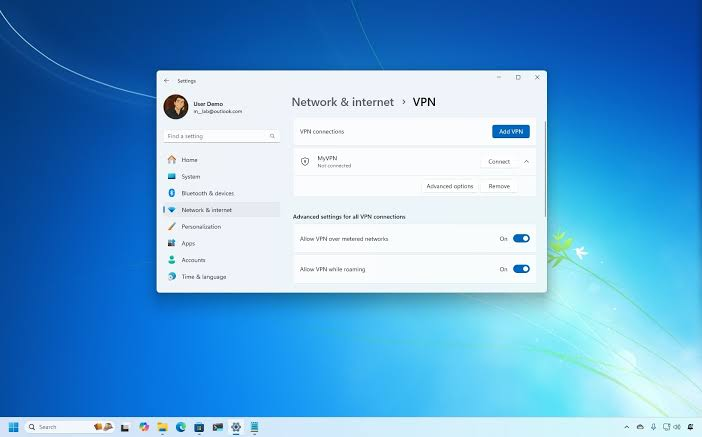
Installing any of these on Windows 10 or 11 follows roughly the same steps, so it’s worth knowing what to expect before you start.
- Download the app directly from the provider’s official website, not a third-party download site.
- Create a free account using an email address.
- Install and open the Windows app.
- Pick a server location from the free list available to you.
- Hit connect, and check that your app confirms an active connection before you start browsing.
A quick habit worth building: after connecting, visit any “what is my IP” checker site to confirm your location has actually changed. It only takes a few seconds and saves you from assuming you’re protected when the connection quietly failed.
Common Mistakes People Make With Free VPNs
A few small missteps show up again and again with new users:
- Forgetting the VPN is off after a restart. Most free apps don’t auto-connect by default, so people assume they’re protected when they aren’t.
- Ignoring the data cap until it’s too late. If you’re on Windscribe or PrivadoVPN, keep an eye on usage, especially before something important like a video call or download.
- Using a free VPN for anything requiring real anonymity. Free tiers are fine for everyday privacy, but if your situation genuinely requires strong anonymity, a paid, audited service with a strict no-logs policy is the safer choice.
- Assuming “free” and “safe” are the same thing. They’re not automatically connected. Always check whether the provider has been independently audited before trusting it with your traffic.
Frequently Asked Questions
Is it safe to use a free VPN on Windows?
Some are, some aren’t. Providers like Proton VPN, Windscribe, PrivadoVPN, and Hide.me have published no-logs policies and have gone through independent audits, which makes them reasonably safe choices. Random apps from unknown developers with no privacy policy are a different story, and it’s best to avoid those entirely.
Do free VPNs slow down internet speed?
Yes, to some degree, almost all of them do, since free users typically share server capacity with a large number of other people. The slowdown is usually mild during off-peak hours and more noticeable during busy times. Paid tiers generally offer faster, more consistent speeds.
Can I use a free VPN for streaming?
It depends on the provider and the streaming service. Data caps make sustained streaming difficult on most free plans, and some streaming platforms actively block known VPN server IP addresses, including free ones. PrivadoVPN and Windscribe tend to perform better here than most alternatives, but results can vary.
Will a free VPN protect me from all online threats?
No. A VPN encrypts your traffic and hides your IP address, but it won’t protect you from phishing links, malicious downloads, or weak passwords. Think of it as one layer of protection, not a complete security solution on its own.
How much data do free VPNs usually offer?
It varies widely. Proton VPN Free and Hide.me Free don’t cap your data at all. Windscribe typically offers around 10GB a month. Others cap usage even lower. If data volume matters to you, check the current limit directly on the provider’s website before installing, since these numbers do change.
Is it better to use a free VPN or a free trial of a paid VPN?
That depends on your timeline. If you need protection indefinitely, a free tier makes more sense since it doesn’t expire. If you need full speed and unrestricted access for a short, specific window, like a two-week trip, a free trial from a paid provider like NordVPN or Surfshark is usually the stronger choice.
Can I use more than one free VPN at the same time on Windows?
Technically yes, but running two VPN apps simultaneously often causes conflicts and connection drops. It’s better to pick one that fits your needs and stick with it, switching only if it stops meeting them.
Conclsion
Free Windows VPN software in 2026 isn’t the wasteland it used to be. A handful of providers, particularly Proton VPN, Windscribe, PrivadoVPN, and Hide.me, offer genuinely useful free tiers backed by real privacy commitments. The key is matching the app to what you actually need instead of grabbing the first “100% free VPN” that shows up in a search, and staying alert to the warning signs that separate a legitimate free tier from a data-harvesting app in disguise.
Start with whichever option above matches your main use case, give it a week of real use, and see how it holds up. If it turns out you need more speed, more servers, or unlimited streaming, that’s when a paid plan or a free trial from a premium provider starts to make sense.

