Business presentations are not the same as student projects or social media slideshows. A business presentation carries real stakes — a sales deck that fails to convert costs revenue, an investor pitch that lacks polish loses funding. A boardroom report that confuses executives damages credibility.
AI tools have become serious assets for business professionals who need to produce high-quality presentations consistently, quickly, and at scale. The best tools do not just make slides look good — they help structure arguments, generate compelling copy, visualize data, and deliver presentations with confidence.
This guide covers the best AI tools for business presentations in 2026 — evaluated specifically for professional use cases including sales decks, investor pitches, client proposals, board reports, and team presentations.
What Business Presentations Demand That Other Presentations Do Not
Before diving into tools, it helps to understand what separates a business presentation from a general one:
Credibility — Business presentations must look polished and professional. Amateur design kills credibility instantly in front of clients and investors.
Data visualization — Revenue charts, market size graphs, pipeline metrics, and KPI dashboards need to be clear, accurate, and visually compelling.
Brand consistency — Every client-facing presentation must use correct brand colors, fonts, and logo placement. Off-brand slides reflect poorly on the organization.
Narrative structure — A sales deck or pitch must tell a story — problem, solution, proof, call to action. AI tools that understand narrative structure produce better business output.
Collaboration — Multiple stakeholders often contribute to and review business presentations. Real-time collaboration and version control matter significantly.
Delivery support — Speaker notes, presenter view, and timing features help business presenters deliver confidently.
Export flexibility — Business presentations need to work in boardrooms (full-screen), in email (PDF), and in video calls (screen share).
Best AI Tools for Business Presentations in 2026
1. Gamma — Best for Fast Business Deck Creation
Gamma remains the fastest AI presentation tool available in 2026 — and its output quality is now strong enough for most business use cases, including client presentations, internal reports, and team briefings.
Why it works for business:
- Generates complete business decks from a prompt, document, or URL in under 2 minutes
- Business-focused templates — proposals, reports, strategy decks, company overviews
- Embed live data, charts, and web content directly in slides
- Share via secure link — clients view in browser without downloading files
- Analytics — see how long viewers spend on each slide (invaluable for sales decks)
- Password-protect presentations for confidential business content
- Real-time collaboration for team editing
Business-specific workflow:
- Paste your meeting notes, brief, or outline into Gamma
- Select Business template category
- Generate complete deck
- Replace placeholder data with real figures
- Add company logo and brand colors
- Share via secure link or export to PDF
Pricing: Free plan (400 credits). Plus at $10/month for PowerPoint export, custom domains, and analytics. Pro at $20/month for team features and priority generation.
Best business use cases: Client proposals, project updates, strategy presentations, company overviews, internal reports.
2. Beautiful.ai — Best for Consistent Business Design

Beautiful.ai is purpose-built for business presentations — its Smart Slides technology automatically maintains design consistency across every slide, which is critical for client-facing and boardroom presentations.
Why it works for business:
- Smart Slides automatically reformat as content changes — no manual layout adjustments
- DesignerBot AI generates complete business decks from prompts
- Brand kit — lock company colors, fonts, and logo across all presentations
- Template library focused heavily on business use cases (sales, strategy, finance, HR)
- Real-time collaboration with role-based permissions
- Presenter view with speaker notes and timer
- PowerPoint and PDF export for any delivery format
Business-specific features:
- Slide analytics — track which slides get the most attention when shared
- Version history — revert to previous versions if stakeholders request changes
- Comment and approval workflow — team members comment, managers approve before client delivery
Pricing: Pro at $12/month per user. Team plans available. Free trial for testing.
Best business use cases: Sales decks, investor pitches, quarterly business reviews, HR presentations, board reports.
3. Pitch — Best Free Business Collaboration Tool
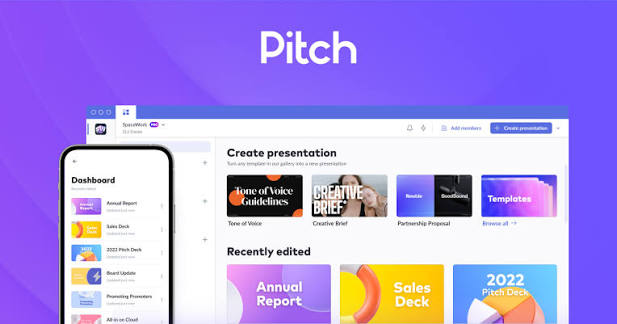
Pitch is a browser-based presentation tool designed specifically for business teams. Its free plan is remarkably generous — unlimited presentations with real-time collaboration — making it the best free option for small business teams and startups.
Why it works for business:
- Templates built specifically for business: pitch decks, OKR reviews, product roadmaps, sales presentations
- AI generates slide content and suggests layouts based on business context
- Real-time collaboration — sales team edits simultaneously
- Presentation analytics — know exactly which slides clients viewed and for how long
- Version history and comment threads for stakeholder review
- Direct Unsplash integration for professional stock images
- Custom domain for sharing (paid) — present from yourcompany.pitch.com
Business-specific workflow:
- Create master template with brand assets
- Team members duplicate and customize for each client
- Share analytics link — track client engagement per slide
- Iterate based on which slides clients spend most time on
Pricing: Free plan — unlimited presentations, basic AI, PDF and PPT export. Pro at $8/month per user for analytics, custom domain, and advanced AI.
Best business use cases: Startup pitch decks, sales presentations, client proposals, team OKR reviews, product roadmaps.
4. Microsoft Copilot in PowerPoint — Best for Enterprise Business
For businesses already running Microsoft 365, Copilot in PowerPoint is the most seamlessly integrated AI tool available. It works inside the PowerPoint interface that most corporate professionals already know — zero learning curve.
Why it works for business:
- Generate presentations from Word documents, PDFs, or text prompts without leaving PowerPoint
- Summarize long presentations into executive summaries automatically
- Rewrite slide content for different audiences — technical to executive, detailed to summary
- Design suggestions maintain brand template compliance
- Speaker notes generated automatically from slide content
- Integration with Microsoft Teams — present directly from Teams with AI speaker coaching
- SharePoint integration — pull company data directly into presentations
Business-specific features:
- Copilot in Teams — Real-time meeting summaries and action items during presentations
- PowerPoint Coach — AI analyzes your delivery and gives feedback on pacing, filler words, and eye contact during rehearsal.
- Sensitivity labels — AI respects Microsoft Information Protection labels on confidential business content
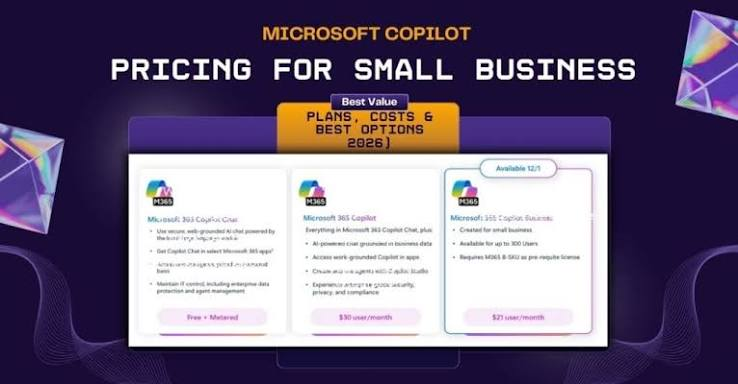
Pricing: Microsoft 365 Business Basic at ₹145/user/month includes PowerPoint Online. Copilot add-on at approximately $30/user/month for full AI features.
Best business use cases: Enterprise boardroom presentations, executive briefings, company-wide all-hands, compliance and audit reports.
5. Tome — Best for Business Storytelling and Investor Pitches
Tome‘s narrative-driven format makes it particularly effective for investor pitches and business storytelling where traditional bullet-point slides feel flat and unconvincing.
Why it works for business:
- AI understands narrative structure — problem, solution, market, traction, team, ask
- Generates investor pitch frameworks automatically from company description
- Embed live metrics from Notion, Figma, and other business tools
- Analytics show exactly how investors engage with each section
- Modern web-native format distinguishes your pitch from standard PowerPoint decks
- Password protection for confidential business information
Business-specific workflow for investor pitches:
- Describe your startup in 2–3 sentences
- Select Investor Pitch template
- Generate complete pitch structure
- Replace with real metrics, team photos, and product screenshots
- Share secure link with investors
- Monitor analytics to see which sections they spend most time on
Pricing: Free plan (500 credits). Pro at $16/month for unlimited generation, custom branding, and advanced analytics.
Best business use cases: Startup investor pitches, venture capital presentations, partnership proposals, product launch decks.
6. Visme for Business — Best for Data-Driven Business Presentations
Visme is the strongest AI tool for business presentations that are heavy on data — quarterly reports, financial presentations, market analysis decks, and KPI dashboards embedded in slides.
Why it works for business:
- Advanced chart and graph generation from spreadsheet data
- Infographic creation integrated directly into presentation slides
- AI generates complete presentations with data-appropriate visualizations
- Brand kit ensures consistent visual identity across all business output
- Interactive elements — clickable charts and animated statistics in digital presentations
- White-label option — remove Visme branding for client-facing output (paid)
- Direct PDF and PowerPoint export for any delivery format
Business-specific data features:
- Import data directly from Excel, Google Sheets, or CSV
- Charts update automatically when source data changes
- Animated data reveals — numbers count up during presentation for impact
- Data maps — visualize geographic business data on interactive maps
Pricing: Free plan (5 projects, basic features). Starter at $12.25/month. Business at $24.75/month for full brand kit and white-label export.
Best business use cases: Financial presentations, sales performance reports, market analysis decks, investor data rooms, quarterly business reviews.
7. Canva for Teams — Best for Brand-Consistent Business Presentations
Canva‘s business-focused offering — Canva for Teams — adds brand controls, approval workflows, and team asset management on top of its already strong AI presentation capabilities.
Why it works for business:
- Brand kit locks company colors, fonts, and logos — team members cannot go off-brand
- Magic Design generates on-brand presentations automatically
- Template locking — protect core design elements that should not be changed
- Approval workflows — manager reviews before client delivery
- AI image generation for custom business visuals
- Print-ready export for physical presentation materials
- Canva Presentations live — present with speaker notes, timer, and audience Q&A in browser
Business-specific workflow:
- Brand admin sets up Brand Kit with company assets
- Create master presentation templates
- Lock brand elements so team members only customize content
- Team generates on-brand client presentations in minutes
- Manager approves via comment workflow before delivery
Pricing: Canva Free (individual, limited brand features). Canva Pro at approximately ₹4,000/year. Canva for Teams at approximately ₹5,000/year per user with full brand controls.
Best business use cases: Marketing team presentations, sales collateral, client-facing decks, franchise business communications, HR and training materials.
8. Storydoc — Best for Interactive Business Proposals
Storydoc is a specialized business presentation tool designed specifically for sales proposals, business proposals, and interactive business documents that replace static PDF attachments.
Why it works for business:
- AI generates complete sales proposals and business proposals from prompts
- Interactive web-based format — clients engage with content rather than passively viewing slides
- Built-in analytics — know exactly which sections clients read, how long they spend, and whether they shared with colleagues.
- E-signature integration — close deals directly from the proposal
- CRM integration — sync with Salesforce, HubSpot, and Pipedrive
- Personalization at scale — automatically customize proposals with client name, company, and specific details
Business-specific impact:
Research cited by Storydoc indicates interactive proposals receive significantly higher engagement than static PDFs — and sales teams report faster response times when clients can interact with content directly.
Pricing: Free trial available. Starter at $40/month. Business plans for teams with CRM integration.
Best business use cases: B2B sales proposals, business development presentations, client onboarding decks, account management reviews.
9. Slides AI (Google Workspace Add-on) — Best for Business Teams on Google
For businesses running on Google Workspace, SlidesAI integrates directly into Google Slides — generating AI presentations inside the tool your team already uses daily.
Why it works for business:
- Works inside Google Slides — no new tool to learn or adopt
- Generate presentations from meeting notes, documents, or briefs
- All Google Workspace collaboration features remain available
- Presentations stored in Google Drive with existing permissions and access controls
- Works with Google Workspace business accounts — admin-approved add-on
Pricing: Free plan (3 presentations/month). Basic at $10/month. Pro at $20/month for unlimited generations and priority processing.
Best business use cases: Internal business presentations, team briefings, client proposals for Google Workspace businesses.
Business Presentation AI Tools — Head-to-Head Comparison
| Tool | Best For | Brand Controls | Analytics | Collaboration | Starting Price |
|---|---|---|---|---|---|
| Gamma | Fast deck creation | ⚠️ Basic | ✅ Yes | ✅ Yes | Free / $10/month |
| Beautiful.ai | Design consistency | ✅ Strong | ✅ Yes | ✅ Yes | $12/month |
| Pitch | Team collaboration | ⚠️ Basic | ✅ Yes | ✅ Yes | Free / $8/month |
| Copilot PowerPoint | Enterprise | ✅ Template-based | ❌ Limited | ✅ Teams | $30/user/month |
| Tome | Investor pitches | ⚠️ Basic | ✅ Yes | ✅ Yes | Free / $16/month |
| Visme | Data presentations | ✅ Strong | ✅ Yes | ✅ Yes | Free / $12.25/month |
| Canva for Teams | Brand consistency | ✅ Best | ❌ Limited | ✅ Yes | ₹5,000/year/user |
| Storydoc | Sales proposals | ✅ Strong | ✅ Best | ✅ Yes | $40/month |
| SlidesAI | Google Workspace | ⚠️ Basic | ❌ No | Free / $10/month |
Which Tool Is Right for Your Business?
Startups and Founders
Primary: Tome for investor pitches — the narrative format and analytics make it ideal for fundraising.
Secondary: Gamma for internal decks and quick client presentations.
Sales Teams
Primary: Pitch for collaborative deck creation with analytics on client engagement.
Secondary: Storydoc for interactive proposals that replace static PDF attachments.
Marketing Teams
Primary: Canva for Teams for brand-consistent presentation production at scale.
Secondary: Visme for data-heavy campaign reports and market analysis decks.
Enterprise and Corporate
Primary: Microsoft Copilot in PowerPoint — integrates with existing Microsoft 365 infrastructure.
Secondary: Beautiful.ai for presentations that need to look distinctly better than standard PowerPoint output.
Consultants and Freelancers
Primary: Gamma for fast, high-quality client presentation generation.
Secondary: Visme for data-driven deliverables and reports.
Small Business Teams on Google Workspace
Primary: Pitch (free plan) for collaborative business presentations.
Secondary: SlidesAI for quick generation inside Google Slides.
How to Build a Business Presentation with AI — Step by Step
Regardless of which tool you choose, this workflow produces the best results:
Step 1 — Define the objective
Before opening any tool, write one sentence: “This presentation will convince [audience] to [specific action] by showing them [key evidence].” This clarity makes AI generation dramatically more focused.
Step 2 — Generate the structure
Use AI to generate a complete deck from your brief. Review the structure before reviewing individual slides — fix the narrative arc first.
Step 3 — Replace placeholder content
AI generates generic content. Replace every statistic, example, and claim with real company data, actual client names (where appropriate), and verified figures.
Step 4 — Apply brand consistency
Upload your logo, set brand colors, and apply your company font. A presentation with correct branding immediately looks more credible than one using default templates.
Step 5 — Add data visualizations
Replace bullet-point data with charts wherever possible. A revenue trend shown as a line chart communicates faster and more powerfully than numbers in a list.
Step 6 — Write speaker notes
Use AI to generate speaker notes for each slide. Edit them to match your natural speaking style. Practice with the notes visible before presenting.
Step 7 — Test the share experience
Before sending to clients or investors, open your shared link in an incognito browser window and view it as they will. Check loading speed, mobile viewing, and that all embedded content displays correctly.
Business Presentation Best Practices in 2026
One idea per slide — Business audiences process information faster when each slide makes exactly one point. AI tools often generate over-filled slides — edit ruthlessly.
Lead with the conclusion — Business audiences are busy. Put your key message on slide 1, not slide 10. AI tools default to building up to a conclusion — restructure for business audiences.
Use real numbers — AI generates plausible-sounding placeholder statistics. Replace every number with verified, sourced data before any client or investor sees your deck.
Limit text — The most common AI presentation mistake is generating slides that are too text-heavy. Cut AI-generated copy by 50% and move detail to speaker notes.
Design for the room — A presentation viewed on a 4K boardroom screen needs different font sizes than one shared via email PDF. Test your presentation at actual display size before delivery.
Always have a backup — Export a PDF backup of every business presentation. Internet failures, software outages, and browser incompatibilities happen at the worst moments. A PDF opens anywhere.
Frequently Asked Questions
Which AI tool makes the best investor pitch deck?
Tome is the strongest choice for investor pitches — its narrative format, analytics on investor engagement, and modern web-native look distinguish it from standard PowerPoint decks. Pitch is the best free alternative with strong startup-focused templates.
Can AI tools replace a professional presentation designer for business use?
For standard business presentations, yes — with proper review and customization. For high-stakes pitches to major investors or enterprise clients, AI-generated slides benefit significantly from a designer’s review of layout, visual hierarchy, and brand application.
Which tool is best for Indian businesses?
CoinDCX Gamma and Canva are most popular among Indian business users — both are accessible in India, support INR billing on paid plans, and work without VPN. Canva for Teams is particularly well-adopted among Indian marketing and sales teams.
Do these tools work for presentations in Hindi?
Canva, Zoho Show, and Google Slides with SlidesAI all support Devanagari script. Gamma and Tome work with Hindi text input,t but rendering quality varies. For Hindi business presentations, Canva is the most reliable choice.
How do I maintain brand consistency across a large sales team using AI tools?
Beautiful.ai’s brand kit with locked elements is the strongest solution — team members can only customize content, not design. Canva for Teams with template locking is a strong alternative at lower cost.
Is it safe to put confidential business information into AI presentation tools?
Check each tool’s data privacy policy before inputting sensitive information. Enterprise plans for Copilot (Microsoft) and Canva for Teams offer stronger data protection commitments. For highly confidential content, use tools with SOC 2 compliance and data processing agreements.
Conclusion
The best AI tool for business presentations in 2026 depends entirely on your specific use case — and the good news is that genuinely excellent options exist at every price point.
Gamma is the right starting point for most business professionals who need fast, high-quality deck creation. Beautiful.ai wins when design consistency and brand compliance matter most. Pitch is the best free option for collaborative business teams. Tome stands out for investor pitches and business storytelling. And Microsoft Copilot in PowerPoint is the natural choice for enterprise organizations already running Microsoft 365.
Whichever tool you choose, the AI handles the structure and design — your job is to bring the real business insight, accurate data, and compelling narrative that no AI can generate on your behalf.