
Short answer: DaVinci Resolve is the best free video editing app for PC in 2026 if you want professional quality. CapCut is the best if you want speed and social media features. The right choice depends on what you are making.
This guide breaks down the top free PC video editors, what each does best, and which one matches your specific use case.
Free video editing app for PC in 2026 is easier than ever, but choosing the right one can still be confusing. Some editors are perfect for beginners creating YouTube videos, while others offer professional-grade features for filmmakers, gamers, and content creators—all without requiring a paid subscription.
The best free video editing app depends on your needs. If you want advanced color grading and visual effects, there are professional desktop editors available for free. If you prefer a simple drag-and-drop interface for social media content, lightweight editors can help you create polished videos in minutes. Many free options now include features like 4K editing, AI-powered tools, motion graphics, audio enhancement, and direct export to popular platforms.
Compare the best free video editing apps for PC in 2026, highlighting their key features, advantages, limitations, and who they’re best suited for. Whether you’re a beginner, student, gamer, business owner, or professional creator, you’ll find a free editor that fits your workflow and budget.
Why the Answer Depends on What You’re Making
A YouTuber making 10-minute tutorials needs different software than someone cutting 30-second Instagram Reels. A Windows user has options a Mac user does not. A beginner needs a different interface than someone with editing experience.
Here is the quick decision guide before diving into full reviews:
- Professional YouTube content, films, long-form video → DaVinci Resolve
- Short-form social media (Reels, Shorts, TikTok) → CapCut
- Windows users wanting watermark-free output → Clipchamp (built into Windows 11)
- Faceless AI-generated videos → InVideo AI or CapCut
- Collaborative team editing → Kapwing
- Intermediate editors wanting timeline control → Kdenlive or Shotcut
- Complete beginners on Windows → CapCut or Clipchamp
Best free video editing App for PC in 2026:-
1. DaVinci Resolve — Best Free Video Editor for PC Overall
DaVinci Resolve is professional-grade video editing software available completely free. The same software used by Hollywood productions is available to anyone with a PC — at no cost.
DaVinci Resolve is widely regarded as the best free video editing software for PC in 2026. Developed by Blackmagic Design, it combines professional video editing, advanced color correction, visual effects, motion graphics, and audio post-production into a single application. Unlike many free editors, DaVinci Resolve does not place watermarks on exported videos, making it an excellent choice for YouTubers, filmmakers, students, and professional content creators.
The free version includes an impressive set of features that are powerful enough for most editing projects. You can edit videos in resolutions up to 4K, work with multiple video and audio tracks, apply cinematic color grading using the industry-leading Color page, create animations with Fusion, and produce high-quality audio using the Fairlight workspace. These tools are the same ones used in many Hollywood films and television productions.
One of DaVinci Resolve’s biggest strengths is its non-linear editing workflow. Users can trim clips with frame-level precision, add transitions, titles, slow-motion effects, and stabilize shaky footage without needing additional software. The software also supports a wide range of video formats and hardware acceleration, helping projects render faster on modern Windows PCs.
Although the interface can feel overwhelming for complete beginners, there are plenty of free tutorials available, and the learning curve becomes worthwhile as your editing skills improve. If you’re planning to grow a YouTube channel, create professional marketing videos, edit short films, or produce high-quality social media content, DaVinci Resolve offers exceptional value at no cost.
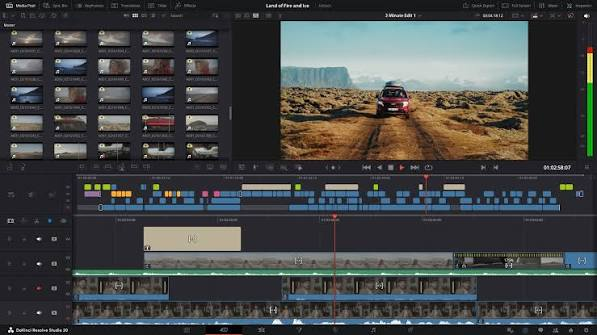
Available on: Windows 10/11, Mac, Linux
Free version includes:
- Full professional multi-track timeline editor
- Fairlight audio mixer — a complete digital audio workstation built in
- Fusion visual effects and motion graphics — compositing tools built in
- Color correction and grading tools used in professional film and TV
- Neural Engine AI tools — Magic Mask, Speed Warp, noise reduction, face refinement
- 4K export with no watermark
- No time limit, no project limit
- Collaboration features for team editing
What it does well: DaVinci Resolve’s color grading tools are the industry standard — the same tools used on major films and streaming productions. The built-in audio editor (Fairlight) eliminates the need for separate audio software. For PC users who want cinematic-looking YouTube content without paying for Adobe Premiere Pro, DaVinci Resolve is the answer. The free version has more features than most paid editors.
Limitations: Steep learning curve — DaVinci Resolve is a professional tool and takes time to learn. Resource-heavy: requires a minimum 8GB RAM (16GB recommended) and a dedicated GPU for smooth performance. Older or budget PCs may struggle. The free version locks some advanced collaboration and noise reduction tools behind the paid Studio version ($295 one-time purchase — but most users never need it).
Best for: Serious YouTube creators, filmmakers, video production students, content creators who want professional results and are willing to invest time in learning.
Verdict: Best overall free video editor for PC in 2026 for quality-focused creators.
2. CapCut for PC — Best Free Editor for Social Media Content
CapCut is the most downloaded free video editor in the world, and the desktop version for Windows is significantly more powerful than the mobile app.
CapCut for PC is one of the best free video editing apps for creating content for YouTube, TikTok, Instagram Reels, Facebook, and other social media platforms in 2026. Developed by ByteDance, CapCut combines an intuitive drag-and-drop interface with powerful editing tools, making it ideal for beginners and experienced creators alike.
The desktop version offers many of the same features that made the mobile app popular, including multi-track editing, ready-made templates, transitions, filters, text animations, and royalty-free music. It also includes smart editing tools such as automatic captions, background removal, object tracking, and audio enhancement, helping creators produce professional-looking videos in less time.
CapCut supports high-resolution video editing, including 4K exports on compatible hardware. Users can easily trim clips, adjust playback speed, add cinematic transitions, apply visual effects, and customize subtitles without needing advanced editing skills. The software is optimized for creating vertical videos, making it especially useful for short-form content on social media.
One of CapCut’s biggest advantages is its large library of built-in effects, stickers, fonts, and transitions that can be applied with just a few clicks. It also offers cloud syncing for users who edit across multiple devices, allowing projects to be started on mobile and finished on a Windows PC.
While the free version includes a generous feature set, some premium templates, effects, and advanced editing tools require a CapCut Pro subscription. Even so, the free version remains more than capable of producing high-quality videos for personal, educational, and commercial content.
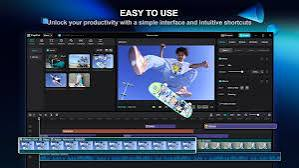
Available on: Windows, Mac, browser, Android, iOS
Free version includes:
- Multi-track timeline editing
- Auto-captions with high accuracy (supports Hindi and multiple Indian languages)
- AI background removal
- Beat sync — automatically cuts footage to music rhythm
- Text-to-speech in multiple voices
- Speed ramping and keyframe animation
- Trending templates updated weekly for Reels, Shorts, TikTok
- AI video enhancer — upscales video quality
- Chroma key (green screen)
- 4K export — no watermark on standard exports
- AI noise reduction for audio
What it does well: CapCut is built for short-form viral content. The auto-caption feature alone saves hours of manual subtitle work. Templates are updated constantly to match trending video formats — a genuine advantage for social media creators. The desktop version has a proper multi-track timeline that handles most editing needs. AI features that cost money in other apps are free in CapCut.
Limitations: Some premium effects and templates require CapCut Pro. CapCut is made by ByteDance (TikTok’s parent company), which raises data privacy concerns for some users. Heavy editors working on long-form content will find the timeline limiting compared to DaVinci Resolve.
Best for: Short-form content creators, social media managers, Indian YouTubers needing Hindi captions, faceless video channels, anyone making Reels or Shorts regularly.
Verdict: Best free PC video editor for social media content in 2026.
3. Clipchamp — Best Free PC Editor for Windows Users (No Watermark)
Clipchamp is Microsoft’s free video editor, built directly into Windows 11 and accessible through any browser with a Microsoft account.
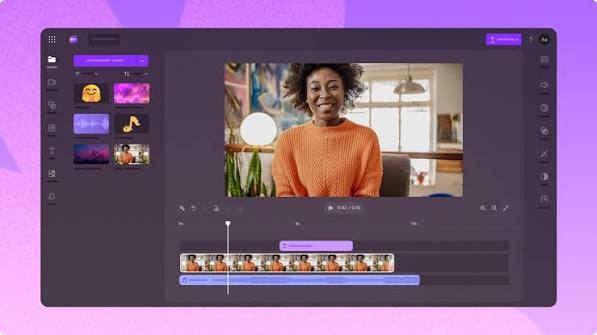
Available on: Windows 11 (built-in), browser (all platforms)
Free version includes:
- Multi-track timeline editing
- AI auto-compose — creates video from your clips automatically
- Text-to-speech with natural-sounding voices
- Built-in stock footage and music library
- Auto-captions
- Green screen support
- Templates for social media formats
- 1080p export — no watermark
- Direct export to YouTube, TikTok, and OneDrive
What it does well: Clipchamp is the only major free video editor that exports clean 1080p video with no watermark at zero cost, built into Windows 11. For Windows users who want professional-looking output without installing anything or paying anything, Clipchamp is right there in the Start menu. The text-to-speech voices are among the most natural-sounding in any free editor.
Limitations: Less powerful than DaVinci Resolve for professional editing. No 4K export on the free plan. The stock library is smaller than paid alternatives. AI features are more limited than CapCut.
Best for: Windows users who want clean 1080p exports without watermarks, beginners who want a simple editing experience, and anyone who does not want to install additional software.
Verdict: Best free Windows video editor for users who prioritize simplicity and watermark-free output.
4. Kdenlive — Best Free Open-Source Video Editor for PC
Kdenlive is a free, open-source video editor for Windows and Linux with a proper professional timeline and no feature limitations.
Available on: Windows, Linux, Mac
Free version includes:
- Multi-track timeline with unlimited tracks
- Keyframe animation and transitions
- Color correction tools
- Audio mixing
- Proxy editing for smooth performance on older PCs
- Effect stack with hundreds of built-in effects
- 4K export with no watermark
- No project limits, no time limits
- Regular community updates
- Completely open-source — no data collection
What it does well: Kdenlive offers a genuine professional editing experience at zero cost with no catches. Unlike CapCut (ByteDance ownership) or Clipchamp (Microsoft data), Kdenlive collects no user data. For privacy-conscious creators on Windows or Linux, this matters. The proxy editing feature makes it usable on older or lower-spec PCs that would struggle with DaVinci Resolve.
Limitations: Less polished interface than DaVinci Resolve or CapCut. Occasional stability issues on some Windows configurations — always save frequently. Fewer AI features than CapCut. Color grading tools are less advanced than DaVinci Resolve.
Best for: Privacy-conscious creators, Linux users, PC users with older hardware, open-source advocates who want a full timeline editor without corporate data collection.
Verdict: Best free open-source video editor for PC in 2026.
5. Shotcut — Best Free Editor for Older PCs
Shotcut is a free, open-source video editor that runs well on older and lower-spec Windows PCs where DaVinci Resolve or CapCut might struggle.
Available on: Windows, Mac, Linux
Free version includes:
- Multi-track timeline editor
- Wide format support (nearly any video format without conversion)
- Audio filters and mixing
- Color grading with scopes
- Keyframe animation
- 4K export with no watermark
- Completely free and open-source
- No account required
What it does well: Shotcut’s biggest advantage is compatibility. It handles almost any video format without needing to convert files first — useful when working with footage from different cameras or devices. It runs on older Windows machines and consumes less RAM than DaVinci Resolve. The interface is functional and stable.
Limitations: Interface is less intuitive than modern alternatives. Fewer AI features than CapCut. Color tools are less advanced than DaVinci Resolve. Learning curve for beginners.
Best for: PC users with older or budget hardware, creators who work with many different video formats, users who want a lightweight open-source alternative to heavier software.
Verdict: Best free video editor for older or low-spec Windows PCs.
6. Kapwing — Best Free Browser-Based Editor for Teams
Kapwing runs entirely in the browser — no installation needed, works on any Windows PC.
Available on: Browser (all platforms)
Free version includes:
- AI auto-subtitles with high accuracy
- Smart background removal
- Video resizing for multiple platforms simultaneously
- Collaboration — multiple team members editing the same project
- AI script generation
- Meme and short-form video templates
- Export up to 720p (watermark on free exports)
What it does well: Kapwing’s collaboration features are unmatched among free tools. Multiple editors can work on the same project simultaneously — useful for social media teams, agencies, or student group projects. The subtitle generation is accurate and easy to style. No installation means it works on any Windows PC regardless of specs.
Limitations: 720p export limit on free plan. Watermark on free exports. Slower than desktop apps for complex editing since everything runs in the browser. 250MB storage cap on free accounts.
Best for: Small teams, social media agencies, student projects, and any situation where multiple people need to edit the same video without expensive software.
Verdict: Best free browser-based video editor for collaborative PC editing.
7. InVideo AI — Best Free PC Tool for AI-Generated Videos
InVideo AI is not a traditional editor — it generates complete videos from a script or topic automatically. Runs in the browser on any Windows PC.
Available on: Browser (all platforms)
Free version includes:
- 10 video exports per week
- AI script generation from a topic, keyword, or URL
- Automatic stock footage matching to script
- AI voiceover in multiple languages including Hindi
- Auto-captions
- 1080p export (InVideo watermark on free plan)
- Templates for YouTube, Instagram, and marketing content
What it does well: InVideo AI handles the entire video creation workflow automatically. Paste a topic, choose a voice and style, and it generates a complete video with footage, voiceover, and captions in minutes. This is the fastest way to produce faceless YouTube content at scale on a PC.
Limitations: InVideo watermark on free exports. 10 exports per week cap. Less creative control than traditional editors. Stock footage quality on the free plan is more limited.
Best for: Faceless YouTube channels, content marketers, and anyone who needs to produce video content at volume without spending hours editing on a PC.
Verdict: Best free tool for automated AI video generation on PC.
PC Specs: What You Need for Each Editor
| Editor | Minimum RAM | GPU Required | Works on Old PCs? |
|---|---|---|---|
| DaVinci Resolve | 8GB (16GB recommended) | Yes (dedicated GPU best) | No |
| CapCut | 4GB | No | Yes |
| Clipchamp | 4GB | No | Yes |
| Kdenlive | 4GB | No | Yes (with proxy) |
| Shotcut | 2GB | No | Yes |
| Kapwing | Browser-based | No | Yes (needs internet) |
| InVideo AI | Browser-based | No | Yes (needs internet) |
Free vs Paid: When Should You Upgrade?
Free PC video editors work well for:
- Social media content at any volume
- YouTube videos up to 4K resolution
- Learning video editing fundamentals
- Small business marketing videos
- Student and personal projects
A paid editor (Adobe Premiere Pro, Final Cut Pro, Vegas Pro) makes sense when:
- You need advanced multicamera editing
- You work with clients who require specific delivery formats
- You need After Effects-level motion graphics integration
- You are producing broadcast-quality commercial content
- Your free tool has become a bottleneck
For the vast majority of PC users in 2026, free tools — particularly DaVinci Resolve and CapCut — cover everything they need.
FAQs
Q: Which free PC video editor has no watermark?
DaVinci Resolve, CapCut, Kdenlive, and Shotcut all export without watermarks on their free versions. Clipchamp exports 1080p watermark-free. Kapwing and InVideo AI add watermarks on free exports.
Q: Is DaVinci Resolve really free?
Yes. The free version of DaVinci Resolve includes professional-grade editing, color grading, audio mixing, and visual effects at no cost. The paid Studio version ($295 one-time) adds some advanced features most creators never need.
Q: Which free video editor is best for YouTube on PC?
DaVinci Resolve for long-form YouTube content needing quality color grading and editing control. CapCut for YouTube Shorts and faster turnaround content.
Q: Can I edit 4K video for free on PC?
Yes. DaVinci Resolve, CapCut, Kdenlive, and Shotcut all support 4K editing and export for free. You will need a reasonably powerful PC — at least 8GB RAM and a decent GPU — for smooth 4K editing performance.
Q: Which free PC editor works best for Indian content creators?
CapCut supports Hindi auto-captions and has templates designed for Indian social media formats. InVideo AI has Hindi voiceover options. Both are widely used by Indian YouTube and Instagram creators.
Q: Is CapCut safe to use on PC in 2026?
CapCut is developed by ByteDance and has faced scrutiny over data privacy due to its Chinese ownership. It remains available in India and most markets. For sensitive content or if data privacy is a priority, consider Kdenlive or DaVinci Resolve as privacy-respecting alternatives.
Q: What is the best free video editor for a low-spec Windows PC?
Shotcut runs on PCs with as little as 2GB RAM. Kdenlive with proxy editing enabled also performs well on older hardware. Browser-based tools like Kapwing and InVideo AI work on any PC with a modern browser and internet connection.
Conclsion
For PC users in 2026, the two editors that stand above every other free option are DaVinci Resolve and CapCut — but they serve different needs.
If you are making serious YouTube content, short films, or any video where quality matters and you are willing to spend time learning the software, install DaVinci Resolve. It is genuinely professional software at zero cost.
If you are making social media content — Reels, Shorts, TikTok, faceless YouTube videos — and speed matters more than fine control, use CapCut. It is faster, has better AI features for social content, and produces content optimized for how people actually consume video in 2026.
For Windows users who want nothing complicated, Clipchamp is already installed on your PC and exports clean 1080p with no watermark. Start there.
Pick one, learn it properly, and you will not need to pay for video editing software for a long time.

