
A free VPN for Windows 10 lets you encrypt your internet connection, hide your IP address, and access region-locked content without paying anything upfront. Options like Proton VPN, Turbo VPN, and Urban VPN all offer free Windows apps, but they differ a lot in server count, speed limits, and how they fund the “free” part of their service — some cap your data, some show ads, and some route other users’ traffic through your device to stay free.
If you’ve typed “VPN free for Windows 10” into Google, you already know the problem: there are hundreds of results, half of them look sketchy, and almost none of them tell you what’s actually different between the options. Some free VPNs genuinely protect your privacy. Others quietly turn your laptop into part of their network, or throttle you so hard you give up after a week.
This guide breaks down what a free VPN can realistically do for you on Windows 10, compares the most downloaded free options right now, and helps you figure out whether “free” is actually free, or just a different kind of cost.
If you’ve typed “VPN free for Windows 10” into Google, you already know the problem: there are hundreds of results, half of them look sketchy, and almost none of them tell you what’s actually different between the options. Some free VPNs genuinely protect your privacy. Others quietly turn your laptop into part of their network, or throttle you so hard you give up after a week.
This guide breaks down what a free VPN can realistically do for you on Windows 10, walks through some of the most downloaded free options right now, and helps you figure out whether “free” is actually free, or just a different kind of cost.
Who this is for
This is written for regular Windows 10 users, not network engineers, who want:
- A VPN that won’t cost money right away
- Something simple enough to install and use in a few minutes
- Honest information about privacy trade-offs, not marketing copy
- A sense of when free is good enough, and when it’s time to pay
What a VPN actually does (quick refresher)
A VPN routes your internet traffic through an encrypted tunnel to a server somewhere else, hiding your real IP address and location from websites, your internet provider, and anyone snooping on public Wi-Fi. On Windows 10, this usually comes as a downloadable app that sits in your system tray and connects with a single click.
Free VPNs do this same basic job, but the way they pay their server bills without charging you is exactly where the differences start to matter.
How free VPNs actually make money
This is the part most people skip, and it’s the most important part. A VPN server network costs real money to run. If you’re not paying for the service, one of these is usually happening:
- Freemium model – The company also sells a paid tier with more servers and speed, and hopes some free users upgrade
- Ad-supported model – You’ll see ads inside the app itself
- Data-sharing model – Some free VPNs log and sell anonymized usage data to advertisers
- Peer-to-peer / IP-sharing model – Your idle bandwidth and IP address get used to route other users’ traffic, essentially turning your device into a mini exit node
None of these are automatically evil, but they matter a lot if privacy is your main reason for wanting a VPN in the first place.
A look at some of the most popular free options: Free for Windows 10
Proton VPN Free
Proton VPN’s free tier stands out because it doesn’t put a cap on data usage. You get unlimited browsing time and data without ever hitting a paywall mid-session. <cite index=”14-1″>To connect, you download the app for Windows, install it, open it, log in, and click Quick Connect</cite>, and <cite index=”14-1″>the free plan automatically connects you to servers in countries like the Netherlands, Japan, Romania, Poland, Norway, Singapore, Canada, Mexico, Switzerland, or the United States</cite>.
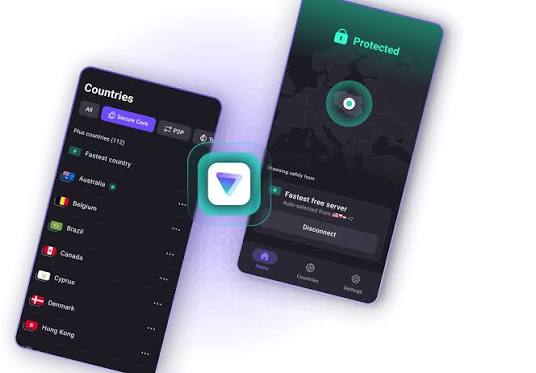
The company behind it, Proton, also built Proton Mail, and their engineering approach leans heavily on published, independent audits rather than just marketing claims. The free tier deliberately limits you to a handful of server locations and slower speeds compared to their paid Plus plan, which is the trade-off you’d expect, but the no-data-cap policy is genuinely rare among free VPNs. Windows
Key Features
- Unlimited free data with no monthly cap
- Strong AES-256 encryption
- Strict no-logs policy
- Kill Switch for extra protection
- WireGuard and OpenVPN support
- Easy setup on Windows 10
- No ads or bandwidth throttling
Pros
- Completely free with unlimited usage
- High level of privacy and security
- Fast and stable performance for everyday browsing
- Trusted company with a strong reputation
- User-friendly Windows application
Cons
- Limited server locations on the free plan
- No dedicated streaming servers
- Premium features require a paid subscription
Good for: People who want a long-term free VPN without nagging data limits, and who care about verifiable privacy practices over flashy features.
Turbo VPN
Turbo VPN’s Windows client is built around simplicity, one-click connect, unlimited bandwidth, and no charge for the base desktop version. <cite index=”21-1″>The desktop free plan is entirely ad-free, with strong encryption and a no-logs policy</cite>, according to the company. It also throws in extra features like a kill switch, split tunneling, and AES-256 encryption, though some of the more advanced options are reserved for premium subscribers.

Independent reviewers note a fairly big gap between the mobile and desktop experience: <cite index=”23-1″>TurboVPN is a solid, specialized option, particularly praised for ease of use and its free tiers on mobile</cite>, though desktop competitors with paid plans tend to edge it out on raw performance.
Key Features
- Free version available for Windows 10
- One-click VPN connection
- Military-grade AES-256 encryption
- Secure browsing on public Wi-Fi
- Multiple server locations (more with Premium)
- No registration required for basic use
- Kill Switch (Premium)
- Fast protocol support for improved performance
- Compatible with Windows 10 (32-bit and 64-bit)
Pros
- Easy for beginners to use
- Free plan available
- Quick installation process
- Good security for basic browsing
- Works on multiple devices
Cons
- Free version contains ads
- Limited server choices
- Speed may decrease during peak hours
- Premium subscription required for the fastest servers
Good for: Casual users who mainly want quick, no-fuss access to streaming or region-locked content without digging through settings.
Urban VPN
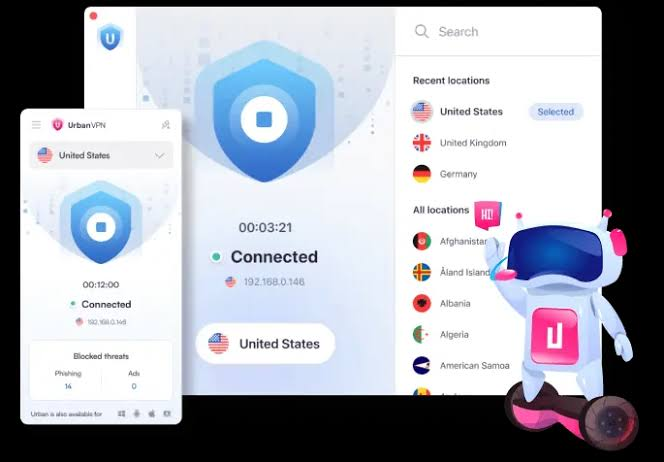
Urban VPN markets itself as a free, unlimited-bandwidth VPN with servers across dozens of countries, and it’s genuinely easy to install and use. However, it’s worth understanding how the business model works before installing it. Urban VPN operates partly as an IP-sharing network, meaning that in some configurations, your device’s connection can be used to route other users’ traffic as part of how the “free” service is funded. It’s not necessarily unsafe, but it’s a materially different privacy trade-off compared to a VPN that only routes your own traffic through dedicated servers.
Key Features
- 100% Free with no monthly data limits
- Unlimited bandwidth for everyday browsing
- Works on Windows 10 (32-bit and 64-bit)
- Servers in multiple countries
- Simple one-click connection
- No registration required for basic use
- Can help access geo-restricted websites by changing your virtual location
Pros
- Completely free to use
- No bandwidth restrictions
- Easy installation and user-friendly interface
- Good selection of virtual locations
- Fast enough for general browsing
Cons
- Uses a peer-to-peer network instead of a traditional VPN server model
- Privacy protections may not be as strong as premium VPN services
- Connection speeds can vary depending on network demand
- Not the best choice for users who require maximum security or privacy
Who Should Use Urban VPN?
Urban VPN is a good option for students, casual users, and anyone looking for a free VPN for Windows 10 without data limits. It’s suitable for changing your IP address, accessing region-restricted websites, and everyday internet browsing. However, users handling sensitive information or requiring advanced privacy features should consider a reputable premium VPN instead.
Good for: Quick, occasional use, like unblocking a single website, rather than a daily driver for sensitive browsing.
The wider free VPN landscape
Beyond the well-known names, there’s a long tail of free VPN software available through download hubs, aggregator sites that list dozens of tools ranging from long-established names like Windscribe and OpenVPN to newer, smaller apps you may not have heard of. Some, like SoftEther, are open-source projects built by universities and research groups rather than commercial companies chasing subscriptions. Others are ad-supported freemium products hoping you’ll eventually upgrade.
The lesson here isn’t that free options are bad; it’s that “free VPN” covers a huge range of business models, and the label alone tells you almost nothing about how your data is actually handled.
Practical example: choosing between two everyday scenarios
Scenario 1: Sara just wants to watch a show that’s only available in another country, once in a while. A lightweight, ad-supported free VPN with quick server switching, like Turbo VPN or Urban VPN, is probably fine here. She’s not handling sensitive data, just wants quick access, and doesn’t mind occasional ads or slower peak-hour speeds.
Scenario 2: Raj works from cafes and hotel Wi-Fi regularly and wants his banking and work logins protected every day. This is where a no-data-cap, audited option like Proton VPN Free makes more sense, since daily use on unsecured networks is exactly the situation where a stronger privacy model actually earns its keep, even if server choice is more limited.
Pros and cons of using a free VPN on Windows 10
Pros
- Zero upfront cost, no credit card needed for most reputable options
- Fast to install, usually a two-minute setup from download to connection
- Good enough for casual privacy needs, like protecting yourself on public Wi-Fi
- Some options (Proton VPN Free) don’t cap your data or browsing time at all
- Lets you try before committing to a paid plan; most free tiers double as trial funnels
Cons
- Free tiers usually limit you to a handful of server countries
- Speeds are commonly capped or deprioritized compared to paying customers
- Some free VPNs use your idle bandwidth or IP as part of their business model
- Ad-supported apps can be intrusive, and might slow your browser down
- Not every free VPN publishes independent security audits, so trust varies a lot between providers
- Premium features like split tunneling, dedicated streaming servers, or multi-hop routing are usually locked behind a paywall
Price comparison: free vs paid, and what you’re really trading
| Free tier | Typical paid tier | |
|---|---|---|
| Data limit | Often unlimited (varies by provider) | Always unlimited |
| Server locations | Usually 3–10 countries | Often 60–140+ countries |
| Speed | Standard, sometimes deprioritized | Optimized, higher priority |
| Ads | Present in some apps | Ad-free everywhere |
| Advanced features (kill switch, split tunneling, multi-hop) | Rare or basic | Standard |
| Audits & transparency | Varies widely | Usually documented publicly for major providers |
| Typical cost | $0 | Roughly $2–$12/month depending on provider and plan length |
If your budget genuinely can’t stretch to a paid VPN right now, going free isn’t a bad decision; it’s just important to pick a provider whose free tier is actually a scaled-down version of a trustworthy paid product, rather than a separate, ad-driven app built purely to monetize free users.
How to install a free VPN on Windows 10 (general steps)
- Download the Windows installer directly from the provider’s official website, not a random third-party mirror
- Run the installer and follow the setup wizard
- Open the app and create a free account if required (Proton VPN, for instance, needs sign-up before you can connect)
- Click Connect or Quick Connect, and the app will pick the fastest available free server.
- Check your new IP address using any “what’s my IP” site to confirm the VPN is actually active.e
- Test a site or two to make sure your browsing feels normal before relying on it for anything sensitive.ve
Common mistakes people make with free VPNs
- Downloading from unofficial sites. Random download aggregators sometimes bundle extra software you didn’t ask for. Stick to the provider’s own website when possible.
- Assuming “free” means “no data collection.” Always check whether the provider has a published privacy policy and, ideally, independent audits.
- Using a free VPN for anything financial without checking its logging policy first. Not every free VPN is built for that level of trust.
- Ignoring server load. Free servers are often crowded during peak hours, which explains a lot of the speed complaints in reviews.
- Forgetting to disconnect. Some free VPNs auto-disconnect after a set time or data threshold, leaving you unexpectedly unprotected mid-session.
FAQs
Is it actually safe to use a free VPN on Windows 10?
It depends entirely on the provider. Reputable options with clear privacy policies and independent audits, like Proton VPN’s free tier, are generally safe for everyday use. Lesser-known apps from unclear developers deserve more caution, especially around what they log and how they fund their servers.
Do free VPNs slow down my internet speed?
Often, yes, to some degree. Free tiers typically get lower server priority than paid users, and peak-hour congestion is common on crowded free servers. If speed matters a lot, expect some compromise unless you upgrade.
Can I use a free VPN to stream shows from other countries?
Sometimes. Streaming platforms actively block known VPN IP addresses, and free servers get blacklisted faster than paid ones because so many people share the same handful of IPs. Paid tiers usually have dedicated streaming servers that work more reliably for this.
Is Proton VPN’s free plan really unlimited?
Yes, based on the provider’s own stated policy, there’s <cite index=”20-1″>no limit on data usage, no bandwidth caps, and no time restrictions on the free plan</cite>, which is unusual compared to most competitors.
What’s the catch with VPNs that offer unlimited servers and bandwidth for free, like Urban VPN?
The likely trade-off is the business model behind it. Some free, unlimited VPNs rely partly on IP-sharing arrangements to fund their infrastructure, meaning your connection may, in some configurations, help route traffic for other users. It’s worth reading the specific privacy policy before deciding if that trade-off works for you.
Should I ever pay for a VPN instead of using a free one?
If you use a VPN daily, handle sensitive logins over public Wi-Fi, or want reliable access to streaming content, a paid plan is usually worth it. The jump in server count, speed priority, and advanced privacy tools is significant, and most reputable providers charge only a few dollars a month if you commit to a longer plan.
Do free VPNs work on Windows 10 without any technical setup?
Yes, for almost all mainstream options. Installation is generally a straightforward download-and-click process, and Windows 10 doesn’t require any manual network configuration for standard VPN apps.
Are browser extension VPNs the same as full Windows apps?
Not quite. Browser extensions typically only protect traffic inside that specific browser, while a full desktop VPN app protects your entire device’s internet connection, including other apps and background processes.
Conclsion
A free VPN for Windows 10 can absolutely cover your day-to-day needs, whether that’s securing a coffee shop Wi-Fi connection or getting around a regional restriction now and then. The real work is in picking the right one for how you’ll actually use it: an audited, no-cap option if privacy is your priority, or a lightweight, quick-connect app if you just need occasional, casual coverage. Either way, take two minutes to check the provider’s privacy policy before installing anything; that single step avoids most of the bad experiences people run into with free VPN software.

