
Creating professional-quality videos has never been easier thanks to the rapid advancement of AI-powered video creation tools. In 2026, businesses, content creators, marketers, educators, and YouTubers can produce engaging videos in minutes without requiring advanced editing skills or expensive production equipment. From generating videos with simple text prompts to creating realistic AI avatars, voiceovers, animations, and cinematic effects, modern AI tools have transformed the entire video production process.
Whether you’re creating YouTube videos, social media reels, marketing ads, product demonstrations, online courses, or corporate presentations, the right AI video tool can save hours of editing while improving quality and creativity. These platforms offer features such as automatic script generation, AI voice narration, background removal, motion graphics, subtitles, and high-resolution video exports.
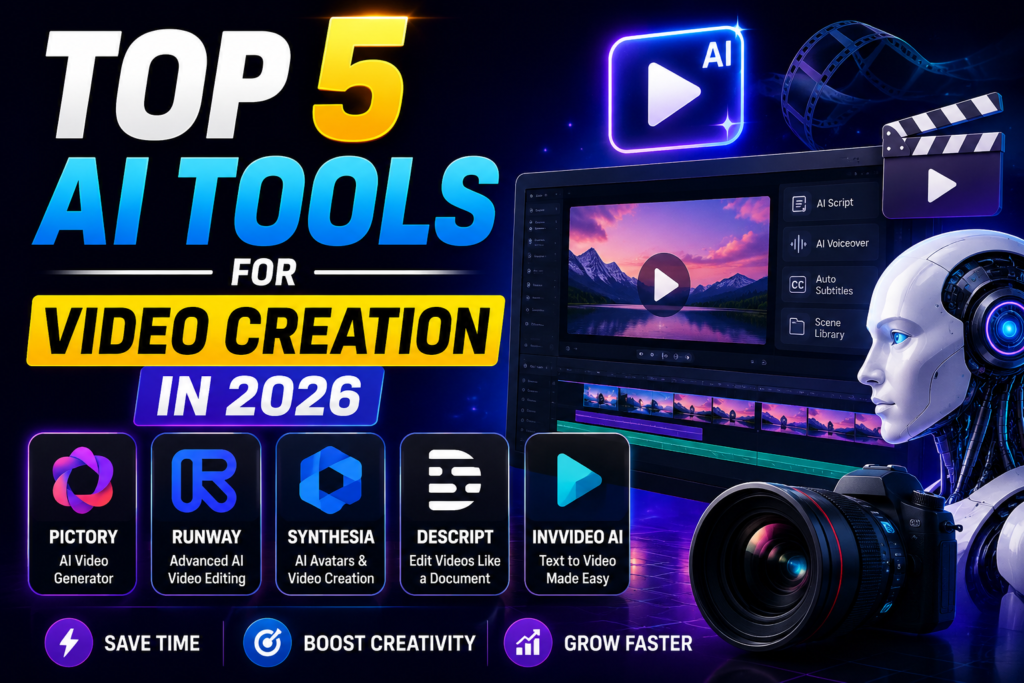
In this guide, we’ll explore the Top 5 AI Tools for Video Creation in 2026, comparing their key features, strengths, pricing, and ideal use cases. Whether you’re a beginner looking for an easy-to-use platform or a professional seeking advanced AI-powered editing capabilities, you’ll find the perfect tool to streamline your video creation workflow and produce stunning content faster than ever.
If you’ve been trying to make videos without a big team or a fancy studio, you already know how much time and effort it takes. Writing scripts, recording footage, editing clips, adding music, fixing colors — it’s a full-time job by itself.
That’s why smart video tools have become so popular in 2026. These platforms handle the heavy lifting for you. You don’t need to be a professional editor or spend hours in post-production. Whether you want to make YouTube videos, product demos, social media reels, or online course content, the right tool can cut your production time from days to minutes.
This guide covers the top 5 video creation tools in 2026 — what each one does, who it’s best for, and the honest pros and cons so you can pick the right fit.
Why Video Creation Tools Have Changed Everything
A few years ago, making a decent video required a camera, editing software like Adobe Premiere or Final Cut Pro, a microphone, and hours of manual work. Most small creators couldn’t compete with brands that had entire production teams.
Today, that gap has closed significantly. Tools now let you:
- Turn a blog post or script into a finished video in minutes
- Generate realistic voiceovers without recording a single word yourself
- Add subtitles, music, and transitions automatically
- Create faceless videos, explainer content, or even product ads without going on camera
The result? Solo creators, small businesses, educators, and marketers are now producing content that looks polished and professional — without the budget or the team.
The Top 5 Video Creation Tools in 2026-Top 5 AI Tools for Video Creation
1. Pictory
Best for: Turning long-form content into short videos
Pictory is one of the most practical tools for anyone who already has written content — blog posts, articles, newsletters, scripts — and wants to turn it into video without filming anything.
You paste your text, and Pictory breaks it into scenes. It automatically pulls in stock footage and images that match your content, adds captions, and lets you choose a voiceover style. The result is a clean, watchable video that you can publish directly.
Practical example: Say you run a finance blog and you’ve written a 1,500-word post about budgeting tips. Instead of sitting in front of a camera, you paste the article into Pictory. It builds a 3–4 minute video with visuals matching each point, adds a calm voiceover, and includes subtitles. You export it and post it on YouTube — no filming required.
Key Features
- AI text-to-video generation from blogs, articles, and scripts
- Automatic scene creation with relevant stock footage
- AI-generated voiceovers in multiple languages
- Auto-generated subtitles and captions
- Access to millions of royalty-free images, videos, and music
- Video summarization for webinars and long-form content
- Brand customization with logos, colors, and fonts
- Simple drag-and-drop video editor
- Cloud-based platform with no software installation required
- High-quality HD video exports for multiple platforms
Pros:
- Very fast turnaround from text to video
- Good stock library built in
- Realistic voiceover options
- Auto-captions save a lot of editing time
- Works well for repurposing old content
Cons:
- Stock footage can sometimes feel generic
- Not ideal if you want highly customized animations
- Limited branding control on lower-tier plans
- Voiceover tones can sound a bit flat for emotional content
Best For
- Bloggers converting articles into videos
- YouTube content creators
- Social media marketers
- Educational and training videos
- Product explainers and tutorials
- Businesses creating promotional content
Pricing: Starts around $19/month for the Starter plan. Mid-tier plans with more features run around $39–$99/month.
2. Runway
Best for: Advanced creators who want full creative control
Runway sits at the higher end of video creation tools. It’s built for people who want to do more than just piece together stock clips — it lets you generate video from text prompts, edit with precision, and apply effects that would normally require a motion graphics studio.
It’s particularly popular with filmmakers, content studios, and social media creators who need something beyond templates.
Practical example: A fashion brand wants a short ad campaign video — dreamy visuals, slow motion, cinematic color grading. Instead of hiring a videographer, they use Runway to generate video clips from text descriptions (“model walking through golden field, slow motion, warm tones”), combine them, add their logo and music, and export a 30-second ad ready for Instagram.
Key Features
- AI text-to-video generation from simple prompts
- Image-to-video animation for realistic motion effects
- Advanced video editing with AI-powered enhancements
- Background removal without green screens
- AI object removal and scene cleanup
- Motion tracking and camera control tools
- Automatic subtitles and caption generation
- AI-powered frame interpolation for smoother videos
- High-resolution video export options
- Cloud-based collaboration for teams and creators
Pros:
- Industry-leading video generation from text
- Precise editing tools, not just drag-and-drop
- Strong community and regular feature updates
- Great for cinematic and creative content
- Supports green screen, background removal, and style transfer
Cons:
- Steeper learning curve than other tools on this list
- Credit-based system can get expensive for heavy users
- Some features are still in beta — occasional glitches
- Not ideal for beginners or quick turnarounds
Best For
- YouTube creators
- Filmmakers and video editors
- Social media content creation
- Advertising and marketing campaigns
- Music videos and creative storytelling
- Short films and promotional videos
Pricing: Free plan available with limited credits. Standard plan starts at $15/month; Pro plan at $35/month. Teams and studios have custom pricing.
3. Synthesia
Best for: Business training, corporate videos, and explainer content
Synthesia takes a unique approach. Instead of stock footage or animations, it uses realistic digital presenters — called avatars — that speak your script in dozens of languages. You type your script, pick an avatar, choose a language, and the platform generates a video of that presenter delivering your content on screen.
This is huge for corporate teams, HR departments, online course creators, and businesses that regularly produce instructional content.
Practical example: A software company needs to create onboarding training videos for employees across five countries. Instead of recording a presenter five times in five languages, they use Synthesia. They write one script, translate it, and generate five separate videos — each with a presenter speaking the local language. The whole project takes an afternoon instead of a week.
Key Features
- Realistic AI avatars with natural facial expressions and gestures
- AI text-to-video generation from written scripts
- Support for 140+ languages and accents
- AI voiceovers with lifelike speech synthesis
- Automatic lip-sync for multilingual videos
- Custom AI avatars for businesses and enterprise users
- Professional templates for training, marketing, and education
- Screen recording and presentation integration
- Brand customization with logos, fonts, and colors
- Cloud-based collaboration for teams
Pros:
- Over 160 languages supported
- Consistent presenter appearance across all videos
- Very good for formal, professional content
- Easy to update — change the script and regenerate
- No filming, no studio, no presenter needed
Cons:
- Avatars, while realistic, can still feel slightly unnatural for casual content.
- Not suitable for creative or entertainment-style videos
- Limited flexibility for highly visual or dynamic content
- Custom avatar creation (your own face) costs more
Best For
- Corporate training and employee onboarding
- Educational courses and e-learning
- Product demonstrations
- Internal business communications
- Customer support and knowledge-base videos
- Marketing presentations and explainer videos
Pricing: Starter plan around $29/month (limited videos). Creator plan at $89/month. Enterprise pricing available for large teams.
4. InVideo
Best for: Social media creators and marketers on a budget
InVideo is the go-to tool for creators who need to produce a lot of content quickly without breaking the bank. It’s template-heavy, has a massive stock library, and lets you produce everything from YouTube intros to Instagram Reels to Facebook ads in a clean, drag-and-drop editor.
It’s not the most advanced tool, but for sheer volume and speed, it’s hard to beat — especially for solo creators or small marketing teams.
Practical example: A travel blogger needs to post three short videos per week — one for YouTube Shorts, one for Instagram Reels, and one longer video for YouTube. They use InVideo’s templates tailored to each format, drop in their footage or stock clips, adjust the text, add music, and export. The whole process for all three videos takes under two hours.
Key Features
- AI text-to-video generation from simple prompts
- Thousands of professionally designed video templates
- AI-generated voiceovers in multiple languages and accents
- Automatic subtitles and captions
- Access to millions of royalty-free stock videos, images, and music
- Drag-and-drop video editor with transitions and animations
- AI script generation and content suggestions
- Brand kit for logos, fonts, and custom colors
- One-click resizing for YouTube, Instagram, TikTok, Facebook, and other platforms
- Cloud-based editing with team collaboration support
Pros:
- Thousands of templates for every format and niche
- Huge built-in stock library (images, video, music)
- Beginner-friendly interface
- Very affordable pricing for what you get
- Good collaboration features for small teams
Cons:
- Templates can make videos feel similar to other creators using InVideo
- Less creative flexibility compared to Runway
- Voiceover quality isn’t as strong as Synthesia or Pictory
- Exporting in higher resolutions requires a paid plan
Best For
- YouTube videos
- Instagram Reels and TikTok Shorts
- Social media marketing
- Product advertisements
- Business presentations
- Educational and tutorial videos
Pricing: Free plan available. Plus plan starts at $25/month; Max plan at $60/month.
5. HeyGen
Best for: Personalized video at scale — sales, outreach, and marketing
HeyGen is built around one core idea: personalized video. While Synthesia focuses on corporate training, HeyGen targets sales teams, marketers, and creators who want to send personalized video messages at scale or build interactive video experiences.
Think of it as a tool that lets you send 500 personalized “hello [first name]” sales videos without recording yourself 500 times. It also has strong capabilities for creating avatar-based content similar to Synthesia, but with a heavier focus on business communication and outreach.
Practical example: A SaaS startup wants to follow up with leads after a webinar. Instead of a generic email, they use HeyGen to generate personalized video messages where a digital avatar greets each lead by name, references the webinar topic, and invites them to a demo. Click-through rates on their follow-up campaign jump significantly.
Key Features
- Realistic AI avatars with natural facial expressions and gestures
- Text-to-video generation with AI voice narration
- Voice cloning for personalized video presentations
- Automatic translation into 170+ languages and dialects
- Accurate lip-sync technology for multilingual videos
- Custom AI avatars for businesses and creators
- Built-in templates for marketing, education, and corporate training
- Screen recording and presentation tools
- Cloud-based editor with no software installation required
- Team collaboration and brand management features
Pros:
- Excellent for personalized outreach at scale
- Clean, professional avatar quality
- Strong voice cloning features
- Good integrations with CRM tools
- Easy to produce branded explainer videos
Cons:
- Not as strong for creative or entertainment-style video
- Higher plans needed for most business features
- Voice cloning requires careful setup to sound natural
- Some users report customer support delays
Best For
- Marketing and promotional videos
- Corporate training and onboarding
- Online courses and educational content
- Product demonstrations
- Social media and YouTube presenter videos
Pricing: Free plan with limited credits. Creator plan at $29/month; Team plan at $89/month. Custom enterprise plans available.
Quick Comparison Table
| Tool | Best For | Starting Price | Ease of Use |
|---|---|---|---|
| Pictory | Repurposing text content | $19/month | Easy |
| Runway | Creative and cinematic video | $15/month | Advanced |
| Synthesia | Corporate training, multilingual | $29/month | Easy |
| InVideo | Social media, bulk content | $25/month | Very Easy |
| HeyGen | Personalized outreach, sales | $29/month | Easy |
How to Choose the Right Tool for You
The best tool depends entirely on what you’re making and who you’re making it for. Here’s a quick guide:
Go with Pictory if you have a blog, podcast, or lots of written content you want to turn into videos quickly.
Go with Runway if you’re a serious creator, filmmaker, or studio that wants cinematic quality and creative freedom.
Go with Synthesia if you’re a business that needs training videos, onboarding content, or multilingual explainers regularly.
Go with InVideo if you’re a solo creator or small team focused on social media and need to publish content consistently without spending much.
Go with HeyGen if you’re in sales or marketing and want to use personalized video as part of your outreach strategy.
Tips for Getting the Most Out of These Tools
Start with a clear script. Every tool works better when you know exactly what you want to say. Even a rough outline will cut your production time in half.
Use templates as a starting point, not the finish line. Templates are great for speed, but small tweaks — your brand colors, your logo, your preferred font — make a big difference in how professional the final video looks.
Batch your content. If you’re using any of these tools regularly, block out time once or twice a week to produce multiple videos in one session rather than making one video at a time.
Check captions before publishing. Auto-captions are a huge time saver, but they’re not always perfect — especially with industry-specific words, brand names, or numbers. Always review before going live.
Frequently Asked Questions
Do I need any video editing experience to use these tools?
No. All five tools on this list are designed for people who are not professional video editors. Pictory, InVideo, Synthesia, and HeyGen are especially beginner-friendly. Runway has a steeper learning curve but still doesn’t require traditional editing knowledge.
Can I use these tools to make videos for YouTube?
Yes, absolutely. All five tools can export video formats compatible with YouTube. InVideo and Pictory are particularly popular among YouTube creators because of their speed and ease of use.
Are there free versions available?
Most of these tools offer a free trial or a limited free plan. Runway has a free plan with credits, InVideo has a free tier, and HeyGen offers a few free videos to start. Pictory and Synthesia primarily work on paid plans after a trial period.
Which tool is best for making videos without showing my face?
Any of them work well for faceless video. Pictory uses stock footage, Synthesia and HeyGen use digital avatars, InVideo uses templates and stock clips, and Runway can generate footage from text prompts. All five are solid options for creators who prefer to stay off camera.
Can these tools add subtitles automatically?
Yes. Pictory, InVideo, and HeyGen all offer automatic subtitle generation. Synthesia includes captions as part of its standard output. Runway offers caption tools as well, though with a bit more manual control.
Is the content created with these tools copyright-free?
Generally, yes — the video content you export is yours to use. However, any stock footage or music pulled from their libraries may have platform-specific usage rules. Always check the licensing terms for commercial use, especially if you’re making ads or branded content.
Which tool is the best value for money in 2026?
For most solo creators and small businesses, InVideo or Pictory offer the best value. InVideo’s templates and stock library are hard to beat at that price point. If multilingual or corporate content is a priority, Synthesia is worth the higher price.
Conclsion
Video content isn’t slowing down — if anything, it’s becoming the default way people consume information online. The good news is that making quality videos no longer requires a production crew or a massive budget.
Pictory, Runway, Synthesia, InVideo, and HeyGen each solve a specific problem. Whether you’re a one-person blog, a corporate HR team, a sales department, or a creative studio, at least one of these tools is built exactly for the kind of content you need to make.
Start with the free trials, test one or two tools against a real project, and pay attention to where you feel the least friction. That’s the one worth investing in.

