
If you’ve ever connected to public Wi-Fi at a coffee shop, airport, or hotel and wondered whether it’s safe, you’re right to wonder. Public networks are one of the easiest places for someone to snoop on your browsing activity. A VPN fixes that. It encrypts your connection and hides what you’re doing online.
The problem is that most good VPNs cost money. But there are a handful of genuinely decent free options for Windows laptops that don’t require you to hand over your credit card. This guide covers the best ones, what they’re actually like to use, and the truth about their limits.
Free VPN for Windows Laptop: A VPN for a Windows laptop helps protect your internet connection, improve online privacy, and unlock restricted websites or streaming content. Whether you use your laptop for work, gaming, streaming, or browsing on public Wi-Fi, a VPN creates a secure, encrypted connection between your device and the internet. This makes it harder for hackers, advertisers, or even internet providers to track your activity.
Many Windows laptop users rely on VPNs when connecting to public networks in cafes, airports, hotels, or colleges. Public Wi-Fi networks are often less secure, and a VPN adds an extra layer of protection by encrypting your data. It also helps hide your IP address, giving users better privacy while browsing websites, downloading files, or accessing online services.
Popular VPN providers such as NordVPN, ExpressVPN, Surfshark, and Proton VPN offer dedicated apps for Windows laptops. These apps are easy to install and usually require only one click to connect to a secure server. Most services support Windows 10 and Windows 11 and include features like kill switch protection, split tunneling, ad blocking, and fast streaming servers.
Free VPNs are also available for Windows laptops, but they often come with limitations such as slower speeds, fewer server locations, data limits, or advertisements. Paid VPN services generally provide faster performance, stronger security, and better customer support. Users who stream videos, play online games, or download large files usually prefer premium VPN plans for a smoother experience.
VPNs are also useful for accessing geo-restricted content. For example, users can connect to servers in different countries to watch region-locked streaming libraries or access websites unavailable in their location. Many remote workers also use VPNs to securely connect to office systems and protect sensitive business information.
When choosing a VPN for a Windows laptop, users should look for important features such as strong encryption, no-logs policies, fast connection speeds, compatibility with Windows devices, and reliable customer reviews. Ease of use is also important, especially for beginners who want quick setup without technical knowledge.
Overall, a VPN is a valuable tool for Windows laptop users who want better security, privacy, and internet freedom. With the right VPN service, users can browse safely, stream content securely, and protect their personal data wherever they connect online.
What Does a VPN Actually Do on a Windows Laptop?
Before jumping into the list, here’s a quick breakdown of what you’re actually getting when you use a VPN.
When you browse without one, your internet provider, the network owner, and potentially third parties can see which websites you visit and roughly what you do there. A VPN creates an encrypted tunnel between your laptop and the internet, routing your traffic through a server in another location. To anyone watching, it looks like your traffic is coming from that server — not from you.
On a Windows laptop specifically, a VPN is useful for:
- Using public Wi-Fi safely (airports, cafes, hotels)
- Accessing content that’s blocked in your region
- Preventing your ISP from tracking your browsing habits
- Adding a layer of privacy when working remotely
Now, free VPNs can’t do everything a paid one can — but for basic protection and occasional use, several of them hold up surprisingly well.
Free VPN for Windows Laptop in 2026:-
1. Proton VPN Free — Best Overall Free VPN for Windows
Best for: Privacy-first users who want no data limits
Proton VPN is the one free VPN that genuinely stands out from the crowd. Most free VPNs either cap your data, log your activity, or make money by selling your browsing data to advertisers. Proton VPN does none of those things — and they’ve had their no-logs policy independently audited to prove it.
What you get on the free plan:
The free tier gives you unlimited data, which is almost unheard of among free VPNs. You’re limited to three server locations (the US, Netherlands, and Japan) and one device at a time, but those are reasonable restrictions for a free product.
The Windows app is clean, simple, and easy to install. You download it, create a free account, and connect with one click. There’s no confusing setup or technical knowledge required.
Practical example: You’re working remotely from a hotel and need to check your work email and do some light browsing. You open Proton VPN, connect to the Netherlands server, and your connection is encrypted for the rest of the session — at zero cost.
Speed: Free servers are slower than paid ones because they’re shared with more users. For browsing and video calls, it’s fine. For streaming HD video on a consistent basis, you might notice some buffering.
Pros:
- Unlimited data on the free plan
- Verified no-logs policy
- Clean, user-friendly Windows app
- No ads are injected into your browsing
- Backed by a Swiss privacy company (strong legal protections)
Cons:
- Only 3 server locations on the free plan
- Slower speeds compared to the paid tier
- Can’t unblock Netflix or most streaming services on free servers
- One device at a time
2. Windscribe — Best Free VPN for More Server Choices
Best for: Users who want access to more countries on a free plan
Windscribe is generous by free VPN standards. You get 10GB of data per month just by creating an account — and if you confirm your email address and tweet about Windscribe (yes, really), you can get up to 15GB. That’s enough for a few weeks of regular browsing.
What makes Windscribe stand out is the number of server locations available on the free plan — over 10 countries, including the US, UK, Canada, Germany, France, and more. Most free VPNs give you one or two locations, so this is a meaningful advantage.
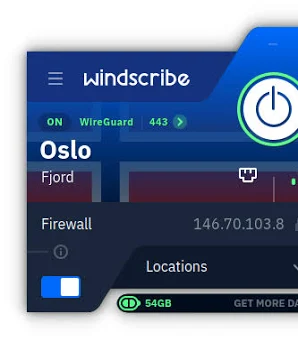
The Windows app is well-designed and includes a firewall feature called ROBERT that blocks ads and trackers at the VPN level — meaning you get ad blocking built into your VPN connection, not just your browser.
Practical example: You’re trying to watch a YouTube video that’s region-blocked in your country. You open Windscribe, connect to a UK or US server, refresh the page, and it loads. That’s the kind of everyday use Windscribe handles comfortably within the free data limit.
Pros:
- 10–15GB free data per month
- 10+ countries on free plan
- Built-in ad and tracker blocking
- Solid Windows app with a clear interface
- Good privacy policy
Cons:
- Monthly data cap (10–15GB)
- Speeds can be inconsistent
- Streaming services often detect and block Windscribe free servers
- No 24/7 live chat on the free plan
3. Hotspot Shield Free — Best Free VPN for Speed
Best for: Users who prioritize connection speed over privacy features
Hotspot Shield has been around for years and has built a reputation for being one of the fastest free VPN options. The free version gives you 500MB of data per day — which works out to roughly 15GB per month — and connects you to a US server.
The Windows app is straightforward. You open it, hit connect, and you’re protected. There’s no account required to use the basic free version, which is convenient if you don’t want to hand over an email address.

Speed-wise, Hotspot Shield uses its own protocol (Hydra), which is genuinely fast. If you’re using a VPN for quick tasks — checking your bank account on public Wi-Fi, sending emails, doing quick research — it performs well.
Practical example: You’re at an airport with a two-hour layover, connected to the free airport Wi-Fi. You open Hotspot Shield, connect, and safely check your online banking and email without worrying about anyone on the same network intercepting your data.
Pros:
- Fast connection speeds
- No account required for basic use
- 500MB daily data (approximately 15GB/month)
- Simple one-click connection
- Long-established, well-known service
Cons:
- Limited to one US server location on the free plan
- Shows ads in the free version
- Privacy policy is less strict than Proton VPN or Windscribe
- No choice of server location
4. TunnelBear — Best Free VPN for Beginners
Best for: First-time VPN users who want something friendly and approachable
TunnelBear has always had a reputation for being the most beginner-friendly VPN on the market. The interface uses bear-themed graphics (bears tunneling through countries on a map), which sounds gimmicky but actually makes it very intuitive to understand what’s happening when you connect.
The free plan gives you 500MB per month, which is very limited. TunnelBear is honest about this — they’re upfront that the free plan is more of a trial to let you test the service before committing to a paid plan. That said, if your VPN usage is minimal (one or two sessions a month, light browsing only), 500MB might be enough.
The Windows app is polished, and the connection is reliable. TunnelBear also publishes annual transparency reports and has undergone independent security audits, which puts it in the same trustworthy category as Proton VPN.
Practical example: You’re new to VPNs and want to try one out before paying. You download TunnelBear, connect to a Canadian server, and browse for 20 minutes. The experience shows you exactly how a VPN works without any setup complexity.
Pros:
- Extremely beginner-friendly interface
- Independently audited for security
- Reliable connections
- Available in many countries
- Good transparency practices
Cons:
- Only 500MB per month on the free plan — very restrictive
- No streaming or heavy usage possible on the free tier
- Customer support is limited on the free plan
- Not suitable as a primary free VPN for regular use
5. hide.me — Best Free VPN for No Registration
Best for: Users who want a VPN without creating an account
Hide.me offers a free plan with 10GB of data per month and — importantly — you don’t need to create an account to use it. You download the app, open it, and connect. That’s it.
For privacy-conscious users, not having to hand over an email address or create a profile is a real advantage. The free plan covers 5 server locations and supports one device at a time.
The Windows app is clean and functional. It supports several VPN protocols, including WireGuard (one of the newer, faster protocols), which gives it a speed advantage over some competitors.
Pros:
- 10GBof free data per month
- No account or email required
- Supports WireGuard protocol (fast and modern)
- 5 server locations on the free plan
- Strong privacy policy
Cons:
- 10GB monthly cap
- Free servers can be congested during peak hours
- No streaming access on the free plan
- Limited customer support for free users
Side-by-Side Comparison
| VPN | Free Data | Server Locations | Speed | No-Log Policy | Ads |
|---|---|---|---|---|---|
| Proton VPN | Unlimited | 3 | Medium | Audited | No |
| Windscribe | 10–15GB/month | 10+ | Medium | Yes | No |
| Hotspot Shield | ~15GB/month | 1 (US only) | Fast | Partial | Yes |
| TunnelBear | 500MB/month | Many | Good | Audited | No |
| hide.me | 10GB/month | 5 | Good | Yes | No |
Things to Watch Out For With Free VPNs
Not all free VPNs are worth using. Some of them are genuinely dangerous. Here’s what to look for before downloading anything.
Avoid VPNs that log and sell your data. Some free VPNs make money by recording your browsing activity and selling it to advertisers. This defeats the entire purpose of using a VPN. Stick to services that publish clear, audited privacy policies — like the ones on this list.
Watch out for unlimited free VPNs with no business model. If a VPN is free, has no data limit, and isn’t a well-known company, ask yourself how they’re paying for their servers. Often, the answer is your data.
Avoid browser extensions marketed as VPNs. Most browser-based “VPN” extensions only protect your browser traffic, not your entire laptop. A proper VPN app on Windows protects everything — your browser, apps, background processes, all of it.
Check the parent company. Some VPNs that appear independent are owned by larger companies with questionable privacy records. A quick search of “[VPN name] parent company” before downloading is worth 30 seconds of your time.
How to Set Up a Free VPN on Your Windows Laptop
Setting up any of the VPNs above follows roughly the same process:
- Go to the official website of the VPN you’ve chosen (don’t download from third-party app stores)
- Download the Windows installer
- Run the installer and follow the on-screen steps
- Create a free account if required (Proton VPN, Windscribe, TunnelBear) or skip this step (Hotspot Shield basic, hide.me)
- Open the app, select a server location, and click Connect
- Your connection is now protected
The whole process takes under five minutes for any of these services.
One tip: After connecting, you can verify your VPN is working by searching “what is my IP address” in your browser. The IP address shown should match the country of your VPN server, not your actual location.
When a Free VPN Is Enough — and When It Isn’t
Free is enough if you:
- Use public Wi-Fi occasionally and want basic protection
- Want to check region-restricted content once in a while
- Are you testing VPNs before committing to a paid plan
- Only need a VPN for light browsing, not heavy usage
Free isn’t enough if you:
- Want to stream Netflix, Disney+, or other services reliably (free servers get blocked)
- Need a VPN running 24/7 on multiple devices
- Travel frequently and need access to many different country servers
- Require fast, consistent speeds for video calls or downloads
In those cases, a paid VPN like Proton VPN Plus, NordVPN, or ExpressVPN will serve you much better. But for occasional, everyday use? The free options above do the job.
Frequently Asked Questions
Is it safe to use a free VPN on my Windows laptop?
It depends entirely on which one you use. The VPNs listed in this guide — Proton VPN, Windscribe, TunnelBear, and hide.me — are trustworthy and have strong privacy policies. Random free VPNs from unknown developers are a different story. Stick to well-known, audited services.
Will a free VPN slow down my internet?
Yes, to some extent, all VPNs add a small amount of overhead because your traffic is being encrypted and routed through an extra server. Free VPN servers are also shared with more users, which can slow things down during busy periods. For regular browsing and video calls, the slowdown is usually tolerable.
Can I use a free VPN to watch Netflix?
Generally no. Streaming services actively detect and block VPN servers, and free VPN servers are among the first to get blacklisted. Paid VPN services invest in rotating their server IPs to stay ahead of these blocks. If unblocking streaming content is your main goal, a paid VPN is a better investment.
Does Windows have a built-in VPN?
Windows does have built-in VPN support, but it requires you to manually configure a connection to a VPN server — meaning you’d need to already have access to a server somewhere. It’s not a consumer-friendly solution. The apps listed above are far simpler to use.
Can I use a free VPN for working from home?
For light tasks like email and browsing, yes. For accessing company systems or internal networks, most organizations use their own VPN setup (like Cisco AnyConnect or GlobalProtect) that you’d be provided with. A consumer VPN is not a replacement for a corporate VPN.
Do free VPNs work on Windows 11?
Yes. All the VPNs listed in this guide are compatible with Windows 10 and Windows 11. Just download the app from the official website and install it as you would any other program.
How do I know my VPN is actually working?
After connecting, open your browser and search “what is my IP address.” The result should show an IP address and location matching your chosen VPN server, not your real location. If it shows your real location, the VPN isn’t connected properly.
Conclsion
If you only remember one thing from this guide, Proton VPN Free is the best free VPN for Windows laptops in 2026. Unlimited data, a verified no-logs policy, and a clean app make it the obvious first choice for most people.
If you want more server locations, go with Windscribe. If speed matters most and you’re okay with ads, try Hotspot Shield. If you want zero account signup, hide.me is your best bet.
All five are legitimate, safe options. The key is picking the one that matches how you plan to use it — and avoiding the dozens of shady free VPNs that aren’t worth the risk.
Stay safe out there.

