
Introduction
Otter.ai is a powerful voice transcription and meeting assistant tool that converts spoken conversations into accurate, searchable text in real time. It is widely used for meetings, lectures, interviews, and webinars.
Otter.ai Review 2026 Otter.ai is ideal for students, journalists, professionals, remote teams, and content creators who need to capture and organize spoken information quickly. In 2026, it became popular because of its real-time transcription, easy collaboration features, and seamless integration with online meeting platforms like Zoom and Google Meet. Beautiful.ai
Key Features of Otter.ai
Here are the main features that make Otter.ai stand out:
1. Real-Time Transcription
- Converts speech into text instantly during meetings or recordings.
- Example: Record a Zoom meeting and get live transcripts as people speak.
2. Speaker Identification
- Automatically detects and labels different speakers.
- Example: Distinguish between team members in a group discussion.
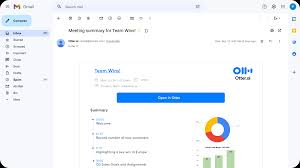
3. Meeting Summaries
- Generates summaries with key points and highlights.
- Example: Get a quick overview of a 1-hour meeting in minutes.
4. Searchable Notes
- Search through transcripts using keywords.
- Example: Find a specific discussion point without replaying the entire recording.
5. Integration with Tools
- Works with Zoom, Google Meet, Microsoft Teams, and more.
- Example: Automatically join meetings and record transcripts without manual setup.
6. Collaboration Features
- Share transcripts and allow team members to edit or comment.
- Example: Teams can highlight important sections or add notes.
7. Audio Recording & Playback
- Records audio along with text for easy reference.
- Example: Replay specific parts of a conversation while reading the transcript.
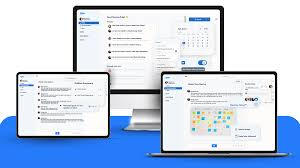
8. Cross-Platform Access
- Available on web, iOS, and Android devices.
- Example: Access meeting notes anytime from your phone or laptop.
How Otter.ai Works
Using Otter.ai is simple and beginner-friendly:
- Sign up and create an account.
- Start recording or connect Otter.ai to your meeting platform.
- Let it transcribe conversations in real time.
- Review transcripts and edit if needed.
- Highlight key points or generate summaries.
- Share transcripts with team members or save them for later.
Performance & Speed
- Output Quality: Otter.ai provides highly accurate transcription, especially for clear audio. It may need minor edits for accents or noisy environments.
- Speed: Transcriptions appear instantly during conversations.
- Reliability: Otter.ai offers stable performance with high uptime, making it dependable for meetings and recordings.
Pricing & Plans
Otter.ai offers flexible plans:
- Free Plan: Limited transcription minutes per month with basic features.
- Pro Plan: Around $10/month with more transcription minutes and advanced tools.
- Business Plan: Around $20/month per user with team collaboration and admin features.
Is it worth the money?
Yes, especially for professionals and teams who frequently attend meetings or need accurate transcripts.
Pros and Cons
Pros:
- Real-time, accurate transcription
- Easy integration with meeting platforms
- Searchable and shareable transcripts
- Speaker identification
- Time-saving summaries
Cons:
- Limited free transcription minutes
- Accuracy may drop with background noise
- Requires an internet connection for best performance
Best Use Cases
Who should use Otter.ai:
- Students recording lectures
- Journalists transcribing interviews
- Professionals attending meetings
- Remote teams needing documentation
Who should avoid it:
- Users needing offline-only transcription tools
- People working in very noisy environments
Comparison with Competitors
| Feature | Otter.ai | Fireflies.ai | Rev |
|---|---|---|---|
| Real-Time Transcription | ✅ Yes | ✅ Yes | ❌ No (manual) |
| Accuracy | ✅ High | ✅ High | ✅ Very high |
| Meeting Integration | ✅ Strong | ✅ Strong | ❌ Limited |
| Pricing | $0–$20/month | $10–$25/month | Pay-per-use |
| Collaboration | ✅ Yes | ✅ Yes | ❌ Limited |
Otter.ai is best for real-time transcription and collaboration, while Rev offers higher accuracy with manual transcription services.
Security & Privacy
- Encryption: Data is encrypted in transit and at rest.
- Privacy Policy: Otter.ai follows strict privacy guidelines and does not misuse user data.
- Safety: Suitable for professional use, but avoid recording sensitive conversations without consent.
Final Verdict
In 2026, Otter.ai is one of the best tools for real-time transcription and meeting documentation. Its accuracy, speed, and integration features make it a valuable tool for students, professionals, and teams.
Recommendation: If you attend frequent meetings or need reliable transcription, Otter.ai is definitely worth using.
FAQs
1. Is Otter.ai free?
Yes, Otter.ai offers a free plan with limited transcription minutes per month.
2. How accurate is Otter.ai?
It is highly accurate for clear audio but may require minor edits in noisy environments.
3. Can Otter.ai record meetings automatically?
Yes, it can integrate with platforms like Zoom and join meetings automatically.
4. Does Otter.ai work offline?
No, it requires an internet connection for real-time transcription.
5. Can I edit transcripts?
Yes, you can easily edit and refine transcripts after recording.
6. Is Otter.ai secure?
Yes, it uses encryption and follows strict privacy policies.
7. Can multiple people collaborate on transcripts?
Yes, team members can view, edit, and comment on transcripts.
8. Does Otter.ai support multiple languages?
It mainly supports English, with limited support for other languages.
9. Who should use Otter.ai?
Students, journalists, professionals, and teams need accurate transcription.
10. Is the paid plan worth it?
Yes, especially for users who need more transcription time and advanced features.
11. Can Otter.ai summarize meetings?
Yes, it can generate summaries and highlight key points automatically.
12. Is Otter.ai free?
Yes, Otter.ai offers a free plan with limited transcription minutes each month.
13. How accurate is Otter.ai?
It is highly accurate for clear audio but may need minor corrections in noisy environments or with strong accents.
14. Can Otter.ai automatically join meetings?
Yes, it can integrate with tools like Zoom and automatically record and transcribe meetings.
15. Does Otter.ai work offline?
No, it requires an internet connection for real-time transcription and syncing.
16. Can I edit transcripts in Otter.ai?
Yes, you can easily edit, highlight, and organize transcripts after recording.
17. Is Otter.ai secure?
Yes, it uses encryption and follows strict privacy practices to protect user data.
18. Can teams collaborate using Otter.ai?
Yes, team members can share, comment, and edit transcripts in real time.
19. Does Otter.ai support multiple languages?
It mainly supports English, with limited support for other languages.
20. Who should use Otter.ai?
Students, journalists, professionals, and remote teams who need fast and accurate transcription.
21. Is the paid plan worth it?
Yes, especially for users who need more transcription time and advanced features.
Conclusion
In 2026, Otter.ai remains one of the most reliable tools for real-time transcription and meeting documentation. Its ability to convert speech into searchable text, generate summaries, and integrate with popular meeting platforms makes it a valuable tool for students, professionals, and teams. While the free plan has limits and accuracy may vary in noisy environments, the overall performance is strong. If you frequently attend meetings or need quick transcripts, Otter.ai is definitely worth using.