
Altered Studio is an advanced AI voice and audio production platform that helps creators, studios, and professionals generate, transform, and edit vocal content with high realism and flexibility. It combines multiple voice AI technologies into a single toolset for voice creation, voice morphing, text‑to‑speech, transcription, translation, and voice‑over production.
Altered Studio Review 2026. At its core, Altered Studio lets you create professional‑quality voice performances from text or existing recordings. You can morph a recorded voice into a new one—changing accent, age, gender, style, or emotional tone—preserving timing and performance nuances. This makes it useful for storytelling, character dialogue, game audio, podcasts, video narration, dubbing, and other media projects. Listnr
Altered Studio is one of the most specialized AI voice tools on the market — and that’s both its strength and its limitation. While most AI voice platforms focus on text-to-speech, Altered goes deeper into voice morphing, voice cloning, and real-time voice transformation. If you work in game development, film production, podcasting, or content creation that needs multiple character voices, it is worth a close look.
This review covers everything: what Altered Studio does in 2026, who it is built for, honest pros and cons, pricing, and how it stacks up against competitors like ElevenLabs and Murf AI.
What Is Altered Studio?
Altered Studio is an AI-powered voice content creation platform developed by Altered AI, a London-based company founded in 2018 by Ioannis Agiomyrgiannakis — a former Google research scientist who worked on Tacotron 2, one of the landmark breakthroughs in synthetic speech technology.
The platform is available as a desktop application for Windows and macOS, with core features accessible online. It combines several distinct voice AI capabilities into a single interface:
- Speech-to-speech voice morphing
- AI voice cloning
- Text-to-speech with emotive styles
- Real-time voice changing
- AI voice cleaning and audio editing
- Transcription and translation
What separates Altered from general-purpose voice generators is its focus on performance-driven voice content — the ability to record your own delivery (emotion, timing, pacing) and transfer it to a completely different voice. This “voice puppeteering” approach is unique in the market.
The company has raised $3.39 million in seed funding and counts major game studios like Ninja Theory among its professional users.
Who is it for?
- Podcasters and streamers who want polished audio.
- Game developers who need voice effects.
- Marketers creating voiceovers for ads and videos.
- Educators or trainers producing engaging audio lessons.
Why is it popular in 2026?
Altered Studio stands out for its realistic voice modulation, intuitive interface, and fast processing speed. Its blend of simplicity and professional features has made it a go-to tool for creators worldwide.
2. Key Features
1. AI Voice Cloning
Voice cloning is Altered Studio’s most impressive feature. Upload a few minutes of audio from any speaker, and Altered builds a custom AI voice model that replicates that person’s vocal identity — tone, texture, and speaking characteristics.
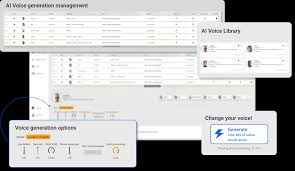
Key details:
- Works from short audio samples (a few minutes of clean recording)
- Local processing — cloning runs on your computer, not Altered’s servers
- Voice clones are private and stored with a personal key
- Unlimited voice clones on paid plans
- Clean input audio produces significantly better clone quality
The local processing approach is a meaningful privacy advantage over cloud-based competitors. Your voice data and cloned voices stay on your machine.
2. Voice Morphing (Speech-to-Speech)
This is Altered’s defining feature and what sets it apart most clearly from competitors. Voice morphing is not text-to-speech — it is speech-to-speech conversion.
You speak into a microphone. Altered transforms your voice in real time to sound like a different person — a character voice, a cloned voice, or one from the built-in voice library. Your emotion, timing, and delivery transfer to the new voice. The character sounds the way you perform it.
This is valuable for:
- Voice actors producing multiple characters alone
- Game developers prototyping character voices before hiring talent
- Content creators who want distinct character voices without casting
- Dubbing workflows where emotional delivery must match the original
No other tool in 2026 does speech-to-speech voice morphing at this quality level.
3. Text-to-Speech with 14 Speaking Styles
Altered’s TTS goes beyond standard neutral narration. The platform supports 14 speaking styles including:
- Whispering
- Shouting
- Sad
- Happy
- Angry
- Excited
- And more
These emotive styles make AI-generated voiceovers sound dramatically more natural and engaging than flat narration. You can mix styles within a single script — a character whispers one line and shouts the next — giving you creative control that standard TTS tools don’t offer.
The voice library includes 100+ portfolio voices covering various ages, genders, and accents.
4. Real-Time Voice Changer
The real-time voice changer transforms your voice live during gaming sessions, streaming, or video calls — with ultra-low latency so there is no perceptible delay.
It works across communication platforms including Discord, Zoom, OBS, and streaming software. Noise cancellation runs simultaneously, keeping the transformed voice clean even in noisy environments.
Hardware note: The real-time voice changer performs best on machines with an 8+ core CPU. Older or lower-spec computers may experience latency or audio glitches with this specific feature.
5. AI Voice Cleaning
The voice cleaner processes raw audio recordings and removes:
- Background noise
- Mouth clicks and breathing sounds
- Filler words (ums, ahs)
- Static and room reverb
The result sounds like studio-recorded audio even from a home setup or laptop microphone. Running voice cleaning before voice cloning also produces significantly better clone quality — cleaner input means more accurate models.
6. Voice Editor
Altered Studio includes a full audio editing timeline. Cut, trim, arrange, and export your audio without leaving the platform. The History Editing feature lets you revert to any previous version of your project — a useful safety net during complex productions.
This eliminates the need for a separate DAW for basic to intermediate voice production work.
7. Transcription and Translation
Altered supports transcription and translation across 75+ languages. Record audio in one language, transcribe it, translate the text, and generate the translation in a cloned or library voice — creating multilingual versions of content without re-recording.
This is particularly useful for eLearning, YouTube localization, and podcast distribution across language markets.
8. Voice Training
Beyond basic cloning, Altered’s voice training feature lets you improve a voice clone by feeding it more audio data over time. The system learns subtle patterns in speaking style — pauses, emphasis, stress patterns — producing increasingly natural output as the model improves.
This is designed for voice creators who want a signature custom AI voice that stays consistent across long-term projects.
3. How It Works
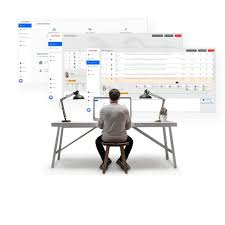
Step-by-Step Guide for Beginners:
- Sign up for an Altered Studio account.
- Upload your audio or type your script.
- Choose a voice style or effect.
- Adjust pitch, tone, or speed.
- Preview the audio.
- Export in your desired format (MP3, WAV, etc.).
4. Performance & Speed

- Audio Quality: Crisp, professional, and natural-sounding.
- Processing Speed: Short scripts render almost instantly; longer recordings may take a few seconds.
- Reliability: Stable platform with minimal downtime.
5. Pricing & Plans
Altered Studio uses a subscription model with three tiers:
| Plan | Price | Best For |
|---|---|---|
| Free | $0/month | Basic testing, limited features |
| Creator | $30/month | Content creators, podcasters, freelancers |
| Professional | $90/month | Studios, production teams, agencies |
Approximate INR pricing:
- Creator plan: ~₹2,500/month
- Professional plan: ~₹7,500/month
Free plan: Provides access to basic voice editing and limited TTS features. Voice cloning and speaking styles are not available on the free plan. Useful only for testing the interface — not for real production work.
Creator plan ($30/month): Unlocks voice cloning, voice morphing, all 14 speaking styles, the real-time voice changer, and the full voice library. This is the entry point for practical use.
Professional plan ($90/month): Adds higher usage caps, priority processing, advanced collaboration features, and priority support. Designed for studios producing large volumes of voice content.
Enterprise pricing: Available on request for teams needing custom usage limits, SLA support, or on-premise deployment options.
Note: Prices are billed annually. Monthly billing is available at higher per-month rates. Verify current pricing at altered.ai as rates may be updated.
6. Pros and Cons
Pros
Best speech-to-speech voice morphing available — No competitor in 2026 matches Altered’s ability to transfer your emotional performance to a different voice. For multi-character voice production, this is a game-changing capability.
Realistic voice cloning from short samples — A few minutes of clean audio is enough to produce a convincing voice clone. The quality is among the best in the market for close-up replication of a specific voice.
Local processing for privacy — Voice cloning and training run on your own machine. Your voice data does not go to Altered’s servers. This is a significant advantage for enterprise users and anyone with sensitive voice IP to protect.
All-in-one voice production platform — Cloning, morphing, TTS, cleaning, editing, and translation in a single application. No need to move between multiple tools for a complete voice production workflow.
14 emotive speaking styles — The speaking style range is the most extensive among dedicated voice AI tools and produces noticeably more engaging output than competitors’ neutral TTS.
Professional pedigree — Founded by a former Google speech research scientist, used by professional game studios, backed by institutional funding. Not a rushed consumer app.
Cons
Free plan is too limited to evaluate properly — The features that make Altered worth paying for — voice cloning, morphing, speaking styles — are not available on the free plan. You cannot make a fully informed purchasing decision without committing to the Creator plan first.
Pricing is steep compared to alternatives — At $30/month, the Creator plan costs six times more than ElevenLabs’ Starter plan ($5/month). For budget-conscious creators, this is a significant barrier.
Real-time changer requires powerful hardware — The 8+ core CPU requirement for smooth real-time voice changing excludes users with older or mid-range computers from one of the platform’s headline features.
Smaller voice library than competitors — 100+ voices is functional but significantly smaller than ElevenLabs (thousands of voices) or Murf AI (120+ studio-grade voices). For variety, competitors win.
Steeper learning curve — Altered Studio has more complexity than simpler TTS tools. New users typically need several sessions to build a comfortable workflow, particularly for voice morphing and cloning projects.
Customer support speed — Support response times can range from a few hours to over a day. For professional production work with tight deadlines, this can be frustrating.
7. Best Use Cases
Who Should Use It:
- Podcasters, YouTubers, game developers, and educators.
Who Should Avoid It:
- Users who need only basic audio recording without editing or voice effects.
8. How It Compares to Competitors
Altered Studio vs ElevenLabs
ElevenLabs is the most realistic TTS platform available in 2026, with a larger voice library, better emotional depth in standard TTS, and a more affordable entry price ($5/month Starter vs $30/month Creator). ElevenLabs wins on voice variety and TTS quality.
Altered wins on speech-to-speech voice morphing — a feature ElevenLabs does not offer. If your work requires performance-driven voice content where your delivery drives the AI voice, Altered is the only serious option. For straightforward TTS and voice cloning without morphing, ElevenLabs is a stronger value.
Altered Studio vs Murf AI
Murf AI is the most beginner-friendly professional voice tool, with a cleaner interface and 120+ studio-grade voices across 20+ languages. Murf is better for users who want polished voiceovers quickly without a learning curve.
Altered is better for creative voice production that requires character distinctiveness, emotional performance transfer, and custom voice cloning. Murf is the right choice for corporate narration and eLearning; Altered is the right choice for gaming, film, and character-driven content.
Altered Studio vs Descript
Descript is primarily a video and podcast editing platform with TTS features (Overdub). It excels as an all-in-one podcast and video production tool. Altered focuses specifically on voice AI with deeper voice transformation capabilities.
If your workflow centers on podcast recording and video editing, Descript is the better fit. If voice production is the core of your work, Altered’s voice AI tools are more powerful.
Altered Studio vs Play.ht
Play.ht offers voice cloning and TTS from $9/month — significantly cheaper than Altered. Play.ht has a larger voice library and is better suited for high-volume content production where voice variety matters more than morphing capability.
Altered’s speech-to-speech morphing has no equivalent in Play.ht. For price-sensitive users who don’t need morphing, Play.ht offers better value.
9. Security & Privacy
- All projects are encrypted during upload and storage.
- No sharing of user content with third parties.
- Ideal for sensitive or professional projects.
10. Who Should Use Altered Studio?
Strongly recommended for:
- Game developers who need multiple character voices and want to prototype or produce them efficiently
- Voice actors and voice directors who want to extend their creative range or produce content faster
- Film and animation producers handling dubbing and localization
- Podcasters who produce interview or narrative content with multiple distinct voices
- eLearning creators who need engaging multi-character audio at scale
Worth considering if:
- You create YouTube or social content and want distinctive AI voices without hiring voice talent
- You livestream or game online and want a real-time voice transformation option
- You have multilingual content needs and want AI-driven localization across 75+ languages
Look elsewhere if:
You need a massive voice library with thousands of options (ElevenLabs is significantly larger)
You only need straightforward text-to-speech narration (try ElevenLabs or Murf AI)
You’re on a tight budget and don’t need voice morphing (Play.ht at $9/month is more cost-effective)
Your computer is older or has fewer than 8 CPU cores (the real-time changer will not perform well)
11. FAQs About Altered Studio
1: Is Altered Studio free to use? There is a free plan, but it is very limited. Voice cloning, voice morphing, and speaking styles — the features that make Altered valuable — require the Creator plan at $30/month. The free plan is useful for testing the interface only.
2: Is voice cloning with Altered Studio legal? Using voice cloning technology itself is legal. Cloning someone else’s voice without their consent raises legal and ethical concerns, particularly for commercial use. Always obtain permission before cloning another person’s voice. For your own voice or voices you have rights to, Altered Studio’s use is legal in most jurisdictions.
3: Does Altered Studio work on Mac? Yes. Altered Studio is available for both Windows and macOS. The desktop app supports recent versions of both operating systems.
4: How much audio is needed to clone a voice? A few minutes of clean, clear audio is enough to produce a usable voice clone. Longer samples and cleaner input (processed through Altered’s voice cleaner first) produce higher quality results.
5: Is my voice data safe with Altered Studio? Voice cloning and training run locally on your computer, not on Altered’s cloud servers. Your voice data and cloned voice models stay on your machine and are stored with a private key accessible only through your account. This is one of Altered’s strongest privacy advantages.
6: Can I use Altered Studio in India? Yes. Altered Studio is accessible globally, including from India. Subscription payments are processed in USD. Creator plan at $30/month converts to approximately ₹2,500/month at current exchange rates.
7: How does Altered Studio compare to free AI voice tools? Free AI voice tools like Murf AI’s free tier or ElevenLabs’ free plan offer limited TTS output. Altered’s unique features — voice morphing, high-quality cloning, 14 speaking styles — have no meaningful free equivalent. If you need Altered’s core capabilities, the Creator plan is the minimum practical option.
8: Can I use Altered Studio for commercial projects?
Yes, paid plans allow full commercial use of the audio output.
9. Does it support multiple languages?
Yes, you can generate voices in several languages and accents.
10. Is Altered Studio beginner-friendly?
Absolutely. Its interface is intuitive, and the step-by-step guides make it easy for new users.
11. Can I clone my own voice?
Yes, voice cloning is available for premium users to create consistent branding.
12. How fast is audio processing?
Short scripts process instantly, and longer recordings usually take just a few seconds.
13. Does Altered Studio work with video editors?
Yes, it integrates with DAWs and video editing software for a smooth workflow.
14. Can I collaborate with my team on projects?
Yes, cloud-based collaboration is supported for team projects.
15. Is the platform secure?
Yes, it uses encryption and does not share your content with third parties.
16. Are there voice effects available?
Yes, you can apply effects like cinematic, robotic, character, or dramatic voices.
17. Is the free plan useful?
The free plan is good for testing, but premium plans are recommended for serious projects.
18. What is Altered Studio used for?
Altered Studio is a voice editing and modulation tool that allows you to create, customize, and enhance audio with realistic voice options. It’s used for podcasts, games, videos, and other content requiring high-quality voiceovers.
19. Is Altered Studio beginner-friendly?
Yes, it has a user-friendly interface and step-by-step guides, making it accessible for beginners while still offering advanced features for professionals.
20. Can I use Altered Studio for free?
Altered Studio offers a limited free plan, but access to premium voices, high-quality exports, and advanced features requires a paid subscription.
21. How realistic are the voices in Altered Studio?
The voices are very natural and customizable, offering pitch, tone, and style adjustments to match professional audio needs.
22. Is Altered Studio suitable for commercial use?
Yes, with the appropriate paid plan, you can use the generated audio for commercial projects like videos, podcasts, and games.
23. Can I integrate Altered Studio with other tools?
Yes, it supports integrations and exports in formats compatible with most audio and video editing software.
24. How fast is Altered Studio?
Processing is generally fast, and most voice edits or exports take only a few seconds to a minute, depending on length and complexity.
25. Does Altered Studio keep my data safe?
Yes, it has strict privacy policies, does not store your personal recordings long-term, and uses secure encryption for all audio data.
26. Who should avoid using Altered Studio?
If you only need a very basic audio recording without modulation or professional editing, simpler free tools may be more suitable.
27. How often does Altered Studio update its features?
The platform is regularly updated with new voices, tools, and performance improvements to stay ahead in 2026.
28. Can I use Altered Studio on mobile devices?
Yes, it supports web-based access on mobile devices, but the full desktop experience is recommended for editing complex projects.
Conclusion– Altered Studio
Altered Studio is a top-notch tool for voice editing and modulation in 2026. It stands out with its intuitive interface, realistic voice options, and fast performance, making it ideal for content creators, podcasters, and developers. While some advanced features require a paid plan, the tool’s reliability, creative flexibility, and high-quality output make it a valuable investment for anyone serious about audio production.