
1. Introduction
Veed.io is a browser-based video editing platform that uses artificial intelligence to simplify professional video creation. Designed for creators, businesses, and teams, it provides automated tools for subtitles, translation, voice generation, and AI avatars—making high-quality video production fast and accessible without specialized software or hardware. Features
VEED.lo Review 2026 Veed.io is a browser-based video editor that combines simplicity with powerful features, making it ideal for creators, marketers, and businesses who want to produce professional videos without complicated software. Veed.io focuses on fast editing, AI tools, and social media optimization. Kapwing
It is widely used for creating YouTube videos, Instagram Reels, TikTok content, tutorials, and marketing videos, all within a cloud-based platform. Features
What is VEED.lo?
VEED. lo is an online video editing platform that allows users to create, edit, and share videos easily. It’s designed for simplicity, making it accessible for both beginners and professionals who need fast, high-quality video output.
Who is it for?
VEED. lo is perfect for:
- Social media creators and marketers
- YouTubers and vloggers
- Educators and online course creators
- Businesses producing promotional videos
- Anyone who wants to make polished video content quickly
Why is it popular in 2026?
- Fully browser-based, works on any device
- Beginner-friendly interface with drag-and-drop editing
- Templates and stock media for social media content
- Collaboration features for teams
- Fast exports and optimized for online sharing
2. Key Features
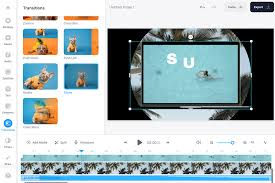
1. Video Editing Tools
Trim, cut, merge, and add transitions to your videos with simple drag-and-drop functionality.
Example: Combine multiple clips into a social media ad in minutes.
2. Automatic Subtitles
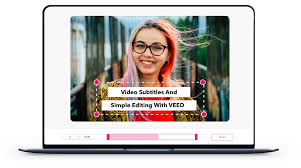
Generate captions automatically or edit them manually to make videos more accessible.
3. Templates & Stock Library
Access pre-made templates for TikTok, Instagram, YouTube, and more. Includes stock images, videos, and audio tracks.
4. Audio Editing
Add background music, trim audio, or include voiceovers directly in the editor.
5. Meme & GIF Creation
Quickly create memes, GIFs, and short animated clips for social media engagement.
6. Collaboration & Team Features
Share projects with team members for real-time edits, comments, and feedback.
7. Resize & Format Conversion
Easily resize videos for various platforms and convert files to MP4, GIF, or image formats.
8. Screen Recording
Capture your screen or webcam for tutorials, presentations, and demos.
3. How It Works (Step-by-Step)
Step 1: Sign Up
Create a free VEED.lo account using your email or Google account.
Step 2: Start a Project
Upload your media or choose from a template.
Step 3: Edit
Trim, add text, captions, music, or effects. Use drag-and-drop for quick adjustments.
Step 4: Collaborate
Invite teammates to review or edit projects in real-time.
Step 5: Export
Download your video in your preferred format or share directly to social media.
4. Performance & Speed
- Speed: Fast editing and exports for videos up to 15 minutes.
- Output Quality: HD video and clear audio output.
- Reliability: Cloud storage ensures projects are automatically saved and accessible from any device.
- Real-Life Usage: Social media teams can produce multiple posts quickly; educators can make online lessons efficiently.
5. Pricing & Plans
Free Plan
- Basic editing features
- Limited exports per month
- VEED.lo watermark included
Paid Plans
- Pro Plan: Unlimited exports, watermark removal, premium templates, team collaboration, more storage, priority support
Is it worth the money?
Yes. Frequent creators, marketers, and educators will benefit from faster, high-quality production with the Pro plan.
6. Pros and Cons
✅ Pros
- Fully online, no software installation required
- Beginner-friendly interface
- Templates for social media content
- Automatic subtitles and captions
- Team collaboration features
- Supports video, GIFs, and memes
❌ Cons
- Free plan includes a watermark
- Advanced cinematic effects are limited
- Longer videos may take more time to export
7. Best Use Cases
Who should use VEED.lo?
- Social media managers and marketers
- YouTubers creating short videos or tutorials
- Educators making online lessons
- Small businesses creating promotional content
Who should avoid VEED.lo?
- Professional filmmakers need advanced editing tools.
- Users who prefer offline software
8. Comparison with Competitors
VEED.lo vs Kapwing
- VEED.lo: Strong video editing, subtitles, collaboration features
- Kapwing: Better meme and GIF creation, simpler interface for beginners
VEED.lo vs inVideo AI
- VEED. loo: Focus on ease-of-use and online collaboration
- inVideo AI: Offers AI-assisted templates and marketing video tools
9. Security & Privacy
- Cloud-stored projects with encryption
- Strict privacy policies; only shared projects are visible to collaborators
- Safe for sensitive and professional content
10. Final Verdict
Is VEED.lo worth using in 2026?
YesVEED. Lolo is a versatile, beginner-friendly online video editing platform that allows creators, educators, and marketers to produce high-quality videos quickly. Its collaboration tools and cloud storage make it particularly useful for teams.
👉 Recommendation:
If you need a simple, fast, and effective tool for social media content, tutorials, or promotional videos, VEED.lo is an excellent choice in 2026.
11. FAQs
1. What is VEED.lo used foVEED. lo
VEED. lo is used for video editing, subtitles, meme creation, and online content production.
2. Is VEED.lo beginner-friendly?
Yes. Its drag-and-drop interface makes editing simple for beginners.
3. Can I remove the watermark?
Yes, by upgrading to the paid Pro plan.
4. Does VEED.lo support captions and subtitles?
Yes. You can generate captions automatically or edit them manually.
5. Can teams collaborate on VEED.lo projects?
Yes. Paid plans allow real-time collaboration and feedback.
6. Is VEED.lo secure?
Yes. All projects are stored securely in the cloud with encryption.
7. Can I resize videos for different social media platforms?
Yes. VEED.lo allows resizing and format conversion for TikTok, Instagram, YouTube, and more.
8. Does VEED.lo work on mobile devices?
Yes. Being browser-based, it works on desktops, tablets, and smartphones.
9. Can I create GIFs and memes?
Yes.VEED. looo has tools to create GIFs, memes, and animated clips.
10. Is the free plan sufficient for casual users?
Yes. It’s good for small projects, though videos will include a watermark.
1. What is VEED.lo used for?
VEED. lo is an online video editing platform that helps you create, edit, and share videos, GIFs, memes, and social media content quickly.
2. Is VEED.lo beginner-friendly?
Yes. Its intuitive drag-and-drop interface makes video editing simple, even for first-time users.
3. Can I remove the VEED? lo watermark?
Yes. Upgrading to the paid Pro plan removes watermarks and unlocks additional features.
4. Does VEED.lo support captions and subtitles?
Yes. You can generate automatic captions or manually edit subtitles for better accessibility.
5. Can teams collaborate on VEED.lo projects?
Yes. Paid plans allow multiple team members to collaborate, review, and edit projects in real-time.
6. Is VEED.lo secure?
Yes. Projects are stored securely in the cloud with encryption, and only shared projects are visible to collaborators.
7. Can I resize videos for social media platforms?
Absolutely. VEED. lo allows resizing and formatting for TikTok, Instagram, YouTube, and more.
8. Does VEED.lo work on mobile devices?
Yes. Being browser-based, it works smoothly on desktops, tablets, and smartphones.
9. Can I create GIFs and memes?
Yes. VEED.lo includes tools for making GIFs, memes, and short animated clips quickly.
10. Is the free plan sufficient for casual users?
Yes. Casual users can create short projects with the free plan, though videos will include the VEED watermark. lo watermark.
11. How fast is video exporting on VEED? lo?
Exports are fast for short clips (a few minutes), but longer videos may take slightly longer depending on file size and internet speed.
Conclusion
VEED. lo is a versatile, beginner-friendly, browser-based tool that makes video creation, editing, and sharing fast and efficient in 2026. Its drag-and-drop interface, automatic subtitles, templates, and collaboration features make it ideal for social media creators, educators, marketers, and small business teams.
While advanced cinematic editors may offer more sophisticated effects, VEED. loo excels at producing polished, high-quality videos quickly without any steep learning curve.
👉 Final Verdict:
If you want an easy-to-use, efficient platform for creating videos, GIFs, memes, and social media content, VEED.lo is a top choice in 2026. Its speed, versatility, and collaborative tools make it especially valuable for creators and teams looking to save time and enhance productivity.